Super-productivity: Narrow text area when editing note in fullscreen (Firefox)
Just discovered this app and I'm totally stunned! It combines so many eye candy features that often each make an app on their own, it's a pleasure to use it! Thank you for sharing this with the world!
I discovered a tiny bug that I want to report:
Your Environment
- Version used: Web App 4.0.0
- Operating System and version: GNU/Linux 5.0.11
- Desktop Environment: Fedora 30
- Browser Name and version: Firefox 74.0
Expected Behavior
I added a note in the sidebar:
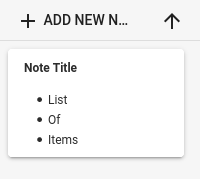
When I click on _Edit in fullscreen_, I expect a text area spanning the whole window:
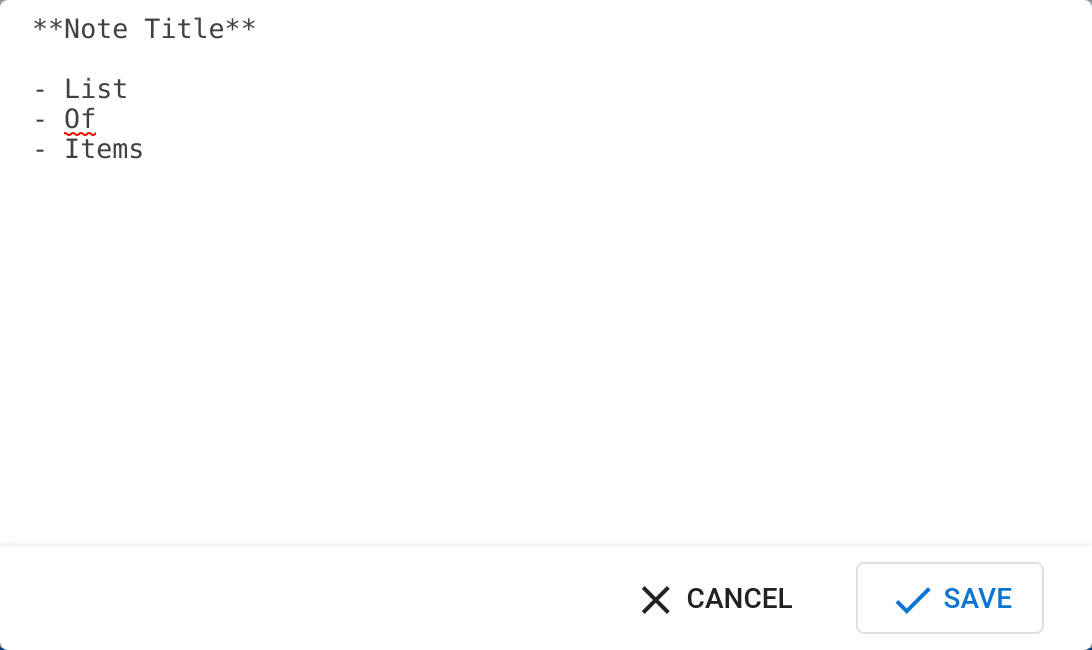
(Screenshot made with Chromium 79.0.3945.117)
Current Behavior
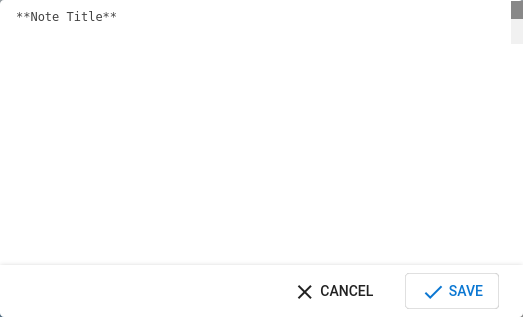
When I click on _Edit in fullscreen_, I only see a narrow text area at the top, regardless of browser window size:
Steps to Reproduce (for bugs)
- add a note
- _Edit in fullscreen_
Console Output
The Notification permission may only be requested from inside a short running user-generated event handler.
 fkohrt
All 3 comments
Hey there! Thanks for reporting. Glad that you like the app. As far as I can see, this error only occurs on ff. Currently I'm quite busy with other features & fixes, but a PR would be very welcome!
 johannesjo
on 23 Mar 2020
johannesjo
on 23 Mar 2020
Alright, just wanted to be sure to have it tracked!
fkohrt
on 23 Mar 2020
This should fixed now. Thanks again for reporting!
johannesjo
on 17 Oct 2020
Related issues
 IT-Tool
·
3Comments
IT-Tool
·
3Comments
 jac1013
·
3Comments
jac1013
·
3Comments
 calvadosxo
·
4Comments
calvadosxo
·
4Comments
 Mindstormer619
·
4Comments
Mindstormer619
·
4Comments
 sdruskat
·
3Comments
sdruskat
·
3Comments