Super-productivity: Enabling Google Drive Sync gives me an error
Your Environment
- Version used: Web App
- Operating System and version: Win10
- Desktop Environment:
- Browser Name and version: Latest Chrome
Expected Behavior
I've just found Super Productivity - great work!
When I want to use it in my browser there is no login. So this only works on that computer, correct?
But if I want to be able to see my tasks at work pc and at home pc how should I do it?
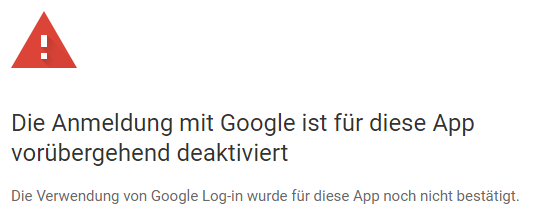
I thought I enable Googly Drive Sync but when I do this I get the followin error message
Steps to Reproduce (for bugs)
- Enable the switch to google drive sync
- Click on my user/icon
Console Output
Error Log (Desktop only)
 Heart1010
All 9 comments
@Heart1010 Hey try downloading the app from the Windows Store, don't use the Web app it is not enabled yet.
 KonTy
on 1 Oct 2019
KonTy
on 1 Oct 2019
@johannesjo this brings up a good point have you been able to update the Windows Store app. I didn't get any Update notifications for the App since version 2.10.12 from May 31st.
KonTy
on 1 Oct 2019
@Heart1010 I have a look at this. Thank you very much for reporting! Google changed some of their policies, so that's probably the reason why this appears.
@KonTy I prepare a Windows Store Release with the next Release I'm making here. It's always a little bit more effort and I was unable to automate it, so I don't do this for every release.
 johannesjo
on 1 Oct 2019
johannesjo
on 1 Oct 2019
@KonTy I tried it with the Web app, correct. There no google sync is possible (error above). Now I installed the github win setup exe and here I can enable Google Sync 👍
_(Last version in Windows Store here is also the old may release)_

Heart1010
on 2 Oct 2019
@KonTy I tried it with the Web app, correct. There no google sync is possible (error above). Now I installed the github win setup exe and here I can enable Google Sync 👍
Awesome I'm glad it worked just don't use the web app if possible, regular normal app gives you so much more freedom and more stable since more people are testing/using it.
KonTy
on 2 Oct 2019
The error message is unrelated to the web app this case. The error should be gone now. I had to add a private policy and upload around 10 videos to google showing the integration. Both tasks were not being any particular fun I've to complain. But on the plus side: All is legitimate now it seems :D
johannesjo
on 7 Oct 2019
Der Sync klappt ja mittlerweile in der App. Aber da scheint etwas verdreht zu sein was neuer/älter von lokal<->remote ist oder 😃 ?!
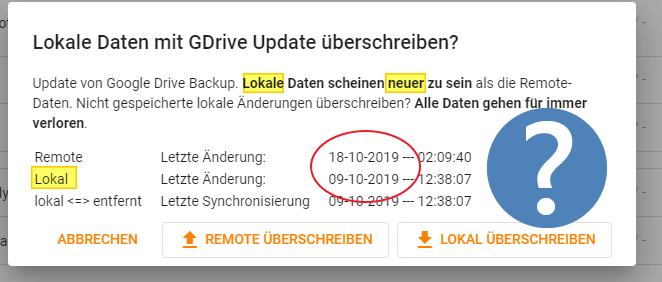
update: Obiger Screenshot war mit der v2.12.11
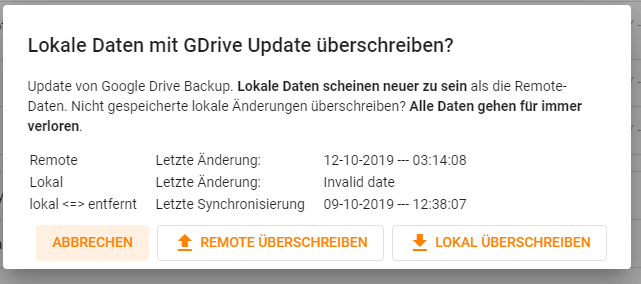
Ich dachte, ich versuch es gleich nochmal mit der aktuellsten Version 2.13.3 - mit dieser sieht das ganze nun so aus.
Heart1010
on 18 Oct 2019
Super vielen Dank. Ich habe die Nachricht angepasst. Das mit dem "Invalid Date" sollte nach einmaligem Update nicht mehr auftauchen.
johannesjo
on 18 Oct 2019
Should be fixed I think.
johannesjo
on 14 Feb 2020
Related issues
 GabrielRodriguesS
·
4Comments
GabrielRodriguesS
·
4Comments
 NPReport
·
3Comments
NPReport
·
3Comments
 mar-v-in
·
3Comments
mar-v-in
·
3Comments
 Kl4tch
·
3Comments
Kl4tch
·
3Comments
 IT-Tool
·
3Comments
IT-Tool
·
3Comments
Most helpful comment
@Heart1010 I have a look at this. Thank you very much for reporting! Google changed some of their policies, so that's probably the reason why this appears.
@KonTy I prepare a Windows Store Release with the next Release I'm making here. It's always a little bit more effort and I was unable to automate it, so I don't do this for every release.