Super-productivity: [FEATURE] Tags for tasks
Description
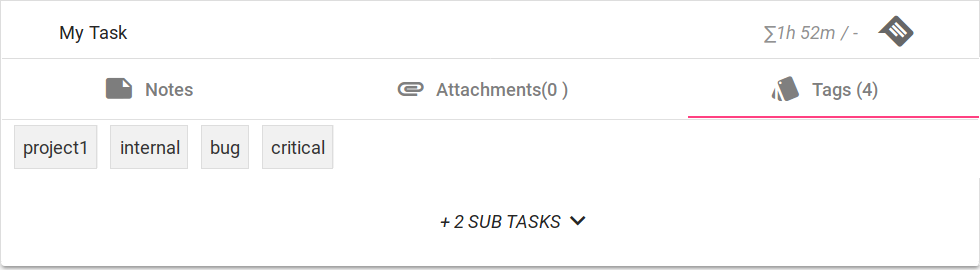
To increase flexibility and possible use cases, it would be a very useful feature to be able to add tags to tasks and filter by them.
User Story
As a agile developer with potentially many clients and products
I want to have a flexible way of organizing and filtering my tasks
so I can further analyse them, e.g. to identify money sinks or for billing.
- Tags should be unobtrusive and optional as not all users will require them -> could be implemented similar to notes and attachements
- Export, daily backlog and metrics should offer filtering by tag
- There could be column options in the exporter like "has tag 'some-value'" (filled with boolean values) which allow to easily use tags in other programs after the export (e.g. Excel)
- Subtasks should inherit tags
- It would be handy to add a setting that warns users if tasks are either being created or being marked complete while they haven't been assigned any tags
 theCalcaholic
All 12 comments
Another way to think about this is the way Todoist has implemented this feature. Where you can add a @label anywhere in the task title or description and it will show up in the labels section
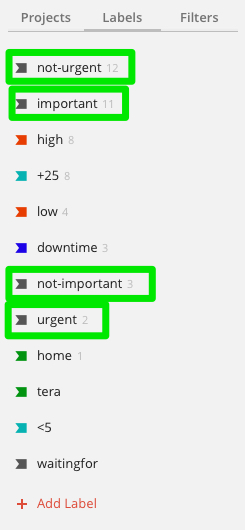
The feature is explained more here https://get.todoist.help/hc/en-us/articles/360000029000-How-to-best-use-labels
Another way to think about it is filters the way they are done in Todoist.
https://get.todoist.help/hc/en-us/articles/205248842-Filters
 KonTy
on 10 Jul 2019
KonTy
on 10 Jul 2019
I do agree with the sentiment that the whole query mechanism might need a little improvement.. Being able to filter/query/slice work items imho is essential for a productivity tool.
KonTy
on 10 Jul 2019
@KonTy Adding tags when creating a task is a nice idea. Probably something for the polishing phase of the implementation though :)
@johannesjo If you are okay with the described feature, I would start working on a PR (I can't make any promises on the amount of time I can dedicate though).
theCalcaholic
on 18 Jul 2019
@theCalcaholic that would be great!! I'm just about done with the internationalization. Would make sense to include those changes, so please pull in the latest master :)
Personally I've the following spec in mind (though I'm open to suggestions and adjustments of course):
- tags are displayed below the task title using the material chip component. I think its good to see them right in the overview rather than inside the additional info, but they shouldn't affect the presentation of tasks without tags
- tags can be added via a dialog or something similar from the task context menu using the
<chip-list-input>component - no idea what should happen if we click on tag ???
- tags can be added via the short syntax using
#tagName - tags should have a separate model and be saved via their id to the task model
- not sure if tags should be a global model or a project based model. deleting a tag would become much more complicated if we use a global model, because we can't use the redux state and have to handle updates manually, if we decide to delete a tag globally. I tend to the project based model solution as it makes things a lot easier, but I'm open to suggestions.
- there is a custom generator for new features. you can run it via
ng g jo:jo --name=featName - you also need to add something like this to the persistence.service:
tag = this._cmProject<TagState> (LS_TAG_STATE, 'tag'); - furthermore you need to make sure that the data is loaded on project change. you can do so by adding
this._tagService.loadStateForProject(projectId),to theproject.effect.ts TaskWithIssueDatamight be renamed toTaskWithDatafor a model including the tags directly
- alternatively we just can use strings and save them directly to the tasks. this might limit us though, if we decide to add more to the feature later on and special characters in the titles might make trouble too
export interface TaskCopy {
 tagIds: string[]
}
export interface TaskWithData extends Task {
  readonly issueData?: IssueData;
  readonly tags?: Tag[];
}

export interface Tag {
 id: string;
 tite: string;
?? color?: string;
}
optional or later
- filtering tags would be super nice, but is probably not easy to implement
- maybe we can add a new button in the top right menu to choose active filters
- auto-completion when using the short syntax but that's probably very hard to implement
- might also be cool to have some filtering available on the daily summary component
- also nice might be the option to provide an option to add githubs labels and jiras components automatically as new tags
Also let me know if you have any questions or when you are stuck somewhere.
I really appreciate the effort!!!
 johannesjo
on 18 Jul 2019
johannesjo
on 18 Jul 2019
Thanks for your elaborate input on this - these are very good points. :)
Now that you mention it, I think we should definitely separate tags into their own model, otherwise we'll run in several performance issues and limitations.
Do you think they should hold references to the tasks they are assigned to (for faster filtering, etc), to model the de-facto many-to-many relation?
Otherwise we would e. g. have to iterate _all_ tasks when deleting a tag (project-wide).
Regarding editing tags:
I'd prefer a small + or # icon behind the tag list that turns into a text input when you click it and allows you to add a new tag (ideally with suggestions).
Removing could be done similar to removing bookmarks or (additionally) when ctrl + clicking / ctrl + rightclicking a tag (just clicking/right clicking could lead to accidental deletions too easily imo)
Also, intuitively I'd expect to be able to edit a tag when clicking it (in accordance with the overall UX of the application).
I think I would go for a project model for now - maybe at some point a global synchronization model could be considered (where we can e. g. store whether or not a tag is being used in each project, giving us the option to delete it if it's not used anymore without having to load anything from multiple protects)
theCalcaholic
on 19 Jul 2019
Do you think they should hold references to the tasks they are assigned to (for faster filtering, etc), to model the de-facto many-to-many relation?
I would suspect that this is more complicated to handle than the other way round or having references for both the models.
Otherwise we would e. g. have to iterate _all_ tasks when deleting a tag (project-wide).
I think that should be ok regarding the performance. A little bit tricky might be, that we would have to do this for the task archive. But that should be doable (preferable via a tag effect). I will extend the model instances in the persistence.service.ts in a bit to allow for an bulk update of an entitiy model
I'd prefer a small + or # icon behind the tag list that turns into a text input when you click it and allows you to add a new tag (ideally with suggestions).
I like the idea!!
Removing could be done similar to removing bookmarks or (additionally) when ctrl + clicking / ctrl + rightclicking a tag (just clicking/right clicking could lead to accidental deletions too easily imo)
Also, intuitively I'd expect to be able to edit a tag when clicking it (in accordance with the overall UX of the application).
I like this as well!
johannesjo
on 19 Jul 2019
Alright :)
In general, do you have any performance pitfalls to look out for? In the discussions about a joined view for multiple projects (#163) I got the impressions, that some things might bear unforeseen challenges in that regard.
theCalcaholic
on 19 Jul 2019
As long as we use a project based model, we hopefully shouldn't run into trouble as the model is limited to a per project base and done tasks are put into the archive. I don't know how familiar you are with the hole rxjs and store stuff. If this is new to you there might be a lot to swallow. https://ngrx.io/ is a good place for getting started.
What might be a tad tricky is adding the full model of the tags to the tasks via their ids. You can have a look into task.selectors.ts and the mapIssueToTask function on how this might be done.
Another tricky things will be definitely the filtering. There will be some side effects regarding the task sorting once a filter is applied and the complete list isn't displayed any more, things might get a little bit messy (especially when reordering them via drag and drop). If you have a good suggestion on how to fix this, I'm all ears!!. Alternatively we could disable drag&drop sorting when filtering is active.
johannesjo
on 19 Jul 2019
Alright, thanks :)
I've been working with react and Flux a few years ago, so that shouldn't be a problem
theCalcaholic
on 19 Jul 2019
I'd happily pay for this one! 😄 Any chance this is in your roadmap anytime @johannesjo ?
 danielestevez
on 22 Jan 2020
danielestevez
on 22 Jan 2020
@danielestevez Sorry, I really can't give you any estimate at this point of time... :(
johannesjo
on 23 Jan 2020
Tags are now available, so I am closing this.
johannesjo
on 10 Jun 2020
Related issues
 generic-user
·
3Comments
generic-user
·
3Comments
 tiotrom
·
4Comments
tiotrom
·
4Comments
 fkohrt
·
3Comments
fkohrt
·
3Comments
 wimel
·
3Comments
wimel
·
3Comments
 Mindstormer619
·
4Comments
Mindstormer619
·
4Comments
Most helpful comment
Alright, thanks :)
I've been working with react and Flux a few years ago, so that shouldn't be a problem