Sumatrapdf: "Open File - Security Warning" "Do you want to run this file?" warning whenever I start SumatraPDF
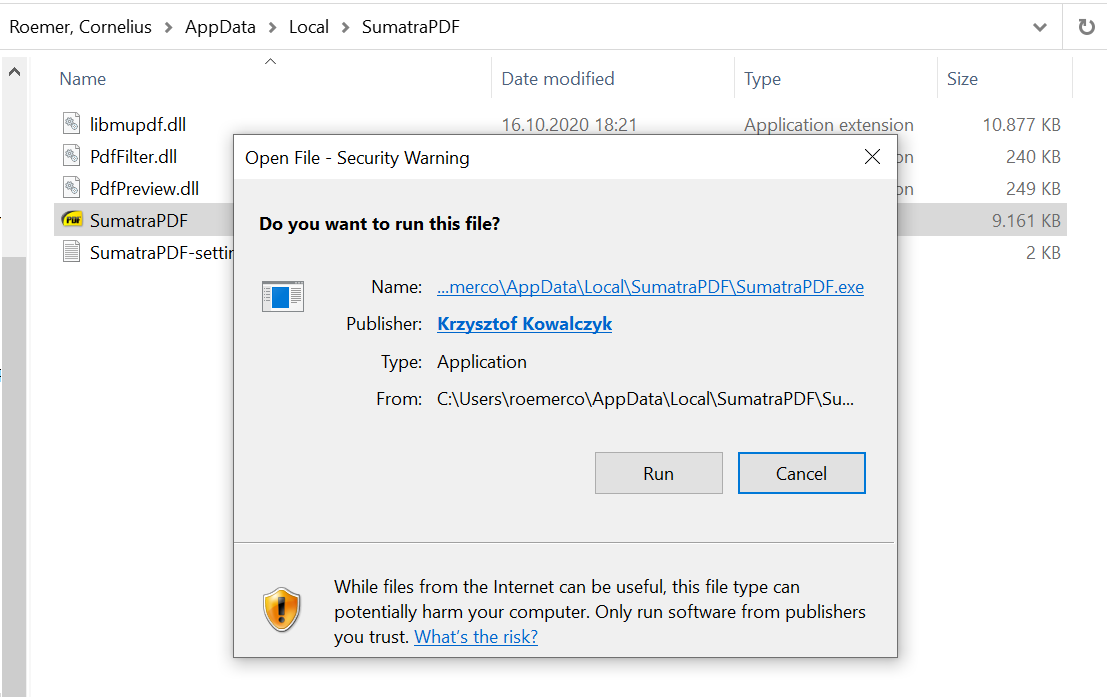
I'm getting a security warning whenever I open SumatraPDF.
Sumatra v3.2 was installed through SumatraPDF-3.2-64-install. It's in the path C:\Users\cr\AppData\Local\SumatraPDF.
Here's a screenshot of the warning. It could be that this issue has already been opened but I couldn't find it by doing a thorough issue search. Maybe no one has entered these particular keywords with it yet.
 corneliusroemer
All 13 comments
@corneliusroemer: Windows itself is responsible for this. To resolve, right-click the EXE > Properties > Select Unblock > OK. You can read more about the cause here if you're interested.
 SumatraPeter
on 17 Oct 2020
SumatraPeter
on 17 Oct 2020
@SumatraPeter I agree this is not SumatraPDF for 3.2 release.
@corneliusroemer If you currently download a Pre-Release there will be in addition a secondary warning since they are currently unsigned.
@ All users If in doubt compare with VirusTotal or similar trusted quality check site (just beware the rogues)
 GitHubRulesOK
on 17 Oct 2020
GitHubRulesOK
on 17 Oct 2020
Thanks for your quick replies and suggestions on how to fix the issue.
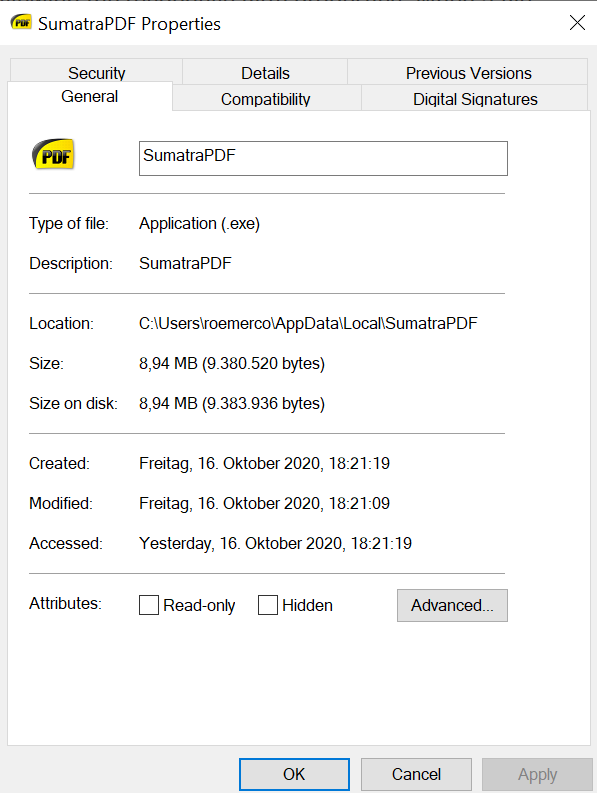
I tried doing it via Exe > Properties >Select Unblock, but that option doesn't exist for me:
What worked in the end was opening the ZoneIdentifier in Notepad and replacing it with an empty file. So much about the workaround.
notepad .\SumatraPDF.exe:Zone.Identifier
I don't completely understand @SumatraPeter and @GitHubRulesOK how you've come to the conclusion that this is not a Sumatra Issue. I've never had another program I installed continue to prompt me after installation - only for the installation had I accept the security warning. Could it be that other programs create the .exe by copying it - and you're simply unpacking the folder, which retains the ZoneIdentifier? Would it not be better, if the ZoneIdentifier was removed during installation? How is that not a Sumatra issue?
Or is something in my setup peculiar and that's why you think it's not worth fixing - because most people don't encounter this issue?
corneliusroemer
on 17 Oct 2020
@corneliusroemer
You are right that I most usually run versions such as portable that dont invoke a warning,
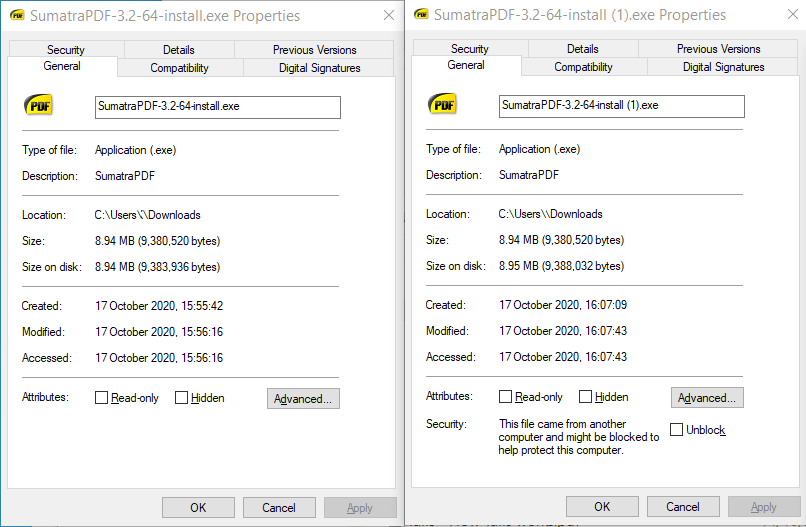
However I (and posibly @SumatraPeter) favour Firefox for downloads which does not add the same blocker as Microsoft do in Iexploer or Edge. I just downloaded same file in each.
Firefox is on the left and Edge is on the right, spot the difference. It is MS Edge that is altering the download.
Additionally I would tend to be elevated during install and switch to Program Files for multiple usage rather than a basic user with lower privilidges, so am less likely to see that windows 10 UAC restriction.
Also even if I uninstall and reinstall to user\local\ using the version from Edge I dont get the runtime warning as presumably I have previously accepted the warning in the past so possibly a windows registry entry flag allows me to run without the continuous warning.
GitHubRulesOK
on 17 Oct 2020
@GitHubRulesOK Hmm, but I get the warning even when using the portable version - that version also has the zoneidentifier set. It could have something to do with the computer I'm using, it's running Enterprise Windows. I downloaded on Brave, not Edge or IE.
Well it really be due to the particular Windows Version. I was also not able to Unblock as you indicate above. So that must happen for a reason.
But after all it only happens to SumatraPDF - I've not encountered this repeated prompting for any other program I've ever installed. That's why I filed it as an issue here - it's clearly related to this program and the way it's set up. So I wouldn't necessarily consider it closed - maybe rather as unreproduced (thus far).
corneliusroemer
on 17 Oct 2020
I cant get the same result as yours, but I have seen exactly that same message with applications other than SumatraPDF.
I tried to emulate a basic Install to verify your experience
I logged in as a basic user
I used Brave (Chrome) to download both official 3.2 release portable and x64 installer
The zip files have the same "file from another computer" marker as Edge (Chrome)
I unpacked the portable zip files and the portables ran with no warning at all (as expected, once removed from their zip file the internet association is not there) However you say in your case that the zips contents are marked ?
I ran the installer and had a different issue that I should have known better and been watching out for since it asks for admin rights, then installs to the admin account local, rather than user account) This issue has been raised before but on this occasion was a slightly different twist.
However once I realised my error and installed to the Basic user accout it ran without any warnings or problem.
Hence in that scenario I cant get your result, perhaps you can talk me through your install steps, however it does look like Enterprise does not behave the same as for a Home user.
I work with SumatraPDF portable on Pro as a standard elevated domain user without any UAC issues but since thats a company computer can not test the installed version.
GitHubRulesOK
on 18 Oct 2020
@GitHubRulesOK: I believe Firefox also uses the standard Windows _IAttachmentExecute_ interface just like IE, Edge and Chrome/Chromium do (including naturally derivatives like ChrEdge and Brave). Thus by default FF too does add the ZoneID to downloaded files unless the mechanism has been disabled. I know I have done so, and perhaps you disabled it too at some point and don't quite remember.
@corneliusroemer: Since the ZoneID ADS was obviously there the Unblock option ought to have shown up. AFAIK the only way this can happen is if your enterprise admin has chosen to hide that particular option for some strange reason. You can take it up with them if you wish.
Regarding the repeated prompts, the issue here is two-fold:
1. Your system is configured such that browsers add the ZoneID to downloaded files.
2. Sumatra's 'installer' is a bit different in that it extracts the necessary files and copies them to the install dir, but also _copies itself as-is_ because the installer EXE _is_ the program EXE! (If the EXE contains the word "install" anywhere in its file name it runs the installation code.) This naturally means the program EXE is unnecessarily large because it contains the install/uninstall code as well as duplicated data of all the other extracted files, but I suppose it simplifies things and so the dev chose to do it this way. In any case that is what is causing the problem here, because the downloaded installer EXE with the ZoneID added by your system/browser has been copied and so every time the program EXE is launched Windows see the ADS and warns you.
So yes, while it is strictly not an issue with Sumatra per se, the problem _is_ manifesting itself due to how Sumatra's fake 'installer' functions. I'll leave it to kjk to figure out if there's any way to safely make the program strip the ADS from its own executable while copying it as part of the installation routine.
SumatraPeter
on 18 Oct 2020
@SumatraPeter
Thanks for the clarification, it makes sense that I could have forgotton many things (blame old age) including getting rid of that anoying windows download "feature" in my go to browser.
And agree that there are several differences in the way SumatraPDF "one exe" is treated (hence I may have seen similar behaviours in other apps that work in a similar fashion)
As we both know the hidden / blind default location is one major cause of poor installation problems. And as usuall I tripped over on that one again.
GitHubRulesOK
on 18 Oct 2020
@kjk
I am opening this thread again since it raises some points that may need review prior to next release
i.e. the installer often needs to be elevated to install then defaults to that administrators local area not the unelevated user local.
GitHubRulesOK
on 18 Oct 2020
I unpacked the portable zip files and the portables ran with no warning at all (as expected, once removed from their zip file the internet association is not there) However you say in your case that the zips contents are marked ?
@GitHubRulesOK: "as expected"? If only... 🙂 This is an entirely different can of worms since it depends on _which_ utility has been used for extraction! I believe the Window in-built ZIP utility and some third-party ones propagate the ZoneID ADS attached to an archive to _all_ the files extracted from it, while other utilities don't.
Such weird quirks... 🙄
As we both know the hidden / blind default location is one major cause of poor installation problems. And as usuall I tripped over on that one again.
You know my thoughts about that all too well, and there's no use repeating them and so I shan't.
SumatraPeter
on 18 Oct 2020
@GitHubRulesOK: Thanks for your thoughts - I just checked again to make sure everything is reproducible. Unzipping the portable ZIP folder with my default unzip utility (the one that pops up when right-clicking) does not strip ZoneID in my case.
@SumatraPeter: Yes, the Enterprise setup I got definitely has its quirks - no chance for me to change anything there. Maybe this is the overarching problem here. It could well be that on normal systems the run prompt doesn't appear after the first time - just in my case it does. Nonetheless, I think it's good to have this out here to see whether anyone else has similar problems and if so what the workarounds are.
Thanks for your help - I'd say unless it's itching anyone else out there, it's not necessary to focus too much on this issue right now. You've already helped me by suggesting a workaround.
corneliusroemer
on 18 Oct 2020
I guess I need to strip Zone.Identifier from the exe if exists.
https://www.unknowncheats.me/forum/c-and-c-/112860-strip-zone-identifier-aka-file-computer.html
#include <iostream>
#include <Windows.h>
#include <string>

class ZoneIdentifier
{
public:
    ZoneIdentifier( const wchar_t* fileName )
        : mFilename(fileName ? fileName : L"")
    {
        if( !fileExists( mFilename ) ) {
            mFilename.clear();
        }
    }
    bool validFile() const
    {
        return !mFilename.empty();
    }
    static bool fileExists( const std::wstring& fileName )
    {
        DWORD attr = GetFileAttributesW( fileName.c_str() );
        return INVALID_FILE_ATTRIBUTES != attr && FILE_ATTRIBUTE_DIRECTORY != attr;
    }
    bool hasZoneID() const
    {
        if( validFile() ) {
            std::wstring file = mFilename;
            file.append( L":Zone.Identifier" );
            return fileExists( file );
        }
        return false;
    }
    bool strip() const
    {
        if( validFile() ) {
            std::wstring file = mFilename;
            file.append( L":Zone.Identifier" );
            return !!DeleteFileW( file.c_str() );
        }
        return false;
    }
private:
    std::wstring mFilename;
};

int main()
{
    ZoneIdentifier id( L"C:\\Users\\learn_more\\Downloads\\comment-3.txt" );
    std::cout << "Valid: " << id.validFile() << std::endl;
    std::cout << "Has: " << id.hasZoneID() << std::endl;
    std::cout << "Strip: " << id.strip() << std::endl;
    std::cout << "Has: " << id.hasZoneID() << std::endl;


    std::cin.get();
    return 0;
}
 kjk
on 18 Nov 2020
kjk
on 18 Nov 2020
@corneliusroemer
I do not know if the above change https://www.sumatrapdfreader.org/dailybuilds.html would address an enterprise install issues since the daily versions are not certificated thus Edgium always falsely tells me they are positively harmful.
Perhaps worth a download to a user folder then do not unblock (the whole point of this exercise is on install it should be self stripping)
Edge will probably require you to say KEEP twice as pre-release is an unsigned application
Even as an ADMIN user I again have to confirm twice that it is allowed to install but by that point it should have already "self de-streamed" itself
GitHubRulesOK
on 13 Dec 2020
Related issues
 zeniko
·
5Comments
kjk
·
4Comments
zeniko
·
5Comments
kjk
·
4Comments
 Aliaksandr3by
·
4Comments
Aliaksandr3by
·
4Comments
 wins9900
·
7Comments
wins9900
·
7Comments
 Gugus99
·
3Comments
Gugus99
·
3Comments
Most helpful comment
@GitHubRulesOK: "as expected"? If only... 🙂 This is an entirely different can of worms since it depends on _which_ utility has been used for extraction! I believe the Window in-built ZIP utility and some third-party ones propagate the ZoneID ADS attached to an archive to _all_ the files extracted from it, while other utilities don't.
Such weird quirks... 🙄
You know my thoughts about that all too well, and there's no use repeating them and so I shan't.