Sumatrapdf: Detect sending open commands from non-admin process to admin process
Can't reproduce this issue every time. But, every once in a while, you leave a file open for too long, you can't open another one.
I don't know what's going on.
 775405984
All 8 comments
Version ? you are experiencing this in
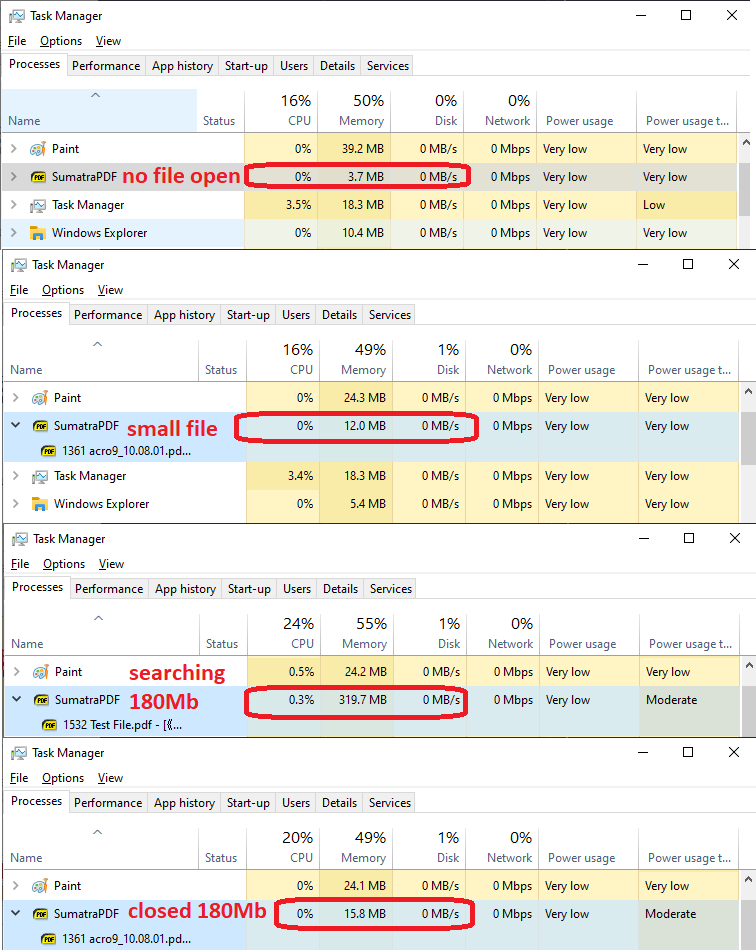
Running Task Manager there is normally an increase in memory use with certain actions but should drop back, unless there is a problem :-) using a previous big file of yours from issue 1532 ?
 GitHubRulesOK
on 4 Jun 2020
GitHubRulesOK
on 4 Jun 2020
Please provide more information:
- version of Sumatra and the OS
- how long is "too long"?
- how big are the files?
- what does "you can't open another one" mean?
- how much memory is Sumatra using (see task manager)
 kjk
on 4 Jun 2020
kjk
on 4 Jun 2020
- SumatraPDF-prerel-12682-64, OS: Win10 enterprise 64bit
- I don't know, long enough?
- larger than 100MB for the first file,
- It means if I double click another pdf file, Sumatra neither open the file nor prompt in front.
- Low. I don't think it's a memory issue.
775405984
on 5 Jun 2020
Description is still too vague to be able to replicate, I dont keep files open for long periods so can I expect it to happen with just one file permanantly open in the background, whilst testing other uses?
e.g.
"Long enough" is not seconds but will I wait a few minutes or over 1 hour to see a problem
Are there types of files that you use that cause this to happen more than others.
Apart from scrolling or zooming are other actions such as hyperlinking involved
Are the files on C: drive or are some in other locations such as networked or in sync folders
What Anti-virus or other file access products are running ....
With 128 MB 1532 test.pdf in the backround for one and two now over twelve hours with that file open and (occasionally revisiting it to change pages /zoom) with only ony one problem which may be a red herring but was not due to the large file open in the background.
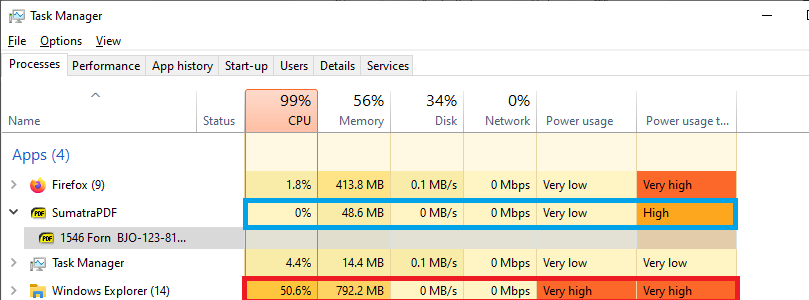
I opened / closed dozens of other files including several around 80 MB with no issues except on the one occasion I "searched" for a file to open by partial name which was taking explorer too long so closed the search and SumatraPDF took a long time to recover whilst the aborted search continued, but after a good few minutes waiting control was resumed and could then open other files.
Here I switched the search to outside SumatraPDF and the red box values shown for explorer are similar to the ones visible in SumatraPDF (blue box) at that time. Windows fle searching seems to continue for quite a long while even after abandonment in explorer too.
P.S multiple times I was running anti virus scans without it disturbing SumatraPDF usage.
GitHubRulesOK
on 5 Jun 2020
Finally, I found the problem. It doesn't matter what size of files I opened.
I use a software called Everything, a search engine that locates files and folders by filename instantly for Windows. Here is what you can do to reproduce the issue.
- Open a pdf file in Everything.
- Open a second file in Windows File Explorer.
Oddly, if you open the files in reversed order, it doesn't have any problem.
So I did some digging. Turns out I turned on the "run as administrator" feature, and apps that opened from Everything will be automatically run as administrator. So I had to turn it off.
But Everything isn't the cause of this problem.
Because if you manually run Sumatra shortcut from Windows File Explorer as administrator, you still can't open a pdf file after Sumatra's privilege got promoted.
Is that a Windows' problem or Sumatra's?
@kjk @GitHubRulesOK
775405984
on 7 Jun 2020
I am no expert on uac issues but it sounds like that is a good reason to see problems
So over 32 MB files are subject to user file locking when accesed by multiple apps ( could be why you see it more often with bigger pdf files)
Test if the problem dis/appears with a file over and under those sizes e.g. repeatable difference between a 30 MB and a 40 MB file
GitHubRulesOK
on 7 Jun 2020
Thanks for additional details.
This works as expected.
When SumatraPDF process is already running we handle double-clicking by sending data from new Sumatra process to existing Sumatra process.
For security reasons, in Windows this doesn't work when you send data from non-admin process to admin process. In your case, the process started from Everything is admin, and the one from File Explorer is non-admin.
I can't fix it but maybe I can detect that and inform the user.
This has been reported before and always is a mystery.
kjk
on 7 Jun 2020
This only happens if you're using tabs. If you use separate Windows for each document, then there is no messaging.
Just for the record there's no need to run Everything elevated - run the background service to maintain the index. That avoids running anything launched by the everything find interface beng elevated e.g. file explorer launched to view a directory.
 ajkajk
on 15 Jun 2020
ajkajk
on 15 Jun 2020
Related issues
 kyle-goodwin
·
7Comments
kyle-goodwin
·
7Comments
 Aliaksandr3by
·
4Comments
Aliaksandr3by
·
4Comments
 Gugus99
·
3Comments
Gugus99
·
3Comments
 zeniko
·
5Comments
zeniko
·
5Comments
 banbonic
·
4Comments
banbonic
·
4Comments
Most helpful comment
This only happens if you're using tabs. If you use separate Windows for each document, then there is no messaging.
Just for the record there's no need to run Everything elevated - run the background service to maintain the index. That avoids running anything launched by the everything find interface beng elevated e.g. file explorer launched to view a directory.