Sumatrapdf: Copy-paste fails on certains PDF on 3.2 and not on 3.1.2
3.2 seems to have introduced a new bug.
On certain pdf, notably some of the pdf generated by latex (lot of scientific article etc...) sumatra pdf 3.2 fails to copy-paste properly some text BUT sumatra 3.1.2 succeed.
An example :
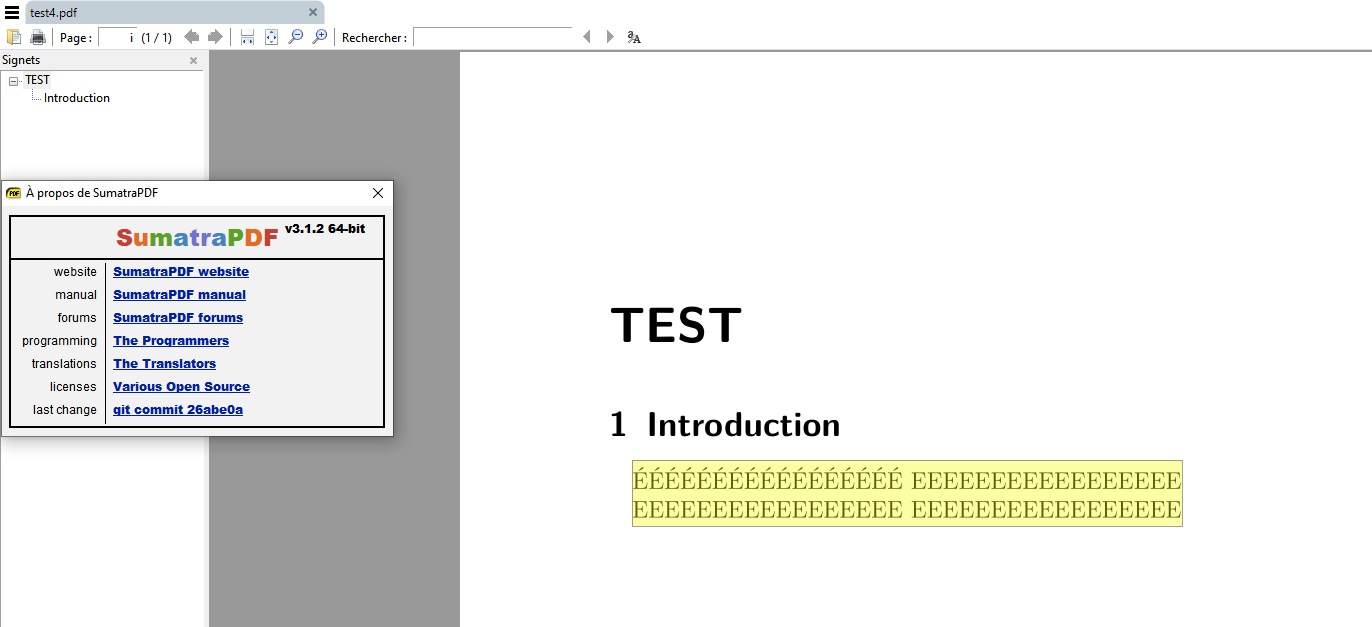
Selection of the text on a test file with sumatra pdf 3.1.2 :
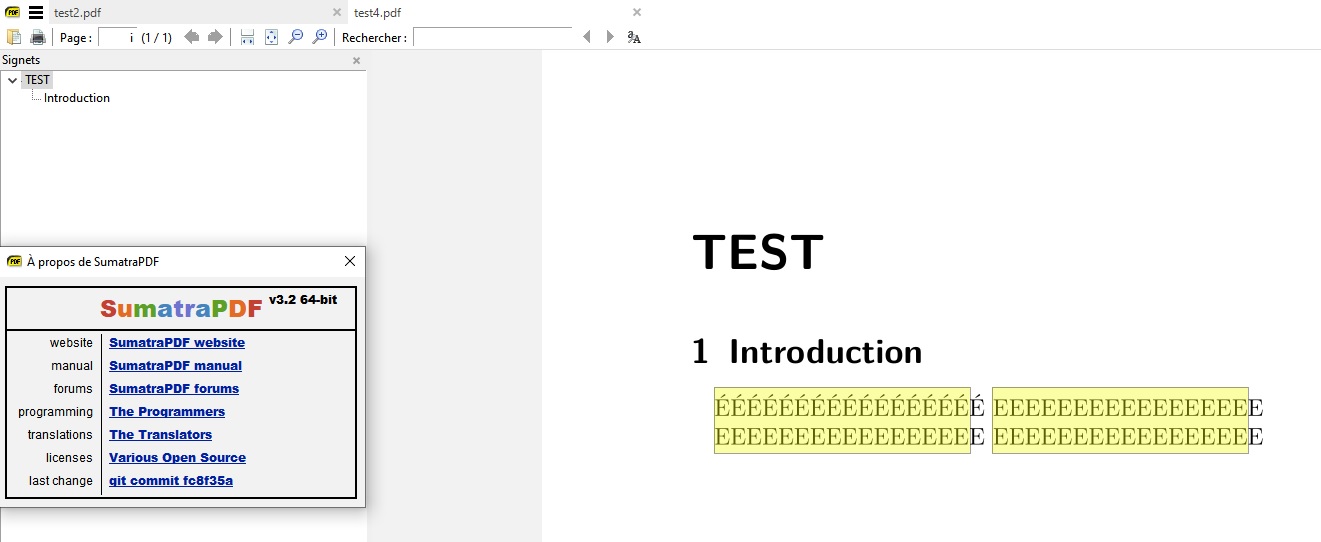
Selection of the text on a test file with sumatra pdf 3.2 :
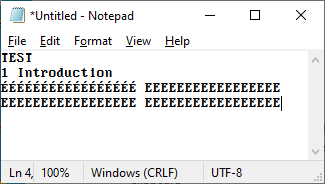
Original text :
ÉÉÉÉÉÉÉÉÉÉÉÉÉÉÉÉÉ EEEEEEEEEEEEEEEEE
EEEEEEEEEEEEEEEEE EEEEEEEEEEEEEEEEE
3.1.2 copy-paste text :
ÉÉÉÉÉÉÉÉÉÉÉÉÉÉÉÉÉ EEEEEEEEEEEEEEEEE
EEEEEEEEEEEEEEEEE EEEEEEEEEEEEEEEEE
3.2 copy-paste text :
É É É É É É É É É É É É É É É É É
E E E E E E E E E E E E E E E E E
E E E E E E E E E E E E E E E E E
E E E E E E E E E E E E E E E E E
An example file :
test4.pdf
 msnbcorp
All 19 comments
@kjk
as you are aware there are several related issue to this one where words in many cases are spaced out and often wrapped to separate lines
Some examples are raised in Copying text without (any) line-breaks #1427 and
/ToUnicode mapping issue #471
However, this sample also illustrates another raised issue in that the word I n t r od u c t i on is not searchable and thus similar to Problem copying text from PDFs #544
 GitHubRulesOK
on 19 Mar 2020
GitHubRulesOK
on 19 Mar 2020
I can reproduce the problem with the lmodern and the ec-fonts. It works again with the old cmr font and with otf fonts. I don't think that the problem is from spaces in the page stream. I have there for example (TEST) or (EEEEEEEEEEEEEEEEE). It looks more as if the copy&paste code inserts a spurious space almost everywhere. Actually the one place where the space is not inserted is where in the stream there is a negative kern: (Intro)-32(duction).
 u-fischer
on 19 Mar 2020
u-fischer
on 19 Mar 2020
@u-fischer
Hi Ulrike (how's bear coping with all this social distancing ?)
Using conventional sources we see no problem
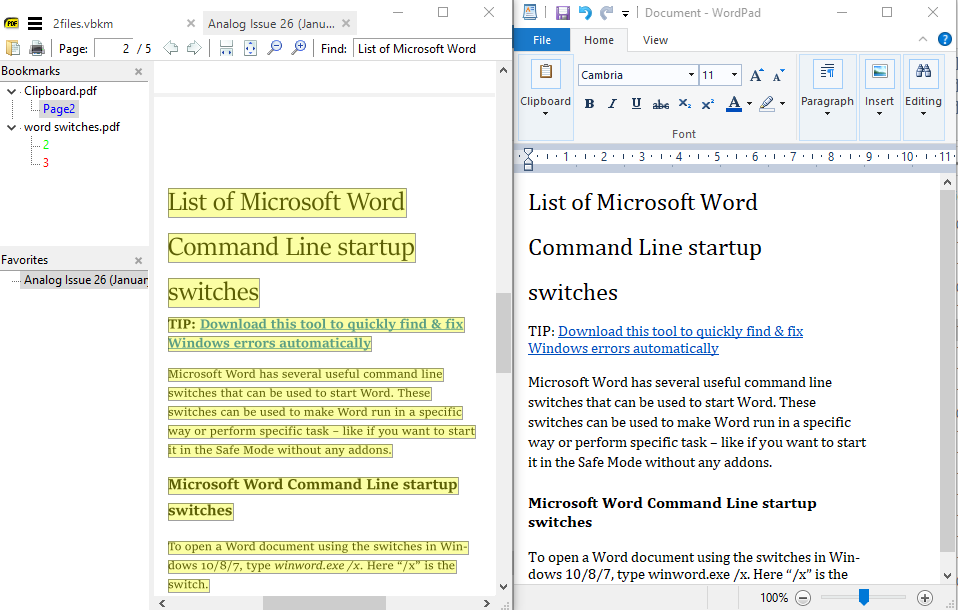
It is less conventional Tesseract OCR and pdfLaTeX rooted documents that tend to cause issues
is there something in the way their glyphs are defined that you think causes a difference?
e.g. is the inter character white space greater in those fonts you mentioned ?
GitHubRulesOK
on 19 Mar 2020
The problematic documents uses type1 fonts. I doubt that the glyph definitions are the problem - it worked fine with sumatra 3.1.2. Imho there is simply an error in the code somewhere that inserts a space.
u-fischer
on 19 Mar 2020
@kjk
if I recollect correctly there were some significant changes made to interpret "foreign" word spacing behaviours. Certainly if a line has been justified with larger word spacing it sometimes seems they are treated as either EOL or paragraph endings.
This sample of Tesseract v4.0 OCR output works well in nearly all cases however note that the main justified paragraph copies perfectly in version 3.1.2 but introduces two mid line breaks in version 3.2
isn’t a bark, and
it
isn’t the noise-you-make-before-beginning-a-
GitHubRulesOK
on 19 Mar 2020
Note that there is no need of anything "foreign" to achieve the same bug.
A minimal (and standard) latex code like :
\documentclass{book}
\usepackage{lmodern}
\usepackage[utf8]{inputenc}
\usepackage[T1]{fontenc}
\begin{document}
\frontmatter
\chapter{TEST}
\section{Introduction}
EEEEEEEEEEEEEEEEE
EEEEEEEEEEEEEEEEE
\end{document}
produce the same bug. With no special spacing etc... (no babel, no koma-script ...) it's all standard scientific international document/article/report.
msnbcorp
on 19 Mar 2020
@msnbcorp
my reference was not to your sample but to code introduced for Cyrillic/CJK handling some time ago
P.S. Ulrike would not see SumatraPDF application update signal until 3.2 goes on full release usually a week or so after forum users are given the chance to get bitten :-).
Just as an observation and by way of reference. I cannot remember which fonts I used for this pdfLaTeX sample one year ago (I probably did not use lmodern) thus it copies perfectly in 3.2

GitHubRulesOK
on 19 Mar 2020
@kjk
unsure where the root is but in checking a decompressed copy of above sample it exhibits the same problem however if I resave in notepad (without any changes) but with Unix LF setting the problem disappears even though the file size appears unchanged ! (need to test with diff ?)
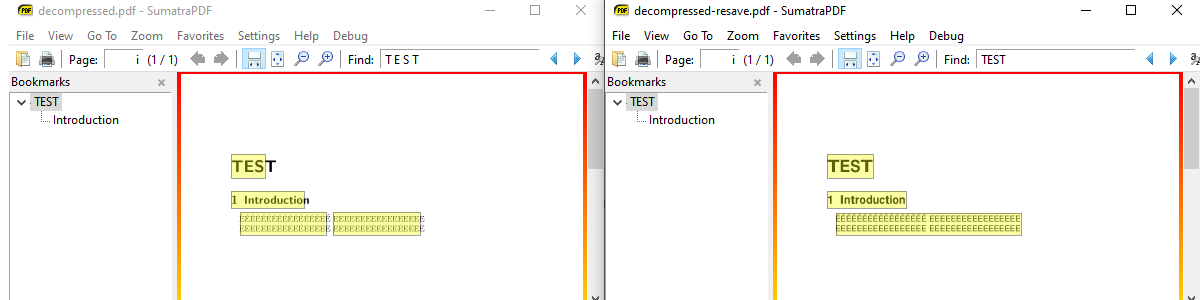
decompressed.pdf
decompressed-resave.pdf
GitHubRulesOK
on 28 Mar 2020
@GitHubRulesOK : A quick difference between the two file show that the char " " in the stream of decompressed-resave are writen as NULL character in the decompressed.pdf, this seems to be the only difference.
As it's a replacement char to char it is logical that the size is the same ;)
msnbcorp
on 29 Mar 2020
@msnbcorp
I stumbled on the cause without any analysis tools so ran comp (a very poor tool ) which shows in working file the first 10 changes as # 20 (decimal 32 is placed somewhere !! instead of 0 (null) but since you got a better handle on it I guess that is potentially a root cause
somewhere SumatraPDF is potentially interpreting one as different to the other ?
At first glance it seems other apps such as edge dont give a damn
So in summary
1) the modified working file has spaces the non working original has nulls !
2) SumatraPDF is NOT interpreting spaces where the non working source file has nulls !!
3) other apps treat those null characters same as if they were spaces !!!
Illogical does not compute there must be another wrinkle
So using logic there are 150 changes and it may be one or more of those that makes a difference (too many 150! permutations to test one by one) but they are within the streams which are presumably the font definitions thus the problem seems to be confined to font interpretation / handling. If so why is a corrupted font working but an uncorrupted one exhibits bad behaviour. need to unpick those definitions (good and bad ?)
Observation
The file behaves as expected if I totally remove those embedded font streams !
thus in theory the PDF works better in this case if there are NO fonts just scaled characters
@kjk do you have any idea why me corrupting the file as per two posts up or by removing font definition now appears to make it work as expected
GitHubRulesOK
on 29 Mar 2020
It should also be noted that this affects searching, since it's based on the same mechanism that gets the text string for copy&paste.
 NicolBolas
on 29 Mar 2020
NicolBolas
on 29 Mar 2020
@NicolBolas: Yes, that's already been noted in issue #1526 which has been marked as a duplicate of this one.
 SumatraPeter
on 29 Mar 2020
SumatraPeter
on 29 Mar 2020
@NicolBolas it was mentioned above in this thread too https://github.com/sumatrapdfreader/sumatrapdf/issues/1505#issuecomment-601274154 and also later illustrated in one of the images even if not repeated and referenced as Problem copying text from PDFs #544
Ulrike a well respected LaTeX consultant (who carries a bear to conferences in her handbag)
mentioned indirectly the fonts in question becomes searchable when kerned
At present it looks like in this case LaTeX font styles have a bearing to cause some difference
which also is a suspect cause for SOME but not all tesseract issues.
GitHubRulesOK
on 29 Mar 2020
Fixed by https://github.com/sumatrapdfreader/sumatrapdf/commit/59ee85e40bed1a94a16ef3cfa801fe4e0face3f1
 kjk
on 6 Jul 2020
kjk
on 6 Jul 2020
I have tested the last dev-build, it is still not fixed properly as @GitHubRulesOK mentionned in 59ee85e. This issues should be re-open.
msnbcorp
on 14 Sep 2020
@msnbcorp
there are several freetype related issues and although some similar ones are still open in theory this one issue is fixed. perhaps check which problems you have and see if they match those still open.
GitHubRulesOK
on 14 Sep 2020
Hi, on this specific example file it's OK, but on other files it's not ...
I guess this had solved a part of the problem, but the copy-paste is still messy on certain files...
msnbcorp
on 15 Sep 2020
yes copy and past fails on OCR files and LaTeX because of the way the fonts are interpreted by freetype
Many intercharacter spacing issues, but not all, were resolved, as here, by this fix
there are still issues over font height, word spacing, line returns, and Unicode that remain unresolved by this fix thus open elsewhere.
GitHubRulesOK
on 15 Sep 2020
Ok, if they are open elsewhere no problem ;)
I hope this will be fixed soon, it's sad that none of these problems appears on 3.1.2 ...
msnbcorp
on 15 Sep 2020
Related issues
kjk
·
25Comments
 somi9
·
17Comments
somi9
·
17Comments
 StefanMich
·
25Comments
StefanMich
·
25Comments
 nbrummerstedt
·
15Comments
nbrummerstedt
·
15Comments
 sahwar
·
16Comments
sahwar
·
16Comments
Most helpful comment
The problematic documents uses type1 fonts. I doubt that the glyph definitions are the problem - it worked fine with sumatra 3.1.2. Imho there is simply an error in the code somewhere that inserts a space.