Sumatrapdf: bookmark align right
C波段波导缝隙阵列天线的分析与设计.pdf
@kjk I uploda the PDF file witch align bookmarks right, maby you can find out the way to correct this phenomenon.
 jam-luo
All 9 comments

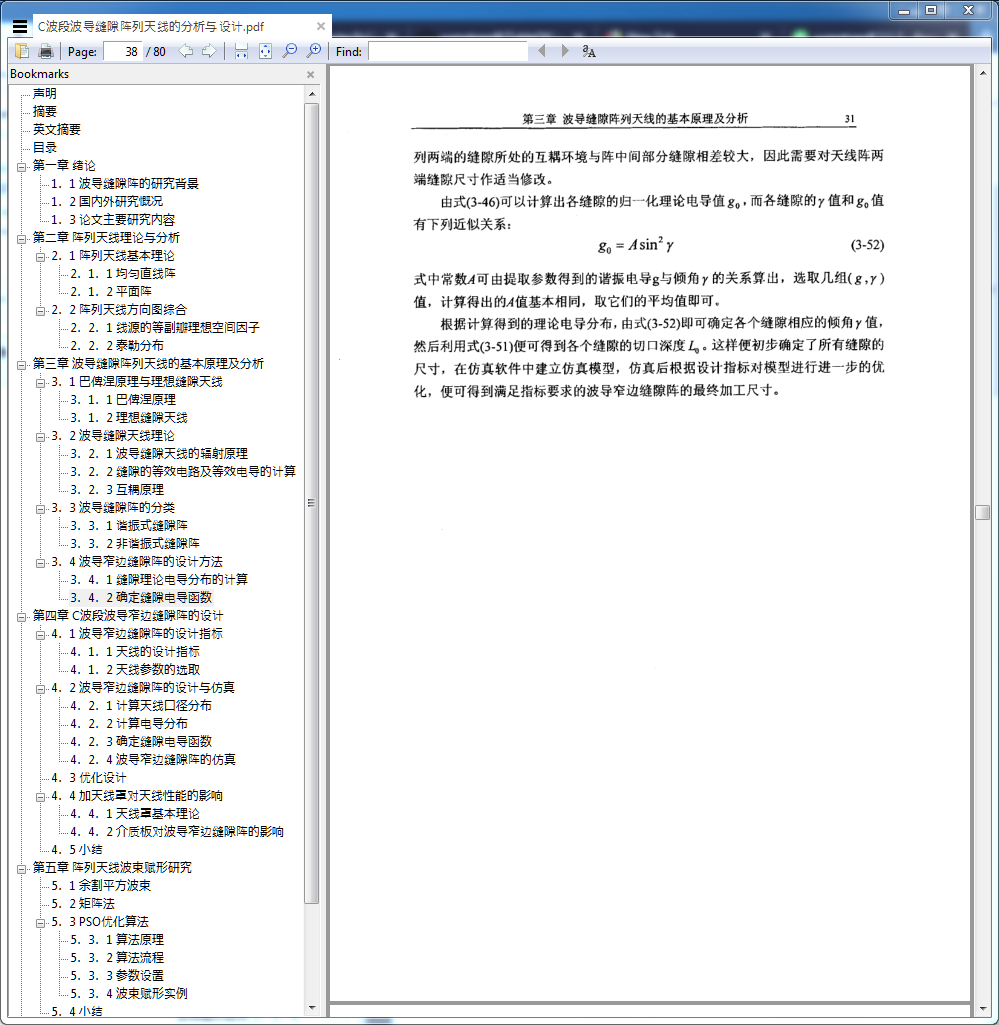
this pic show the issue , and I want to align the bookmarks left, pleas tell me how to solve this problem.
jam-luo
on 26 Feb 2019
@jam-luo
I am not the developer however have never seen bookmarks like that before although opening thousands of files with bookmarks, so I have to presume the author thought it would be a good idea to go against convention and in the editor set the bookmark to R2L (I have no idea how you could correct that other than using full adobe acrobat or another pdf tool) I tried changing all possible R2L user settings in SumatraPDF without any effect. I guess you would need to add a control into the core code to be able to override that behaviour
@kjk have you any idea, if this is controlable ?
 GitHubRulesOK
on 6 Mar 2019
GitHubRulesOK
on 6 Mar 2019
First: which version of Sumatra is this?
We do support RTL but it should only apply to languages marked as RTL in https://github.com/sumatrapdfreader/sumatrapdf/blob/master/scripts/trans_langs.py#L26 (see RTL at the end of the list) but it should apply to everything i.e. either everything is RTL or nothing is.
This is the first time someone reports only one part of the UI is RTL and I can't see how this could happen.
The relevant code is here: https://github.com/sumatrapdfreader/sumatrapdf/blob/master/src/SumatraPDF.cpp#L560
hwndFavTree is hwnd for the tree control that shows the favorouties. If you have ability to recompile the code and poke in there, that's the place to look.
 kjk
on 6 Mar 2019
kjk
on 6 Mar 2019
@jam-luo
I am not the developer however have never seen bookmarks like that before although opening thousands of files with bookmarks, so I have to presume the author thought it would be a good idea to go against convention and in the editor set the bookmark to R2L (I have no idea how you could correct that other than using full adobe acrobat or another pdf tool) I tried changing all possible R2L user settings in SumatraPDF without any effect. I guess you would need to add a control into the core code to be able to override that behaviour@kjk have you any idea, if this is controlable ?
Thanks for your replay, I have tried to open the file in adobe acrobat, the book marks of this file is aligened left in adobe acrobat. Till now, I did't find out any way to solve this problem, but that is no matter. I belive sumatra pdf will do better, and I will use this masterpiece than adobe acrobat.
jam-luo
on 25 Mar 2019
First: which version of Sumatra is this?
We do support RTL but it should only apply to languages marked as RTL in https://github.com/sumatrapdfreader/sumatrapdf/blob/master/scripts/trans_langs.py#L26 (see RTL at the end of the list) but it should apply to everything i.e. either everything is RTL or nothing is.
This is the first time someone reports only one part of the UI is RTL and I can't see how this could happen.
The relevant code is here: https://github.com/sumatrapdfreader/sumatrapdf/blob/master/src/SumatraPDF.cpp#L560
hwndFavTree is hwnd for the tree control that shows the favorouties. If you have ability to recompile the code and poke in there, that's the place to look.
Thanks for your reply, the version of sumatra pdf is 3.1.2(64-bit), and i didn't good at coding, if you want more detail about this problem, I Am happy to send this PDF file to your email address.
jam-luo
on 25 Mar 2019
@kjk
First: which version of Sumatra is this?
We do support RTL but it should only apply to languages marked as RTL in https://github.com/sumatrapdfreader/sumatrapdf/blob/master/scripts/trans_langs.py#L26 (see RTL at the end of the list) but it should apply to everything i.e. either everything is RTL or nothing is.
Actually that is not - strictly speaking - true.
This is the first time someone reports only one part of the UI is RTL and I can't see how this could happen.
The relevant code is here: https://github.com/sumatrapdfreader/sumatrapdf/blob/master/src/SumatraPDF.cpp#L560
hwndFavTree is hwnd for the tree control that shows the favorouties. If you have ability to recompile the code and poke in there, that's the place to look.
Actually, the relevant code is a few lines before, where the direction for the table of contents (which is labeled "Bookmarks") is globally set.
The direction for the table of contents is also set in src/TableOfContents.cpp:434. There, the direction is determined by comparing the count of RTL characters in the table of contents to the count of LTR characters.
Investigating this issue further, I found that the submitted PDF file has, in it's table of contents, only 4 characters counted as LTR, but 57 characters counted as RTL. All of those RTL characters are Unicode 0xFEFF (the BOM or ZWNBSP character), which is at the end of the list of RTL characters, but isn't really an RTL character.
Removing 0xFEFF from the RTL list, aligns the table of contents ("Bookmarks") to the left:
@jam-luo
If you want to try out my fix, you can download the 32-bit binary, or the 64-bit version if you prefer.
 TamirEvan
on 22 Apr 2019
TamirEvan
on 22 Apr 2019
@TamirEvan excellent analysis. I hope you don't mind that I merged this fix into Sumatra.
kjk
on 23 Apr 2019
@jam-luo This should be fixed in pre-release version: https://www.sumatrapdfreader.org/prerelease.html
kjk
on 23 Apr 2019
Thanks, may you have a good day! @TamirEvan @kjk
jam-luo
on 24 Apr 2019
Related issues
 somi9
·
17Comments
somi9
·
17Comments
 akontsevich
·
15Comments
kjk
·
25Comments
kjk
·
43Comments
akontsevich
·
15Comments
kjk
·
25Comments
kjk
·
43Comments
 sahwar
·
16Comments
sahwar
·
16Comments
Most helpful comment
@jam-luo This should be fixed in pre-release version: https://www.sumatrapdfreader.org/prerelease.html