Sumatrapdf: Invert Colors (dark color) key or menu option
I find I want the ability to invert the colors a lot and having to relaunch the app with the command line option is annoying.
A simple way I added this ability is to add the following to 'SumatraPDF.cpp' after line 3426.
case 'i':
gGlobalPrefs->fixedPageUI.invertColors ^= true;
UpdateDocumentColors();
return;
I don't know how to make suggestions without forking... or is that how your supposed to do it?
 TheTaLlesT
All 10 comments
This is a good way to report this.
I'm not promising, however, that I'll make this change. I'm wary of adding too many keyboard shortcuts that can be hit accidentally and leave user perplexed as to what happened and how to go back. Maybe with some modifier (Shift-I or Ctrl-I).
 kjk
on 4 Sep 2015
kjk
on 4 Sep 2015
Just in case it might help, Ctrl+I seems a more reasonable keyboard shortcut than simply I.
 ousia
on 4 Sep 2015
ousia
on 4 Sep 2015
I agree that just the 'I' key is probably not a good idea.
I changed the code to something a bit more acceptable I think.
In 'resorce.h' I added
#define IDM_VIEW_INVERT_COLOR 700
looked like a free id
In 'SumatraPDF.rc' under accelerators I added
"I", IDM_VIEW_INVERT_COLOR, VIRTKEY, CONTROL
In 'Menu.cpp' under { _TRN("Man&ga Mode"), IDM_VIEW_MANGA_MODE, MF_CBX_ONLY }, I added
{ _TRN("Invert Color\tCtrl+I"), IDM_VIEW_INVERT_COLOR, 0 },
Also in 'Menu.cpp' in the 'MenuUpdateDisplayMode' function I added
win::menu::SetChecked(win->menu, IDM_VIEW_INVERT_COLOR, gGlobalPrefs->fixedPageUI.invertColors);
Under 'switch (wmId)' in 'SumatraPDF.cpp' I added
case IDM_VIEW_INVERT_COLOR:
OnMenuInvertColors(win);
break;
And after the 'OnMenuViewMangaMode' function I added
static void OnMenuInvertColors(WindowInfo *win)
{
gGlobalPrefs->fixedPageUI.invertColors ^= true;
UpdateDocumentColors();
for (int tab = 0; tab < win->tabs.Count(); tab++)
if (win->tabs[tab] != win->currentTab)
win->tabs[tab]->reloadOnFocus = true; // need to fix flash effect...
}
A problem I noticed with my old code was if you went to another tab that was loaded before inverting the colors, the pages in the view area of that tab did not get inverted, they would update if you scroll away and back.
The above code does not do that anymore but when you switch to a tab that was loaded before inverting the colors you see the original page for a split second and can create an flash effect. Any ideas on how I might fix that?
Also should this be a setting per document/tab or keep it global?
If I was to add much more this would start to become a really annoying way to share my changes. Is there a better way?
TheTaLlesT
on 7 Sep 2015
For bigger changes you can fork and make changes on a branch.
Regarding the changes, we have a very high bar for adding new menu items and 'invert colors' doesn't meet that bar.
kjk
on 8 Sep 2015
Perhaps it could be added as an advanced option in addition to a hotkey? (pressing the hotkey would probably need to change the advanced settings file)
 FSund
on 23 Oct 2015
FSund
on 23 Oct 2015
A button or shortcut key for inverting colors is a very welcome change for me (I love and frequently use the https://wiki.gnome.org/Apps/Evince Ctrl+I shortcut - but, for Windows (in my work), Evince is a bit bloated) :-)
 fbobraga
on 21 Jun 2016
fbobraga
on 21 Jun 2016
I'd like a RightClick Menu option to toggle altered bitmaps to unaltered and back,
so I can see human faces properly. I do not want to alter
the foreground/background colors of text. So "inverted" is not the proper word.
Should I open a new "issue" ticket ?
 Jeff-Relf
on 12 Jun 2017
Jeff-Relf
on 12 Jun 2017
we have a very high bar for adding new menu items and 'invert colors' doesn't meet that bar.
Any bar which allows 'favorites' but forbids 'invert colors' is a very silly bar. Night Mode is far more broadly useful than a favorites list.
 jkopczyn
on 9 May 2020
jkopczyn
on 9 May 2020
@jkopczyn
Historically -invert-colors is specified during startup, it was never considered as needing to be a toggle during a session. Whilst it is depreciated (as now replaced by user preferences) it is still active.
Adding inversion as a shortcut as per above requires avoiding I and Alt+I (Ctrl + I is possibly best)
Due to the various current open issues when inverting it needs be applicable to all engines (not just for one filetype) see the increasing list of places that code changes as found by user TheTaLlesT in their comments and that was over 4 years ago, and there are certainly many additional places to consider now.
Ideally the current issues with -invert-colors across multiple parts of the interface and different filetypes should be fixed first before adding an internal switch to make them all even more apparent.
e.g. forcing inversion causes issues like this
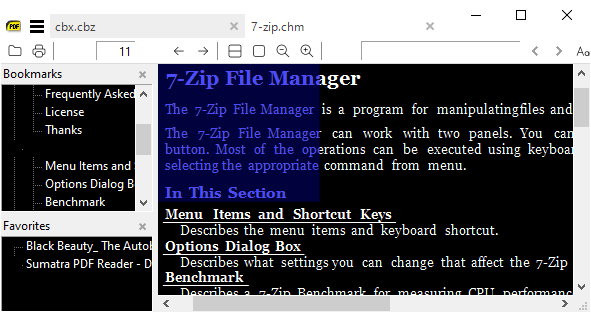
 GitHubRulesOK
on 9 May 2020
GitHubRulesOK
on 9 May 2020
Consolidating as duplicated by discussions in Toggle background color #79
GitHubRulesOK
on 12 May 2020
Related issues
 somi9
·
17Comments
somi9
·
17Comments
 StefanMich
·
25Comments
StefanMich
·
25Comments
 pnsantos
·
28Comments
pnsantos
·
28Comments
 bradrn
·
19Comments
bradrn
·
19Comments
 philiparvidsson
·
19Comments
philiparvidsson
·
19Comments
Most helpful comment
A button or shortcut key for inverting colors is a very welcome change for me (I love and frequently use the https://wiki.gnome.org/Apps/Evince Ctrl+I shortcut - but, for Windows (in my work), Evince is a bit bloated) :-)