Suitecrm: Stacked bar chart and Grouped bar chart at Report Charts
I have been using SuiterCRM 7.11.13.
I love SuiteCRM, mostly I am satisfy with it. But I have a small request.
I have searched the same request, and I found this.
https://community.suitecrm.com/t/stacked-bar-charts/28676
But, I suppose this issue has not yet resolved.
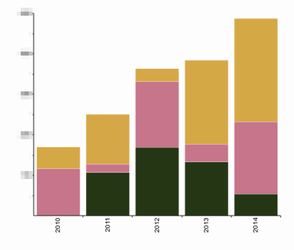
The stacked bar chart below seems that the items of each bar are not sorted by label, so the colors are same on each bar, but the orders are wrong.
[before(now)]
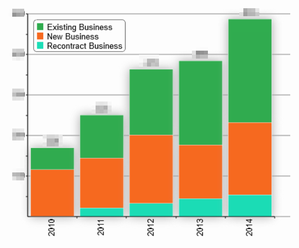
I've sorted the data on label of each bar, and draw the chart.
That's exactly what I want.
Besides, I change some property(shawos:on) to make it gorgeous.
[after]
I have modified the source code on AOR_Chart/AOR_Chart.php.
I want to explain here, but it is hard to explain.
I want to contribute to SuiteCRM community, but I don't know how.
I can send the source code I have modified, so I want someone to validate it, and hopefully commit to the SuiteCRM repository.
 take4tuz
All 2 comments
HI take4tuz, this sound like potentially a very valuable fix,
if your are not yet familiar with git and make a pull request, or not comfortable creating a pull request you can find some detail that may help you on our documentation site https://docs.suitecrm.com/community/ and i@m sure they're is plenty of documentation on GitHub for you to view on this topic
Alternatively you could contact our community team by referencing this issue #8866 at community[at]suitecrm[dot]com
 mattlorimer
on 15 Sep 2020
mattlorimer
on 15 Sep 2020
Thank you for your kind support. I've just finished my first step.
Install git and git with gui(TortoiseGIT), cloned repository and checkout SuiteCRM. I replaced the AOR_Chart.php file to mine. That's all for today.
I think I can have my second step (commit and pull request) this weekend. ;)
take4tuz
on 16 Sep 2020
Related issues
 pgorod
·
3Comments
pgorod
·
3Comments
 sasha2002
·
3Comments
sasha2002
·
3Comments
 Mausino
·
3Comments
Mausino
·
3Comments
 daschenbrener
·
3Comments
Mausino
·
3Comments
daschenbrener
·
3Comments
Mausino
·
3Comments
Most helpful comment
HI take4tuz, this sound like potentially a very valuable fix,
if your are not yet familiar with git and make a pull request, or not comfortable creating a pull request you can find some detail that may help you on our documentation site https://docs.suitecrm.com/community/ and i@m sure they're is plenty of documentation on GitHub for you to view on this topic
Alternatively you could contact our community team by referencing this issue #8866 at community[at]suitecrm[dot]com