Suitecrm: Errors in User profile with French translation (quote)
browser console shows:
- SyntaxError: Unexpected identifier 'utilisateur'
- ReferenceError: Can't find variable: tinyConfig
Then, you can't edit Emails parameters
Issue
Expected Behavior
Actual Behavior
Possible Fix
See modules/Emails/EmailUI.php
change the way quotes are escaped:
$v = str_replace("'", "\'",$v);
=>
$v = str_replace("'", "\'",str_replace("\'", "'", $v));
Steps to Reproduce
- Install french translation
- log in french
- go to user profile
- look at the browser console
5 click on Emails parameters
Context
Your Environment
- SuiteCRM Version used: 7.10.20
- Browser name and version (e.g. Chrome Version 51.0.2704.63 (64-bit)): any
- Environment name and version (e.g. MySQL, PHP 7): any
- Operating System and version (e.g Ubuntu 16.04): any
 QuickCRM
All 4 comments
The PHP possible fix was not saved correctly by Github.
We will submit a PR
QuickCRM
on 24 Sep 2019
👍2
Hi @QuickCRM, thanks for the PR! just to note for the future, if you want to post code in a GitHub issue you can encapsulate it with three backticks ``` like this:
<?php
echo 'Hello World!';
and it should keep it intact.
 Dillon-Brown
on 24 Sep 2019
Dillon-Brown
on 24 Sep 2019
It's gets even better if you add a language name, like this:
```php
or
```bash
<?php
function helloWorld() {
   echo 'Hello World!';
}
you get syntax highlighting.
 pgorod
on 24 Sep 2019
pgorod
on 24 Sep 2019
👍1
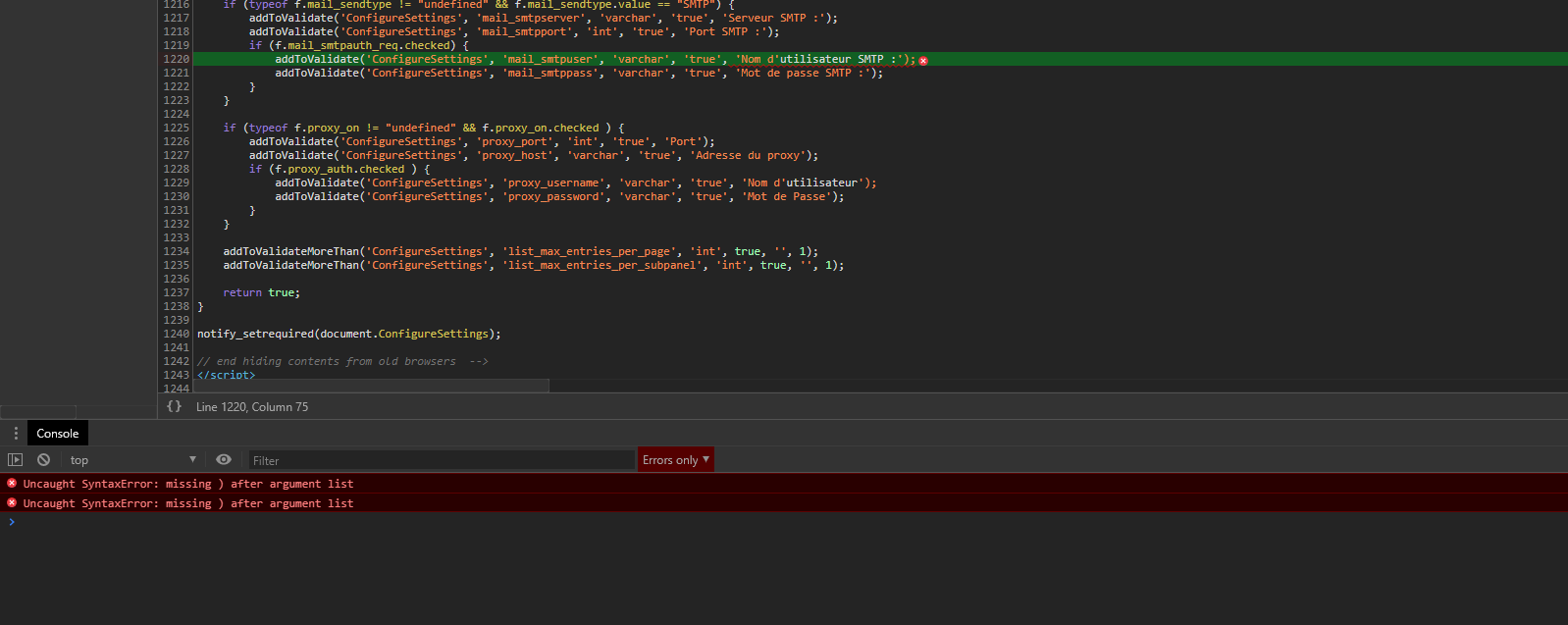
As a french dev & user so much error like this, for example in /index.php?module=Configurator&action=EditView
In the console "Uncaught SyntaxError: missing ) after argument list"

 holdusback
on 5 Nov 2019
holdusback
on 5 Nov 2019
Was this page helpful?
0 / 5 - 0 ratings
Related issues
 jellydonuts
·
3Comments
jellydonuts
·
3Comments
 ArturoBurela
·
3Comments
ArturoBurela
·
3Comments
 darouca
·
3Comments
pgorod
·
3Comments
darouca
·
3Comments
pgorod
·
3Comments
 Mausino
·
3Comments
Mausino
·
3Comments
Most helpful comment
The PHP possible fix was not saved correctly by Github.
We will submit a PR