Suitecrm: Emails, Import, Quick Search for Assigned To and Related to not working
Issue
Open Email and try to import it to an Account or Contact not working. More specifically - the quick search to lookup an Account or Contact not working.
In the same form, the Assigned To quick search does work (it brings up a popup with available users to assign to), but, when a user is selected in the popup, it is not passed back to the form.
I am running a new Install 7.10.8. (and this functionality did work in version 7.10.7)
Expected Behavior
I should be able to assign an email to a contact or an account using the IMPORT functionality in EMAIL.
Actual Behavior
The POPUP is not working. There are two faults.
1) Quick Search is not working for the account, case, contact fields
2) Quick Seach is working for looking up a "Assigned User", but when a user is selected in the popup, it is not passed back to the form.
Possible Fix
Not a fix, but here is some information that may help.
In Chrome, when I click on the "arrow" button to request the lookup, the Chrome console throws the following error:
Uncaught TypeError: Cannot read property 'parent_name' of undefined
    at HTMLSelectElement.onchange (index.php?module=Emails&action=index&parentTab=All:1)
Steps to Reproduce
- You will need email SMTP incoming and outgoing setup, so that you can use the EMAIL module.
- Click on Email so you can see your emails. Click View Emails if necessary.
- Using the suite select boxes on the left of your emails, select an email
- Click "Bulk Action" and select "Import"
- First Error: Click the "lookup arrow" to the right of "Assigned To". Select any user in the POPUP. When you select the user, it should be returned to the form.
- Second Error: After the "Related to" label, click any module in the dropdown and click the "lookup arrow" to the right of "Related To". You should get a POPUP window (but I dont).
Context
I'm just trying to attach email to customers and contacts using the IMPORT function of the EMAIL module.
Your Environment
- SuiteCRM Version used: 7.10.8
- Browser name and version up to date version of Chrome: Version 69.0.3497.92 (Official Build) (64-bit)
- Environment name and version: Mysql, PHP 7.0
- Operating System and version: 4.4.126-0.ksplice-lts-generic GNU/Linux
 DanVancPdx
All 22 comments
In SuiteCRM forum, user 3boptic has made a video showing this error, and a work-around.
SuiteForum link: https://suitecrm.com/suitecrm/forum/feedback/20392-import-emails-not-working-on-v7-10-8
Video https://drive.google.com/file/d/1KpXtp2PMakLiFcM2p9q4PE6sAiJfwRgJ/view?usp=sharing
DanVancPdx
on 18 Sep 2018
related to issue #6050 (braking change added in PR #6076)
 gymad
on 18 Sep 2018
gymad
on 18 Sep 2018
Hi @DanVancPdx, Are you able to test the proposed fix and confirm if it helps resolves your issue. That would be much appreciated!
Thanks!
 samus-aran
on 18 Sep 2018
samus-aran
on 18 Sep 2018
Partial fix. With the proposed fix, the quick search works with both the Assigned To and the Related To.
In other words, I can select a new account and assigned.
But the Ok button doesn't save the selected account/assigned-to.
In fact, when I click on "OK", the ok/cancel row disappears, and the changes do not get applied, and the screen "Importing Email" stays showing instead of disappearing.
In this image below, the quick search found a customer and replaced it on the screen.
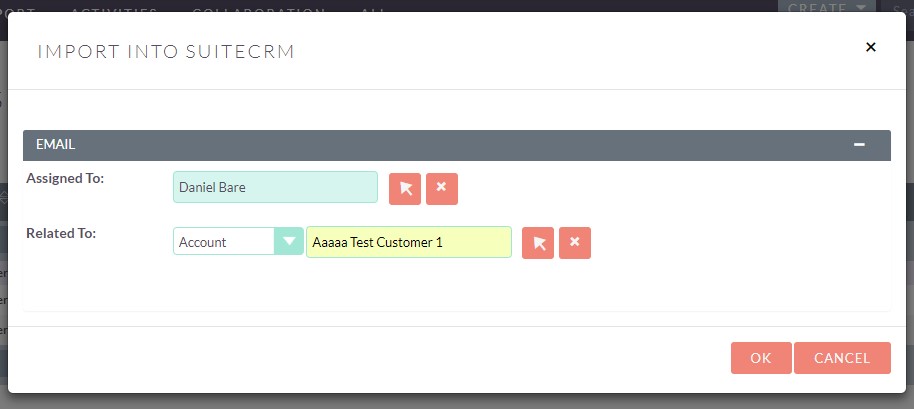
Yay! But then I clicked "OK", I received this:
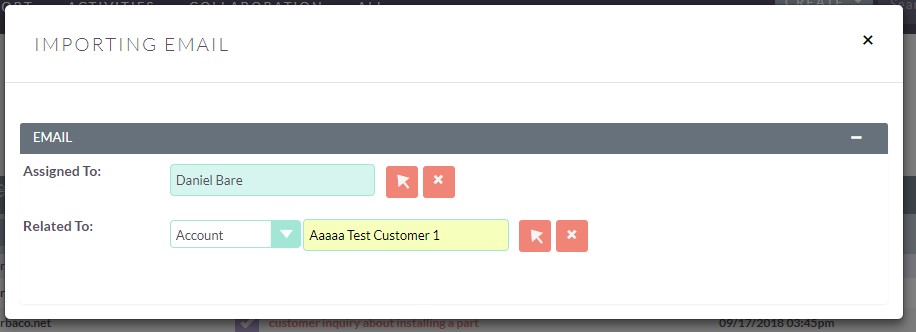
The "OK/cancel" disappear, but the IMPORTING email screen should of applied the change, and the popup screen itself disappear.
This may be a second problem issue. The original issue was that the quick search wasn't working. Now the form isn't updating. I'm not sure if this should be a new issue or stay in this thread. (I'm new to github and am grateful for assistance).
DanVancPdx
on 18 Sep 2018
I'm having a different behavior. After applying this fix, quicksearch won't work yet, but selection user from pop-up window (arrow button) will work. Ok button works fine too.
 labcerouno
on 18 Sep 2018
labcerouno
on 18 Sep 2018
Hi @labcerouno @DanVancPdx, I've pushed a new commit to #6323, would you be able to confirm if this resolves your issue? (Make sure to clear cache, repair and rebuild and Rebuild Minified JS Files + Rebuild JS Grouping Files).
 Dillon-Brown
on 19 Sep 2018
Dillon-Brown
on 19 Sep 2018
See my post above starting with Partial Fix.
The proposed fix does allow the popup form to do a quick search and populate the fields in the form, however, the ok/cancel buttons disappear.
See the post above for screenshots.
Thanks for all the help!!!!
DanVancPdx
on 19 Sep 2018
Thank you @Dillon-Brown !
After applying this new fix and repairing and rebuilding JS files, I'm in a worse scenario: quicksearch won't work yet. Clicking in arrow button and selecting from pop-up will fill the user field with the one I chose, but when clicking OK it happens the same thing as described by @DanVancPdx: the OK button disappears and the modal won't close. Importing never happens.
labcerouno
on 19 Sep 2018
While testing the issue with emails imported automatically (which cannot be edited or changed the user assigned to), I activated the option "Import automatically" for the inbound group account I use. After this, I'm having the same behavior I had after the first commit: it will import only when I choose the user from pop-up window. The OK button in the modal is working again. \o/
labcerouno
on 19 Sep 2018
@labcerouno @DanVancPdx So far i'm unable to replicate, have you tried doing a hard refresh of the browser cache? this resolves the missing OK button and the emails correctly import for me (Using the latest version of the fix).
Dillon-Brown
on 20 Sep 2018
@labcerouno @DanVancPdx I think we should separate some of these issues out. If we can confirm that the proposed fix works for relating and importing emails then I would suggest creating a new issue for automatic importation. I've also seen an issue where there is no notification when importing the same email twice, and another where the pagination doesn't take you to the last page.
I think we have a few more minor bugs to fix before we can get this one fully closed out.
Dillon-Brown
on 20 Sep 2018
Thank you @Dillon-Brown for your concern.
Actually, I'm not sure that the OK button had worked back because I activated "Import automatically". It seemed to be but now I'm having an erratic behavior and I can't replicate it anymore.
Ok button is not working again. I've tried with 3 different browsers (Chrome, Edge and Firefox) under both normal and incognito mode and clearing cache. I also reloaded PHP-FPM service because I think it may clear PHP's cache too. No solution.
About the other issues, I will create new ones here in GitHub. For our company, #6321 is fundamental and top priority. I hope we can solve it together soon!
Thank you again. Regards.
labcerouno
on 20 Sep 2018
On v.7.10.9 OK button is working. Quicksearch is not. I can choose an user to assign to from the pop-up window after clicking the arrow button.
labcerouno
on 21 Sep 2018
I wonder if this might be related to #6013 ?
 pgorod
on 21 Sep 2018
pgorod
on 21 Sep 2018
Hi @pgorod ! How could I test that?
When I'm on Edit page (after importing a message) the quicksearch works. It seemed to be an issue with the modal. Watch below:
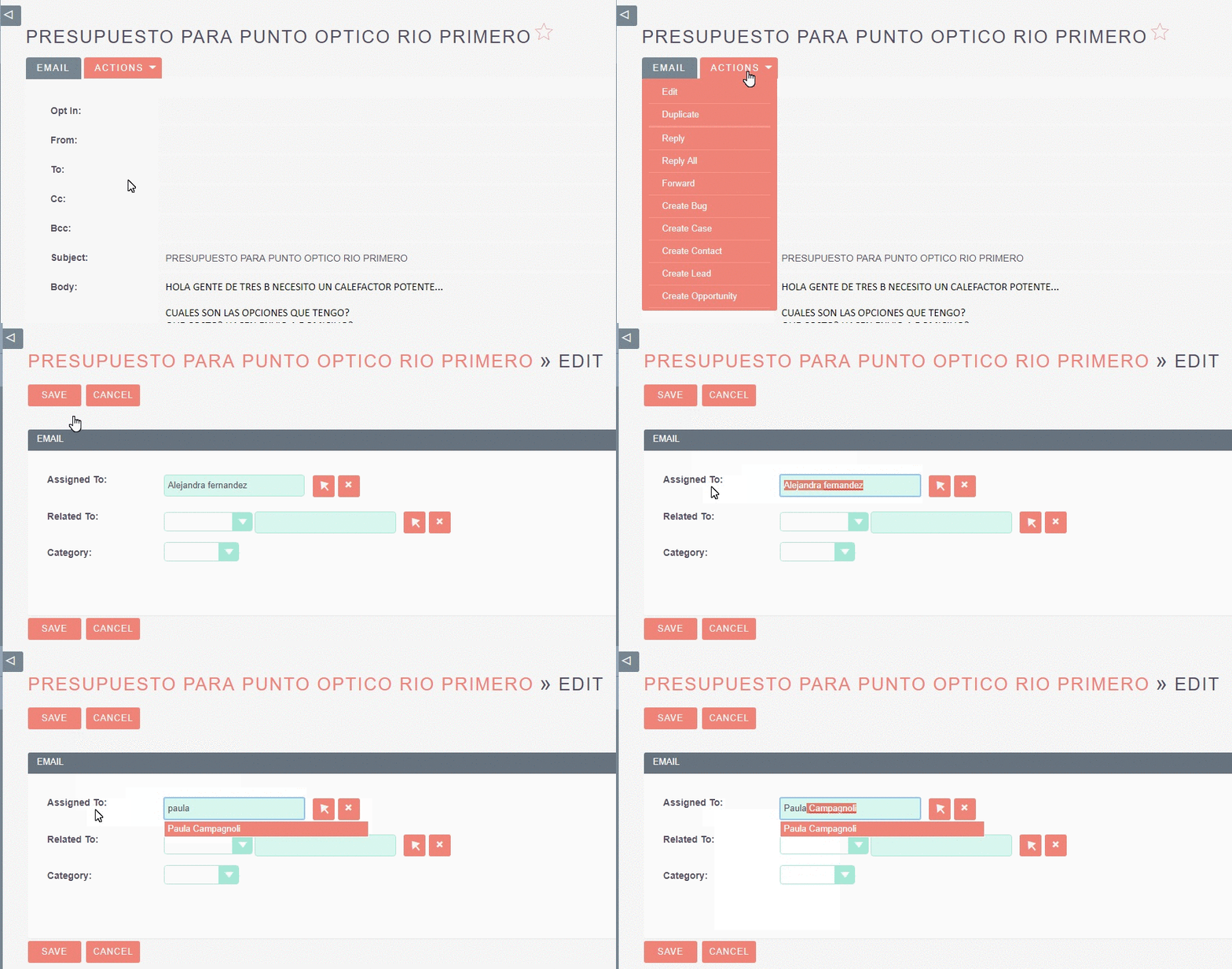
labcerouno
on 21 Sep 2018
Applying #6013 won't fix this buggy behavior.
labcerouno
on 1 Oct 2018
Hi @labcerouno @Dillon-Brown @pgorod @DanVancPdx @samus-aran !!
As far I could investigate, the commit that introduced the error is:
https://github.com/salesagility/SuiteCRM/pull/6076/commits/5a8d6a7a1080a0664ef204361965870da769191f
If you revert this commit, everything seems to work ok:
I tested in 7.10.9
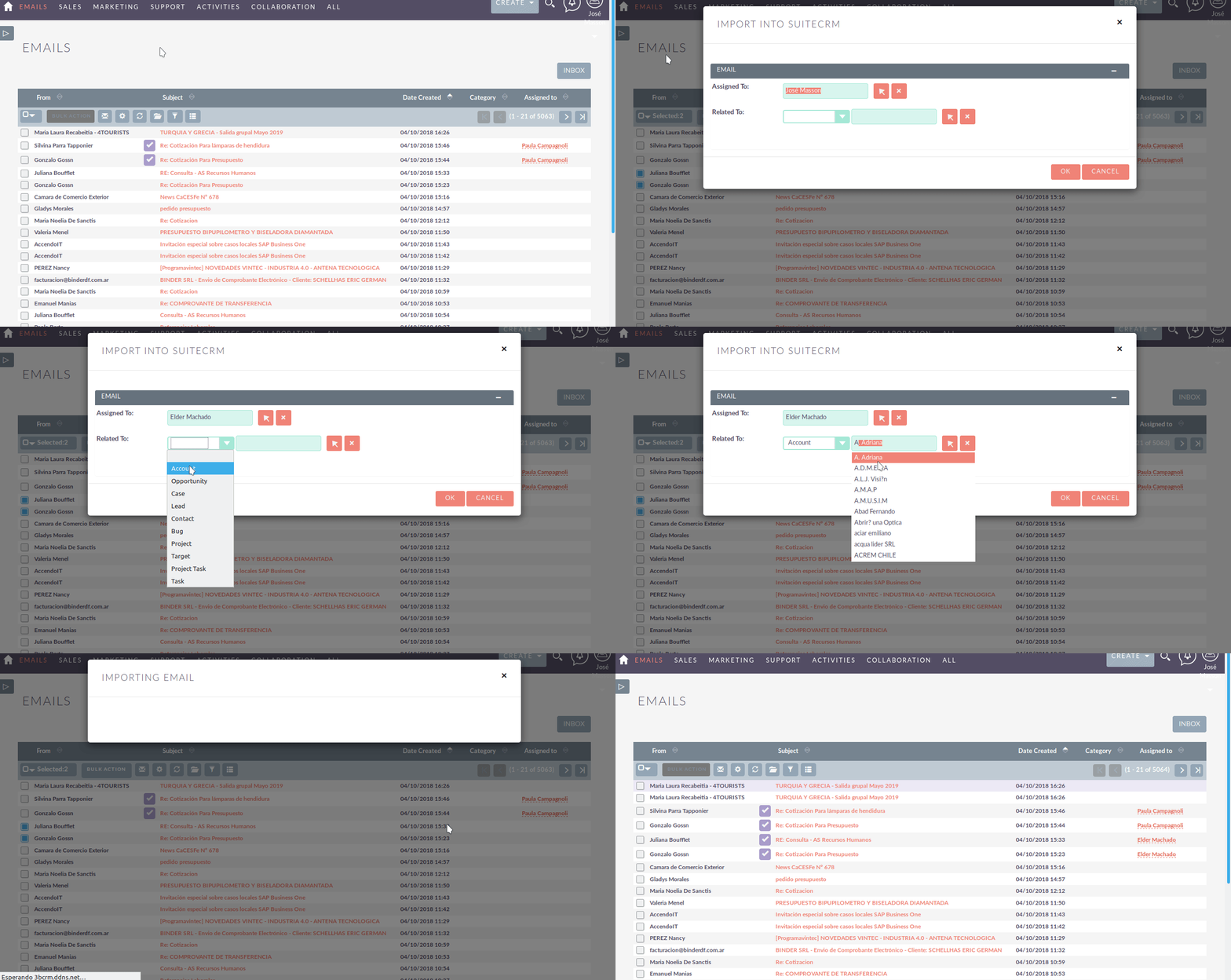
 Abuelodelanada
on 4 Oct 2018
Abuelodelanada
on 4 Oct 2018
Hi @Abuelodelanada, this should be fixed in #6323. The issue as you can see was that the formName was set to "EditNonImported" in that single file but hadn't been updated everywhere else.
Dillon-Brown
on 5 Oct 2018
According to what @Dillon-Brown suggested, I created a new issue for something discussed here: https://github.com/salesagility/SuiteCRM/issues/6440
labcerouno
on 26 Oct 2018
Found a solution to get QuickSearch working again in 7.10.11:
Change form ID from "EditView" to "EditNonImported" in /modules/Emails/include/ImportView/ImportView.tpl:
From:
To: nettags
on 18 Dec 2018
nettags
on 18 Dec 2018
@nettags this issue is already closed and marked as fixed.
Exactly which problem (steps to reproduce) are you using that workaround for?
does it have anything to do with the related issue #6440?
Thanks!
pgorod
on 18 Dec 2018
Oh yes, you are right, it is fixed with commit 53774af by gymad - sorry for the confusion.
nettags
on 20 Dec 2018
Related issues
pgorod
·
3Comments
 jellydonuts
·
3Comments
jellydonuts
·
3Comments
 tech-ch1
·
3Comments
tech-ch1
·
3Comments
 criterion9
·
3Comments
criterion9
·
3Comments
 sasha2002
·
3Comments
sasha2002
·
3Comments