Suitecrm: Feature - Sync with Google Calendar
This is a project I'm currently working on. I want to be able to have users sync with their Google Calendar.
I'm creating this issue to gain feedback, and track my progress. If anyone else is working on a similar feature, please chime in so we don't duplicate the effort.
Issue
We use Google's Services, as I'm sure a lot of other SuiteCRM users do. Currently the only way to see your CRM calendar in Google Calendar is by subscribing to the iCal URL. The problem is that Google (in their infinite wisdom) has decided that they'll sync that iCal feed very rarely, and only if they feel like it. So, once you subscribe any changes made seem to never show up. It's also a view only option.
I'm working on building a two way calendar sync using Google's API PHP library, and integrating it into SuiteCRM.
Once the calendar sync is working, it can be built on to sync other Records with the user's Google Account, since the API covers most of Google's services.
Expected Behavior
When you create or modify an event in SuiteCRM, it should show up on your Google Calendar.
Actual Behavior
New calendar events you create are not refreshed once you subscribe to the iCal feed.
Possible Fix
Use the Google API PHP library to perform a calendar sync via a scheduled job.
I'm working on this.
Steps to Reproduce
- Subscribe to your SuiteCRM iCal feed in Google Calendar
- Notice that new events and changes never show up
- No Profit
Context
All our users have a Google account. Keeping the calendar's in sync is currently not a feature of SuiteCRM (without an addon). This is annoying and causes the users to not keep their appointments.
Your Environment
- SuiteCRM Version used: 7.10.6
- Browser name and version: Chrome Version 67.0.3396.62 (Official Build) (64-bit)
- Environment name and version: MariaDB (Galera Cluster) v10.1.29-6, Apache 2.4.18-2ubuntu3.8, PHP 7.0.30-0ubuntu0.16.04.1
- Operating System and version: Ubuntu 16.04
 ApatheticCosmos
All 34 comments
That would be amazing. Will cases show up in the calendar as well?
 acoolov
on 18 Jun 2018
acoolov
on 18 Jun 2018
Theoretically, any record based on a date/event/etc could be synced... but I'm nowhere close to that yet. I'm still working on the authentication system.
ApatheticCosmos
on 18 Jun 2018
Does CalDAV help? I have a oneway sync from Sugar to Outlook with sabredav (well, it is not in good code condition, but it works ;) )
Feel free to ask if it can help you.
 gunnicom
on 18 Jun 2018
gunnicom
on 18 Jun 2018
@gunnicom
Thanks! I'll keep that in mind when I get to the sync code.
I just got the auth key creation working. Going to work on the UI for it next.
ApatheticCosmos
on 18 Jun 2018
I'm really happy to see this happening! Great initiative!
I don't want to sound too demanding, but remember we're trying to get to that point where code is only allowed into the product when it has tests written for it. So it would be great if you (or any other contributor helping you out) could get that going as soon as possible, since it will assist you during development.
My point is: if you're going to have to go to the trouble of writing tests, it's better to do it sooner than later. Of course, tell us if you need any help!
 pgorod
on 18 Jun 2018
pgorod
on 18 Jun 2018
@pgorod
I'll keep that in mind, and try my hand at writing some tests. I haven't looked into the testing framework yet. It's there any documentation written for it?
ApatheticCosmos
on 18 Jun 2018
Yep, here you go
https://docs.suitecrm.com/developer/appendix-c---automated-testing/
EDIT: fixed link
pgorod
on 18 Jun 2018

I've got the authentication working.
ApatheticCosmos
on 19 Jun 2018
I'm having trouble retrieving deleted meetings.
// This works:
$meetings = $user->get_linked_beans('meetings', 'Meeting', Array(), 0, -1, 0, '');
// This returns an empty resultset:
$meetings_deleted = $user->get_linked_beans('meetings', 'Meeting', Array(), 0, -1, 1, '');
Does anyone watching this know what's going on?
ApatheticCosmos
on 20 Jun 2018
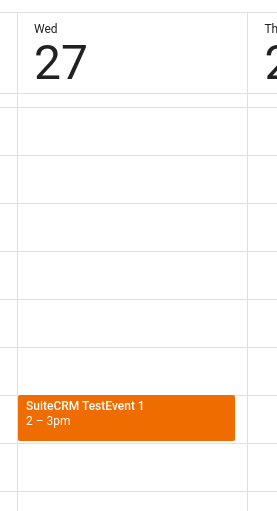
Progress!
ApatheticCosmos
on 21 Jun 2018
It looks like I've gotten two way syncing of simple Meetings working.
I'm skipping recurring events, since there doesn't seem to be a way to produce them in SuiteCRM. If there is a way in the future (or if I missed something), I'll add that functionality.
My next step is to get the reminders synced, and then I'll refactor and clean up for a pull request.
EDIT: I'm syncing recurring events now.
ApatheticCosmos
on 26 Jun 2018
Just a heads up, I'm not going to sync email reminders. It seems pointless to receive a reminder email from both systems.
ApatheticCosmos
on 26 Jun 2018
Great work.
The only way I know to create recurring events in SuiteCRM is by going onto the calendar view, and then clicking on a date/time in the calendar and at the bottom of the pop up form is a repeat option. The full form from the left hand schedule meeting option doesn't have the repeat option; https://github.com/salesagility/SuiteCRM/issues/5924
 evanevgram
on 27 Jun 2018
evanevgram
on 27 Jun 2018
@evanevgram Ah! I found it! Thanks!
I'll see if I can translate the recurring events. I may not have that functionality in the initial pull request, but I'll work on it.
ApatheticCosmos
on 27 Jun 2018
I've found some edge cases that mess with the syncing. Moving a GCal event from one calendar to another doesn't mark the event as moved, or deleted, it simply doesn't show up on the original calendar any more. It also clears all the extended properties for the event, which is how I am tracking what SuiteCRM meeting the GCal event belongs to.
I'm going to need to make some changes to overcome this. Some of the GCal API isn't very straightforward.
I'm still working on it!
ApatheticCosmos
on 3 Jul 2018
very googd adding !
 micker
on 5 Jul 2018
micker
on 5 Jul 2018
I've gotten popup reminders syncing both ways, and recurring events syncing in one direction (SuiteCRM -> GCal). I don't think it will be possible to sync recurring events from Google to SuiteCRM. Google's recurring system is far, far more flexible than SuiteCRM's. There are many recurring configurations that SuiteCRM simply cannot handle.
There are other limitations as well, which I'll go over in the near future. Maybe we can find workarounds. Due to these limitations, the code I've written syncs with a calendar named "SuiteCRM" instead of the primary Google calendar. This means that if something goes wrong, it only affects the non-primary calendar.
I think that the code is ready for public viewing at this point. I'm going to clean it up a bit, run some tests from a fresh build, and then post it. Crossing my fingers... I really could use a few more sets of eyes on this.
ApatheticCosmos
on 9 Jul 2018
https://github.com/ApatheticCosmos/SuiteCRM/tree/feature/google_calendar_sync
Here is my initial commit for this feature. It's not as cleaned up as I'd like, and I still need to write the tests (I tried to figure that out, but gave up for the time being).
With this code, I was able to create a fresh instance, configure the Google OAuth key, and sync. I have more testing to do with this fresh instance, but I think the sooner I get more eyes on it the better.
I'll be providing instructions on getting that OAuth key tonight or tomorrow. (America/New_York TZ here).
ApatheticCosmos
on 10 Jul 2018
I've thrown together a quick PDF with instructions on configuring the calendar sync. I'll figure out how to create official docs and put in a pull request for them along with this feature.
SuiteCRM_Google_Sync_Instructions.pdf
ApatheticCosmos
on 11 Jul 2018
Great work. Looking forward to this being included.
evanevgram
on 11 Jul 2018
I'll figure out how to create official docs and put in a pull request for them along with this feature.
There are some instructions here:
https://docs.suitecrm.com/community/contributing-to-docs/
But when you want to invest some time in this, open an Issue on the Documentation GitHub site, and I will give you personal guidance with any details (you've earned it! 🏅).
pgorod
on 11 Jul 2018
Oh, also, I figured out a better way to handle recurring events. Instead of syncing the recurring info, I'm syncing the individual events. Sometimes it helps to sleep on a problem. :)
After testing it a bit, it seems to be much more sane, and any changes to individual events on either side sync up just fine. The only downside I've found is that it's more events to sync, and takes a few seconds longer if there are a lot of events.
I'm limiting the syncing to events that start from 1 month in the past to 3 months in the future to offset this. I'll make that configurable later.
ApatheticCosmos
on 11 Jul 2018
@pgorod
I don't know what my mental malfunction is, but I can't wrap my head around creating tests. I could really use some help with it. An example test for my code would help me immensely. Once I see how it works with my code, I should be able to expand into more tests.
ApatheticCosmos
on 12 Jul 2018
Ok, hold on, I'll see if I can get someone to help.
pgorod
on 13 Jul 2018
Hi @ApatheticCosmos, have you checkout out the documentation site? that would probably be the best place to start: Automated Testing. Aside from that codeception also has some excellent documentation here and I think there should be quite a few existing pull requests you could get some SuiteCRM specific examples from too, Feature Anti Malware Scanner Integration.
Let me know if you have any questions.
 Dillon-Brown
on 16 Jul 2018
Dillon-Brown
on 16 Jul 2018
@Dillon-Brown I have read the Automated Testing docs. I'll study the Codeception docs as well. I'm looking over the other pull request as well.
Hopefully I can figure it out.
ApatheticCosmos
on 16 Jul 2018
I just wanted to say thanks to you guys for working on this, and offer my support!
 cscottiw
on 25 Aug 2018
cscottiw
on 25 Aug 2018
So i'm new to SuiteCRM and this whole github thing. How do i get the code for this google calendar sync?
To my understanding it has to be merged into the main branch for the next release?
How long does it take for these things to usually happen? My bosses are on my ass about syncing with google calendar and don't particularly want to pay for an add-on.
Any information would be helpful, thanks!
 DLageMesh
on 27 Aug 2018
DLageMesh
on 27 Aug 2018
@DLageMesh the time it takes varies greatly, it depends on how long it takes to finish the development, how interesting the PR is (this one is very interesting 😃), whether the tests go well... and more.
So it could be in shortly, but we can't promise.
You can pull the code from Git, from the branch on ApatheticCosmos' fork, directly into your project. Make sure you test it thoroughly, though. This is still a Work in progress. You do it at your own risk...
pgorod
on 27 Aug 2018
@DLageMesh Start here: https://help.github.com/articles/checking-out-pull-requests-locally/
I personally always keep a separate fork of the project code and a separate "master" or "production" branch for what I'm using and I'm able to merge in PRs keep it in a stable state.
 isleshocky77
on 27 Aug 2018
isleshocky77
on 27 Aug 2018
Well given a client has asked about this, early next week I'll commit some time to help out where I can with this (I'll start with reading that documentation and see if I can help with the tests)
 markbond1007
on 8 Nov 2018
markbond1007
on 8 Nov 2018
Where is an appropriate place to ask a few questions about setting this up? I have read the docs but I have one huge stumbling block, there is no place in System Settings for the Google Authentication(there is no entry below the Proxy Settings as is shown in the docs). I can get the stuff regarding Google Suite but something I'm doing there isn't working right either as when I select the json file, it doesn't seem to upload, even when I click save because it still says that it's unconfigured.
 TheOncomingStorm
on 16 Feb 2019
TheOncomingStorm
on 16 Feb 2019
@TheOncomingStorm The place to ask is in the Forums:
https://suitecrm.com/suitecrm/forum/
If you don't see the option there, you're probably running a SuiteCRM version before this feature was introduced.
pgorod
on 16 Feb 2019
I checked, I'm using 7.11.1 Sugar Version 6.5.25 (Build 344) which should have it if I'm seeing correctly when it was merged(7.11.0, I think I read). Anyway, I'll ask on the forums. Thanks.
TheOncomingStorm
on 16 Feb 2019
Related issues
 Mausino
·
3Comments
Mausino
·
3Comments
Mausino
·
3Comments
Mausino
·
3Comments
 tech-ch1
·
3Comments
tech-ch1
·
3Comments
 ArturoBurela
·
3Comments
ArturoBurela
·
3Comments
 Vhex
·
3Comments
Vhex
·
3Comments
Most helpful comment
I've got the authentication working.