Suitecrm: No outbound accounts shown in "From" dropdown with group outbound email
_This may seen similar to #4111 but it's not a duplicate._
Outbound email accounts are being ignored when composing an e-mail in Emails module.
Issue
The outbound group email accounts set in Admin / Outbound Email are never shown in "From" dropdown of Compose page in Emails module.
Expected Behavior
All the accounts set in Admin should appear in "From" dropdown in Compose page of Emails module for all users.
Actual Behavior
If Allow users to use this account for outgoing email was checked in Admin / Email / Email Settings, this is the only account to be shown in the From dropdown. If this box was not checked, the dropdown will not populate, it will be empty, blocking the possibility to send an e-mail.
Any account set in Admin / Email / Outbound Email will be ignored in Compose page of Emails module.
Steps to Reproduce
- Log in as Admin
- Go to Admin / Email / Outbound email
- Click
Create Outbound Email Accounts, fill up the fields properly and save - Go to Emails Module and click
Compose
5.Fromfield won't show the account created. It might show the system account ifAllow users to use this account for outgoing emailwas checked.
Context
This bug affects the possibility to send e-mail. In our case, the system account is only used by the IT Team and should be not used by the Sales Team. If the outbound account doesn't work, we cannot send e-mails.
Due to the break of functionality of Compose in Email module, it should be High Priority.
Your Environment
- SuiteCRM Version used: 7.10.4
- Browser name and version: Chrome 66.0.3359.117 (64-bits) / Firefox 59.0.2 (64-bits)
- Environment name and version: PHP 7.0 FPM, Percona Server 5.6
- Operating System and version: Ubuntu 17.10
 labcerouno
All 19 comments
Identical issue, show-stopper. There is some chatter that if inbound accounts are not configured, the population of the drop-down is not "triggered" somehow, but we've had no success.
Only the admin outbound account is showing for all users when composing e-mail regardless of calling module.
Not tenable, needs high priority, even a dirty mod to a php/js would help. Critical issue.
 global-H
on 9 May 2018
global-H
on 9 May 2018
Can anyone tell us which was the last version of SuiteCRM where you know _for sure_ that this was working well?
 pgorod
on 9 May 2018
pgorod
on 9 May 2018
@pgorod I have same issue... my version 7.10.4
- new things are here
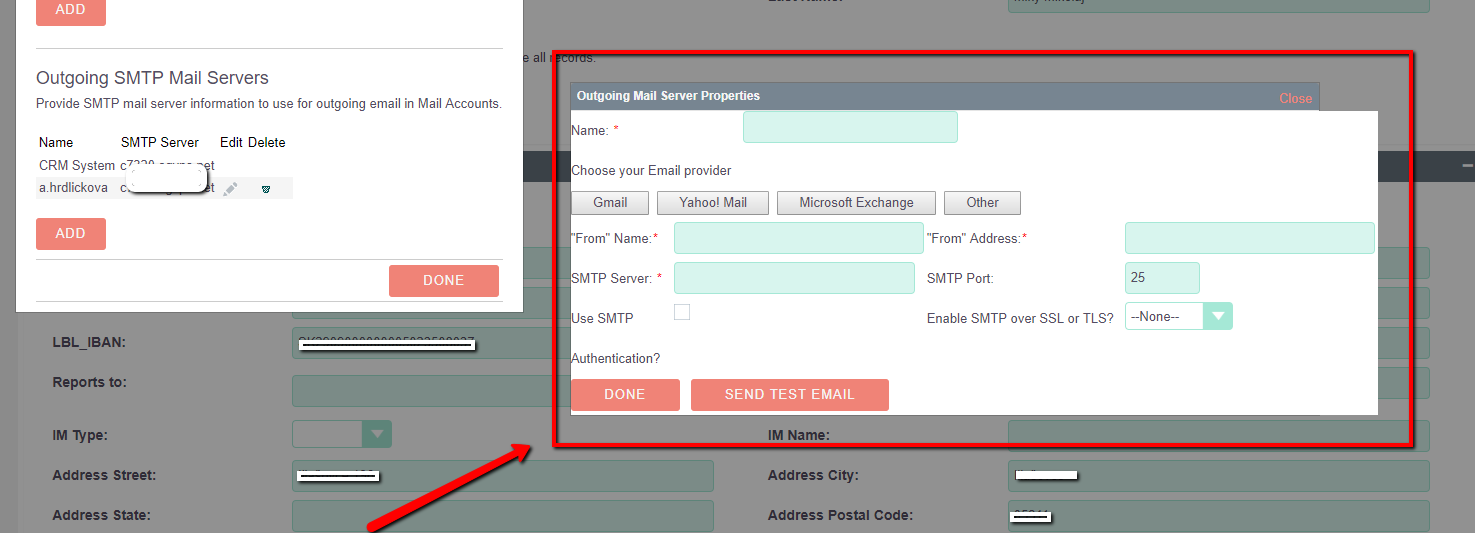
if you create outbound email account via user-> email settings -> pop up window in user account.. it will show it in pop up window of user email setting + outbound email accounts listview
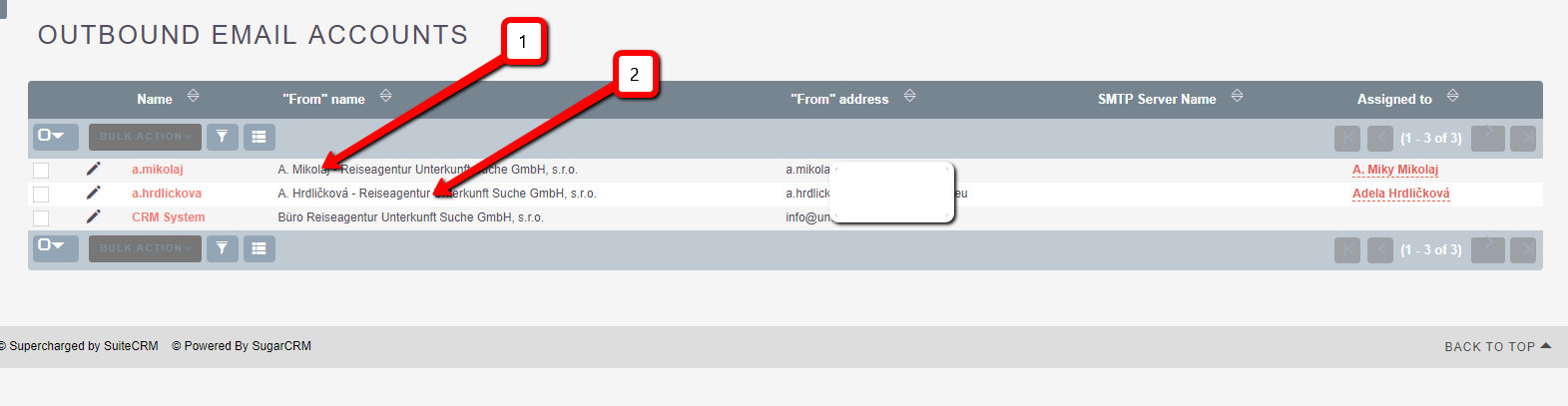
record 2 is created via user email settings, record 1 via admin --> outbound email accounts -> new record
but if you create outbound email account via outbound email in admin area (administration-->outbound email account --> new record) doesn't will show this outbound email address in user--> settings -> pop up window

if you compose email... you see only system email address 👎 as reported above
- also you can assign the record to user... but isn't working... will show for all user outbound + also can't add role or group outbound email account
 Mausino
on 9 May 2018
Mausino
on 9 May 2018
@Mausino thanks for that. Do you know which was the last version of SuiteCRM where this was working well?
pgorod
on 9 May 2018
@pgorod after 7.8.x never working fine... i tried this 3 or 4 times in versions 7.9 /7.10 but as everybody knows.. emails were unusable till version 7.9.8 or something liked that.... afer we as community focused on smaller email bugs...
If i look on github and write "Email" i see this
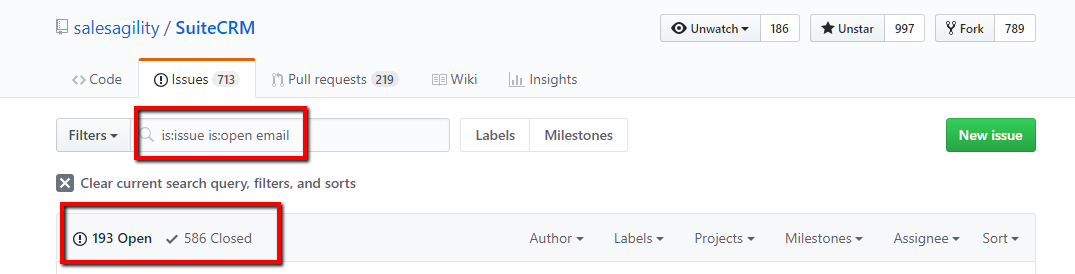
I don't want be negative... i love working with SuiteCRM and help with many passionate people to grow this amazing sofware.. but till time when on first place doesn't will bug fixing, it is very hard testing... because new things(features) create new problems and old are left without focus on them. I am so proud that @salesagility can fight with this big project and moved it so far 👍
Mausino
on 9 May 2018
pgorod,
The last time I saw outgoing email work though system accounts was 7.8, while we were still evaluating SuiteCRM. Once we switched to 7.10 it stopped working. In 7.8 we could send mail as the user (users email address as 'from') as well without having an incoming mail server set up.
I've been digging though the code for a while, and I still can't figure out where the 'from' dropdown gets populated. All I need for our use is to populate the from field with the users email address from their profile.
 ApatheticCosmos
on 24 May 2018
ApatheticCosmos
on 24 May 2018
I think user accounts are getting saved around here
https://github.com/salesagility/SuiteCRM/blob/master/modules/InboundEmail/InboundEmail.php#L2739
And the populate the box might be this one
https://github.com/salesagility/SuiteCRM/blob/master/modules/Emails/EmailsController.php#L359
I am not sure about these things but I hope this helps.
pgorod
on 24 May 2018
@pgorod That's exactly it. I'm digging in to figure out why it's not returning anything. It looks like the output can be viewed directly (in JSON format) by going to:
[site-url]/index.php?module=Emails&action=getFromFields
It's returning an empty array right now.
ApatheticCosmos
on 24 May 2018
As a test / WIP, I've added the following code to modules/Emails/EmailsController.php at line 443:
if (empty($data)) {
// No sending addresses found. Add users email address as a fallback.
$data[] = array(
'type' => 'personal',
'id' => '',
'attributes' => array(
'from' => $current_user->email1,
'name' => $current_user->full_name,
),
'prepend' => $prependSignature,
'isPersonalEmailAccount' => true,
'isGroupEmailAccount' => false,
'emailSignatures' => $defaultEmailSignature,
);
}
After doing so, the users name and address show up in the dropdown when composing an email, and the email gets sent properly.
In no way is this production level code, but it (almost) produces the results I'm looking for. I'm going to see if I can add a checkbox option on the admin page to enable/disable this behavior. I also need to figure out how to get the signature working. The signature is in the JSON data, but not showing up in the compose window, or being sent with the email. And what if the user has multiple email addresses? I should get that working too.
Anyway... this isn't really a fix for this particular bug anyway. It's a change to the email functionality. Maybe this code will be useful to someone who comes looking for it.
ApatheticCosmos
on 25 May 2018
I got the signature to work. Insert in modules/Emails/EmailsController.php at line 443:
        if (empty($data)) {
                // No sending addresses found. Add users email address as a fallback.
                $GLOBALS['log']->fatal(print_r($defaultEmailSignature, true));
                $data[] = array(
                        'type' => 'personal',
                        'id' => $current_user->id,
                        'attributes' => array(
                                'from' => $current_user->email1,
                                'name' => $current_user->full_name,
                        ),
                        'prepend' => $prependSignature,
                        'isPersonalEmailAccount' => true,
                        'isGroupEmailAccount' => false,
                        'emailSignatures' => array(
                                'html' => utf8_encode(html_entity_decode($defaultEmailSignature['signature_html'])),
                                'plain' => $defaultEmailSignature['signature'],
                        ),
                );
        }
same issue here on Version 7.10.6
 parijke
on 10 Jul 2018
parijke
on 10 Jul 2018
I think I got a fix and have outbound emails listed now:
edit /include/SugarFolders/SugarFolders.php line 612
from
$folders = $this->retrieveFoldersForProcessing($focusUser);
to
$folders = $this->retrieveFoldersForProcessing($focusUser, false);
Problem introduced by this PR https://github.com/salesagility/SuiteCRM/pull/4877/files
 boombata
on 19 Jul 2018
boombata
on 19 Jul 2018
I tried @boombata's fix and a QRR, and still have a blank From: dropdown in Compose Email. I do have a personal box setup for send & receive, and receive is working properly while the send-test also works.
 dhayner
on 3 Aug 2018
dhayner
on 3 Aug 2018
I am on 7.10.7 and can see in dropdown all outbound emails that are created, but in sent mail is always the one from system settings.
Also when I disable 'Allow users to send from this ..' email cannot be sent.
I have mentioned before that whole EMAIL module with Inbound and Outbound is broken and needs fix.
 fcorluka
on 19 Oct 2018
fcorluka
on 19 Oct 2018
@fcorluka I would suggest upgrading to 7.10.9, there have been many fixes between 7.10.7 and 7.10.9. If you are still able to replicate those bugs then i'd suggest raising issues for them.
 Dillon-Brown
on 19 Oct 2018
Dillon-Brown
on 19 Oct 2018
@Dillon-Brown
I have tried 7.10.9 version (clean install) but no success.
I have passed trough issue list and I have got every issue there is with emails.
I will open a new issue, but generally Email need revision. I am free to help with testing and describing all of my problems to whoever is in charge of Emails.
fcorluka
on 19 Oct 2018
@fcorluka All assistance is appreciated! the next release should contain fixes for several of the current high priority issues and we're currently working on a set of unit/acceptance tests for inbound/outbound emails so we hopefully won't need to fix any of these issues again.
Dillon-Brown
on 19 Oct 2018
@Dillon-Brown do you have a date of next release?
I would be willing to test it prior to the official release and give you feedback.
fcorluka
on 19 Oct 2018
@fcorluka I don't have an exact date but it shouldn't be very far off. We do have a nightly build (User/Pass Will/Will) which pulls from the latest hotfix but I can see how that wouldn't be ideal for email testing since it's publicly available. I'd normally suggest pulling down straight from git to test the latest changes.
I'll take a look at those issues you've raised and see what I can replicate and confirm. Thanks!
Dillon-Brown
on 19 Oct 2018
Related issues
 ArturoBurela
·
3Comments
ArturoBurela
·
3Comments
 tech-ch1
·
3Comments
tech-ch1
·
3Comments
 sasha2002
·
3Comments
sasha2002
·
3Comments
 ajprouty87
·
3Comments
ajprouty87
·
3Comments
 connorshea
·
3Comments
connorshea
·
3Comments
Most helpful comment
I got the signature to work. Insert in modules/Emails/EmailsController.php at line 443: