Suitecrm: Navigate in different page don't work after modify collumn
Issue
In the Contacts list, when we add or delete collumn : it's impossible to navigate at the different page (Button Previous/ Next)
Expected Behavior
After the modification of collumn , possibility of navigate in different pages from contacts table with the buttons.
Actual Behavior
Impossible to navigate next or previous in the table.
When we log us of a other PC or web browser, we have ever the same problem.
Possible Fix
The only fix is try with a other user.
Steps to Reproduce
- In contacts list (Support -> Contacts)
- Add a collumn with the "Collumn Chooser button"
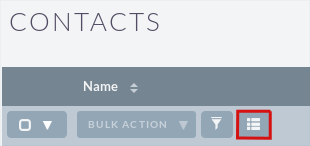
3.Try to navigate in the different page

Context
Your Environment
- SuiteCRM Version used: 7.10
- Browser name and version (e.g. Chrome Version 51.0.2704.63 (64-bit)): Firefox 58.0.2
- Environment name and version (e.g. MySQL, PHP 7): PHP 7.0.27 MySQL 15.1 5.5.56-MariaDB
- Operating System and version (e.g Ubuntu 16.04): CentOS 7
 Mika67
All 11 comments
It happens in accounts, documents and custom modules as well. And you can't sort by column.
 javitoron
on 14 Mar 2018
javitoron
on 14 Mar 2018
Fix by : apply a 'My filter' and remove it
But the bug is present if you add a column from the view
Seems to work when the conlumn is adding by the studio
 sguilly
on 25 Mar 2018
sguilly
on 25 Mar 2018
@sguilly What do you mean with the studio ?
Mika67
on 26 Mar 2018
You could setup columns displayed in the contact list view with the studio module 'admin menu) and the navigation work fine.
But, if you add a collumn with the "Collumn Chooser button" in the contact list view then the navigation is broken.
sguilly
on 28 Mar 2018
I have this problem also, on previous version of suitecrm, both upgraded and also tried fresh install.
Originally thought it was because i have migrated from early version of sugarcrm.
However have tried installing a fresh install of 7.9.16 and I experience the same issue.
SuiteCRM version: 7.9.16
OS: windows 7, xampp, php version 7 (have tried php version 5.6.8 also same issue)
client windows 7, browser: many browsers tried, all have same issue.
 lee1974
on 2 Apr 2018
lee1974
on 2 Apr 2018
Same problem here!
 luscala
on 3 Apr 2018
luscala
on 3 Apr 2018
Commenting out modifications from fix #4197 in include/MVC/View/views/view.list.php seems to solve the problem.
EDIT: but SuiteCRM keeps forgettings columns customizations...
luscala
on 3 Apr 2018
@chogori92 @Mika67 @sguilly @lee1974 @javitoron
There is a fix proposed, are you able to test this and confirm it is a successful fix. :+1:
 samus-aran
on 19 Apr 2018
samus-aran
on 19 Apr 2018
Same issue here on 7.10.4, I tested the proposed fix and the problem is still occuring.
The list is stuck on the second page of the result set, until a filter is applied and reset.
 awakenweb
on 23 Apr 2018
awakenweb
on 23 Apr 2018
Please test #6117 and see if it solves the issue, thanks.
 PedroErnst
on 3 Jul 2018
PedroErnst
on 3 Jul 2018
@PedroErnst I just tested it and everything works fine now.
Many thanks for finding a solution.
awakenweb
on 3 Jul 2018
Related issues
 Mausino
·
3Comments
Mausino
·
3Comments
Mausino
·
3Comments
Mausino
·
3Comments
 darouca
·
3Comments
darouca
·
3Comments
 criterion9
·
3Comments
criterion9
·
3Comments
 dawansv
·
3Comments
dawansv
·
3Comments
Most helpful comment
It happens in accounts, documents and custom modules as well. And you can't sort by column.