Can't add conditions onto a new workflow
Can't see conditions for an existing workflow
 gray1st
All 6 comments
Hello @gray1st
Thank you for taking the time to report this issue.
It does not appear to be obvious from your description what the issue is. Please follow the Github template for reporting issues that appears in the text box when you open the issue. It should (at the very least) include:
- A detailed description of the error
- Expected outcome
- Actual outcome
- Precise steps to reproduce the error
- Your environment
If you are not sure if this is an issue with the program or if it might be related to your setup, or if you require any help with using SuiteCRM, I suggest you check out the forums
 PedroErnst
on 19 Jan 2018
PedroErnst
on 19 Jan 2018
When trying to edit an existing Workflow, any conditions that were previously set don't appear within the 'Conditions' part of the screen (They do on the quickview).. There is the option to Add Condition, but on pressing the button nothing happens (on either an existing workflow, or a new one).
I would expect to see existing conditions in the edit view
I would expect the Add Condition button to do something
I'm using 7.1.0 BETA 3
gray1st
on 19 Jan 2018
On my Beta3 the Edit view works fine, everything appears there, and I can add conditions and view existing ones.
It's the Detail view that doesn't show conditions, this looks like a bug.
 pgorod
on 19 Jan 2018
pgorod
on 19 Jan 2018
@gray1st
It seems to be working for me too. We need more details in order to find the cause of this.
Is it a fresh install of beta 3 in an empty directory?
Localhost or web server?
Which module is the workflow related to?
Do you get anything in php SuiteCRM log / php error log / js console?
Which browser do you use?
Screenshots might be helpful too.
PedroErnst
on 19 Jan 2018

Internet Explorer on top / Firefox on the bottom
In IE it isn't showing the Conditions within the view screen, but does in firefox
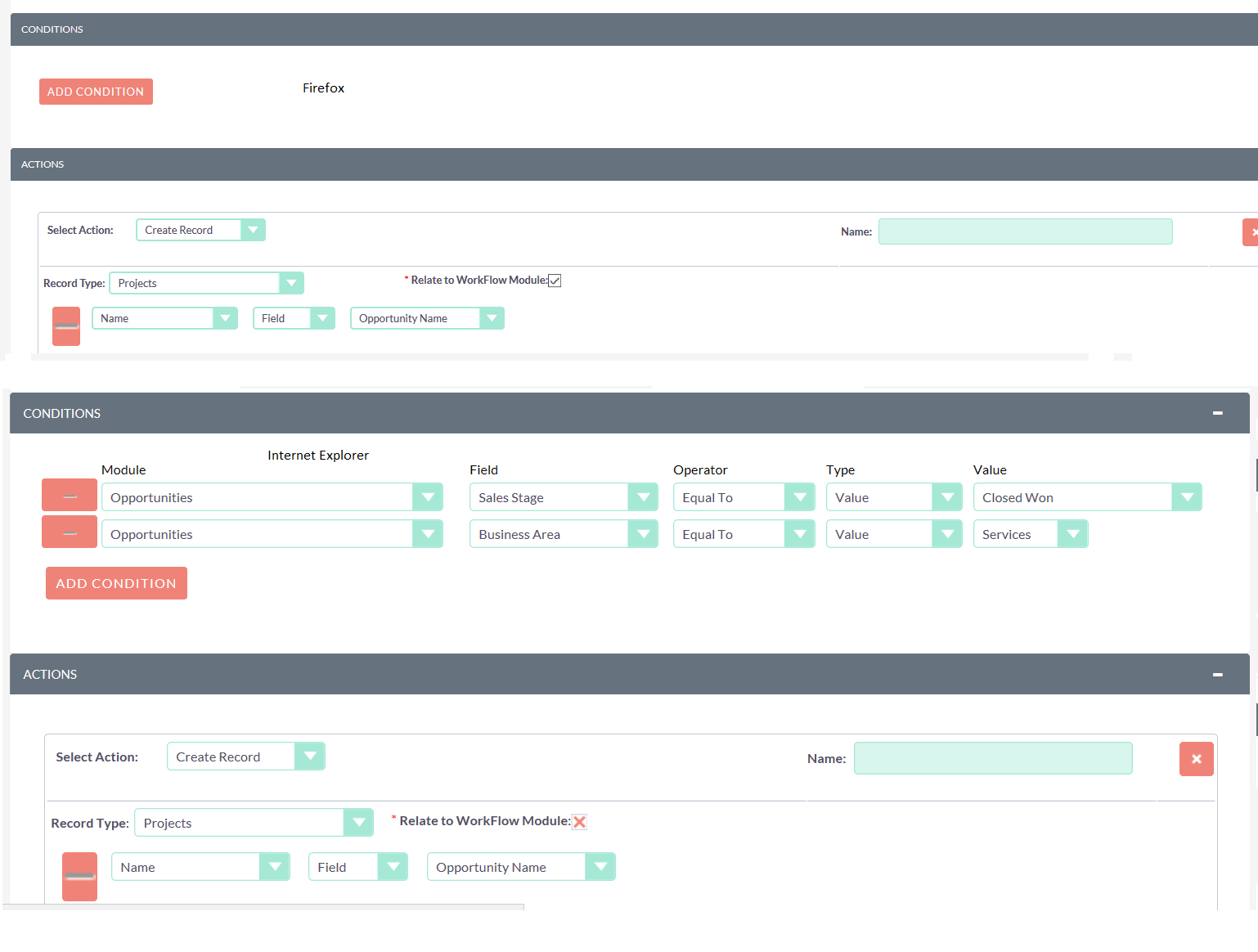
Firefox at top / Internet Explorer on the bottom
In IE it does allow you to edit the conditions within the edit screen, but you can't see the conditions in firefox
gray1st
on 19 Jan 2018
The issue with the condition lines not being visible in detailview is fixed now.
As for the IE issue, we will have to get someone with IE to look into it.
PedroErnst
on 19 Jan 2018
Related issues
 sasha2002
·
3Comments
sasha2002
·
3Comments
 likhobory
·
3Comments
likhobory
·
3Comments
 project-banana
·
3Comments
project-banana
·
3Comments
 Vhex
·
3Comments
Vhex
·
3Comments
 Mausino
·
3Comments
Mausino
·
3Comments