Suitecrm: Email very slow opening Inbox
Issue
A couple of users have complained in the forums about extremely slow email, see here and here.
They are using 7.9.4 but I'm not sure if the problem only started with 7.9.4.
Actual Behavior
There are reports of delays of 3 minutes or 25 seconds from the moment when the Inbox is clicked to the moment when the Emails show.
Environments
I'm still gathering this info and will update here as I get more information.
- One user is using Exchange server via IMAP, and it's a large Inbox.
 pgorod
All 19 comments
Version 7.9.2
Sugar Version 6.5.24 (build version 509)
php 7.0
fresh install of suiteCRM on local synology webserver
apache http Server 2.2
mail server : standard OVH MXPLAN 025 server, via POP3
open inbox is around 25 sec but the rest is ok (except if i change page for load more mails, 50 messages by pages)
 mchelly
on 21 Jul 2017
mchelly
on 21 Jul 2017
@pgorod yes, we have same issue... it takes time.. our shortcut is.. on first time we click away from pop up window (it will close it) and on second time it shows this pop up with results us immediately :D
 Mausino
on 21 Jul 2017
Mausino
on 21 Jul 2017
SuiteCRM Version 7.9.6
Ubuntu 16.04
PHP 7.1.9
Apache 2.4.18 (Ubuntu)
AWS t2.small instance (1 vCPU, 2GB RAM)
SuiteCRM upgraded from 7.8.5 (not a fresh install of 7.9.x)
Office365 mail server, via IMAP
Load times for mailbox with 2745 emails:
Attempt 1: 66 seconds
Attempt 2: 27 seconds
Attempt 3: 24 seconds
Attempt 4: 25 seconds
suitecrm.log is clean
 JamesRPAS
on 17 Oct 2017
JamesRPAS
on 17 Oct 2017
Has anybody checked to see if these delays are network delays (waiting for remote calls) or simply some PHP code going in a cycle? Does the CPU usage spike on the server during the delay? What about on the browser (in case it's a local Javascript delay)?
pgorod
on 17 Oct 2017
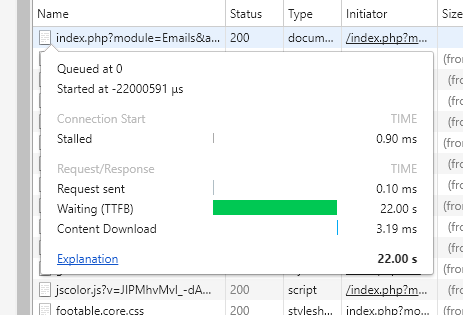
The delay seems to be in the TTFB according to Chrome - however the server doesn't experience that much load (it peaks at about 2% CPU).
However I looked at the network traffic on the server and found that whenever the emails were reloaded it made a request to a Microsoft IP address that takes about 20 seconds to complete (though it only downloads about 2MB) - and as soon as this is done the page loads.
So that sounds like the delay is in retrieving the emails from the mail server. Since SuiteCRM caches the emails that it has, perhaps it would be better to load the page with these first, and then check for new ones, so that the user doesn't feel like nothing is happening.
Also, I don't know anything about IMAP, but 20 seconds seems like an excessively long time to get 2MB of data - is there some inefficiency in the fetching process perhaps?
JamesRPAS
on 18 Oct 2017
@JamesRPAS can you step through the code with a debugger to see exactly which request is causing the delay?
Alternatively, you could increase log level to DEBUG, open a window with a tail -f suitecrm.log to see the log updating live, and when it holds with the delay, you press enter a few times to create blank lines. Later you can scroll back and that moment in time is recognizable. That way we could at least get some notion of where it is, and what it is doing. Your terminal would need to be configured to hold lots of scroll back lines.
Unless there's something wrong with the server, we probably shouldn't be making such a demanding request - one that takes 20 seconds to process on the server, and sends 2Mb (that's a lot of data!) to the client.
Maybe @daniel-samson can help here...
pgorod
on 18 Oct 2017
It appears to be this block of code
# modules/InboundEmail/InboundEmail.php:383
        // Returns an array of msgno's which are sorted and filtered
        $emailSortedHeaders = imap_sort(
            $this->conn,
            $sortCriteria,
            $sortOrder,
            FT_UID,
            $filterCriteria
        );
This is returning an array of every msgid in imap. So for example, I have about 13,000 emails in my imap account. It's returning an array of 13,000 msgids which it's getting from IMAP. And this is not being cached at all it appears since it's happening on every load of Email/index.
This call is taking about 26s on my machine when calling to google's servers.
 isleshocky77
on 18 Oct 2017
isleshocky77
on 18 Oct 2017
@isleshocky77 good find. Maybe that $filterCriteria could be used to narrow down the returned msgids returned, to get less information.
pgorod
on 18 Oct 2017
@pgorod Yeah, I would agree. I was a little surprised that the $filterCriteria was empty. I was thinking it maybe had something to do with the Settings on my Inbound Email account such as the setting _Check for New Mail:_; however, I've tried loading the Email list page with that setting as both Manual and Check Every 5 minutes and it has no effect on the $filterCriteria.
When the List page loads up it really should only using imap_check() and then grabbing the top X (one page normally 20) messages.
isleshocky77
on 18 Oct 2017
@isleshocky77 you are coming dangerously close to the point where I suggest that you contribute a fix for this Issue... :-)
pgorod
on 18 Oct 2017
Will if I have time. I knew tracking down the issue would only be a matter of 5 minutes on a debugger. Fixing the issue is a much bigger ask as I don't know what else is using the code or how it would be effected. Also, there are ~550 warnings on that page which should be looked at cleaning up.
I hesitate to touch anything in this codebase until 7.10 is released and hopefully the codeception branch is merged in.
isleshocky77
on 18 Oct 2017
Thanks @isleshocky77 !
Using $filterCriteria does speed it up - fetching emails from only the last month only took 4 seconds instead of 25.
if ($filterCriteria == NULL){
     $oneMonthAgo = date('d-M-Y', strtotime('-1 month'));
     $filterCriteria = 'SINCE "'.$oneMonthAgo.'"';
}
Obviously this isn't a solution, but it works as a temporary fix for us, with the downside that emails older than a month aren't visible unless you use a filter.
JamesRPAS
on 19 Oct 2017
Hi, the same issue happens here @pgorod in a fresh deploy of SuiteCRM 7.9.7 using google accounts.... I think this is not a low priority bug... can we change this tag @Dillon-Brown ??
 Abuelodelanada
on 1 Nov 2017
Abuelodelanada
on 1 Nov 2017
I think this might have been fixed in 75aacc916abf5fe6ec4e588b5f2ce4b55188194f
Can anyone who had the original issue confirm?
 PedroErnst
on 9 Apr 2018
PedroErnst
on 9 Apr 2018
Confirmed. No longer an issue.
isleshocky77
on 9 Apr 2018
@Dillon-Brown maybe we can close this one. Of course, if anyone experiences the problem again, please comment and it can be re-opened.
pgorod
on 10 Apr 2018
I upgraded to 7.10.4 and that commit doesn't seem to be in it - am I missing something?
JamesRPAS
on 17 Apr 2018
I think the code is there.
PedroErnst
on 17 Apr 2018
I'm sure I didn't see it last time i checked, but it's definitely there now. Sorry for the false alarm.
JamesRPAS
on 18 Apr 2018
Related issues
 ArturoBurela
·
3Comments
ArturoBurela
·
3Comments
 criterion9
·
3Comments
Mausino
·
3Comments
pgorod
·
3Comments
criterion9
·
3Comments
Mausino
·
3Comments
pgorod
·
3Comments
 connorshea
·
3Comments
connorshea
·
3Comments
Most helpful comment
Will if I have time. I knew tracking down the issue would only be a matter of 5 minutes on a debugger. Fixing the issue is a much bigger ask as I don't know what else is using the code or how it would be effected. Also, there are ~550 warnings on that page which should be looked at cleaning up.
I hesitate to touch anything in this codebase until 7.10 is released and hopefully the codeception branch is merged in.