Just an idea; see how there is a "import dump" in the menu (red rectangle)?
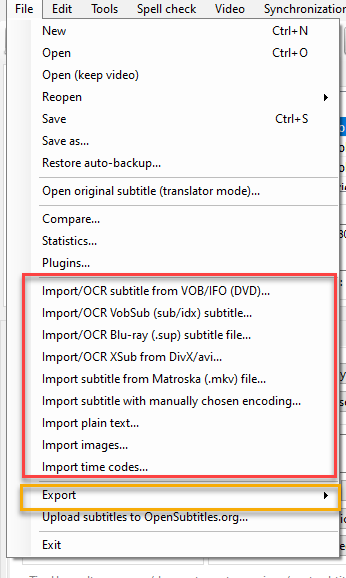
How about creating an "import" menu item there, and then placing all of those "import" commands into it as subitems? The same way the "Export" item does (orange rectangle).
That would make the menu less cluttered (for regular users) and slightly less overwhelming (for new users).
 STaRDoGG
All 6 comments
@niksedk Should I work on this?
 OmrSi
on 30 Nov 2020
OmrSi
on 30 Nov 2020
Yes please 👍
Perhaps "Import subtitle from matroska file..." should be "Import subtitle from video file..." (remove DivX/avi import if it works with "video file") and should show file types mkv/mp4/ts/m2ts/mpeg/avi.
 niksedk
on 30 Nov 2020
niksedk
on 30 Nov 2020
I was poking around in the source and noticed that the menu text, is hard coded in, as well as the same strings in a language.cs file; is there a specific tool you used to edit them in both at once?
As a mildly OCD, shallow, UX guy I see a ton of things I want to play around with gussying up, lol.
STaRDoGG
on 3 Dec 2020
I'm not really sure what you mean exactly... texts exist in the designer.cs file + in the language.cs file + in the language master xml file.
The language master xml is generated from the language.cs file.
niksedk
on 3 Dec 2020
@niksedk for example, lets say I wanted to change the text for the "open" menu item to "open folder"; it looks like if I wanted to do that I'd have to hand edit the menu item itself + the language.cs; if I only edited the menu item but left the one in the language.cs, the one in the language.cs would overwrite the one on the menu when it's run.
I was wondering if there's a single place to edit it so it edits all the proper places at the same time?
STaRDoGG
on 3 Dec 2020
Language.cs is the place to fix English texts. For other languages, the language xml files are used.
The designer.cs files are only for the Winforms UI designer inside Visual Studio.
niksedk
on 3 Dec 2020
Related issues
OmrSi
·
6Comments
 frozenspider
·
5Comments
frozenspider
·
5Comments
 darkred
·
4Comments
darkred
·
4Comments
 SubEdict
·
3Comments
SubEdict
·
3Comments
 ivandrofly
·
5Comments
ivandrofly
·
5Comments
Most helpful comment
Yes please 👍
Perhaps "Import subtitle from matroska file..." should be "Import subtitle from video file..." (remove DivX/avi import if it works with "video file") and should show file types mkv/mp4/ts/m2ts/mpeg/avi.