Subtitleedit: [Improvement] Several waveform improvements
Here are some improvement suggestions I've collected:
[ ] Add an option for single-clicking to select subtitles
At the moment, one can only double-click to select a subtitle from the waveform. It could be useful to also add an option to use a single-click for this.[ ] Properly align gridlines
At the moment, the gridlines are aligned differently on every scroll tick. I'm not sure how these are being drawn, but I think it would be better to align them to the seconds markers,
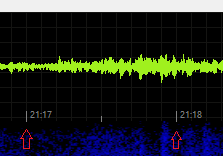
[ ] Snap to shot cuts
I'm always syncing my subtitles to shot cuts. I'm using a seperate application that I wrote to snap all my cues to shot cuts if they're not exactly on them. It would be nice to have SE automatically snap subtitles to shot cuts when moving and resizing subtitles in the waveform. Preferably (if possible) with an accuracy setting on the Waveform tab and the ability to ignore snapping while holding the Alt key (same key as in e.g. PowerPoint).
 Flitskikker
All 18 comments
I'm using a seperate application that I wrote to snap all my cues to shot cuts if they're not exactly on them.
Would you mind sharing that on GitHub?
 aaaxx
on 26 Feb 2019
aaaxx
on 26 Feb 2019
Would you mind sharing that on GitHub?
I'll see if I can add _some_ documentation and share it tomorrow.
Flitskikker
on 27 Feb 2019
@aaaxx: Here you go. :)
https://github.com/Flitskikker/SubTimingsBeautifier
Flitskikker
on 27 Feb 2019
@Flitskikker @aaaxx By the way, what do you use to generate them?
EDIT: I see, probably ffmpeg, I use a demo version of eztitles, export the scene changes and then import them in SE, I find ez to be a lot better and has less false positives.
 OmrSi
on 27 Feb 2019
OmrSi
on 27 Feb 2019
@Flitskikker @aaaxx By the way, what do you use to generate them?
EDIT: I see, probably ffmpeg, I use a demo version of eztitles, export the scene changes and then import them in SE, I find ez to be a lot better and has less false positives.
Yes, it uses ffmpeg to detect the shot cuts, and ffprobe to extract the frame timecodes.
This tool allows you to adjust the sensitivity, whereas SE doesn't.
Afterwards, you can import them into SE.
I'm not familiar with EZTitles. I don't know what format it exports shot cuts as, but if it's seconds or milliseconds, you can import them in Sub Timings Beautifier.
I'll see if I can fiddle around with the demo version.
Flitskikker
on 27 Feb 2019
@Flitskikker SE does allow you to adjust the sensitivity.
EZtitles gives it in frames and you can import it in SE.
As I said, I found that EZtitles is way better at detecting shot changes, the demo version only allows up to 25 lines but I only use it to extract shot changes anyway.
Then I open the exported file and remove all the extra stuff with regex and then import it to SE.
And it's worth it in my opinion.
OmrSi
on 27 Feb 2019
@OmrSi Tried it out, really good detection indeed. I'm using xpath.bat to dump the list of frames.
I'll see if I can add an importer for the XML files for my tool. Then I can port it to SE afterwards as well.
Flitskikker
on 28 Feb 2019
@OmrSi Added support for importing EZTitles shotchanges XML files to both Sub Timings Beautifier and Subtitle Edit (PR #3426).
Flitskikker
on 28 Feb 2019
@Flitskikker It's much better than ffmpeg in my opinion, good thing we can use this feature without having to buy the program, it's very, very expensive.
Thank you so much for adding support for it, this should make things a lot easier for my friends and save me some time. :)
When I tell them about this method they always get scared when I mention Regex, Hehe.
One thing though,
"|Matroska xml chapter file|*.xml" +"|EZTitles shotchanges XML file|*.xml" aren't those the same thing? Both of them are .xml files and when I tried opening an eztitles file as a "|Matroska xml chapter file|*.xml" it worked fine... Should they be merged?
OmrSi
on 28 Feb 2019
@Flitskikker It's much better than ffmpeg in my opinion, good thing we can use this feature without having to buy the program, it's very, very expensive.
Thank you so much for adding support for it, this should make things a lot easier for my friends and save me some time. :)
When I tell them about this method they always get scared when I mention Regex, Hehe.
No problem! I think I'll use it myself too for my own translations (and use FFmpeg for quick resyncs).
One thing though,
"|Matroska xml chapter file|*.xml" +"|EZTitles shotchanges XML file|*.xml"aren't those the same thing? Both of them are .xml files and when I tried opening an eztitles file as a"|Matroska xml chapter file|*.xml"it worked fine... Should they be merged?
Yes it will open them just fine. It's just to show that it supports both formats. It will detect the file type when you actually open it. Do you think it should give an error when you have Matroska selected?
Flitskikker
on 28 Feb 2019
@Flitskikker That's exactly what I do if I'm translating a short video, no need for Eztitles. :D
I don't know, to be honest, you have a point about showing that it supports Eztitles files, though.
@niksedk What do you think?
OmrSi
on 28 Feb 2019
@Flitskikker Thank you SO MUCH for this! I was looking for this for ages!! Really appreciate.
How should I configure SubTimingsBeautifier to be in the Netflix guideline? I was testing, and totally works, but I couldn't the right way to configure for Netflix. Thanks again.
Hopefully this feature will be integrated on Edit soon!
 matmaggi
on 5 Mar 2019
matmaggi
on 5 Mar 2019
@matmaggi I feel your pain, Netflix's rules aren't easy to follow.
I think EZTiltes is about the only one capable of applying them, but the demo version only works on 25 lines.
You have to end the lines 2 frames before the shot change if it ends in a 7-frame range after and so on...
OmrSi
on 6 Mar 2019
@matmaggi Thank you!
I have to say, the Netflix guidelines confuse me a bit. There are some very strange practices that go against any subtitling common sense (at least in my opinion). Maybe you could shed some light on what the reason behind those is?
I'll go over them one by one:
Dialogue that crosses shot changes: when dialogue crosses the shot change the timecodes should be adjusted to either be at the shot change or at least 12 frames from it.
This can be done be using the "For "free" out cues, overshoot shot cuts by [12] frames" option.
If dialogue starts between 8-11 frames (green zone) before the shot change, the in-time should be moved up to 12 frames before the shot change.
This isn't possible for in cues at the moment, I'll see if I can add it.
If dialogue starts 7 frames or less (red zone) before the shot change, the in-time should be moved to the shot change.
This is the first strange practice. Subtitles should NEVER appear AFTER the actor has started speaking. This is extremely disruptive to the viewing experience.
_(You could enforce it though by using the "Snap "free" in cues to shot cuts if within [7] frames" option and disabling "Extend only".)_
If dialogue ends between 8-11 frames (green zone) after the shot change, the out-time should be moved out to 12 frames after the shot change.
See the first option.
If dialogue ends 7 frames or less (red zone) after the shot change, time code out should be moved to the shot change ...
The second strange practice. Subtitles should NEVER disappear BEFORE the actor has finished speaking. This is extremely disruptive to the viewing experience. Furthermore, subtitles should stay on-screen a bit after speaking to allow the viewer to read them, so in most cases, they shouldn't disappear when the actor finishes speaking on the shot cut either.
_(You could enforce it though by using the "Snap "free" out cues to shot cuts if within [7] frames" option and disabling "Extend only".)_
... respecting the two-frame gap.
This point is also the third strange practice. The whole point of syncing to shot cuts is that you reduce the amount of "flashes" of the image. By letting subtitles appear or disappear exactly on shot cuts, there is only 1 "flash" in that case. Sub Timings Beautifier was designed to do exactly this.
By setting a "free" out cue 2 frames before a shot cut, you get two flashes quickly after eachother, which is disruptive. It will give the impresssion of inaccurate, sloppy subtitle spotting. Why would anyone want that?
If there is one subtitle before and one after the shot change, the second one should start on the shot change, and the first should end two frames before.
You can enforce this by enabling the "Only allow gaps before shot cuts" option.
Flitskikker
on 6 Mar 2019
@Flitskikker Thank you for answer me. I totally agree with you, but "the client is always right", so I need to do what Netflix asks. If you could add these features that the software doesn't do right now, I'd appreciate. But your software is incredible, I'm already using it!
matmaggi
on 6 Mar 2019
@Flitskikker Thank you for answer me. I totally agree with you, but "the client is always right", so I need to do what Netflix asks. If you could add these features that the software doesn't do right now, I'd appreciate. But your software is incredible, I'm already using it!
@matmaggi Thank you!
Do you have a contact at Netflix whom you could ask what the reason behind e.g. the gap on "free" out cues is? I watched a Netflix film with a friend tonight, and my head just exploded because of the unnecessary flashing all the time (of course also because of subtitles disappearing before the actors had finished speaking).
I can look into adding the other features as soon I have the time, but adding the gap for "free" out cues... I think it would feel wrong to make this bad practice possible.
Flitskikker
on 12 Mar 2019
@Flitskikker I actually don't have direct contact with them. Sorry. Nobody knows why, we just follow their rules =/
matmaggi
on 12 Mar 2019
Hi @niksedk, any chance you've looked into the suggestions in the first post?
I'd say the snapping to shot cuts would be the most useful; I could live without the other ones. :)
Flitskikker
on 22 Mar 2020
Related issues
 dvjrickkraft
·
4Comments
dvjrickkraft
·
4Comments
 taxen
·
6Comments
taxen
·
6Comments
 Ouroboros1995
·
5Comments
Ouroboros1995
·
5Comments
 depeo
·
5Comments
depeo
·
5Comments
 amiremami
·
4Comments
amiremami
·
4Comments
Most helpful comment
@aaaxx: Here you go. :)
https://github.com/Flitskikker/SubTimingsBeautifier