Subtitleedit: remove formatting from Srt subtitles?
I wondering if there is an easy way to remove formatting from Srt subtitles?
Strip text between parentheses ( )
Strip text between curly brackets { }
Strip text between angle brackets < >
Strip text between square brackets [ ]
Maybe i'm blind but i can't find anything in SE. To use the find and replace isn't very easy.
I was forced to use this site and it was easy removed.
 Sopor
Sopor
All 17 comments
Select all -> right click -> Normal (remove formatting). This removes all {} and <>.
As for () and [], tools -> Remove text for hearing impaired. It also has a shortcut and an Icon.
Also, I don't think using regex for this is hard, but there isn't a need for it anyway.
 OmrSi
on 22 Feb 2019
OmrSi
on 22 Feb 2019
That will mess it up totally. The files isn't even working proper after that. It will leave a lot of <br /> on every line, but maybe i need to remove them elsewhere? The site above removed them all except one.

Sopor
on 22 Feb 2019
That can be fixed with Fix common errors, but anyway, can you attach the subtitle file to test it?
OmrSi
on 22 Feb 2019
I use the Import subtitle from Matroska (.mkv) file... and it will not show any errors but if i save it and then open it with SE it will show a whole bunch of them. I only want to inform you about it. I didn't see those errors until now when i opened it as an srt file. Those errors are there because SE thinks the time code is missing but it because there are so many line breaks between the lines.
3396.zip
Sopor
on 22 Feb 2019
Wow. As it should, the file is a total mess! What's the need for all of the extra lines?
Also, If this is what the file looks like, then the result of removing the tags was normal, as it doesn't unbreak.
@niksedk You might want to take a look at the file.
OmrSi
on 22 Feb 2019
@Sopor- My suggestion for you is to use this:
https://regex101.com/r/bbUon4/1/
Just copy your file to the site, it will replace the 4 empty lines, then copy the result from the second text area and that will fix your problem.
After that you can remove the formatting and use Fix common Errors to remove unused lines breaks...
OmrSi
on 22 Feb 2019
But shouldn't all of the formattings be removed like the <br /> when i run Normal (remove formatting)?
Sopor
on 22 Feb 2019
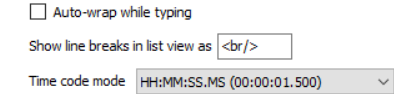
@Sopor- the <br /> isn't actually there, it's just a way to indicate a line break in the list view.
You can even change it from the settings:
OmrSi
on 22 Feb 2019
@Sopor: Hm, could you attach the .mks/.mkv file? (you can remove the other tracks with mkvtoolnix)
 niksedk
on 23 Feb 2019
niksedk
on 23 Feb 2019
If an srt file requires too much work, just download it from http://www.addic7ed.com/serie/Star_Trek%3A_Discovery/2/6/The_Sounds_of_Thunder
Problem solved.
 Ding-adong
on 23 Feb 2019
Ding-adong
on 23 Feb 2019
@niksedk can't you use the attached srt file above?
Do you want me to remove the video and audio and only keep the subtitle like this 3396_mks.zip?
Sopor
on 23 Feb 2019
@Sopor-: yes, thx for the mks file :)
I think that the subtitle is messed up... you can remove the formatting (Select all -> right click -> Normal (remove formatting)) and then use Tools -> Fix common errors... like this:

niksedk
on 23 Feb 2019
@niksedk Exactly. A total and utter mess.
But as you saw when there are more then 4 empty lines, that causes an issue in SE, that's why I told him to use this https://regex101.com/r/bbUon4/1/ to remove those lines then use SE to do what you said.
OmrSi
on 23 Feb 2019
Yeah, i wondering what they do? It was the same thing last episode too :(
Thanks for the help. Now i know how to fix it next time :)
Sopor
on 23 Feb 2019
@Sopor- Doesn't it look weird on video?
OmrSi
on 23 Feb 2019
Yes, that is why i trying to fix it.
Sopor
on 23 Feb 2019
Latest beta should now be able to load .srt files with multiple blank lines (even 4+) in a row: https://github.com/SubtitleEdit/subtitleedit/releases/download/3.5.9/SubtitleEditBeta.zip
niksedk
on 23 Feb 2019
Related issues
 PannenkoekenNL
·
3Comments
PannenkoekenNL
·
3Comments
 rgfx
·
5Comments
rgfx
·
5Comments
 teodargent
·
5Comments
teodargent
·
5Comments
 darkred
·
4Comments
darkred
·
4Comments
 amiremami
·
4Comments
amiremami
·
4Comments
Most helpful comment
Yes, that is why i trying to fix it.