Subtitleedit: A solution for Google Translate
Hi,
I solved the Google translate problem by using the WebBrowser Control.
It is a bit slower, because the returned page size is about 127 kbyte just to translate a chunk of text (512 chars)!. This is due the CSS and Java script code in the page!
On the other hand, slow translation means low hit rate on google, so, maybe we can survive for a while!
There is something to try to minimize the downloaded size. We can inspect the javascript function to fin the code that executes the translation request, and extract the direct translation url, to get the translated text directly. I will not do that, but you are welcome to try.
Notes about the code:
1- The WebBrowser control uses IE 7, so I added code to fix that. This code may need permissions to access the registry on the user PC, so it may need to run as admin.
    public class WebBrowserHelper
    {
        public static int GetEmbVersion()
        {
            int ieVer = GetBrowserVersion();

            if (ieVer > 9)
                return ieVer * 1000 + 1;

            if (ieVer > 7)
                return ieVer * 1111;

            return 7000;
        } // End Function GetEmbVersion

        public static void FixBrowserVersion()
        {
            string appName = System.IO.Path.GetFileNameWithoutExtension(System.Reflection.Assembly.GetExecutingAssembly().Location);
            FixBrowserVersion(appName);
        }

        public static void FixBrowserVersion(string appName)
        {
            FixBrowserVersion(appName, GetEmbVersion());
        } // End Sub FixBrowserVersion

        // FixBrowserVersion("<YourAppName>", 9000);
        public static void FixBrowserVersion(string appName, int ieVer)
        {
            FixBrowserVersion_Internal("HKEY_LOCAL_MACHINE", appName + ".exe", ieVer);
            FixBrowserVersion_Internal("HKEY_CURRENT_USER", appName + ".exe", ieVer);
            FixBrowserVersion_Internal("HKEY_LOCAL_MACHINE", appName + ".vshost.exe", ieVer);
            FixBrowserVersion_Internal("HKEY_CURRENT_USER", appName + ".vshost.exe", ieVer);
        } // End Sub FixBrowserVersion

        private static void FixBrowserVersion_Internal(string root, string appName, int ieVer)
        {
            try
            {
                //For 64 bit Machine
                if (Environment.Is64BitOperatingSystem)
                    Microsoft.Win32.Registry.SetValue(root + @"\Software\Wow6432Node\Microsoft\Internet Explorer\Main\FeatureControl\FEATURE_BROWSER_EMULATION", appName, ieVer);
                else  //For 32 bit Machine
                    Microsoft.Win32.Registry.SetValue(root + @"\Software\Microsoft\Internet Explorer\Main\FeatureControl\FEATURE_BROWSER_EMULATION", appName, ieVer);


            }
            catch (Exception)
            {
                // some config will hit access rights exceptions
                // this is why we try with both LOCAL_MACHINE and CURRENT_USER
            }
        } // End Sub FixBrowserVersion_Internal

        public static int GetBrowserVersion()
        {
            // string strKeyPath = @"HKLM\SOFTWARE\Microsoft\Internet Explorer";
            string strKeyPath = @"HKEY_LOCAL_MACHINE\SOFTWARE\Microsoft\Internet Explorer";
            string[] ls = new string[] { "svcVersion", "svcUpdateVersion", "Version", "W2kVersion" };

            int maxVer = 0;
            for (int i = 0; i < ls.Length; ++i)
            {
                object objVal = Microsoft.Win32.Registry.GetValue(strKeyPath, ls[i], "0");
                string strVal = System.Convert.ToString(objVal);
                if (strVal != null)
                {
                    int iPos = strVal.IndexOf('.');
                    if (iPos > 0)
                        strVal = strVal.Substring(0, iPos);

                    int res = 0;
                    if (int.TryParse(strVal, out res))
                        maxVer = Math.Max(maxVer, res);
                } // End if (strVal != null)

            } // Next i

            return maxVer;
        } // End Function GetBrowserVersion


    }
This is how this class is used:
        static WebBrowser wb;
        static string browseResult;
        private void GoogleTranslate_Load(object sender, EventArgs e)
        {
            WebBrowserHelper.FixBrowserVersion();
            wb = new WebBrowser();
            wb.DocumentCompleted += wb_DocCompleated;
        }
2- I read the translated text as a plain text, so many of old code that parses the tags is useless:
        static void wb_DocCompleated(object sender, EventArgs e)
        {
            var spans = wb.Document.GetElementsByTagName("span");
            foreach (HtmlElement span in spans)
            {
                if (span.GetAttribute("className") == "tlid-translation translation")
                {
                    browseResult = span.InnerText;
                    if (browseResult == null)
                        browseResult = "";
                    break;
                }
            }

        }
3- The Browse function gets the result:
        private static string Browse(string url)
        {
            browseResult = null;
            wb.DocumentText = "";
            wb.Url = null;

            wb.ScriptErrorsSuppressed = true;
            wb.Url = new Uri(url);

            var T = DateTime.Now;
            while (browseResult == null)
            {
                Application.DoEvents();
                if ((DateTime.Now - T).TotalSeconds > 30)
                    browseResult = "";
            }

            return browseResult;
        }
the TranslateTextViaScreenScraping function should be modified to:
        public static string TranslateTextViaScreenScraping(string input, string languagePair, Encoding encoding, bool romanji)
        {
            string url = string.Format("https://translate.google.com/?hl=en&eotf=1&sl={0}&tl={1}&q={2}", languagePair.Substring(0, 2), languagePair.Substring(3), Utilities.UrlEncode(input));
            var result = Browse(url);
            var res = result.Replace("\r\n", "\n");
            res = res.Replace(SplitterString, ((char)0).ToString());
            res = res.Replace("\n", "\r\n");
            return res;
        }
I used the null char (ASCII 0) as a paragraph separator. I made some changes in your code to split paragraphs at this char.
Hope you find this useful and enhance the performance. Typically, the Application.DoEvents has heavy impact (all the timers in you app ticks because of it!) but without it the WebBrowser will not load the page!
 ghost
ghost
All 29 comments
Thank you very much, but I do not understand what I should do.
Can I download a new beta version where everything works back, or what should I do?
 svenverslype
on 1 Dec 2018
svenverslype
on 1 Dec 2018
Not untill @niksedk approves this and releases a new beta. I have a modified bransh of SE with this new code and it works like a charm.
ghost
on 1 Dec 2018
I modified the Browse function to enhance its performance a little:
        private static string Browse(string url)
        {
            browseResult = null;
            wb.Url = null;

            wb.Url = new Uri(url);
            Application.DoEvents();

            var T = DateTime.Now;
            var T2 = T;
            while (browseResult == null)
            {
                var now = DateTime.Now;
                if ((now - T2).TotalMilliseconds > 250)
                {
                    Application.DoEvents();
                    if (_breakTranslation)
                        browseResult = "";

                    T2 = now;
                }

                if ((now - T).TotalSeconds > 30)
                    browseResult = "";
            }

            return browseResult;
        }
I hope he will approve. Thanks @MohammadHamdyGhanem
 madnesofjuice
on 1 Dec 2018
madnesofjuice
on 1 Dec 2018
@MohammadHamdyGhanem : Is it possible to clone your branch with the WebControl-fix ?
 KurtHofman
on 1 Dec 2018
KurtHofman
on 1 Dec 2018
_Is it possible to clone your branch with the WebControl-fix_
I think it's not a good idea. We don't need a fork, be patient :)
 maderios
on 1 Dec 2018
maderios
on 1 Dec 2018
@KurtHofman
I did many changes and missed many SE new features since I made my fork, and I didn't care about globalization in mine. This is why I come here to share new ideas, so that it can be added to SE. Anyway, you can download my Video And Subtitle Edit (VASE) executables from here, use the translation and save the file and reopen in your SE, until this problem is solved:
http://www.mediafire.com/file/jjrqrfjw6j1jzh9/Video+And+Subtitle+Edit.zip
Note: If a problem happens in translation, reopen exe as adminstrator so it can access the registery to make the WebBrowser use the latest IE on your PC.
Hope it helps.
ghost
on 1 Dec 2018
@KurtHofman
I did many changes and missed many SE new features since I made my fork, and I didn't care about globalization in mine. This is why I come here to share new ideas, so that it can be added to SE. Anyway, you can download my Video And Subtitle Edit (VASE) executables from here, use the translation and save the file and reopen in your SE, until this problem is solved:
http://www.mediafire.com/file/jjrqrfjw6j1jzh9/Video+And+Subtitle+Edit.zip
Note: If a problem happens in translation, reopen exe as adminstrator so it can access the registery to make the WebBrowser use the latest IE on your PC.
Hope it helps.
So, Im trying to translate from english to romanian. Its not translating all lines and dont even translate.Im getting first half nothing and second half same text( not translated)
madnesofjuice
on 1 Dec 2018
@MohammadHamdyGhanem
it is normal that it takes so long to translate
svenverslype
on 1 Dec 2018
@madnesofjuice
Google translate sometimes skips some lines, so I filled the missed lines with the original ones. Do you have a slow connection? I use 30 seconds as a timeout, and retry to translate 2 more times.
I don't know why you have some empty lines. Maybe you have to select romanian language in the secong dropdown list, becuase I make it arabic by default (as I said I didn't make this fork global). Try it.
If the problem continues, try to translate a part of the subtitle in IE directly and see if it goes without any problems.
ghost
on 1 Dec 2018
@madnesofjuice
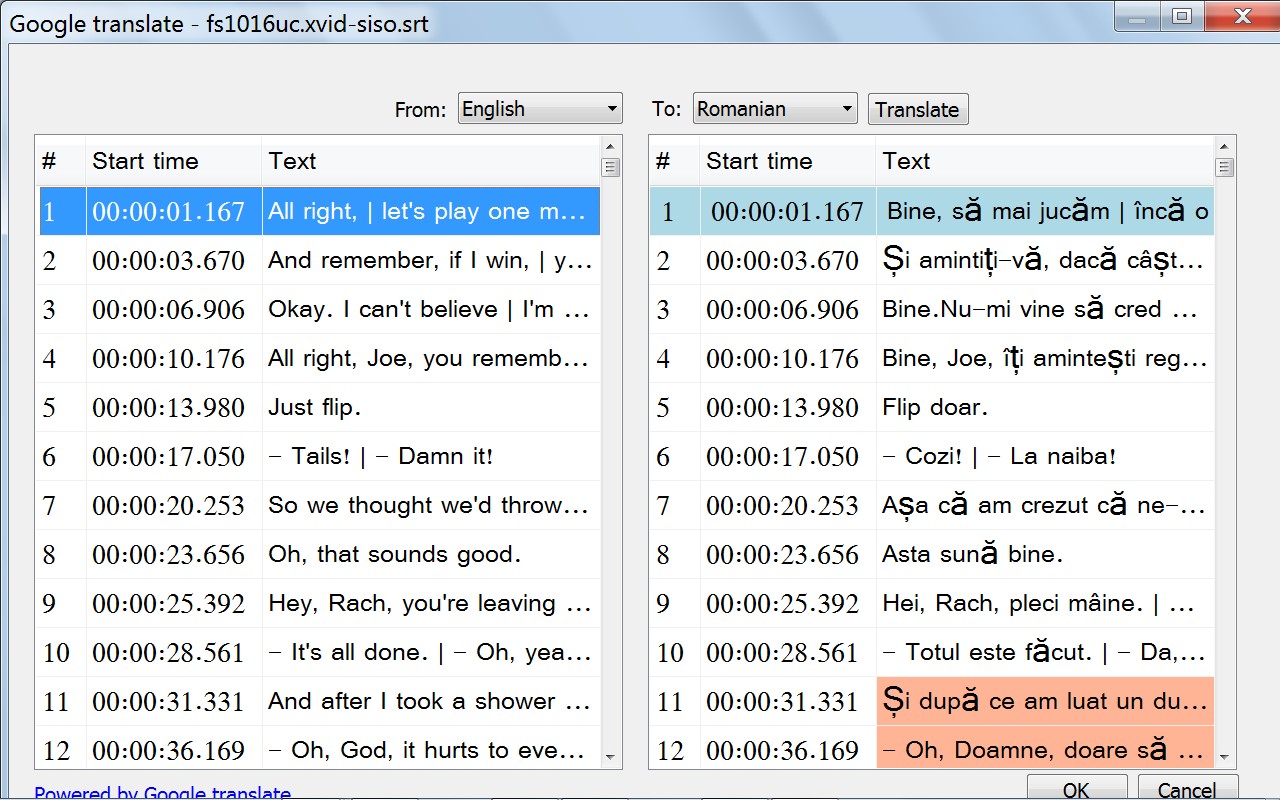
I translated from English to Romanian on my PC and worked fine. This a screenshot noting that some Romanian chars can't displayed on my PC because this language is not installed on it:
ghost
on 1 Dec 2018
@madnesofjuice
Try this: Right click on VASE exe and click Run AS Administrator. As I said, WebBrowser control will not work correctly unless updated to use the latest IE, and this needs permissions to access the registry. But first, you must install Internet Explorer 11 or Edge on tour PC.
By the way, I use Windows 7. I not sure about Win 10!
As I said this is a temp sol until the problem fixed.
ghost
on 1 Dec 2018
@BuluBurid
I tried it, but I got some errors, like translating only half of the file!
An advice: please use a decent picture for your profile.
ghost
on 1 Dec 2018
the remote server has returned an error 503 server is not available
svenverslype
on 2 Dec 2018
@BuluBurid Your profile picture is an insult to women.
maderios
on 2 Dec 2018
@BuluBurid Your profile picture is an insult to women.
FINE !! Then I'm OUT of HERE !!!
Kamsia & Thanks 4 ALL here !!
GOOD LUCK to find the better way than me ..!!
KALIAN MEMANG 101% BUNTAT BANAAARR...!!!

 BuluBurid
on 2 Dec 2018
BuluBurid
on 2 Dec 2018
i wish its work VASE this but is not any alternative software or are all fuckup with new google ?
 davc123
on 2 Dec 2018
davc123
on 2 Dec 2018
@MohammadHamdyGhanem : Thanks !
KurtHofman
on 3 Dec 2018
@KurtHofman
Ik zie dat je van België bent ik ook. Lukt bij jou voor te vertalen met SE. Van mij niet.
svenverslype
on 3 Dec 2018
@BuluBurid Your profile picture is an insult to women.
Maderios, It is not the avatar that is an insult to women, it is your reaction. You seemingly have mistakenly thought by seeing this picture.
There is nothing wrong with the avatar.
 Noepie
on 3 Dec 2018
Noepie
on 3 Dec 2018
@svenverslype : voorlopig werkt het nog niet ...
KurtHofman
on 3 Dec 2018
@MohammadHamdyGhanem : I tried your solution but I only get empty lines :-(
KurtHofman
on 3 Dec 2018
@MohammadHamdyGhanem : I just checked and teh registry-entries are in place.
KurtHofman
on 3 Dec 2018
it also does not work via google translator without api key in SE new version3.5.7 build 157 he translates around 70 sentences and I get this the remote server has returned an error 503 server is not available
svenverslype
on 3 Dec 2018
Nice upgrades. I'll wait for the community's feedback.
 b7398564
on 4 Dec 2018
b7398564
on 4 Dec 2018
it also does not work via google translator without api key in SE new version3.5.7 build 157 he translates around 70 sentences and I get this the remote server has returned an error 503 server is not available
After Microsoft decided to go to a "pay" model for Bing Translate (a service that used to be free), Google did the same thing. No surprise really. Don't hold your breath for a free Google batch capability anytime soon.
 Maniac8888
on 4 Dec 2018
Maniac8888
on 4 Dec 2018
@KurtHofman
I did many changes and missed many SE new features since I made my fork, and I didn't care about globalization in mine. This is why I come here to share new ideas, so that it can be added to SE. Anyway, you can download my Video And Subtitle Edit (VASE) executables from here, use the translation and save the file and reopen in your SE, until this problem is solved:
http://www.mediafire.com/file/jjrqrfjw6j1jzh9/Video+And+Subtitle+Edit.zip
Note: If a problem happens in translation, reopen exe as adminstrator so it can access the registery to make the WebBrowser use the latest IE on your PC.
Hope it helps.
hi ,buddy, could you add "Google translate url" to choose in "Tools panel" ?because chinese mainland area can't open the url “translate.google.com” but only "translate.google.cn" ,
please...
 eaglepie
on 4 Dec 2018
eaglepie
on 4 Dec 2018
OK, while this can be made to work on some machines... it's seems too hackish - but a plugin is welcome :)
 niksedk
on 5 Dec 2018
niksedk
on 5 Dec 2018
@niksedk
I fixed my win 10 x64 machine and discovered the problem. It is related to WOW registry as the one I told you about VLC player. So, I fixed the code that upgrades the WebControl on the x64 systems, and now google translation works on win7, and win 10 both x32 and x64.
This is the modified part:
    public class WebBrowserHelper
    {
        public static int GetEmbVersion()
        {
            int ieVer = GetBrowserVersion();

            if (ieVer > 9)
                return ieVer * 1000 + 1;

            if (ieVer > 7)
                return ieVer * 1111;

            return 7000;
        } // End Function GetEmbVersion

        public static void FixBrowserVersion()
        {
            string appName = System.IO.Path.GetFileNameWithoutExtension(System.Reflection.Assembly.GetExecutingAssembly().Location);
            FixBrowserVersion(appName);
        }

        public static void FixBrowserVersion(string appName)
        {
            FixBrowserVersion(appName, GetEmbVersion());
        } // End Sub FixBrowserVersion

        // FixBrowserVersion("<YourAppName>", 9000);
        public static void FixBrowserVersion(string appName, int ieVer)
        {
            FixBrowserVersion_Internal("HKEY_LOCAL_MACHINE", appName + ".exe", ieVer);
            FixBrowserVersion_Internal("HKEY_CURRENT_USER", appName + ".exe", ieVer);
            FixBrowserVersion_Internal("HKEY_LOCAL_MACHINE", appName + ".vshost.exe", ieVer);
            FixBrowserVersion_Internal("HKEY_CURRENT_USER", appName + ".vshost.exe", ieVer);
        } // End Sub FixBrowserVersion

        private static void FixBrowserVersion_Internal(string root, string appName, int ieVer)
        {
            try
            {
                //For 64 bit Machine
                if (Environment.Is64BitOperatingSystem)
                    Microsoft.Win32.Registry.SetValue(root + @"\Software\Wow6432Node\Microsoft\Internet Explorer\Main\FeatureControl\FEATURE_BROWSER_EMULATION", appName, ieVer);

                //For 32 bit Machine
                    Microsoft.Win32.Registry.SetValue(root + @"\Software\Microsoft\Internet Explorer\Main\FeatureControl\FEATURE_BROWSER_EMULATION", appName, ieVer);

            }
            catch (Exception)
            {
                // some config will hit access rights exceptions
                // this is why we try with both LOCAL_MACHINE and CURRENT_USER
            }
        } // End Sub FixBrowserVersion_Internal

        public static int GetBrowserVersion()
        {
            // string strKeyPath = @"HKLM\SOFTWARE\Microsoft\Internet Explorer";
            string strKeyPath = @"HKEY_LOCAL_MACHINE\SOFTWARE\Microsoft\Internet Explorer";
            string[] ls = new string[] { "svcVersion", "svcUpdateVersion", "Version", "W2kVersion" };

            int maxVer = 0;
            for (int i = 0; i < ls.Length; ++i)
            {
                object objVal = Microsoft.Win32.Registry.GetValue(strKeyPath, ls[i], "0");
                string strVal = System.Convert.ToString(objVal);
                if (strVal != null)
                {
                    int iPos = strVal.IndexOf('.');
                    if (iPos > 0)
                        strVal = strVal.Substring(0, iPos);

                    int res = 0;
                    if (int.TryParse(strVal, out res))
                        maxVer = Math.Max(maxVer, res);
                } // End if (strVal != null)

            } // Next i

            return maxVer;
        } // End Function GetBrowserVersion


    }
Related issues
 taxen
·
6Comments
taxen
·
6Comments
 LeonCheung
·
5Comments
LeonCheung
·
5Comments
 m0ck69
·
5Comments
m0ck69
·
5Comments
 NoRRt
·
6Comments
NoRRt
·
6Comments
 darkred
·
4Comments
darkred
·
4Comments
Most helpful comment
Not untill @niksedk approves this and releases a new beta. I have a modified bransh of SE with this new code and it works like a charm.