It's time for a new release (again a bit late - mostly due to the hot spring/summer), so we can get all the nice new features and fixes out :)
TODO:
- [x] Test export to images
- [x] Test Tesseract OCR
- [x] Test "Batch convert"
- [x] General testing + (fixing bugs)
If you know any issue that should be included please do let us know :)
Link to latest portable beta: https://github.com/SubtitleEdit/subtitleedit/releases/download/3.5.6/SubtitleEditBeta.zip
 niksedk
All 34 comments
Oh, Yeah!
It's been a while.
I don't think I need to say anything here. 😂😂
I've had my share of Bug reports. 😅
Edit: Actually, I think I do need to say something.
Thank you for all the hard work. :)
 OmrSi
on 23 Aug 2018
OmrSi
on 23 Aug 2018
what about #675 is this gonna happen ever?
 diomed
on 23 Aug 2018
diomed
on 23 Aug 2018
Also, people in Croatian subs are basically rooting for #2988 to be implemented,
saying it's the only illogical visible thing in program, when it comes to editing subs.
diomed
on 23 Aug 2018
what about #1408 ?
that is, as I remember from opening SE first time,
one of most user unfriendly behaviours in a program.
diomed
on 23 Aug 2018
675: I'll try to look at the icon after this release...
2988: Somewhat improved now
1408: Not to sure about what to do - just inserting a blank line at an unwanted position also seems weird. Something better must be possible!
niksedk
on 24 Aug 2018
how do you mean 'unwanted position'
my point is that a user could be able to type in text field as soon
as he opens the program without having to click on right click Insert line.
first line should be available automatically
diomed
on 24 Aug 2018
Hmm, since I never make subs like this, I think it's all about the workflow you are using, right? I wonder if you know any other subtitling software that can work as you described, since I want to understand better about this interesting topic. :)
 LeonCheung
on 24 Aug 2018
LeonCheung
on 24 Aug 2018
@niksedk Hope you can take a look at my comment here https://github.com/SubtitleEdit/subtitleedit/commit/4ab31e901bc14b3daa7b439127e16cf038d0e9ec
I don't know if @LeonCheung agrees.
OmrSi
on 24 Aug 2018
Any chance you could take a look at this? https://github.com/SubtitleEdit/subtitleedit/issues/2756
 darnn
on 24 Aug 2018
darnn
on 24 Aug 2018
I'm requesting an option to hide subtitle content in order to avoid spoilers — most notably, OCR displays every line as it processes and stops at the final one: https://github.com/SubtitleEdit/subtitleedit/issues/2934
 07416
on 25 Aug 2018
07416
on 25 Aug 2018
@07416: You could try Tools -> Batch convert...
It's not very configurable - it just uses the last settings use in OCR via Tesseract.
niksedk
on 25 Aug 2018
@LeonCheung: Could you check import of plain text in latest version?
https://github.com/SubtitleEdit/subtitleedit/releases/download/3.5.6/SubtitleEditBeta.zip
Hopefully SE should detect plain text better... (you uploaded some files somewhere which seems okay now)
niksedk
on 25 Aug 2018
@niksedk Does batch convert support OCR at all? I added multiple MKV files and only the one with text-based subtitles was saved after converting.
07416
on 25 Aug 2018
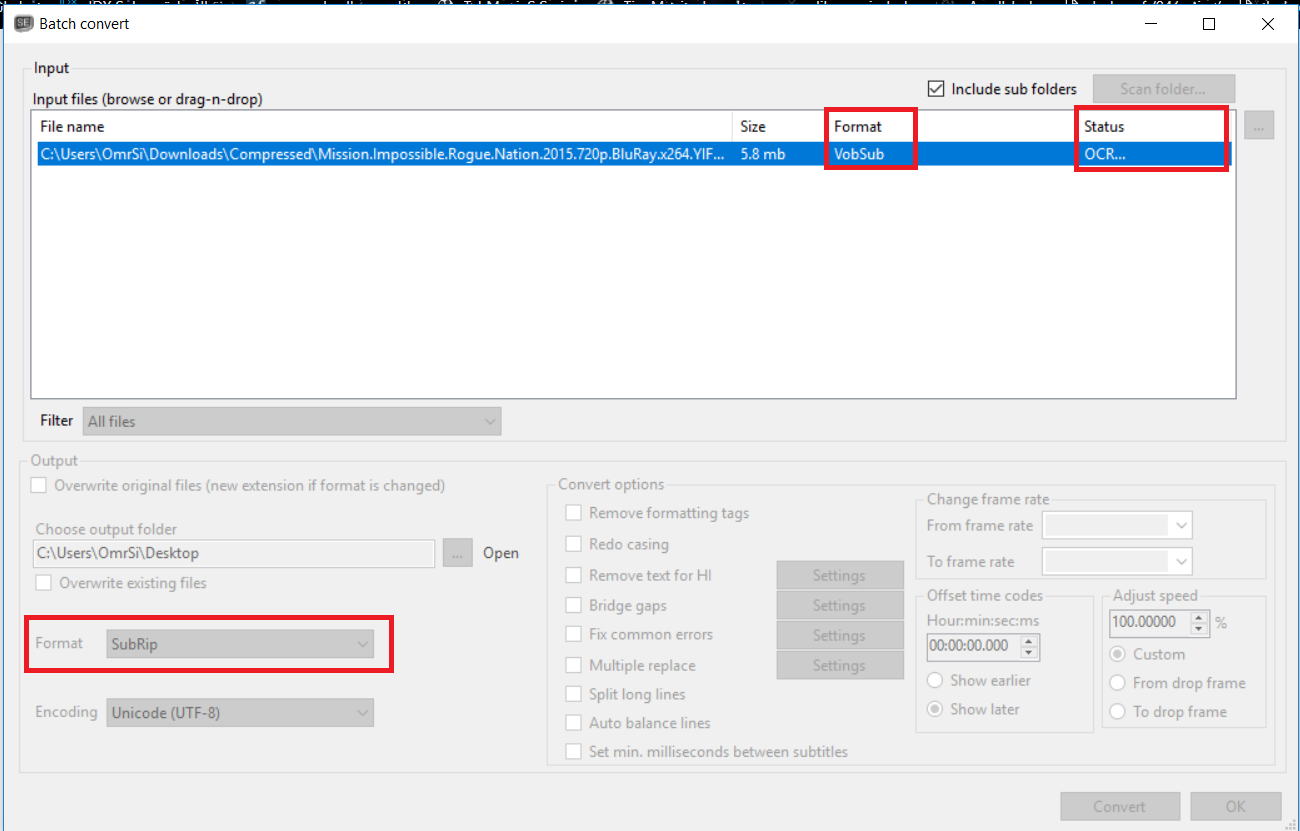
Though I don't see a way to cancel the process, I started it as a test and I can't stop it. 😅
OmrSi
on 25 Aug 2018
Can it batch translating a folder of .srt files? Hope this happen
 pendave
on 26 Aug 2018
pendave
on 26 Aug 2018
@OmrSi Is that a video container (5,8 MB)?
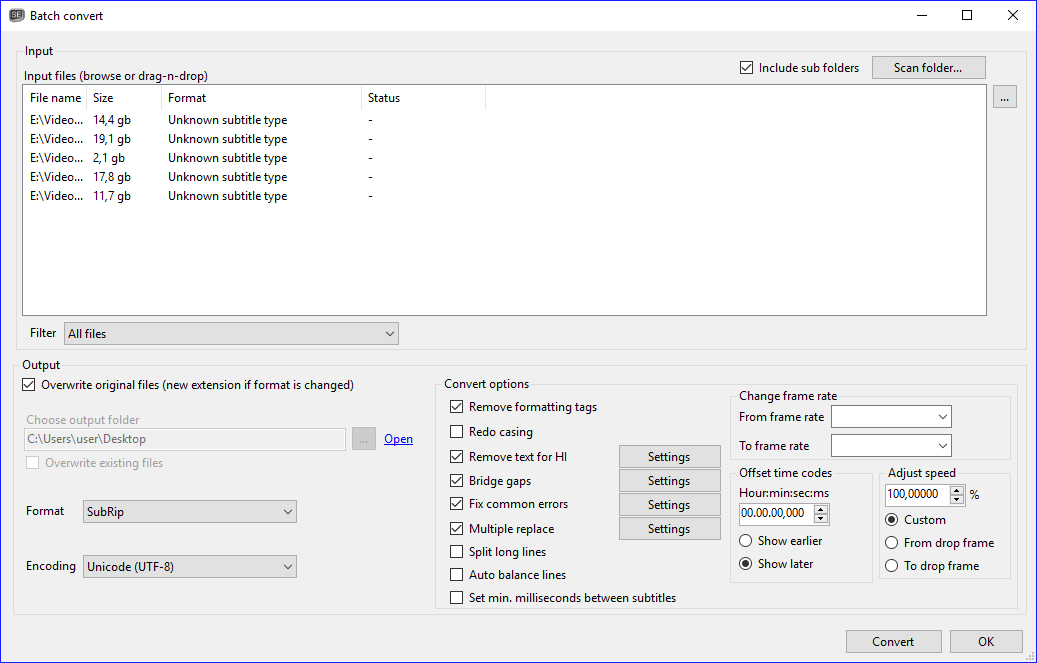
The program can't batch convert MKV files with picture-based, unmodified Blu-ray subtitles:
07416
on 26 Aug 2018
@niksedk So good to know you still keep improving it. Yes it works much better than before however I found a new file that seems to be strange when importing. You may want to check it out. :)
LeonCheung
on 26 Aug 2018
New beta up - will be very close to the final version: https://github.com/SubtitleEdit/subtitleedit/releases/download/3.5.6/SubtitleEditBeta.zip
niksedk
on 26 Aug 2018
So far so good for importing plain text. :+1:
LeonCheung
on 26 Aug 2018
@07416: I've tried to add a tiny bit support for this - last beta should OCR first bdsup found in mkv: https://github.com/SubtitleEdit/subtitleedit/releases/download/3.5.6/SubtitleEditBeta.zip
(it's not perfect, but it's a start)
niksedk
on 26 Aug 2018
@niksedk for some reason, I'm getting this now (just testing it), Although OCR is working.
And there is still no way of canceling the operation.
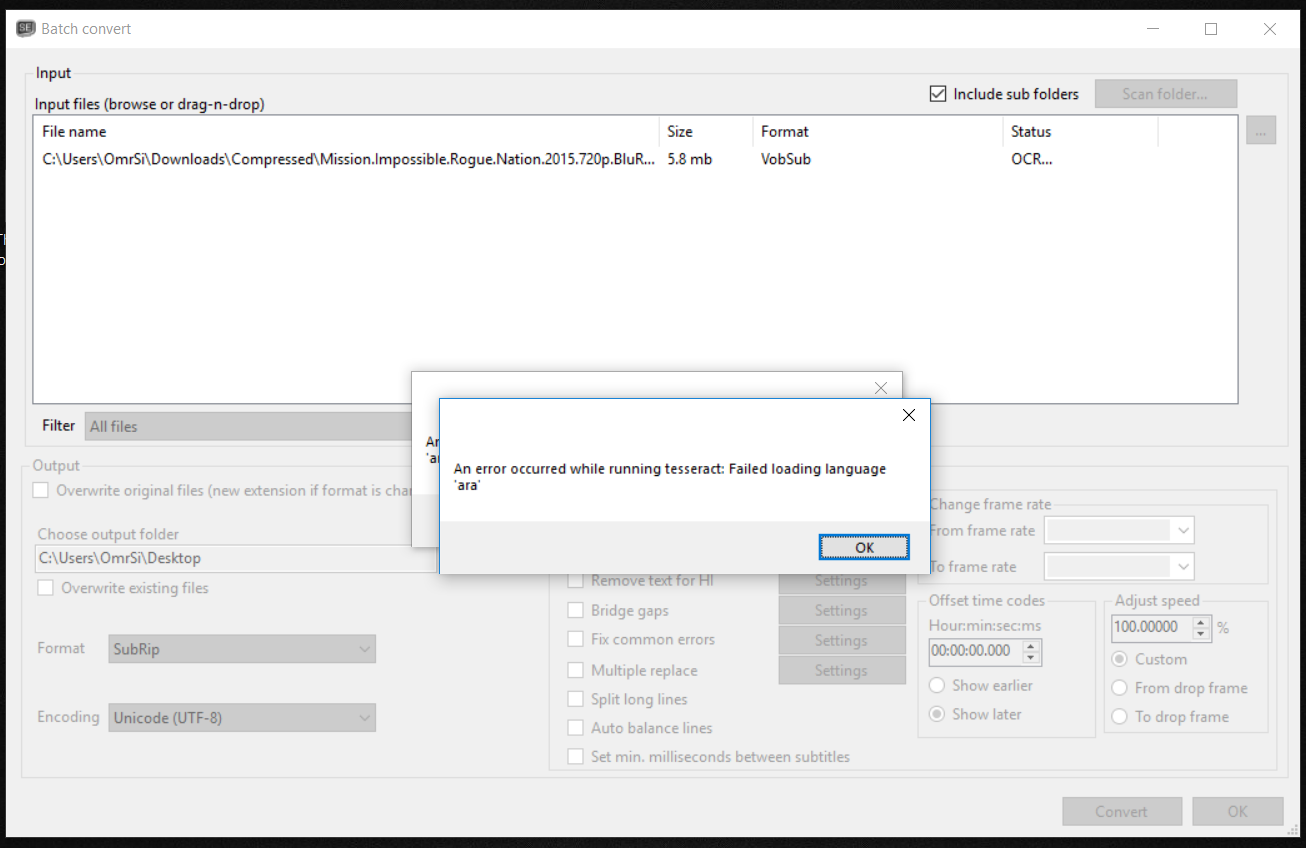
OmrSi
on 26 Aug 2018
@niksedk Being able to select the preferred language would finalize the feature.
07416
on 26 Aug 2018
@niksedk Please try another file here for importing plain text. I found that if I delete Line #566 then it would be fine, don't know why yet. Thanks.
LeonCheung
on 27 Aug 2018
@LeonCheung: thx - beta updated: https://github.com/SubtitleEdit/subtitleedit/releases/download/3.5.6/SubtitleEditBeta.zip
niksedk
on 27 Aug 2018
@niksedk Working again, thx!
LeonCheung
on 27 Aug 2018
how would I test if WordPart fixes work properly?
I'm trying, really trying, but can't get them to fix anything.
diomed
on 28 Aug 2018
Also, when we go to fix common errors - that dropdown box with bunch of languages is the worst thing ever. Such a timewaster. User should be able to pick and save in settings what languages he wants, and not to look for his own language among dozen others, when he wants to select OCR to fix something.
diomed
on 28 Aug 2018
@diomed: Could you supply some subtitles where the language dropdown box does not auto-select the correct language?
niksedk
on 28 Aug 2018
that was my bad, because I was testing on a few lines, with various words, not on real subs.
still, this would be better if selected in options.
what about WordPart? how to test that? since I can't get any wordpart to fix properly
diomed
on 28 Aug 2018
Multiple replace with icon on toolbar
 marb99
on 30 Aug 2018
marb99
on 30 Aug 2018
@niksedk Can you take a look at this https://github.com/SubtitleEdit/subtitleedit/issues/2852 ?
OmrSi
on 31 Aug 2018
Is it possible to export DVD/Blu-ray subtitles without processing with OCR first? I could then batch convert dozens of subtitles at once.
07416
on 31 Aug 2018
@07416; From what format are you exporting to DVD/BD from?
niksedk
on 2 Sep 2018
@niksedk I'm exporting subtitles from DVD and Blu-ray, in their native format.
07416
on 2 Sep 2018
Related issues
 rgfx
·
5Comments
rgfx
·
5Comments
 taxen
·
6Comments
taxen
·
6Comments
 amiremami
·
4Comments
amiremami
·
4Comments
 frozenspider
·
5Comments
LeonCheung
·
5Comments
frozenspider
·
5Comments
LeonCheung
·
5Comments
Most helpful comment
Oh, Yeah!
It's been a while.
I don't think I need to say anything here. 😂😂
I've had my share of Bug reports. 😅
Edit: Actually, I think I do need to say something.
Thank you for all the hard work. :)