Subtitleedit: OCR via Tesseract not working?
I don't know how to use Tesseract. I've tried _OCR via Image Compare_ and now I'm sticking with the recommended _OCR via Binary Image Compare_, but it's tedious. I've been writing for 2 hours and it was merely half-way done.
Tesseract sounds promising, I hope it can offset my workload to convert .sub to .srt much more efficiently. Unfortunately, I've no idea how to use it. If I just select the OCR like any other OCRs selection, it doesn't seem to function properly. (never seen it function properly)
Maybe I missed out something? I need to take additional steps to install Tesseract myself before I can use it?
This is what I have done:
- [x] read all guides of Subtitle Editor 3.5.3 with regards to OCR
- [x] downloaded dictionaries
- [x] installed Tesseract with a Windows installer and opted for _all dictionaries_
- [x] restarted Subtitle Editor 3.5.3
- [x] uninstalled both Subtitle Editor 3.5.3 and Tesseract (I didn't managed to delete Tesseract _environment variable_ because there wasn't any)
- [x] reinstalled both Subtitle Editor 3.5.3 and Tesseract
- [x] Tried running Subtitle Editor 3.5.3 as Administrator
and yet it doesn't help. :(
I don't know how to use it. Please help me.
Additional Information:
- Version: _3.5.3_
- Why? _Because that seems to be the stable and most recommended version._
- Operating System: _Windows 10 Pro_
- Subtitle Language: _English_
 XPMai
XPMai
All 9 comments
OCR works best if you have the letters in white color and the border in black. To do that, use "custom colors" (in your case, set color number two black, number three white, and the rest transparent).

 niksedk
on 13 Sep 2017
niksedk
on 13 Sep 2017
Thank you so much! This saves me lot of time! I thought the issue was more complicated like I needed to install additional software or error with installations. Didn't know everything's already done and it's just the settings.
_(I had experience with open source software and it required me to do a lot of installations like compilers, plugins, and everything. And any errors encountered required to directly modify the files which consumed me lots of time.)_
XPMai
on 13 Sep 2017
No problem, easy to help with the nice video :)
This post might also help others!
niksedk
on 13 Sep 2017
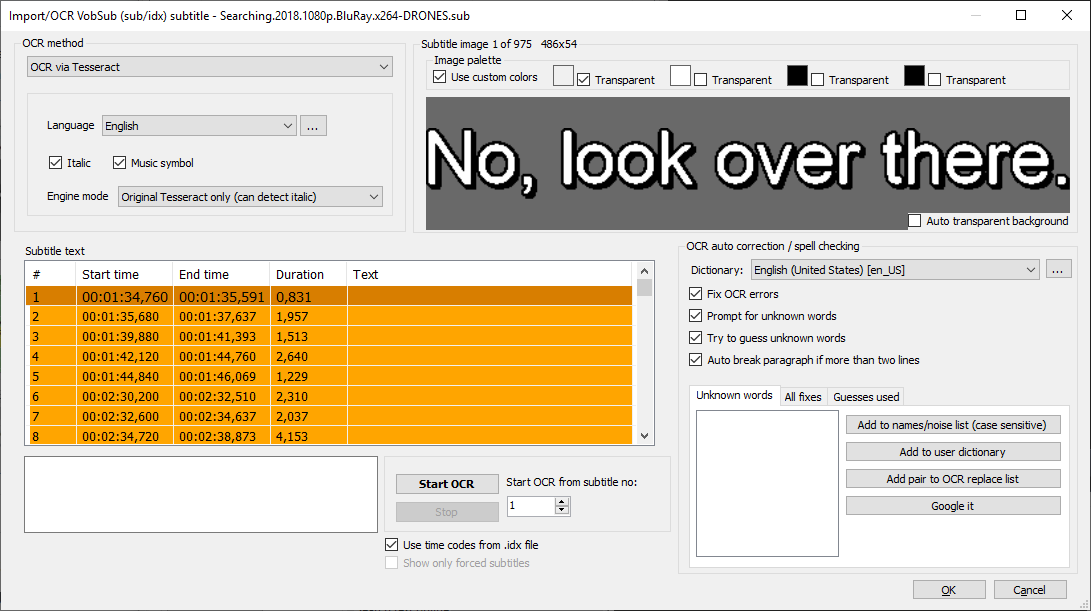
Pls. advise how to use Tesseract in my case.
Thx.
 BurnerTom
on 24 Nov 2018
BurnerTom
on 24 Nov 2018
@BurnerTom: SE 3.5.7 OCR via Tesseract does not work well... I've tried to fix it in latest beta: https://github.com/SubtitleEdit/subtitleedit/releases/download/3.5.7/SubtitleEditBeta.zip
(portable version - unpack to something like C:ToolsSE)
Does this work better for you?
niksedk
on 24 Nov 2018
@niksedk:
- SE357 portable version - unpack to something like C:ToolsSE) - not working
- SE358beta portable version - unpack to something like C:ToolsSE):
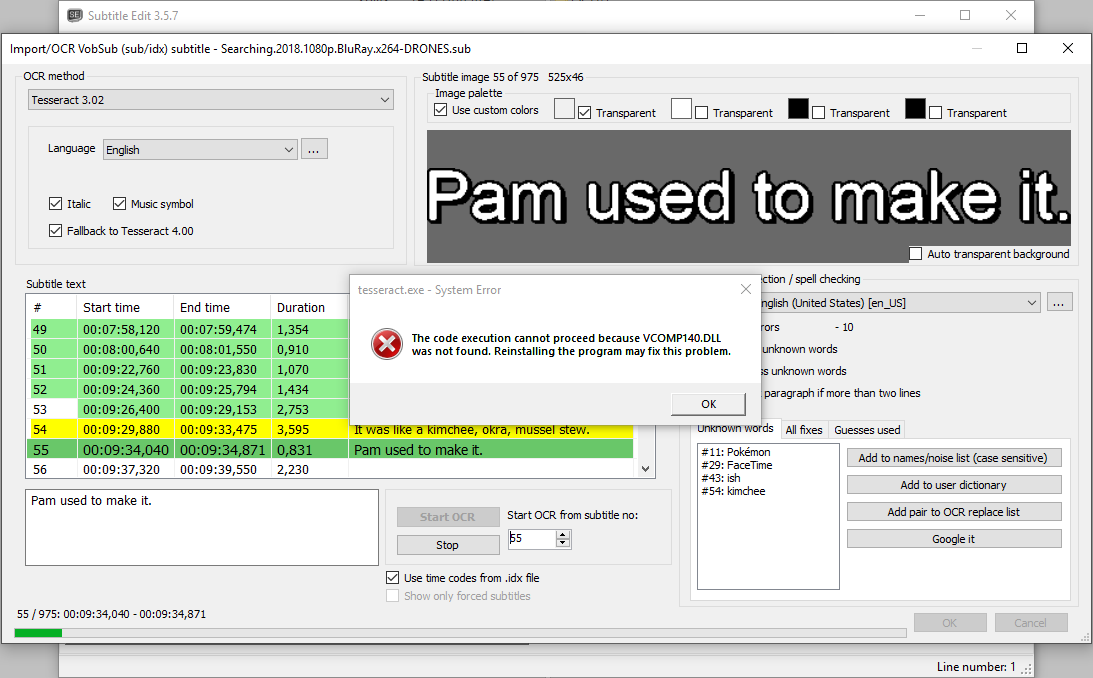
Tesseract4: tesseract.exe - System Error - VCOMP140.DLL was not found, doesn't work at all
Tesseract302: does work, but VCOMP140.DLL was not found pop up every time when is some word not recognized
BurnerTom
on 24 Nov 2018
@BurnerTom:
thx for the info :)
Tesseract 4 requires Visual C++ runtime to be installed I think: https://aka.ms/vs/15/release/vc_redist.x86.exe
Tesseract 3.02 - you have enabled "fallback to tesseract 4", so the fallback caused by unknown words will trigger tesseract 4.
How does it work if you install the c++ runtime?
niksedk
on 24 Nov 2018
@niksedk
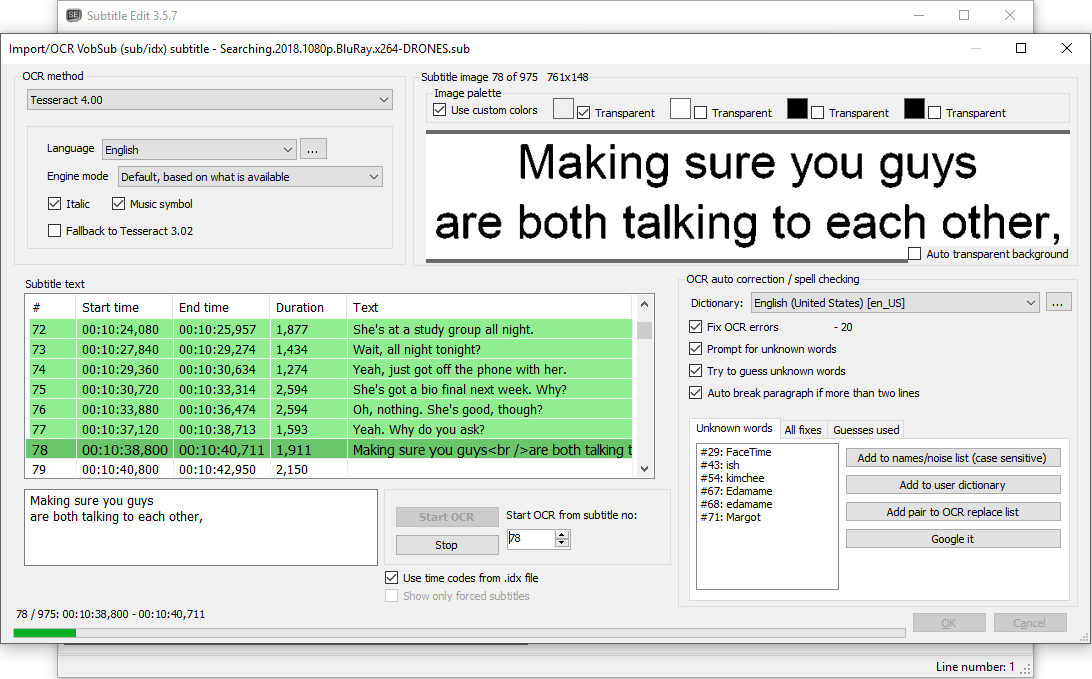
Tesseract 3.02 - after unchecking "fallback to tesseract 4" OCR works fine ;-)
Tesseract 4 - after installing vc_redist.x86 (Microsoft Visual C++ 2017 Redistributable (x86) - 14.16.27012) on Win10 x64 system OCR works fine ;-)
BurnerTom
on 24 Nov 2018
@BurnerTom: thx for testing :)
Note that Tesseract 4 does not detect italic font well.
niksedk
on 24 Nov 2018
Related issues
 OmrSi
·
6Comments
OmrSi
·
6Comments
 NoRRt
·
6Comments
NoRRt
·
6Comments
 PannenkoekenNL
·
3Comments
PannenkoekenNL
·
3Comments
 taxen
·
6Comments
taxen
·
6Comments
taxen
·
6Comments
taxen
·
6Comments