Hello,
I apologize if this is not the correct place to post this issue, but this is the only place I thought I may get an answer.
I was using Stylish for my styles, and I had quite a few custom styles that I had made, and I didn't create a backup for all of them. Suddenly, the extension stopped working with the following message:
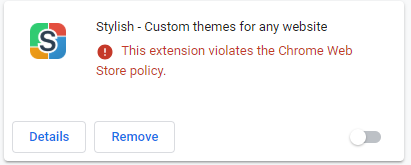
And I can't go and backup my styles.
Is there a way I can find the styles I made and export/import them manually (I'm using Windows)?
I appreciate if you can help me
Thank you
 farzadmf
All 3 comments
What I did:
- Turn Stylish back on with the toggle in lower right
- Go to Stylish "Manage all styles" page and do a backup
- Install Stylus
- Go to Stylus "Manage" and import
(you may need to write explicit filename, my Stylish backup was .dms, but Stylus looks for .json) - Disable Stylish
- Verify Stylus is working with pages you're used to being restyled
- Uninstall Stylish
See also https://github.com/openstyles/stylus/wiki/FAQ#how-can-i-export-my-user-styles-from-stylish-for-firefox-to-stylus
 TWiStErRob
on 28 Jul 2018
TWiStErRob
on 28 Jul 2018
Thank you @TWiStErRob . It was so stupid of me that I didn't check that I can indeed re-enable the extension. I appreciate your answer.
Just while we're at it, is there a way to selectively import the styles into Stylus? (not all the styles altogether)
farzadmf
on 29 Jul 2018
You can edit the file before importing it in any text editor or in a JSON editor.
 tophf
on 29 Jul 2018
tophf
on 29 Jul 2018
Related issues
 dnknn
·
4Comments
dnknn
·
4Comments
 patrickdrd
·
6Comments
patrickdrd
·
6Comments
 FranklinYu
·
5Comments
dnknn
·
6Comments
dnknn
·
4Comments
FranklinYu
·
5Comments
dnknn
·
6Comments
dnknn
·
4Comments
Most helpful comment
What I did:
(you may need to write explicit filename, my Stylish backup was .dms, but Stylus looks for .json)
See also https://github.com/openstyles/stylus/wiki/FAQ#how-can-i-export-my-user-styles-from-stylish-for-firefox-to-stylus