Stylus: Styles are not applied to background tabs in v1.1.7.6
- Browser: Firefox 57.0.1
- Operating System: Win7x64
Immediately after updating to v1.1.7.6 I noticed that Stylus stopped applying styles to tabs opened in background. Eve after switching to those tabs styles don't get applied. This should be very easy to reproduce, but in case I'm wrong I am willing to provide all the info I can gather about this issue.
 monk-time
All 22 comments
I have the same bug since yesterday :(
Firefox 57.0.2 + Windows 8.1
 LeZVince
on 9 Dec 2017
LeZVince
on 9 Dec 2017
Can't reproduce.
 tophf
on 9 Dec 2017
tophf
on 9 Dec 2017
I've got a same issue since I've updated Firefox. The style applies on some tabs, and doesn't apply on other tabs. I only see the recent update of Firefox as origin.
 redking974
on 9 Dec 2017
redking974
on 9 Dec 2017
Can't reproduce in 57.0.2, 52.5.2, 59.
tophf
on 9 Dec 2017
It's the same bug as Stylish, that's why I moved on Stylus...
LeZVince
on 9 Dec 2017
If you want this to be fixed you need to provide a detailed description on how to reproduce it. The first thing to try is a clean browser profile with only Stylus extension and nothing else.
tophf
on 9 Dec 2017
And it would help to know the version of Stylus where this wasn't an issue.
 Mottie
on 9 Dec 2017
Mottie
on 9 Dec 2017
I'm on Nightly, 59.0a1, and I am seeing this as well with 1.1.7.6 only. I've reverted to 1.1.7.4 and this does not occur.
 Shrapnel
on 9 Dec 2017
Shrapnel
on 9 Dec 2017
It'd be helpful if someone who experiences the problem would try in a new browser profile with just Stylus extension installed.
tophf
on 9 Dec 2017
Same system, clean profile (no extensions installed), FF 57.0.2:
- Install Stylus 1.1.7.6.
Create a new style, click Import, paste this mozilla-format style that makes the font on adventofcode.com smaller:
@-moz-document domain("adventofcode.com") {
body {
    font-size: 11pt;
}
}
(btw, on this step panda-syntax theme doesn't work correctly: if I set this theme and then click "Back to manage", opening any script again shows the code on white background and in wrong font, this is also something that didn't happen before 1.1.7.6)
Open https://adventofcode.com/2017/about - the style is applied.
- On that page middle-click or ctrl+click the About button, this opens the same page in a new background tab.
- Switch to the opened tab after it has finished loading.
- The style is not applied, although the extension icon is active and has a badge with "1".
There's nothing in the Browser Console. I'll post a recording and do the same steps in the previous version of Stylus in a few minutes.
monk-time
on 9 Dec 2017
Here's a video of the steps above: https://vimeo.com/246594906
I also couldn't reproduce this issue on 1.1.7.4 in a fresh profile.
monk-time
on 9 Dec 2017
@monk-time, thanks, but I can't reproduce.
Anyway, I've updated the master branch with a tentative fix for the problem.
Try the new version by loading it as a temporary extension on about:debugging page (make sure to disable the official Stylus).
P.S. The theme issue is fixed now.
tophf
on 9 Dec 2017
I did a git-bisect and it looks like commit 6d4689e559af5cddef805239642803b5c2eff120 is the culprit.
 sirxemic
on 9 Dec 2017
sirxemic
on 9 Dec 2017
@sirxemic, yeah it was the only significant change but it's not clear why it causes the issues and how to reproduce them. I'd rather find out that instead of blindly reverting it. Can you please try the new master branch? See my comment above.
tophf
on 9 Dec 2017
@tophf, I removed Stylus 1.1.7.6 from the clean profile, installed the new version (had to unpack it, make a new zip with the contents of the top stylus-master folder and rename the archive to .xpi, wtf mozilla) and repeated same steps: the code editor theme issue is gone now, but I still get the same bug with bg tabs.
monk-time
on 9 Dec 2017
@tophf Yeah I tried the latest master. It's still happening, though. Simply reverting that commit does the trick for me, but I understand that you prefer not to do that before we've figured out what exactly the root cause is.
sirxemic
on 9 Dec 2017
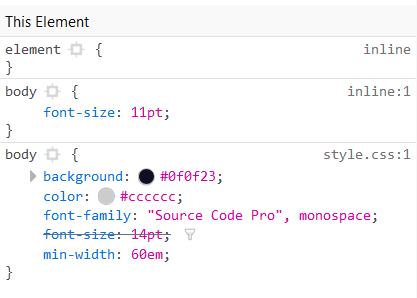
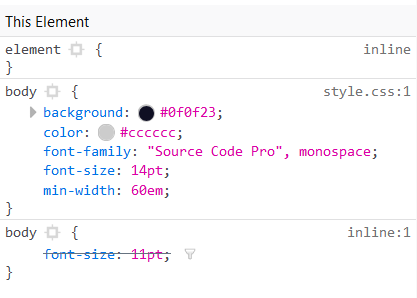
I looked into the inspector (with master.zip installed) and noticed that the rule from the step 2 does appear in a background tab, but it gets overrided by the page's css. If I add !important, bg tabs work fine, but without it the bug reappears:
body { font-size: 11pt; }, foreground tab, the style is applied:
body { font-size: 11pt; }, background tab, the style is not applied:
monk-time
on 9 Dec 2017
Try the master branch once more. I believe I fixed it. Also, no need to make an xpi: simply point to manifest.json on about:debugging
tophf
on 9 Dec 2017
Yes! It works :)
sirxemic
on 9 Dec 2017
@tophf Thanks for the tip! And yes, can confirm the latest master fixes the issue. 👍
monk-time
on 9 Dec 2017
AMO has the updated version now.
tophf
on 9 Dec 2017
Yes, it fixes it. Thanks !
redking974
on 9 Dec 2017
Related issues
 schomery
·
35Comments
schomery
·
35Comments
 kristofferR
·
24Comments
kristofferR
·
24Comments
 narcolepticinsomniac
·
74Comments
Mottie
·
39Comments
tophf
·
26Comments
narcolepticinsomniac
·
74Comments
Mottie
·
39Comments
tophf
·
26Comments
Most helpful comment
Try the master branch once more. I believe I fixed it. Also, no need to make an xpi: simply point to manifest.json on
about:debugging