Stylus: [Feature request] to be able to toggle the installed userstyles via keyboard [1-9] while the Stylus popup is visible
My feature request (if possible) is to be able to toggle on/off the installed userstyles via keyboard shortcuts [1-9] while the Stylus popup is visible,
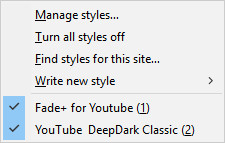
i.e. to add a number in parenthesis to the end of each entry in the style list,
and while the popup is visible, whenever you press, e.g press '1' to toggle the 1st style in the list on/off, etc
This is a feature of Stylish (2.x, pre WebExt) and I had found it very convenient:
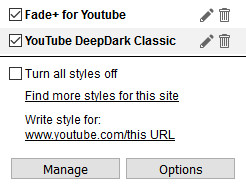
Currently in Stylus you have to point the mouse to each checkbox entry row to toggle them:
- Browser: Firefox 57/Chrome 62, Stylus 1.1.6.1
- Operating System: win10 x64
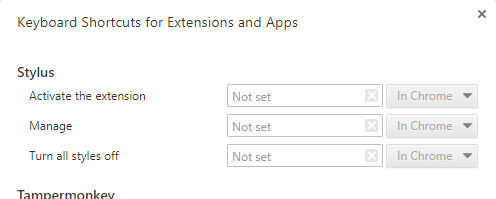
PS. Btw, for reference, in Stylus for Chrome, in its Options | Shortcuts,
one may define some different keyboard shortcuts:
 darkred
All 58 comments
Why not, we can add an option in the advanced block to show the numbers. The number hotkeys will work regardless of the option. BTW, you can simply click on the entire style name to toggle it.
 tophf
on 28 Nov 2017
tophf
on 28 Nov 2017
Try the current master branch: zip
You can load it as a temporary extension (instructions are easy to find).
1-9, 0 - toggles Nth displayed style (0 is 10)
a-z: - toggles first style with a name that starts with the letter
Shift - opens editor instead of toggling
There's no visual indication yet because I don't know how to do it properly in case of very long titles.
tophf
on 28 Nov 2017
It should be noted that Firefox continues its tradition of being special: the popup doesn't receive keyboard focus on opening so hotkeys won't work until you click inside the popup, which obviously defeats the purpose of hotkeys. If anyone cares, there's a report on bugzil.la/1324255
Note: in FF you'll have to press Tab to focus the popup after clicking its icon.
tophf
on 28 Nov 2017
Thanks a lot @tophf for adding this feature!
I just tried it and it's great!
And, even with the need to focus the popup due to that WebExt bug (which luckily is already in the procedure of getting fixed), I like it better than Stylish' implementation:
with Stylish, when you pressed a hotkey, the popup would just close,
and so, if you wanted to enable another userstyle, you had to click the toolbar button again for the popup to re-appear
With the new version, the popup remains, and so you can immediately enable another userstyle ,
i.e. the same behavior as using the mouse to toggle userstyles.
darkred
on 28 Nov 2017
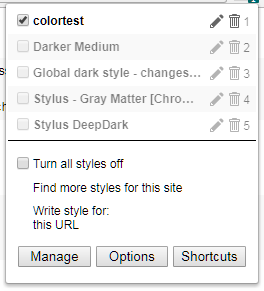
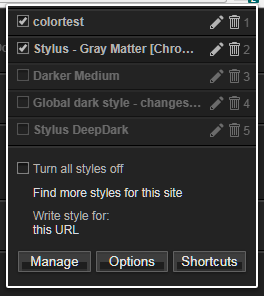
#installed {
  counter-reset: style-number;
}

.entry:nth-child(1):before,
.entry:nth-child(2):before,
.entry:nth-child(3):before,
.entry:nth-child(4):before,
.entry:nth-child(5):before,
.entry:nth-child(6):before,
.entry:nth-child(7):before,
.entry:nth-child(8):before,
.entry:nth-child(9):before,
.entry:nth-child(10):before {
  counter-increment: style-number;
  content: counter(style-number);
  position: absolute;
  right: 8px;
  margin-top: 1px;
}

.entry:before:nth-child(10) {
  content: "0";
}

.entry.enabled:before {
  opacity: .5;
}
@narcolepticinsomniac, @Mottie, @MechaLynx, thoughts/suggestions? Do we need an option for that in our options page?
Edit: code is updated.
tophf
on 28 Nov 2017
I think an option is definitely needed.
This is the obvious way to have a list of hotkey-toggleable items from a popup, which means it's possible other extensions are likely to try the same or set global hotkeys to numbers. Since focus is formally on the browser, website hotkeys wouldn't be an issue, but there's users that like to customize their browser hotkeys (for example, ctrl+[1-8] focuses tabs on FF, a user may want to simplify that shortcut) so it'd be the minimum required to be polite to the user. It would also prevent nasty collisions from being an immediate issue.
Could always make the counter selector look for a .hotkeyed class or equivalent, which you can remove from the popup if the option is disabled, so that the numbers aren't show, if that's undesirable.
I am _not_ keen on the letter hotkeys though. If styles can be ordered by priority, those shortcuts are far less necessary and are likely to end with collisions (say, you have multiple styles for the same page that serve different functions: Youtube classic style + Youtube material style or Wikipedia fonts +Wikipedia theme - on most websites I use a lot, I have multiple styles split up that way).
 mechalynx
on 29 Nov 2017
mechalynx
on 29 Nov 2017
Not sure I follow.
The displayed numbers work only when the popup is displayed.
set global hotkeys to numbers
You can't set a global hotkey to a number without modifers so it won't be an issue.
tophf
on 29 Nov 2017
I think we could add an option to show shortcut keys and add a class to the popup to toggle them.
These shortcuts won't interfere with browser tabs as the popup needs focus before the shortcuts will work.
 Mottie
on 29 Nov 2017
Mottie
on 29 Nov 2017
@tophf fair enough, I still think it's useful (prevent surprises? kind of unlikely but meh), but if it can't interfere with browser hotkeys then it's less of an issue.
I edited my previous comment to add that I'm not in favor of letter hotkeys but that's secondary. User can just skip on those if there's conflicts, not mandatory to use them anyway.
(_I also think a makes a great "Toggle all styles" hotkey_)
mechalynx
on 29 Nov 2017
I'm not in favor of letter hotkeys
I don't really see the use... when I open my popup on GitHub, all my styles start with the name "GitHub" anyway LOL
Mottie
on 29 Nov 2017
prevent surprises
Which surprises? The number/letter keys never worked in the popup and could never be intercepted by anything else in the browser. My only concern is whether the added numbers look intrusive and need an option to hide them. The functionality itself is safe.
I'm not in favor of letter hotkeys
I don't really see the use...
I've seen some screenshots with renamed styles like zzz so why not handle the letters too? No one forces you to press them you know.
tophf
on 29 Nov 2017
I'm not against using letters, I just didn't see the use... but maybe a better toggle all styles shortcut would be *.
Mottie
on 29 Nov 2017
I'm convinced, original proposal in https://github.com/openstyles/stylus/issues/263#issuecomment-347603768 is sufficient, no option needed.
mechalynx
on 29 Nov 2017
Selector can be simplified though:
.entry:nth-child(-n+10):before {
  counter-increment: style-number;
  content: counter(style-number);
  position: absolute;
  right: 8px;
  margin-top: 1px;
}
a better toggle all styles shortcut would be
*
I like the idea. What's a more obvious behavior though: to toggle all displayed styles or the entire extension aka "Turn all styles off"?
@MechaLynx, that's awesome, thanks
tophf
on 29 Nov 2017
@tophf Displayed, as in turn all styles active -> inactive. If no styles are active turn them all on.
Turning the extension on/off is likely something far more rarely useful and probably not a priority over toggling the matched ones. If a choice between the two has to be made, do the matching styles. Alternatively, have a hotkey for each.
mechalynx
on 29 Nov 2017
What about * to invert the state, + to enable all, – to disable all?
All three would process only the listed styles.
tophf
on 29 Nov 2017
I don't think inverting the state would be that useful... I usually only toggle one or two styles at a time.
Mottie
on 29 Nov 2017
Inverting the state on pressing * would be trivial to implement in case each style's state is simply inverted. Otherwise I'm not sure what should happen when the popup contains both enabled and disabled styles.
tophf
on 29 Nov 2017
My only concern with those is that they're all two-hand hotkeys essentially (I click the Stylus icon with my mouse hand, I use my other hand to toggle number styles but if I want to quickly toggle all on or off, I need to get my mouse hand off and shift+8, which means I'd rather just have a mouse option).
Unless you're going to have the numpad + and - be used for that.
I don't like * for the same reason. I think it'd be sufficient to have one hotkey like the ` to cycle as I mentioned before, which covers all cases just less explicitly. But there's no harm in having those hotkeys as long as the numpad matches (apparently you can explicitly match numpad keys or not, so there's options) so I can hit the key with my right thumb.
I agree with @Mottie that I don't see inverting being that useful, but I'm already thinking of clever ways to use it (alternate between two sets of styles for testing for example).
Shift + ` could serve as a substitute for your *, but still be a one-hand hotkey.
mechalynx
on 29 Nov 2017
Backtick ` without Shift would be even simpler.
tophf
on 29 Nov 2017
But I already suggested ` as a means of cycling states before. If that use isn't going to be implemented, then yes, it's simpler and better.
mechalynx
on 29 Nov 2017
Firefox has a openPopup method, so you wouldn't have to use your mouse at all.
Mottie
on 29 Nov 2017
So what exactly ` will do when some styles are enabled and some disabled?
BTW, in Chrome you can assign a hotkey in the extension options to show the popup so the mouse won't be needed.
tophf
on 29 Nov 2017
openPopup also works in Chrome but how is it related?
tophf
on 29 Nov 2017
I guess you could add a custom hotkey, not through the extension menu, to open the popup if you had to... but I think you'd still need to hit tab to focus on it. In Firefox.
Mottie
on 29 Nov 2017
If there's matching and enabled styles, ` turns all matching and active styles off
If there's no matching and enabled styles, ` turns all matching styles on
This lets you press ` to turn all styles off, then press it again to turn them all on, as long as you only have the intended styles matching. If the set of matching styles is larger than the set of styles originally enabled and matching, then you end up turning more of them on than before, but that can be intended or not depending on the situation. Inversion would not be the same as this, so it's a question of what is more usable and useful. I think the above behavior is more usable while being marginally less explicit but still useful enough. Hotkeys that are hard to use are hotkeys never used.
Shift + ` complements this nicely I think.
mechalynx
on 29 Nov 2017
To use openPopup in FF we would need to make our content script intercept keyboard input and add a UI in options to customize the hotkey. I'd rather wait until FF properly implements browser.commands API with a built-in UI to set hotkeys just like Chrome does.
tophf
on 29 Nov 2017
@MechaLynx, what does matching mean? Imagine the popup displays 6 styles, so all obviously match, right? And 3 of them are disabled. So how will ` toggle them and which ones?
tophf
on 29 Nov 2017
@tophf I'm just being explicit in that I don't mean switching off/on the _extension_ but just the styles in the list, hence "matching" to clarify that.
mechalynx
on 29 Nov 2017
Ok, we already clarified that. Now on to my question about enabled/disabled styles.
tophf
on 29 Nov 2017
If there's some enabled and some disabled styles, ` only disables the enabled styles.
mechalynx
on 29 Nov 2017
What if the user installed some style in another browser window while the popup is open and that style got into the mix?
tophf
on 29 Nov 2017
And matches the current page? I think that's a very niche situation. This is how I understand your case:
I'm on GitHub, I have GitHub Dark on with the popup open. I use a different tab to go to USO to install GitHub Blue so now it's on my popup on the GitHub page's tab. I press ` and both get turned off. Am I surprised? Maybe, but I'm likely going to just go "Oh, of course" rather than, "why is GitHub Blue in the list now? And enabled???". So I don't think this is an issue at all. I pressed ` to turn all styles off anyway. If I expected only GitHub Dark to be turned off so I could see GitHub Blue, it's not a workflow, just me previewing things.
mechalynx
on 29 Nov 2017
Test it: zip
numpad 0-9same as 0-9numpad +enables all listednumpad –disables all listednumpad *and`(backtick) - toggles initially enabled styles - doesn't apply to subsequently enabled styles while the popup is open - not sure this is what you had in mind, guys.
tophf
on 29 Nov 2017
It almost is (on ` *). The idea is that if there's any styles currently enabled, it disables all of them. If there aren't any enabled styles it enables all of them. An example:
Styles in the popup:
 - [ ] Style 1
 - [X] Style 2
 - [X] Style 3
 - [ ] Style 4
If I press ` or *:
 - [ ] Style 1
 - [ ] Style 2
 - [ ] Style 3
 - [ ] Style 4
If I press it again:
 - [X] Style 1
 - [X] Style 2
 - [X] Style 3
 - [X] Style 4
And another time:
 - [ ] Style 1
 - [ ] Style 2
 - [ ] Style 3
 - [ ] Style 4
Since whether styles are enabled or not is checked when the key is pressed, if you enable one in between key presses, it behaves like the first step above (disables them all).
My point about the numpad is that the hotkeys should be _inclusive_ of it, not exclusive _to_ it. In other words, use keyEvent.key rather than keyEvent.code (as shown here) which would allow someone to use Shift + 8 for * as well as Numpad's * directly.
_However_, I think that if the toggle still works but _excludes_ styles re-enabled while the popup is still open (as you made it here), it could allow for interesting workflows such as excluding a style by re-enabling. On the other hand, if you're toggling, you're just going to do it once or twice while working before you leave the popup and go edit the style, making this behavior too temporary to be useful. If this kind of separation is desirable, a lock icon that's clickable could allow the user to lock style state regardless of the hotkey. I think that goes a bit too far into solving problems we don't know exist yet though, even if it's an interesting feature to have.
mechalynx
on 29 Nov 2017
I don't see how this scenario can be useful. The one currently implemented I can relate to.
keyEvent.key
You already suggested that and I answered it's not supported in Chrome 49 which is our minimum_chrome_version. This is not a feature worth raising the minimum. The polyfills were naive and unreliable last time I checked.
Shift + 8
Shift is used to invoke the editor.
tophf
on 29 Nov 2017
I'm cool with that & didn't realize you had explained the key thing and forgot about Shift. Disregard.
mechalynx
on 29 Nov 2017
Maybe that was Mottie or silverwind or both who suggested using key. I don't remember exactly.
tophf
on 29 Nov 2017
Works fine but I think + and - should also modify the value of togglingEnables because the way it is now, if I do this:
- Press
*to toggle all styles off - Press
+to toggle all of them on - Press
*again (expected to turn all off, but nothing seems to happen) - Press
*again (now they turn all off)
It needs another * to actually turn them off, because the next hit toggles all of them on, when they're already on. Other than that, it's fine on both FF58/CH64.
mechalynx
on 29 Nov 2017
@MechaLynx, I'm very worried about the users losing their primary state of the styles. Currently it's always preserved in the code so while the popup is open ` (or *) provides a way to restore the initial selection. Won't be the case if we make + and – modify it.
tophf
on 29 Nov 2017
I guess I'll simply make ` and * smarter so that it switches to its alternate state in these cases instead of doing nothing.
tophf
on 29 Nov 2017
If preserving the initial state was the purpose of this implementation, it's not doing its job. I can toggle my styles into either all enabled or all disabled but there's no straightforward way to restore their original state.
I think this is a very difficult goal to satisfy, because it's not clear how it would be easy to use the hotkeys while also being easy for the user to understand the behavior. Generally this means making the behavior simple so the user can think around it, rather than being too smart.
An alternate state is ok, but the original state would be invisible to the user once they modify which styles are enabled. It can easily creep into a situation where they're not sure if the behavior is buggy or not.
A middle ground can be to either allow saving the current state, or allow locking the state of some styles, or making the hotkeys perform only temporary changes. All of these have their own issues, the first being too niche, the second would be cleaner and more general but too cumbersome to resolve the issue you're concerned about and the third would prevent quick changes for styles that the user wants persisting after a reload (for example).
In my opinion, once you start concerning yourself with preserving the original state you're tackling an issue far too large to be solved practically and perhaps too large to be meaningful. I'd say either leave it as it is, since the behavior is simple and obvious, or add locking per style. All of this might be splitting hairs to be honest. As long as the hotkeys are easily accessible, they'll be used by those who are interested and what has to be favored or emphasized will show itself through use and in what objections are raised by users.
mechalynx
on 29 Nov 2017
AFAICT current implementation preserves the initial states when performing global modifications i.e. *, +, –, which was the goal, and I think it works well and even predictable (provided I make * invert its state, see my previous comment).
tophf
on 29 Nov 2017
So the idea is that you press *, it inverts the state, then you can press anything in between, but when you press * the second time, it restores the original state? If so, then it'd be best to call it a Save and invert hotkey that Restores on the second press, rather than call it a toggle so that it's clear what it does.
mechalynx
on 29 Nov 2017
Indeed. See the updated zip. Now I think it behaves that way.
tophf
on 29 Nov 2017
Implemented in c0a227fa39f80d0714c2ce00775f30ead694e2ab
- 1-9, 0 - toggles Nth displayed style (0 is 10)
- a-z: - toggles first style with a name that starts with the letter
- Shift - opens editor instead of toggling
- numpad 0-9 same as 0-9
- numpad + enables all listed
- numpad - disables all listed
- numpad * and ` (backtick) - toggles initially enabled styles;
doesn't apply to subsequently enabled styles while the popup is open
so you can restore the initial selection after testing stuff:
simply disable all, then toggle i.e. numpad -, numpad *
I'll add the (i) icon later to show the cheat sheet which may even contain an option to toggle the feature itself or the visuals only.
tophf
on 29 Nov 2017
Please test the hotkey cheat sheet: zip
@narcolepticinsomniac, @Mottie, @MechaLynx, @darkred
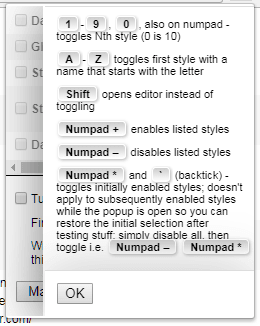
- The localizable message uses
<and>around the key names (hopefully the translators won't bork it). - The sheet appears when you click the area with the numbers on the right (actually the entire height is a hot zone), it shows a tooltip hint first.
tophf
on 1 Dec 2017
I like it. The fake buttons are nice. There's an issue with them overlapping text:
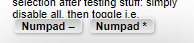
I think it'd be better if it expanded the popup to fit, instead of scrolling at whatever the current height is. We should also do something about the numbers in dark themes with borders added to the popup. They look much more crammed in there. We could latch on to the inline CSS as a selector to give them a little more breathing room if borders are enabled. Either way, we may wanna consider widening the default from 246 a bit to accommodate.
 narcolepticinsomniac
on 1 Dec 2017
narcolepticinsomniac
on 1 Dec 2017
I was planning on adding a wiki page for the popup, so maybe it could have a link for the Numpad * and backtick instead of all the details in the popup.
Mottie
on 1 Dec 2017
@tophf I like it a lot, great job!
I agree with all narcolepticinsomniac's suggestions.
And, having a special wiki page for the popup is indeed great to have, as Mottie mentioned,
but I believe it's even better to also have the hotkey cheat sheet available inline, because there are quite a few keyboard shortcuts involved.
darkred
on 2 Dec 2017
better to also have the hotkey cheat sheet available inline
I agree. I was suggesting adding a link in the cheat sheet to get more details.
I'm working on the wiki page now... I should have it done in 30 minutes.
Mottie
on 2 Dec 2017
Makes sense.
I've fixed all the mentioned issues I believe.
We'll add a link later.
tophf
on 2 Dec 2017
Nice, LGTM.
narcolepticinsomniac
on 2 Dec 2017
Done.
We have an awesome wiki page for the popup thanks to Mottie.
tophf
on 2 Dec 2017
A minor thing, please:
currently, when there are no styles installed for the site,
the 1 is still displayed in the end of the row:
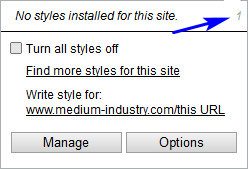
Would you please not display it in such cases?
darkred
on 17 Dec 2017
Yep, already fixed in the upcoming version.
tophf
on 17 Dec 2017
Thank you!
darkred
on 17 Dec 2017
Related issues
 dnknn
·
4Comments
dnknn
·
4Comments
 Gitoffthelawn
·
4Comments
darkred
·
3Comments
tophf
·
6Comments
tophf
·
5Comments
Gitoffthelawn
·
4Comments
darkred
·
3Comments
tophf
·
6Comments
tophf
·
5Comments
Most helpful comment
Implemented in c0a227fa39f80d0714c2ce00775f30ead694e2ab
doesn't apply to subsequently enabled styles while the popup is open
so you can restore the initial selection after testing stuff:
simply disable all, then toggle i.e. numpad -, numpad *
I'll add the (i) icon later to show the cheat sheet which may even contain an option to toggle the feature itself or the visuals only.