Styled-components-website: Add "How can I override styles with higher specificity?" to FAQ
Since this question comes up almost every day in the main repo, we should add a FAQ entry to the website.
Based on this question and answer we should add a note about the &&& workaround and why it works to the FAQ.
 mxstbr
All 13 comments
I can take this one
 GGAlanSmithee
on 18 Dec 2017
GGAlanSmithee
on 18 Dec 2017
Regarding overriding inline CSS, will this trick work too, or will you have to use !important in that case? (I can investigate this if needed)
GGAlanSmithee
on 18 Dec 2017
I think if you use enough ampersands it might work? Not sure though, good question!
mxstbr
on 18 Dec 2017
After a quick glance at google it looks like the most reliable way is to use the element-attr CSS Selector in conjunction with !important;
/* vanilla CSS */
div[style] {
font-size: 12px !important;
color: blue !important;
}
I'll make some tests though, and document both cases in the FAQ section.
GGAlanSmithee
on 18 Dec 2017
I'll make some tests though, and document both cases in the FAQ section.
SGTM
mxstbr
on 18 Dec 2017
The ampersand solution is for overriding styles applied with former classNames or styled applied from the parent and some other cases. It's not meant to be used for overriding inline styles.
/* css */
.header {
  background: #453434; /* overrided */
}
// JSX
<Div className="header sc-wS45d" />

const Div = styled.div`
  && {
    background: white; /* applied */
  }
`
 morajabi
on 19 Dec 2017
morajabi
on 19 Dec 2017
@morajabi thanks, that's what I thought. Let's document both cases though, for clarity.
GGAlanSmithee
on 19 Dec 2017
Just to update @morajabi's answer , according to the docs you need three &s.
So this would be the correct syntax:
// JSX
<Div className="header sc-wS45d" />

const Div = styled.div`
  &&& {
    background: white; /* applied */
  }
 justintemps
on 6 Jan 2019
justintemps
on 6 Jan 2019
You can use as many & as you want, the more you use the higher the specificity will be!
mxstbr
on 7 Jan 2019
Compile error when using more than two &s
 joebentaylor1995
on 24 Sep 2019
joebentaylor1995
on 24 Sep 2019
@joebentaylor1995 can you share an example of a styled component that's failing to compile?
justintemps
on 24 Sep 2019
Any idea how to do this with createGlobalStyle?
This doesn't work.
export const StyleHtmlColor = createGlobalStyle`
  html {
    && {
      background-color: red;
    }
  }
`;
 alfred-pb
on 17 Oct 2019
alfred-pb
on 17 Oct 2019
I had this problem with third-party component libararies with dynamic css injections like antd.
The style tags from antd and styled-components could be re-ordered according to the js excution order.

And I found the solution in webpack's official document:
module.exports = {
  module: {
    rules: [
      {
        test: /\.css$/i,
        use: [
          {
            loader: 'style-loader',
            options: {
              insert: function insertAtTop(element) {
                var parent = document.querySelector('head');
                // eslint-disable-next-line no-underscore-dangle
                var lastInsertedElement =
                  window._lastElementInsertedByStyleLoader;

                if (!lastInsertedElement) {
                  parent.insertBefore(element, parent.firstChild);
                } else if (lastInsertedElement.nextSibling) {
                  parent.insertBefore(element, lastInsertedElement.nextSibling);
                } else {
                  parent.appendChild(element);
                }

                // eslint-disable-next-line no-underscore-dangle
                window._lastElementInsertedByStyleLoader = element;
              },
            },
          },
          'css-loader',
        ],
      },
    ],
  },
};
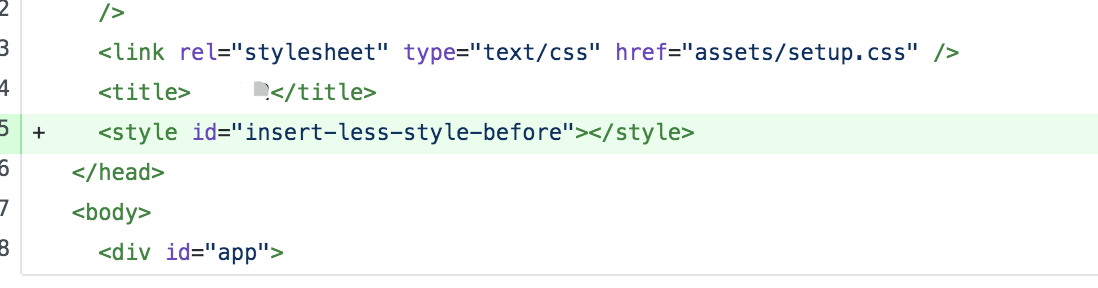
And add a style tag in the index.html:
 Stupidism
on 17 Aug 2020
Stupidism
on 17 Aug 2020
Related issues
mxstbr
·
5Comments
mxstbr
·
4Comments
 Sshetty2
·
6Comments
Sshetty2
·
6Comments
 niraj8
·
5Comments
niraj8
·
5Comments
 el1f
·
4Comments
el1f
·
4Comments
Most helpful comment
The ampersand solution is for overriding styles applied with former classNames or styled applied from the parent and some other cases. It's not meant to be used for overriding inline styles.