Sts4: VSCode extension JDK version
Installed version
- Spring Boot Extension Pack v0.0.8
- Spring Boot Dashboard v0.2.0
- Spring Boot Tools v1.25.0
- Spring Initializr Java Support v0.7.0
Looks like some code in the latest version is compiled against Java 11 (but prerequisites is JDK 8)
Activating 'vscode-spring-boot' extension
Found java exe: /opt/sdkman/candidates/java/8.0.282.hs-adpt/bin/java
isJavaEightOrHigher => true
Redirecting server logs to /dev/null
ERR: Error: A JNI error has occurred, please check your installation and try again
Exception in thread "main" java.lang.UnsupportedClassVersionError: org/springframework/ide/vscode/boot/app/BootLanguagServerBootApp has been compiled by a more recent version of the Java Runtime (class file version 55.0), this version of the Java Runtime only recognizes class file versions up to 52.0
    at java.lang.ClassLoader.defineClass1(Native Method)
    at java.lang.ClassLoader.defineClass(ClassLoader.java:756)
    at java.security.SecureClassLoader.defineClass(SecureClassLoader.java:142)
    at java.net.URLClassLoader.defineClass(URLClassLoader.java:468)
    at java.net.URLClassLoader.access$100(URLClassLoader.java:74)
    at java.net.URLClassLoader$1.run(URLClassLoader.java:369)
    at java.net.URLClassLoader$1.run(URLClassLoader.java:363)
    at java.security.AccessController.doPrivileged(Native Method)
    at java.net.URLClassLoader.findClass(URLClassLoader.java:362)
    at java.lang.ClassLoader.loadClass(ClassLoader.java:418)
    at sun.misc.Launcher$AppClassLoader.loadClass(Launcher.java:352)
    at java.lang.ClassLoader.loadClass(ClassLoader.java:351)
    at sun.launcher.LauncherHelper.checkAndLoadMain(LauncherHelper.java:601)
Also reported here: https://github.com/microsoft/vscode-spring-boot-dashboard/issues/125
 rubensa
All 26 comments
As a side note, I have configured the "spring-boot.ls.java.home" setting to point to the desired JDK (verison 8).
rubensa
on 19 Mar 2021
I can repro it. I've installed both JDK 11 and 8 on my machine.
By default. it works well, and logs are:
Activating 'vscode-spring-boot' extension
Found java exe: C:\Users\zy199\AppData\Local\Programs\AdoptOpenJDK\jdk-11.0.8.10-hotspot\bin\java.exe
isJavaEightOrHigher => true
Redirecting server logs to /dev/null
ERR: Disabling server log output. No more output will be sent after this.
Child process connected on port 45556
If I point "spring-boot.ls.java.home" to JDK 8, and reload window, below error occurs, same as above
Activating 'vscode-spring-boot' extension
Found java exe: C:\Program Files\Java\jdk1.8.0_281\bin\java.exe
isJavaEightOrHigher => true
Redirecting server logs to /dev/null
ERR: Error: A JNI error
ERR: has occurred, please check your installation and try again
Exception in thread "main"
ERR: java.lang.UnsupportedClassVersionError: org/springframework/ide/vscode/boot/app/BootLanguagServerBootApp has been compiled by a more recent version of the Java Runtime (class file version 55.0), this version of the Java Runtime only recognizes class file versions up to 52.0
So I believe those who has only JDK 8 installed will have the same issue.
 Eskibear
on 19 Mar 2021
Eskibear
on 19 Mar 2021
Yes, the extension now requires a JDK11 to run on and the internal check should be updated to reflect that.
@BoykoAlex Can you have a look and update the internal check to look for a JDK11 (and while doing that, we can also probably remove all the checks looking for tools.jar, since that check isn't been used when running on an JDK >=9 anyway).
 martinlippert
on 19 Mar 2021
martinlippert
on 19 Mar 2021
So to quickly fix this, change the settings via "spring-boot.ls.java.home" to point to a JDK >= 11.
martinlippert
on 19 Mar 2021
One question here...
The extension needs JDK >= 11 to work but how does Spring Boot Dashboard launch my application? Can I make sure that my code is being run with the JDK I'm supposed to be developing to (in this case JDK 8)?
As far as I know, the Language Support for Java extension knows the Java runtimes I have installed via "java.configuration.runtimes" config setting, and uses the "best match" based on this and "java.version" (if you are using Spring Boot or "maven.compiler.source", or "maven.compiler.release", depending on maven-compiler-plugin version) maven property to decide witch runtime to use for the compilation.
Does Spring Boot Dashboard extension the same to decide witch java runtime use to launch de application?
rubensa
on 19 Mar 2021
@rubensa about your question...
TLDR; Setting spring-boot.ls.java.home doesn't change how your project launches. It only the affects STS language server. So it should be fine for your scenario.
More detailed explanation. It should be possible to control Java home for your project and for the redhat java tooling (which is what the boot dashboard uses to launch your project) independently. The jvm used to launch the sts4 extensions are controlled by spring-boot.ls.java.home configuration key in vscode settings.json. The redhat tooling is configured independently via java.home.
I was also expecting that you should be able to control the Java home for a specific launch as well from it's launch.json file, but googling a bit for the documentation on this I could only find the list of launch.json option here and it makes no mention of how you set the Java home: https://code.visualstudio.com/docs/java/java-debugging#_configuration-options
That could be an oversight since just like for STS4, the JVM required to launch redhat Java tooling may not neccessarily be the one that a user wants to launch their own project with.
Anyway assuming that doc I found is complete, I think you'd have to control the jvm used for launching your project using 'java.home' property in user/workspace settings while spring-boot.ls.java.home controls only the JVM used to launch STS extension's language server.
 kdvolder
on 19 Mar 2021
kdvolder
on 19 Mar 2021
Should be fixed in this commit a4513b87aeef87e5825098968ce1f86a58f563cc
 BoykoAlex
on 19 Mar 2021
BoykoAlex
on 19 Mar 2021
The fix for this very issue is here: https://github.com/spring-projects/sts4/commit/a4513b87aeef87e5825098968ce1f86a58f563cc#diff-7c23557e367d3cb167b14c0263e24464fb6c82b0a9f381bfb51860adcfd29401R134
BoykoAlex
on 19 Mar 2021
@rubensa about your question...
TLDR; Setting
spring-boot.ls.java.homedoesn't change how your project launches. It only the affects STS language server. So it should be fine for your scenario.More detailed explanation. It should be possible to control Java home for your project and for the redhat java tooling (which is what the boot dashboard uses to launch your project) independently. The jvm used to launch the sts4 extensions are controlled by
spring-boot.ls.java.homeconfiguration key in vscode settings.json. The redhat tooling is configured independently viajava.home.I was also expecting that you should be able to control the Java home for a specific launch as well from it's
launch.jsonfile, but googling a bit for the documentation on this I could only find the list oflaunch.jsonoption here and it makes no mention of how you set the Java home: https://code.visualstudio.com/docs/java/java-debugging#_configuration-optionsThat could be an oversight since just like for STS4, the JVM required to launch redhat Java tooling may not neccessarily be the one that a user wants to launch their own project with.
Anyway assuming that doc I found is complete, I think you'd have to control the jvm used for launching your project using 'java.home' property in user/workspace settings while
spring-boot.ls.java.homecontrols _only_ the JVM used to launch STS extension's language server.
Hello @kdvolder
The JDK pointed by 'java.home' is used to launch the Java Language Server from RedHat extension. It is also used by default to compile your project but if you provide 'java.configuration.runtimes' pointing to multiple JDKs then the "best match" based on your project configuration (Eclipse .settings/org.eclipse.jdt.core.prefs or .classpath settings, maven pom.xml settings or Gradle build.gradle settings) is used.
This is all about "compilling"... the problem is that I don't know how STS4 uses the RedHat extension to launch the application. I'm starting to think that the JDK used to launch is the same as the Java Language Server is running on (that is JDK11 as a minimun) and not the one used to compile (chosen based on settings "best match").
Can anyone clarify this?
rubensa
on 22 Mar 2021
Thanks for the explanation around java.configuration.runtimes. I didn't know much of that.
How STS4 uses Redhat to launch Java projects? Actually... it doesn't. STS 4 vscode plugins don't actually have anything that launches Java projects.
But you are probably talking about the vscode-boot-dashboard extension. That extension is actually built and maintained by Microsoft folks and technically it isn't one of our plugins (though we do recommend people install and use it togetether with our extensions as they complement each other quite nicely).
As far as I understand it, the vscode-boot-dashboard plugin just uses redhat's Java debug/launching support. So it should behave exacly the same is if you launched/debugged your Java project with only the redhat Java support installed.
I'm starting to think that the JDK used to launch is the same as the Java Language Server
It is possible. I don't know. If that is indeed the case though it may be worth raising this as bug with redhat Java vscode extension about that. However, my guess is that the launch will probably follow / use the same JRE that is used for project compilation. That would be the most logical. If however it doesn't work that way, then I think we'd need to consider that a bug that should be reported against Redhat Java extensions.
kdvolder
on 22 Mar 2021
Thanks @kdvolder for your time on this. I'll try to follow here: https://github.com/microsoft/vscode-spring-boot-dashboard/issues/125
rubensa
on 22 Mar 2021
As I've seen multiple related issues (see references above) recently, may I ask when will you ship the fix?
Eskibear
on 25 Mar 2021
The 4.10.1 release is scheduled for late April, but it seems to me like we should push out an update for the VSCode extension earlier than that. Let me double check with the team and push this out as soon as possible.
martinlippert
on 25 Mar 2021
@Eskibear Can you verify that this CI build here fixes the issue from the perspective of those other issues? https://s3-us-west-1.amazonaws.com/s3-test.spring.io/sts4/vscode-extensions/snapshots/vscode-spring-boot-1.26.0-202103191624.vsix ?
martinlippert
on 25 Mar 2021
I just tried.
- It's great that proejcts correctly listed in spring-boot dashboard, no matter whether JDK 8 or 11 is specified in
spring-boot.ls.java.home - If I manually point spring-boot.ls.java.home to JDK 8, an error notification pops.
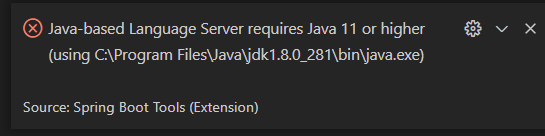
- I'd like to know in this case, which features are missing? As Java extension auto picks JDK 11 as java.home, I can run and debug the project.
This CI build does fix the issue of spring boot dashboard extensions, and I can see the projects correctly listed.
Here I have two more quick questions:
- Is the error message not helpful enough for users? As they may not understand "Java-based Language Server".
- If
spring-boot.ls.java.homeis not specified, and both JDK 8 and 11 are installed on my machine. Can it ensure to pick JDK 11 for your lanague server?
Eskibear
on 25 Mar 2021
@BoykoAlex Can you take a look to see if we can auto-select a JDK11 if that is around somewhere?
martinlippert
on 25 Mar 2021
- Is the error message not helpful enough for users? As they may not understand "Java-based Language Server".
Yeah, this is because we use the code for various language servers that we implemented in Java. But I agree, the error message should be improved, it doesn't make a lot of sense from the users point of view. It should definitely be more specific.
martinlippert
on 25 Mar 2021
@rubensa I noticed this:
As a side note, I have configured the
"spring-boot.ls.java.home"setting to point to the desired JDK (verison 8).
The "spring-boot.ls.java.home" setting is only to launch Spring Language Server process (i.e heart of the tooling) it has nothing to do with the Java version used in your projects. If your projects require Java 8 they will work just fine with Spring Tools that were launched with Java 11 under the hood.
@martinlippert myself and @kdvolder looked into finding Java 11 or higher on the system... Currently JDK is being searched in (unless "spring-boot.ls.java.home" is set)
JAVA_HOMEenvironment variable- In
PATHenvironment variable
Once we find any JDK in any of those steps it is returned. JDT server works similarly, but also checks JDK_HOME, windows registry and "default" location. Finds all of them and then picks the first in the list where version is 11 or higher.
This feels a bit unpredictable...
We felt (me and @kdvolder) that the current logic in vscode extensions looking for JDK is ok... but of course we can switch it to just look for JDK until version constraint is satisfied... maybe we should discuss this a bit...
We felt that the confusion arises because in the Wiki we stated prerequisite for tooling to run is Java 8+, it is not obvious whether java 11 and "spring-boot.ls.java.home" setting to start the tooling or is it the java to work with spring projects. Also the popup is misleading of course (stated above).
We have corrected the wiki and the popup message so far and hope that it might be ok already without picking JDK on user system somewhat randomly...
BoykoAlex
on 25 Mar 2021
Yes @BoykoAlex I "had" spring-boot.ls.java.home pointing to JDK 8 (as, It was specified in the doc as the minimun need). Now It's pointing to version 11 (so no problem here anymore).
When you say "If your projects require Java 8 they will work just fine with Spring Tools that were launched with Java 11 under the hood." That's true, but I want assure that I'm running my app with "the right" JDK my app is supposed to be developed for (so, for example, I do not use any non existing API that exists in a more recent JDK).
So, for me, predictability is important. If should be "great" to be able to specify the "exact" JDK I want to use (as requested, for example, here: https://github.com/redhat-developer/vscode-java/issues/1684) o, at least that "any" extension Java related uses the "same" mechanism to decide which JDK use to compile/run/anything... my application (that could be different JDK that the extension needs to run itself if the extension has code written in Java).
rubensa
on 26 Mar 2021
As there are may Java-related extensions (a must should be anything from Java Extension Pack and Spring Boot Extension Pack), provided by different people/organization, is difficult to "unify" it but the idea could be something like:
- java.home : To specify the JDK path to be used to compile/run/anything the app. This setting could be specified at any scope (User, Remote [Dev Container], Workspace, Folder)
- extension.prefix.java.home (like spring-boot.ls.java.home): To specify the JDK path to be used by the specific extension. This setting could be specified at any scope (User, Remote [Dev Container], Workspace, Folder)
- java.configuration.runtimes : Use this for the project as a fallback if java.home is not specified. Also use this if extension.prefix.java.home is not specified for the extension. The "algorithm" to decide the JDK to use from the available runtimes should be documented and should be the same for any extension.
- If none is set, the extension should do "it's best" to find the available JDKs and use the same documented algorithm to decide the JDK to use form the found ones.
- Also, there should be a mechanism to check the currently JDK used by the extension itself and the one used to compile/run/anything the project.
Does this make any sense?
rubensa
on 26 Mar 2021
@rubensa I feel that there is still a bit of misunderstanding... Outlined above is the Java Language Server approach with spring-boot.ls.java.home (i.e. extension.prefix.java.home) in the mix as the second bullet. I don't think that spring-boot.ls.java.home setting fits in this picture at all as it does not attempt to override Java Language Server settings for your project. Your project will be compiled and run only by the JDK/JRE from the Java Language Server settings and the mechanics of finding the JDK for it is just as you outlined above (or https://github.com/redhat-developer/vscode-java#setting-the-jdk)
spring-boot.ls.java.home setting is around only to launch the __Spring Tools Java Language Server__ application with the specific JDK 11+ if __JAVA_HOME__ is not java 11+. It has nothing to do with the Java settings of your project and it doesn't interfere with the exact Java version you've picked for your project (which would be either __java.home__ or __java.configuration.runtimes__ or JAVA_HOME environment variable - Java LS settings)
For example Java based IDE such as Eclipse can be launched with Java 11+ but you you can still work in it with Java 8 based projects and pick exact Java 8 version for a project or workspace in Eclipse preferences Java -> Installed JREs. In this example Spring Language Server is Eclipse or Eclipse plugin to be precise and Java -> Installed JREs preference is the equivalent of the Java settings from Java Language Server. (Not sure if this is a great example though ;-))
BoykoAlex
on 26 Mar 2021
Hi @BoykoAlex
I understand what you are telling but I was talking about a "wider approach". I was talking about unifying the mechanism for any Java related VSCode extensions to decide which JDK to use for itself and which JDK to use to compile/build/anything your Java project.
rubensa
on 29 Mar 2021
@rubensa I very much agree that a "wider approach" makes sense here and that it would be good to unify the way the different extensions select and use the JDKs on the system. It would be good to find a common ground here to make this easier for the user.
When looking at this at the broader scope, I think we have two fundamentally different use cases here:
- (1) the extension itself requires a JDK to run on. The extension usually requires a specific minimum JDK level to run on, due to the extension itself being written in Java and compiled based on a specific minimum Java version.
- (2) user projects are configured for a specific Java version to compile against and probably can use the same but also a different JDK to run/debug the project.
Both cases are completely separate from each other and should not be mixed up, I think. Different projects might require different JDKs to compile/run against (even in the same workspace different projects might use different JDKs at the same time). Different extensions might need different JDKs as well to work with (e.g. the RedHat Java extension might use JDK14 in the future, whereas the Spring Boot extension still uses JDK11). So it is hard to come up with some unique setting the user defines (like java.home points to a JDK and we use that for everything). But it is also cumbersome for the user to define the individual JDKs all across the place using different settings and options. That is crazy.
One approach could be:
We could come up with a unified way to let users define all the JDKs that are installed on their system (or whatever subset they would like to use). Maybe in some way like the RedHat Java extension defines the project JDKs: https://github.com/redhat-developer/vscode-java#project-jdks - but not specifically for projects, but as a general setting of configured JDKs to use.
Then, extensions could ask this unified list for a specific JDK (or a compatible one). So instead of searching for a JDK11 on its own, the Spring Boot language server could ask this unified component for a JDK >= 11 and that unified component would whatever Is configured in that list. In case extensions need to compile/run projects from the user, the extension could also lookup the available JDKs from that list and use them to compile/run against (or let the user even select which JDK to use then running an app).
@Eskibear What do you think?
martinlippert
on 30 Mar 2021
@Eskibear Btw, we released an updated version of the VSCode extension yesterday with the fix included, so that the extension checks for a JDK >= 11 and report an error if something else is found or configured appropriately. I am sure we can improve the error message a bit further (and add a link to the settings file to configure the JDK to make it easier to navigate there and find the right config setting), but that is subject to another issue.
Therefore I am closing this item here. But I would like to continue the discussion around the unified approach to define JDKs and come to a good conclusion there. We should probably extract that discussion into a separate GitHub item. Would you prefer something on the RedHat Java extension side or something over here?
martinlippert
on 30 Mar 2021
@martinlippert Great to know the issue got mitigated.
About JDKs, it's also a problem for Java extension itself. As you mentioned, it's easy to mix up JDKs used to launch extensions and run projects. And that's why we pin https://github.com/redhat-developer/vscode-java/issues/1543 on Redhat Java extension repository today.
A unified component to manage all JDKs is a good idea. We tried that with a unified Configure Java Runtime page in Java extension pack, listing all installed JDKs and attempting to provide an clearer way to configure JDKs for projects. Ideally, an independent "library extension" would be better, with exported APIs allowing other extensions to ask for location of available JDKs.
Another idea we had before was, to pre-pack a JDK inside the extension (just like what IntelliJ IDEA does). Then you only need to take care of your project JDKs. But the problem is, currently we cannot publish platform-specific extensions in VS Code, meaning that we have to pre-pack JDKs for all platforms together, which is too large.
Eskibear
on 31 Mar 2021
A unified component to manage all JDKs is a good idea. We tried that with a unified Configure Java Runtime page in Java extension pack, listing all installed JDKs and attempting to provide an clearer way to configure JDKs for projects. Ideally, an independent "library extension" would be better, with exported APIs allowing other extensions to ask for location of available JDKs.
Any plans in this direction? Would be awesome if we could collaborate on something like this so that we end up having a component that makes it easier for users to select and use specific JDKs.
Another idea we had before was, to pre-pack a JDK inside the extension (just like what IntelliJ IDEA does). Then you only need to take care of your project JDKs. But the problem is, currently we cannot publish platform-specific extensions in VS Code, meaning that we have to pre-pack JDKs for all platforms together, which is too large.
Yeah, I am not a big fan of pre-packaging the JDKs. We do that for the Spring Tools 4 for Eclipse distribution, but it really increases the size of the extension quite a bit - even if it would be possible to select the platform-specific piece. So I don't see this is the best way to proceed.
martinlippert
on 12 Apr 2021
Related issues
 arayariquelmes
·
4Comments
arayariquelmes
·
4Comments
 cirix
·
12Comments
cirix
·
12Comments
 lneumeier
·
8Comments
lneumeier
·
8Comments
 dsyer
·
7Comments
dsyer
·
7Comments
 subrat086
·
8Comments
subrat086
·
8Comments
Most helpful comment
So to quickly fix this, change the settings via
"spring-boot.ls.java.home"to point to a JDK >= 11.