Sts4: STS3 add-on installation issue in STS 4.8.1 from marketplace
DESCRIBE THE BUG
STS3 add-on installation issue in STS 4.8.1
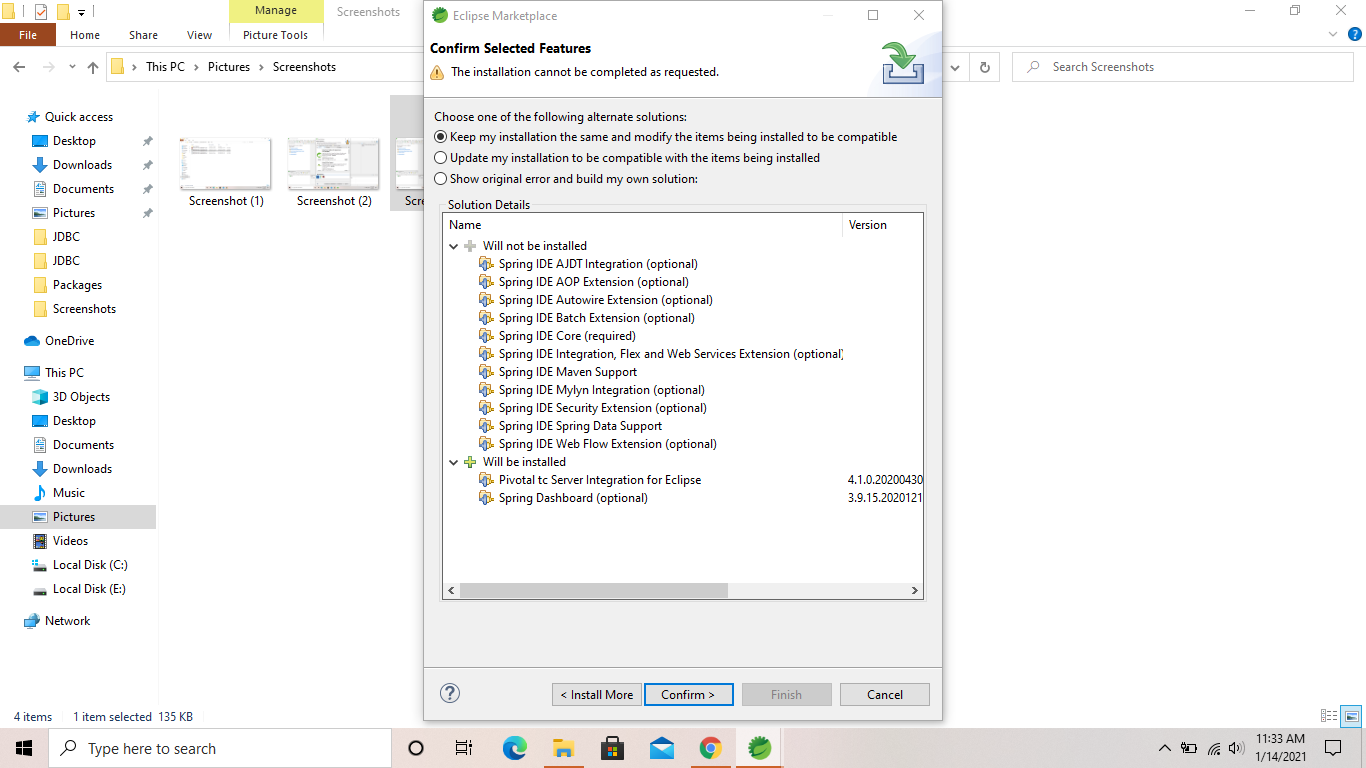
I have been using STS 4.8.1 with STS3 add-on 3.9.14 RELEASE since it's release but after formatting the pc when I'm trying to install the plugin (since now it's got upgraded to 3.9.15 RELEASE) I'm not able to do it so . And I don't want to switch to STS 4.9.0 because of some reasons like, I'm not getting the option to edit the spring bean configuration file(like adding P & C namespaces, UTIL namespaces after creating the SBCF) which was a very handy feature there in STS 4.8.1. So please have a look at it. I have tried multiple times to install it yet failed to do it so. Please have a look at those photos to get a better picture on this issue.

 subrat086
All 8 comments
In case you have a fresh Spring Tools for Eclipse 4.8.1.RELEASE on Eclipse 4.17 installed, you can use this update site to install the compatible STS3 add-on components from:
https://download.springsource.com/snapshot/TOOLS/nightly/e4.17-sts481r
(use this in the Install New Software dialog)
But I have to admit that I don't understand in detail why you can't use a fresh Spring Tools 4 4.9.0.RELEASE instead of the 4.8.1 release. Can you elaborate on that a bit? Would like to understand where the exact problem is.
 martinlippert
on 14 Jan 2021
martinlippert
on 14 Jan 2021
Thanks Martin for the solution.
I will definitely try out this approach.
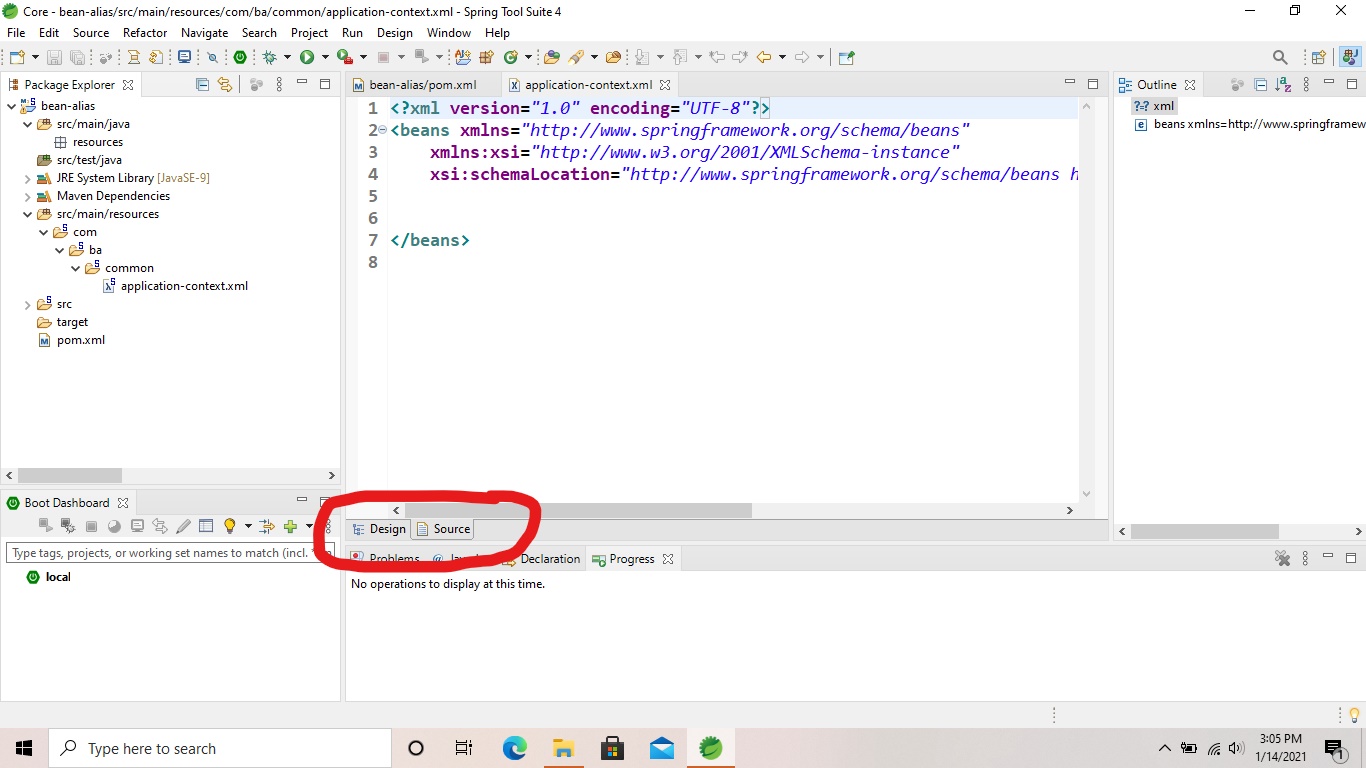
So as per the concern with Spring Tools 4 4.9.0.RELEASE the problem is that the option to add P & C Schemas and UTIL namespaces is not coming after creating the xml file. Precisely the issue with 4.9.0.RELEASE is , while I'm creating an xml file(Spring bean configuration file) for bean configurations at that time only it's allowing me to add XSD namespaces, P and C Schemas and UTIL namespaces. But after creating the xml file I'm not getting that option as I was getting in 4.8.1.RELEASE to add those Schemas whenever I want to add(like while creating and even after creating).That's what forced me to switch to Spring Tools 3 3.9.14.RELEASE. I have attached the photos related to this issue, please have a look at those and I'm sure you will figure out the issue.


subrat086
on 14 Jan 2021
The feature you are talking about is NOT part of Spring Tools 4 for Eclipse 4.8.1. If you have used this in Spring Tools 4 for Eclipse 4.8.1, you probably had the STS3 Add-On pack installed with it. That means you should be able to basically do the same with the 4.9.0.RELEASE - but I vaguely remember that there is an issue that might prevent the STS3 Add-On pack to install and behave properly when installed into 4.9.0. If you want to try that, I can find you the right version to install, so that it should work.
Having said that, please be aware of the fact that the STS3 Add-On pack will no longer be supported for future versions of the Spring Tools 4. So if you are missing a specific feature in the Spring Tools 4 that you had (and don't want to live without), please file an enhancement request for Spring Tools 4 and explain what you are missing and why, so that we can find a way to implement that feature in a way that fits into the Spring Tools 4.
Spring Tools 4 generally support Spring XML config files, but in a different way. If I understand you correctly, you are looking for an easy way to add specific namespaces to an existing Spring XML config file. Is that correct?
martinlippert
on 14 Jan 2021
Yeah Martin you have got the point, after installing STS3 Add-On 3.9.14.RELEASE into Spring Tools 4 4.8.1.RELEASE from marketplace I was getting that option to manipulate with XML files.Infact I use that shortcut alot while configuring the namespaces in XML files. And another fact is that I have had installed the Spring Tools 4 4.9.0.RELEASE but it didn't have that feature that I have highlighted in the photos. And I did give a try to the solution (STS3 Add-On) that you have mentioned in the earlier comment here ,but after installing that too also the shortcut to add namespaces option is not coming. So it will be helpful for me if you provide the right version to install to get that feature. In simple language the newly released Spring Tools 4 4.9.0.RELEASE doesn't support that feature even after adding the STS3 latest add-on(which is 3.9.15.RELEASE) from marketplace. So if you can provide the previous STS3 3.9.14.RELEASE Add-on link to install in Spring Tools 4 4.8.0.RELEASE it would be a great help.
subrat086
on 14 Jan 2021
I provided the update site URL for the compatible STS3 Add-On for 4.8.1 above, see https://github.com/spring-projects/sts4/issues/587#issuecomment-760013098.
If you have Spring Tools 4 for Eclipse 4.9.0 installed, you can use this update site URL to install the STS3 features on top:
https://dist.springsource.com/snapshot/TOOLS/nightly/e4.18-sts490r
I also fixed the Eclipse marketplace entries to install the latest snapshot version of the STS3 components which contain a fix for the underlying incompatibility.
Hope this helps and we can close the issue here. If there is anything left, please comment and we can re-open.
martinlippert
on 18 Jan 2021
Thanks Martin ,I will definitely work on the issue according to the solution you've given and I will let you know if any sort of issue comes.
subrat086
on 18 Jan 2021
I provided the update site URL for the compatible STS3 Add-On for 4.8.1 above, see https://github.com/spring-projects/sts4/issues/587#issuecomment-760013098.
If you have Spring Tools 4 for Eclipse 4.9.0 installed, you can use this update site URL to install the STS3 features on top:
https://dist.springsource.com/snapshot/TOOLS/nightly/e4.18-sts490rI also fixed the Eclipse marketplace entries to install the latest snapshot version of the STS3 components which contain a fix for the underlying incompatibility.
Hope this helps and we can close the issue here. If there is anything left, please comment and we can re-open.
Thank You Martin, this new update for STS3 has really been a great help for me to again work with Spring Tools 4 4.9.0.RELEASE ,and has solved my problem that I was facing. Thank you very much.
subrat086
on 20 Jan 2021
@subrat086 Awesome, thanks for letting us know. Glad to hear that it works for you.
martinlippert
on 20 Jan 2021
Related issues
 evowilliamson
·
14Comments
evowilliamson
·
14Comments
 Samet-MohamedAmin
·
6Comments
Samet-MohamedAmin
·
6Comments
 ingogriebsch
·
12Comments
ingogriebsch
·
12Comments
 gsmachado
·
7Comments
gsmachado
·
7Comments
 lneumeier
·
8Comments
lneumeier
·
8Comments
Most helpful comment
I provided the update site URL for the compatible STS3 Add-On for 4.8.1 above, see https://github.com/spring-projects/sts4/issues/587#issuecomment-760013098.
If you have Spring Tools 4 for Eclipse 4.9.0 installed, you can use this update site URL to install the STS3 features on top:
https://dist.springsource.com/snapshot/TOOLS/nightly/e4.18-sts490r
I also fixed the Eclipse marketplace entries to install the latest snapshot version of the STS3 components which contain a fix for the underlying incompatibility.
Hope this helps and we can close the issue here. If there is anything left, please comment and we can re-open.