Sts4: code completion is really slow with spring-boot-language-server version
When invoking content assist on java files the contents assist is really slow. I have tested this with Eclipse STS4 nightlies and VSCode release as well. They have spring-boot LS versions 1.7.0-SNAPSHOT and 1.6.0-SNAPSHOT respectively. The problem seems to be in 1.7.x version series.
This becomes the problem when working with java files and greatly effect the functionality of intellij when trying to implement the spring boot plugin to intellij. IntelliJ seems to trigger auto completions on typing.
 gayanper
All 53 comments
I'm not noticing CA in Java file being slow. First invocation in the file ~100ms consequent less than 5ms. Spring Boot LS only produces CA for java files inside @Value annotations.
Is there a specific project and/or Java file where CA is slow? Can you measure how long Spring Boot LS CA takes? (See SimpleTextDocumentService#completion(CompletionParams))
 BoykoAlex
on 30 Apr 2019
BoykoAlex
on 30 Apr 2019
With eclipse i tried this and when the lsp content computor is enabled the normal java content asist becomes slow. But when i disable it its back to normal. I don't see any such delays in the yml and properties contributions
gayanper
on 30 Apr 2019
Enabling/disabling Spring Boot LS from preferences didn't reveal any slow down in CA for me... It doesn't mean there is no issue though.
Can you check how long Spring Boot LS takes to produce Completion Proposals in your case? Is it just any random CA invocation takes long time in a Java file?
BoykoAlex
on 30 Apr 2019
Is there a way i can measure without debugging the language server ?
gayanper
on 30 Apr 2019
Measure time in the method and log the calculated time. For example:
    @Override
    public CompletableFuture<Either<List<CompletionItem>, CompletionList>> completion(CompletionParams position) {
        log.info("completion request received");
        CompletionHandler h = completionHandler;
        if (h!=null) {
            try {
                long t = System.currentTimeMillis();
                Either<List<CompletionItem>, CompletionList> either = completionHandler.handle(position)
                        .map(Either::<List<CompletionItem>, CompletionList>forRight)
                        .toFuture().get();
                log.info("Completion Took: {}", System.currentTimeMillis() - t);
                return CompletableFuture.completedFuture(either);
            } catch (InterruptedException e) {
                // TODO Auto-generated catch block
                e.printStackTrace();
            } catch (ExecutionException e) {
                // TODO Auto-generated catch block
                e.printStackTrace();
            }
        }
        return CompletableFuture.completedFuture(Either.forRight(NO_COMPLETIONS));
    }
Is it just the CA that is slow? Or is it a general IDE slow down? If it generally becomes sluggish with Boot LS running heap dumps when it is slow would help too.
Also check if SimpleTextDocumentService#resolveCompletionItem(CompletionItem) is getting called numerous times. Ideally it should only be called (request sent from the client) for the currently selected completion item. If it's called for all then it's a serious bug.
BoykoAlex
on 30 Apr 2019
The log you mentioned, how can i enabled it to be shown in Language Server Console in eclipse ?
gayanper
on 30 Apr 2019
Eclipse Preferences: Language Servers -> Spring Language Servers. Now you should see the check boxes for STS LS plugins. Check Spring Boot (or any other) to the see the log of the LS process in the Eclipse Console view.
BoykoAlex
on 30 Apr 2019
22:39:01.821 [pool-3-thread-1] INFO  o.s.i.v.c.l.u.SimpleTextDocumentService - completion request received
22:39:01.835 [elastic-3] INFO  o.s.i.v.c.l.c.VscodeCompletionEngineAdapter - Starting completion handling
22:39:05.146 [elastic-3] INFO  o.s.i.v.c.l.c.VscodeCompletionEngineAdapter - Got 0 completions
22:39:05.151 [elastic-3] INFO  o.s.i.v.c.l.c.VscodeCompletionEngineAdapter - Completion handling terminated!
This was the output. Seems like the completions take nearly 4 seconds to results a empty completion list. This is initial completion
gayanper
on 30 Apr 2019
22:41:25.034 [pool-3-thread-1] INFO  o.s.i.v.c.l.u.SimpleTextDocumentService - completion request received
22:41:25.039 [elastic-8] INFO  o.s.i.v.c.l.c.VscodeCompletionEngineAdapter - Starting completion handling
22:41:25.764 [elastic-8] INFO  o.s.i.v.c.l.c.VscodeCompletionEngineAdapter - Got 0 completions
22:41:25.765 [elastic-8] INFO  o.s.i.v.c.l.c.VscodeCompletionEngineAdapter - Completion handling terminated!
This is the second completion request, which also takes around 700ms
gayanper
on 30 Apr 2019
22:43:06.421 [pool-3-thread-1] INFO  o.s.i.v.c.l.u.SimpleTextDocumentService - completion request received
22:43:07.850 [elastic-9] INFO  o.s.i.v.c.l.c.VscodeCompletionEngineAdapter - Starting completion handling
22:43:09.659 [elastic-9] INFO  o.s.i.v.c.l.c.VscodeCompletionEngineAdapter - Got 0 completions
22:43:09.666 [elastic-9] INFO  o.s.i.v.c.l.c.VscodeCompletionEngineAdapter - Completion handling terminated!
This is a new different completion request on the same started IDE without closing the file even.
gayanper
on 30 Apr 2019
Where is the 4 seconds it took for completion got logged? It should be between those lines... Do you log the calculated time? If the code is similar to the snippet i pasted above the time should be logged...
Feels like you didn't rebuild the LS jars... From eclipse-language-servers folder run ./local-build.sh wait until it's completed then re-launch the runtime workbench.
BoykoAlex
on 30 Apr 2019
No i didn't changed the source code. Well at least we can see there is some delay since the log time is the time the log entry was created rather than the time it was written to file right ?
gayanper
on 30 Apr 2019
Seems like @gayanper clearly is experiencing long delay for boot language server to return '0 completions'. The timestamp in the log output are indeed good enough evidence to prove that.
The question is now... why? To find out more it will probably be necessary to add some additional logging during the processing.
 kdvolder
on 30 Apr 2019
kdvolder
on 30 Apr 2019
Yes, indeed from the time of the log entries it does take long... doesn't take as long for me. It'd be great if you could dig into the code a bit and see what exactly takes all that time on the Boot LS. Simply measuring the time method execution takes will point in the right direction... Would be good to know how long it takes for BootJavaCompletionEngine#getCompletions(...) for example...
Otherwise, it'd be good to have the project you're trying. the Java file as well. Any specific places that are having slow CA? What's the JVM running the LS process? Are you on Win, Mac or Linux?
I get for CA:
13:26:06.094 [pool-3-thread-1] INFO  o.s.i.v.c.l.u.SimpleTextDocumentService - completion request received
13:26:06.099 [elastic-5] INFO  o.s.i.v.c.l.c.VscodeCompletionEngineAdapter - Starting completion handling
13:26:06.108 [elastic-5] INFO  o.s.i.v.c.l.c.VscodeCompletionEngineAdapter - Got 0 completions
13:26:06.110 [elastic-5] INFO  o.s.i.v.c.l.c.VscodeCompletionEngineAdapter - Completion handling terminated!
13:26:07.391 [pool-3-thread-1] INFO  o.s.i.v.c.l.u.SimpleTextDocumentService - completion request received
13:26:07.392 [elastic-2] INFO  o.s.i.v.c.l.c.VscodeCompletionEngineAdapter - Starting completion handling
13:26:07.455 [ForkJoinPool.commonPool-worker-15] INFO  o.s.i.v.c.boot.app.cli.SpringBootApp - check for spring jmx beans (retry no. 1) -- LocalSpringBootApp [id=46595, name=``]
13:26:07.456 [ForkJoinPool.commonPool-worker-3] INFO  o.s.i.v.c.boot.app.cli.SpringBootApp - check for spring jmx beans (retry no. 1) -- LocalSpringBootApp [id=51885, name=``]
13:26:07.456 [ForkJoinPool.commonPool-worker-7] INFO  o.s.i.v.c.boot.app.cli.SpringBootApp - check for spring jmx beans (retry no. 1) -- LocalSpringBootApp [id=81619, name=``]
13:26:07.472 [elastic-2] INFO  o.s.i.v.c.l.c.VscodeCompletionEngineAdapter - Got 0 completions
13:26:07.472 [elastic-2] INFO  o.s.i.v.c.l.c.VscodeCompletionEngineAdapter - Completion handling terminated!
13:26:09.737 [pool-3-thread-1] INFO  o.s.i.v.c.l.u.SimpleTextDocumentService - completion request received
13:26:09.738 [elastic-5] INFO  o.s.i.v.c.l.c.VscodeCompletionEngineAdapter - Starting completion handling
13:26:09.740 [elastic-5] INFO  o.s.i.v.c.l.c.VscodeCompletionEngineAdapter - Got 0 completions
13:26:09.740 [elastic-5] INFO  o.s.i.v.c.l.c.VscodeCompletionEngineAdapter - Completion handling terminated!
Looks fast. Trying to figure out what is different in your setup.
BoykoAlex
on 30 Apr 2019
thread dumps and/or profiling data from the language server process might help, too. @gayanper do you have a profiler around?
 martinlippert
on 30 Apr 2019
martinlippert
on 30 Apr 2019
I can provide some visualvm snapshots tomorrow. This is on windows 10 with java 8 i think. But i will check and let you know
gayanper
on 30 Apr 2019
Sampling and Profiling snapshots from visualvm
gayanper
on 1 May 2019
I have three projects in the workspace, which has following number of dependencies together with the transitive ones.
Project 1 - 265
Project 2 - 232
Project 3 - 288
gayanper
on 1 May 2019
Seems like calls to java.io.File#getCanonicalFile() take majority of the time (when looking at classpath trying to determine is spring, is boot project)... Maybe Exception is thrown from the method...
BoykoAlex
on 1 May 2019
@BoykoAlex do we really need to resolve the files to just check for the CPE name ? Should we have lightweight method to perform this ?
gayanper
on 1 May 2019
Yes, names should just be enough... but maybe we don't need even to create canonical files, think it's best to expect canonical file paths from JDT and JDT LS for classpath entries rather then convert them to canonical all the time on the LS side... I'll wait for @kdvolder to add his 2 cents before continuing.
BoykoAlex
on 1 May 2019
I think the problem is all the projects in my workspace has more than nearly 800 CPEs. which might be the issue which takes time to resolution of file paths. Even for none JDT-LS do we need to file paths resolved ? because for this check just checking the CPE.Path against a compiled REGEX pattern might be enough right ?
gayanper
on 1 May 2019
I'll wait for @kdvolder to add his 2 cents before continuing.
It sounds reasonable to replace/avoid 'getCanonicalFile' if that's really the cause of this delay. However, I don't remember why it was used in the first place, maybe there is no good reason, maybe there is. I'd like to take a quick look at it and understand this first.
kdvolder
on 1 May 2019
@BoykoAlex and @kdvolder Just patched the commons-java to use pattern matching on the CPE.getpath instead of resolving it to file system file. The problem (delay) is gone now and every thing is working. I think this file path resolving is another root cause to slow startups of the LS server as well, because it takes considerable amount of time for the workspace symbol to be ready.
gayanper
on 1 May 2019
Okay let's just replace the getCanonicalFile with getAbsoluteFile.
kdvolder
on 1 May 2019
@gayanper Can you try replacing in org.springframework.ide.vscode.commons.java.IClasspathUtil
    private static File canonicalFile(File f) {
        try {
            return f.getCanonicalFile();
        } catch (IOException e) {
            return f.getAbsoluteFile();
        }
    }
with
    private static File canonicalFile(File f) {
        return f.getAbsoluteFile();
    }
It should produce the same effect really. If it does will push that fix in.
BoykoAlex
on 1 May 2019
@BoykoAlex the getAbsoluteFile didn't not improved that much. The completions are still slow. Better than getCanonicalFile but not the same as my pattern fix. IMHO i think we should not create File and resolve the getAbsoluteFile just to check the name and extension of the file.
gayanper
on 2 May 2019
diff --git a/headless-services/commons/commons-java/src/main/java/org/springframework/ide/vscode/commons/java/SpringProjectUtil.java b/headless-services/commons/commons-java/src/main/java/org/springframework/ide/vscode/commons/java/SpringProjectUtil.java
index 5cde37cae..6a0ef15af 100644
--- a/headless-services/commons/commons-java/src/main/java/org/springframework/ide/vscode/commons/java/SpringProjectUtil.java
+++ b/headless-services/commons/commons-java/src/main/java/org/springframework/ide/vscode/commons/java/SpringProjectUtil.java
@@ -11,6 +11,7 @@
 package org.springframework.ide.vscode.commons.java;

 import java.io.File;
+import java.util.regex.Pattern;

 import org.slf4j.Logger;
 import org.slf4j.LoggerFactory;
@@ -19,19 +20,23 @@ public class SpringProjectUtil {

    public static final Logger log = LoggerFactory.getLogger(SpringProjectUtil.class);

+   private static final Pattern BOOT_PATTERN = Pattern.compile(".*[\\\\/]spring-boot.*\\.jar");
+
+   private static final Pattern CORE_PATTERN = Pattern.compile(".*[\\\\/]spring-core.*\\.jar");
+
    public static boolean isSpringProject(IJavaProject jp) {
-       return hasSpecificLibraryOnClasspath(jp, "spring-core");
+       return hasSpecificLibraryOnClasspath(jp, CORE_PATTERN);
    }

    public static boolean isBootProject(IJavaProject jp) {
-       return hasSpecificLibraryOnClasspath(jp, "spring-boot");
+       return hasSpecificLibraryOnClasspath(jp, BOOT_PATTERN);
    }

-   private static boolean hasSpecificLibraryOnClasspath(IJavaProject jp, String libraryNamePrefix) {
+   private static boolean hasSpecificLibraryOnClasspath(IJavaProject jp, Pattern pattern) {
        try {
            IClasspath cp = jp.getClasspath();
            if (cp!=null) {
-               return IClasspathUtil.getBinaryRoots(cp, (cpe) -> !cpe.isSystem()).stream().anyMatch(cpe -> isEntry(cpe, libraryNamePrefix));
+               return cp.getClasspathEntries().parallelStream().anyMatch(cpe -> pattern.matcher(cpe.getPath()).matches());
            }
        } catch (Exception e) {
            log.error("Failed to determine whether '" + jp.getElementName() + "' is Spring Boot project", e);
@gayanper Maybe lets try simple return file;. I don't think creating new file resolves anything like getting absolute or canonical file. There are other places that use #getBinaryRoots(...) which would fix a number of use cases with a single fix.
BoykoAlex
on 2 May 2019
@BoykoAlex i agree we need to fix the issue of canonical file problem. But do we really need to creates hundred of file instances to check if we have the spring library jar in the CPE ? That might be over killing right ?
gayanper
on 2 May 2019
In my opinion the problem is that we don't have a uniform path for classpath entries, which you can access in efficient way all the time. Classpath doesn't change often, but classpath entries are accessed often for hovers, CA, CodeLens etc. Therefore, it'd great if JDT or JDT LS would send classpth entry path properly formatted. Then from classpath entry path we could safely and efficiently create instances fo File or Path and access file name to make checks like above. It is very likely that canonical path is the path being sent from JDT and JDT LS and canonical and absolute path conversions were added in the past for safety purposes.
I wouldn't think creating File instances is an overkill. Creating a File instance is quick - it is just a path really, it doesn't load or resolve anything. Should just be as fast as creating a Path. Or did you notice the opposite? If you did I'd be curious to see the difference with the Regex approach...
If creating a File instance is quick as I expect it to be I'd rather keep using #getBinaryRoots(...) that has good performance since it is used in many places. If you really in favour of Regex I think we can take your change above too.
BTW, just noticed that parallelStream() is used for Regex. We should also use parallelStream() then for binary roots so we compare apples to apples.
BoykoAlex
on 2 May 2019
@BoykoAlex one of my colleague also said the same when i was mentioning this situation. I will try to see if there is a big difference, i think i better try it on eclipse since the debug console is already available. I will get back with the results soon.
gayanper
on 2 May 2019
I've tried a Junit test:
    private static final Pattern CORE_PATTERN = Pattern.compile(".*[\\\\/]spring-core.*\\.jar");
    private static final String PREFIX = "/User/aboyko/git/";
    private static final String SPRING_CORE = "spring-core";
    private static final List<String> paths = new ArrayList<>();

    static {
        for (int i = 0; i < 1000000; i++) {
            paths.add(PREFIX + UUID.randomUUID());
        }
    }

    @Test
    public void testFile0() throws Exception {

    }

    @Test
    public void testRegex1() throws Exception {
        for (String path : paths) {
            if (CORE_PATTERN.matcher(path).matches()) {
                fail();
            }
        }
    }

    @Test
    public void testFile1() throws Exception {
        for (String path : paths) {
            File f = new File(path);
            if (f.getName().contains(SPRING_CORE)) {
                fail();
            };
        }
    }

    @Test
    public void testRegex2() throws Exception {
        for (String path : paths) {
            if (CORE_PATTERN.matcher(path).matches()) {
                fail();
            }
        }
    }

    @Test
    public void testFile2() throws Exception {
        for (String path : paths) {
            File f = new File(path);
            if (f.getName().contains(SPRING_CORE)) {
                fail();
            };
        }
    }
    @Test
    public void testRegex3() throws Exception {
        for (String path : paths) {
            if (CORE_PATTERN.matcher(path).matches()) {
                fail();
            }
        }
    }

    @Test
    public void testFile3() throws Exception {
        for (String path : paths) {
            File f = new File(path);
            if (f.getName().contains(SPRING_CORE)) {
                fail();
            };
        }
    }
Results are:
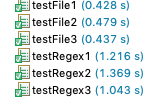
Think I'm leaning towards creating java.io.File rather than use Regex matching...
BoykoAlex
on 2 May 2019
Agree lets go with the java.io.File direction :)
gayanper
on 2 May 2019
I'm surprised that getAbsoluteFile is that expensive. I would expect that a check to see if a file is absolute would be cheap and in that case it basically does nothing.
I could imagine that the cost of various operations like new File(...) and file.getAbsolutePath() are somewhat dependent on OS. For example for Mac and Linux checking if a path is abolute just needs to check whether the first character is a /. But on Windows there's all these complexity around 'device identifiers like C:\blah. So maybe its more costly on Windows to do things like create File objects as well as the various operations on them.
@gayanper Curious to see if when you run Alex tests you see similar measurements.
kdvolder
on 2 May 2019
When I added f = f.getAbsoluteFile() in the file tests it was OK, I didn't see any notable time difference. That was on Mac of course, not on Win.
I'd move #getAbsoluteFile() (or file.getAbsolutePath()) calls to org.springframework.tooling.jdt.ls.commons where those classpath entries are constructed.
BoykoAlex
on 2 May 2019
@kdvolder @BoykoAlex i will run the tests case tomorrow once i get hold of my windows workstation. I'm a linux guys at home ;)
gayanper
on 2 May 2019
I'd move #getAbsoluteFile() (or file.getAbsolutePath()) calls to org.springframework.tooling.jdt.ls.commons where those classpath entries are constructed.
Thought about it and I agree. Doing it on the other side where the events are received is even potentially incorrect. The events are sent and received from different processes (at least in the vscode case). Relative paths are interpreted in relation to the process's working dir. So, the meaning of relative path strings might actually change when viewed from a different process. Therefore it should be a requirement that any path strings in these event messages should always be absolute. This means they have to be made absolute on the sender side, not the receiver.
kdvolder
on 2 May 2019
Hopefully fixed with 6163411e3fb0c1a1385f54f8e2ff886133479cd5
BoykoAlex
on 2 May 2019
@BoykoAlex @kdvolder Windows 10 results
Execution1
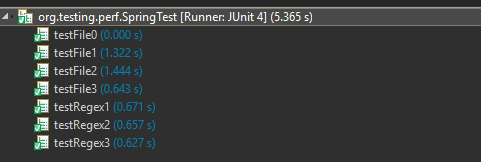
Execution2
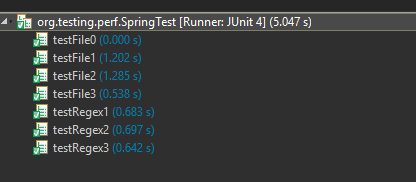
gayanper
on 3 May 2019
Some benchmarks which shows the current direction is the right direction :)
Benchmark | Mode | Samples | Mean | Mean error | Units
------------ | ------- | --------- | ------ | ------------- | -----
o.t.p.MyBenchmark.testFile | avgt | 10 | 478.075 | 337.285 | ms/op
o.t.p.MyBenchmark.testRegex | avgt | 10 | 724.041 | 266.221 | ms/op
gayanper
on 3 May 2019
I think we are ok to close this
BoykoAlex
on 6 May 2019
@martinlippert I am using STS 4.4.0 (win10 x64, eclipse 4.13, openjdk 12). i had a lot of freezes in the past weeks when using the code assistant or combined hover. Today i disabled the spring boot "language server" for Java source files and the freezes are gone. Does the Language Server require a permanent stable internet connection? i am using STS behind a proxy in the company i work at. could that be a problem?
i could also not find any documentation about this option and was also not able to spot a difference in the code assitant after i disabled the language server.
 d2k2-git
on 24 Sep 2019
d2k2-git
on 24 Sep 2019
@d2k2-git lets move this discussion over to #370
Is your OS Windows?
Is your STS 4.4.0 based on Eclipse 4.12 or 4.13?
What do you see in the Boot Language Server log? Can you paste it here? (Should see the log in Console view if you have enabled Boot Languege Server logging in the console view via preferences)
Can you profile content assist invocation with VisualVM (CPU sampling) and attach the profiling file here?
Please reply with more info in #370. Thanks in advance!
BoykoAlex
on 24 Sep 2019
@d2k2-git actually never mind #370. It's about Ctrl-Click navigation... it might be unrelated to CA being slow... Please comment here :-)
BoykoAlex
on 24 Sep 2019
Does the Language Server require a permanent stable internet connection? i am using STS behind a proxy in the company i work at. could that be a problem?
Not explicitly or by design. But I have been surprised in the past that sometimes even just using localhost connecions can end-up somehow pinging outside internet. I recall somethings related to domain name and/or reverse domain name resolution being called from inside Java's socket apis causing delays in the past. So I wouldn't rule out that the firewalling situation in your network has this kind of an effect.
kdvolder
on 24 Sep 2019
@d2k2-git Maybe it is nevertheless related to #370, at least you could try to enable the logging to the console via Preferences -> Language Server -> Spring Language Server and activate the logging for the Spring Boot LS there. Maybe it reveals anything interesting on the console, like a similar exception than in #370.
martinlippert
on 25 Sep 2019
So far i was not able to find any interesting information from the log files. i will have time in arround 10 days to invetigate this problem. i would like to help you. but i need some detailed instruction how to perform the thread/memory snapshots you need. i already tried to do myself, but eclipse is not even listed in jprofiler or visualvm. in jconsole i could not find any dumping/snapshot option.
d2k2-git
on 27 Sep 2019
@d2k2-git
VisualVM
- Download from https://visualvm.github.io/
- Start STS 4.4.0, open Java file from Spring Boot project
- Start Visual VM. You should see in the left pane the following:
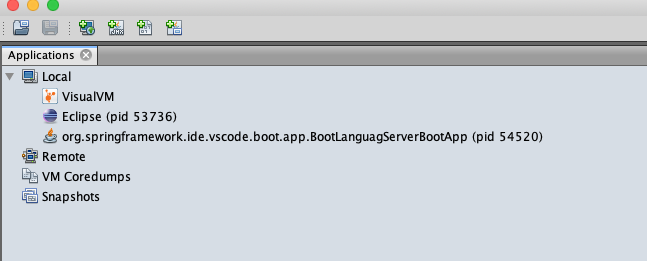
- Then click on the Sample toggle button at the top of the right pane. You should see on the next row CPU and Stop buttons:
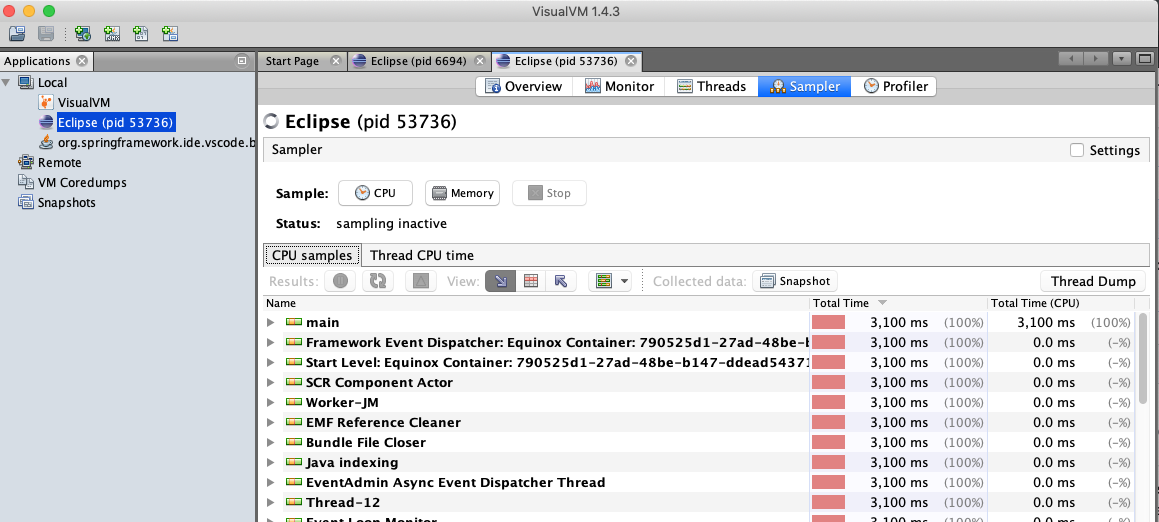
- Click on CPU button (starts sampling). Gp to Eclipse and activate time consuming content assist proposals computation. Wait until proposal computed or Eclipse freezes and then click Stop button in VisualVM.
- Click on the Snapshot button

- Now you should see the snapshot under the app in the left pane
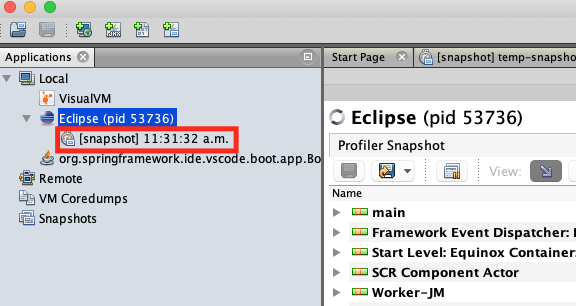
- Right-click on that snapshot and click on Save As...
- Attach the saved .nps file for profiled Eclipse here.
Repeat the same steps for the Boot LS process:org.springframeework.ide.vscode.boot.app.BootLanguageServerBootAppand attach .nps file for the Boot LS profiling here as well.
BoykoAlex
on 27 Sep 2019
@BoykoAlex
Sorry for the late answear. i try to follow your instruction to make a snapshot with visualVM. But there is no eclipse and bootLanguageServer process listed in VisualVM. i tested with different JDK combinations, but no luck.
I can only confirm that STS is now running for many days without freeze when using the content assistant since i disabled the LanguageServer for Java source files.
I still wonder what i am missing after disabling the languagse server for java source files. i did not notice any difference while using the content assistant.
d2k2-git
on 11 Oct 2019
I still wonder what i am missing after disabling the languagse server for java source files. i did not notice any difference while using the content assistant.
The language server doesn't do much in terms of content assist in Java files. There is one example where it kicks in that is inside of @Value(...) annotations. Of the top of my head there's nothing else that comes to mind. The language server does other things though such as providing boot specific symbols in 'open symbols' dialog (press CTRL-6 to open it). Hovers for live process data, completions for properties while editing application.properties and application.yml.
If you are not interested in any of those features then you are probably not missing anything disabling the language server.
@d2k2-git
In the recent past we have seen several reports similar to yours from people on windows and in many cases the problem was caused by them using the built-in windows zip utility to unpack STS distribution. The zip utility in Windows does not support long path names out of the box and just unpacks STS incorrectly causing the language server in particular to break.
See: https://github.com/spring-projects/sts4/issues/304
If you are on Windows and this sounds like it could be your problem, then maybe you can try some of the worksarounds described in that ticket. TLDR: unpack it using something else like jar xf ... on the CLI or 7zip.
kdvolder
on 15 Oct 2019
In the recent past we have seen several reports similar to yours from people on windows and in many cases the problem was caused by them using the built-in windows zip utility to unpack STS distribution. The zip utility in Windows does not support long path names out of the box and just unpacks STS incorrectly causing the language server in particular to break.
@kdvolder
thx for your answear. STS was unpacked with 7zip on my system.
d2k2-git
on 17 Oct 2019
Related issues
 tjstuart
·
10Comments
tjstuart
·
10Comments
 ingogriebsch
·
12Comments
ingogriebsch
·
12Comments
 gsmachado
·
7Comments
gsmachado
·
7Comments
 tkupka
·
11Comments
tkupka
·
11Comments
 MahatmaFatalError
·
8Comments
MahatmaFatalError
·
8Comments