Strongbox: Favicon Support
Hello,
I read an interesting idea at the Keepass Forum (sourceforge) and wanted to share it here & +1 it:
Only a small thing: i used the favicon downloader for my windows keepass. In the app the favicons looks terrible. Is that a app or a resolution problem?
Could you include a possibility to change or even mass download favicons, if a url is provided in the entry?
 aNerdgirl
All 27 comments
Ohhh yes. Was going to mention this.
 milesmcclane
on 10 Feb 2019
milesmcclane
on 10 Feb 2019
Yes, not sure what the cause of the resolution issue is, haven't investigated yet. But I think this would be a nice feature/option to have.
 mmcguill
on 10 Feb 2019
mmcguill
on 10 Feb 2019
So I managed to take a look into this. The issue is the Favicon plugin is storing 16x16 icons with each entry. Which is why they look terrible when blown up to 48x48 (Strongbox Icon size in Browse View). There are two solutions really, one if to ask the Favicon plugin developers to store a larger icons if available (I think most FavIcons are much larger these days) or to build support for favicon downloading into Strongbox.
I'd like to add this natively to Strongbox and so I'll place it in the backlog, and consider this ticket as that item.
Probably want
- An option to do it Database wide (all icons)
- Individually Per Entry (Automatically on Add, or Manually Force Download for Existing Entries)
mmcguill
on 12 Feb 2019
Great news. I wonder how feasible it would be to be able to upload your own custom ones? Obviously not really an essential thing but if you’re looking in this general direction, it could be investigated?
milesmcclane
on 12 Feb 2019
Yes, absolutely, it would be dependent on this: https://github.com/mmcguill/Strongbox/issues/62
mmcguill
on 12 Feb 2019
Support for this now on iOS with 1.22.0. You can download a favicon from within the app. Tap on the Icon in Edit more, or Slide Left in Browse Mode and choose 'Set Icon'.
mmcguill
on 26 Feb 2019
This works very well! Thanks! One very small issue- once a favicon is downloaded, it doesn’t seem possible to use that favicon for another purpose without redownloading it?
An example would be to reuse the Apple favicon, for an Apple folder, where a downloadable link does not occur. The desktop Keepass (XC) adds any downloaded favicon to a seperate section of the standard set, enabling use wherever else you may want.
Does this exist, if not is this possible to implement?
milesmcclane
on 19 Mar 2019
Good idea Miles, yes, I think this would be a nice feature. We can use this issue to track.
mmcguill
on 19 Mar 2019
Downloaded/Custom Icons should be available for selection now for you with latest versions.
mmcguill
on 26 Mar 2019
Yes I have noticed! Way better, everything can be more consistant for my use cases. Thanks!
This project is by far my favourite iOS app at the moment, largely to do with you and your outlook on seeing what the community wants and then implementing it. I’m spreading the word... this is fast becoming the Keepass that iOS so desperately needed.
milesmcclane
on 26 Mar 2019
Thanks very much @milesmcclane ! You're very kind. I really want to build it into a great product too
mmcguill
on 26 Mar 2019
Downloading a Favicon doesn't work for all URLs - even if there's a favicon.ico available unter the entered URL. Any ideas, why this sometimes doesn't work? Does it depend on the resolution of the favicon.ico?
 Slummi
on 26 Jun 2019
Slummi
on 26 Jun 2019
My experience is some websites don’t locate the fav icon in “standard” location.
 georgesnow
on 26 Jun 2019
georgesnow
on 26 Jun 2019
I use a third party library to download the favicon, but I have noticed it sometimes "misses". Do you have a sample URL? It's actually a strangely involved process (there is no standard) for getting this favicon...
mmcguill
on 26 Jun 2019
Here are some sample URLs:
- https://www.adac.de (https://www.adac.de/favicon.ico)
- https://www.shell.de (https://www.shell.de/favicon.ico)
- https://www.trendnet.com (https://www.trendnet.com/favicon.ico)
- https://www.ups.com (https://www.ups.com/favicon.ico)
Slummi
on 27 Jun 2019
@Slummi these should be working for you now... one of the issues was a misconfiguration on some of those sites pointing at icons (not favicon.ico) that didn't exist. Another was the content-type was not a known icon. Another issue was the HTTP method used to download (HEAD instead of GET). Favicon downloading should be a bit more robust now...
mmcguill
on 30 Jun 2019
Thank you @mmcguill for the quick adaptions! I will test this with some other URLs in the future! At first sight it seems to work much better.
Slummi
on 30 Jun 2019
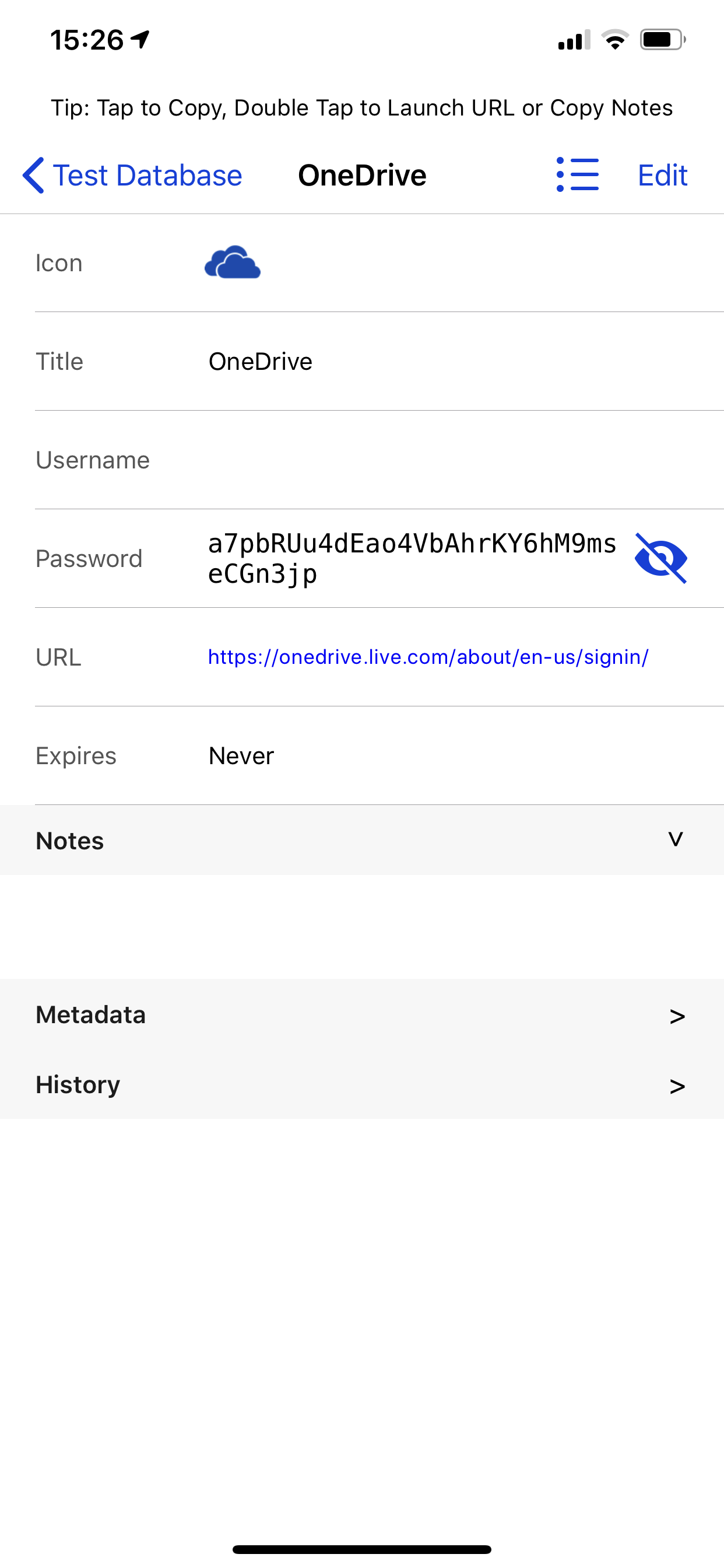
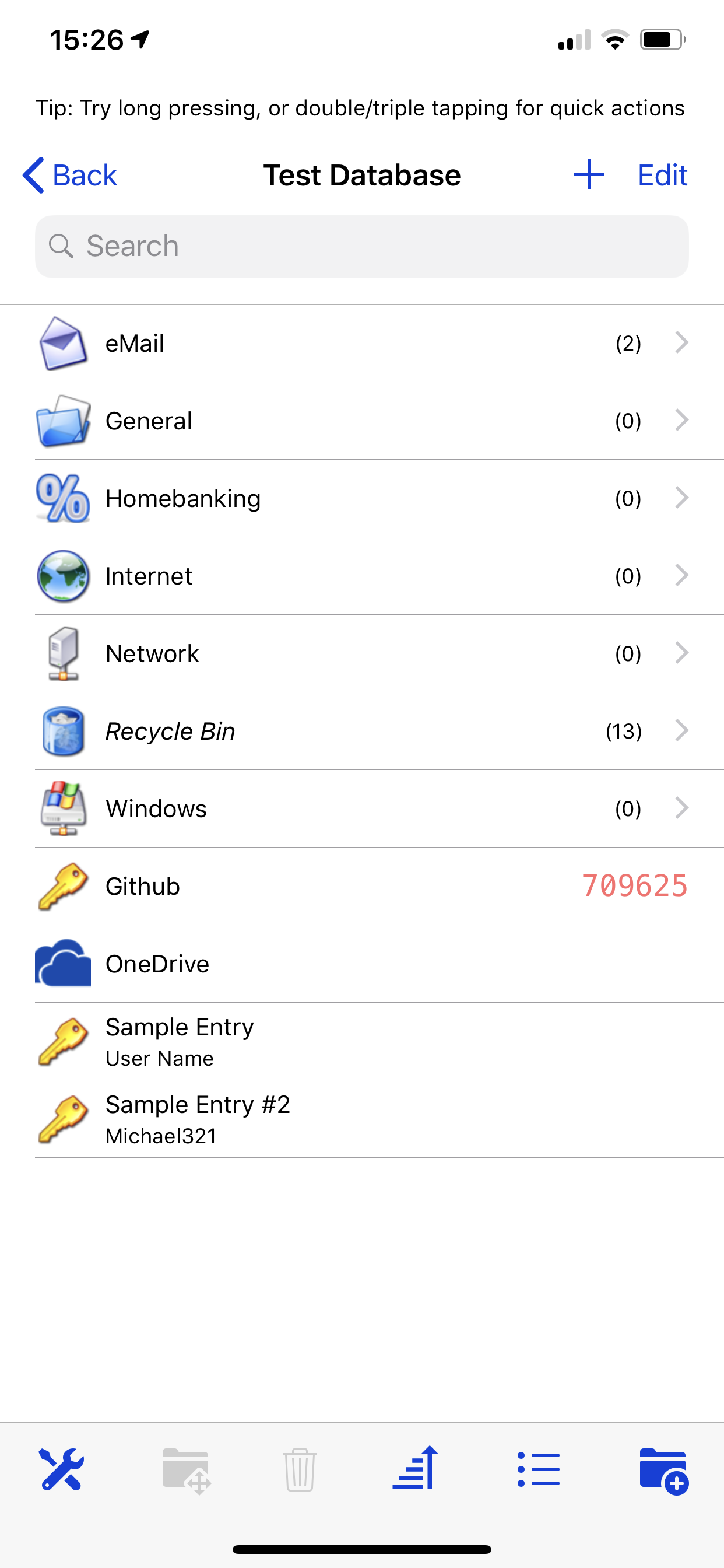
I’ve noticed that if I download the favicon, sometimes it displays nicely within the entry, but it appears truncated on both sides if you go back to the previous screen that lists the entries. Nothing major just odd. OneDrive is used for this example.
 shad0whawk
on 30 Jun 2019
shad0whawk
on 30 Jun 2019
OneDrive icon looks much better now. Thanks!
shad0whawk
on 4 Jul 2019
Just a cosmetic problem. If a website is only offering 16x16 icons they get streched in Strongbox, which led to unsharp favicons. Maybe its possible to check if the size is smaller than 32x32? and than just show the size they have?
 MisterAlanBradley
on 9 Oct 2019
MisterAlanBradley
on 9 Oct 2019
Interesting, I guess that should be possible, anyone else have any thoughts on this?
mmcguill
on 10 Oct 2019
I'm uncertain what the best solution would be. On the one hand the icons are sometimes not sharp, on the other hand the icons would be quite small in 16x16.
Slummi
on 14 Oct 2019
My thoughts on this:
I gave up looking for a tool to do the job. Favicon quality, download tool reliability, icon spacing - all these factors make the result a mess, especially on high DPI screens of iDevices and Macs.
In the end I replaced all icons with icons/logos I found via Google searches which I also manually adjusted in many cases (spacing, cropping) - was quite some effort but gave me the best results.
 dan-el
on 14 Oct 2019
dan-el
on 14 Oct 2019
Hi
i'm a new user of your very nice apps, coming from 1password, and happy to leave it.
The favicon is very usefull, and makes the app a lot more appealing. i would love to see it implemented into the mac app and/or to have an option in the settings/preferences to automatically get the favicon whenever there is a url filled.
Thanks a lot for the app !
 etibamecus
on 20 Nov 2019
etibamecus
on 20 Nov 2019
Thanks @etibamecus! Glad you like it :)
Yes, hoping to add improved FavIcon support to both Mac and iOS soon!
mmcguill
on 21 Nov 2019
FYI, improved FavIcon support now available in iOS 1.45.0 - Mac support coming soon...
mmcguill
on 10 Dec 2019
This is now complete across iOS and Mac. Please open any related issues as new bugs. Cheers!
mmcguill
on 6 Jan 2020
Related issues
 brogers5
·
6Comments
mmcguill
·
7Comments
brogers5
·
6Comments
mmcguill
·
7Comments
 eike-fokken
·
7Comments
shad0whawk
·
5Comments
eike-fokken
·
7Comments
shad0whawk
·
5Comments
 limuc
·
6Comments
limuc
·
6Comments