Strongbox: Pin unlock ui problem on small screen, e.g. iphone se
Hi there, I encountered a ui bug on the iphone se (I guess other iphones with the same small display are also affected):
in portrait mode the "Done" button is almost invisible (too far to the right), see the screenshot below. It is alos hard (but possible) to press it, one has to find a very small spot, where it reacts. In landscape mode all buttons are visible but none of them reacts to pressing them.
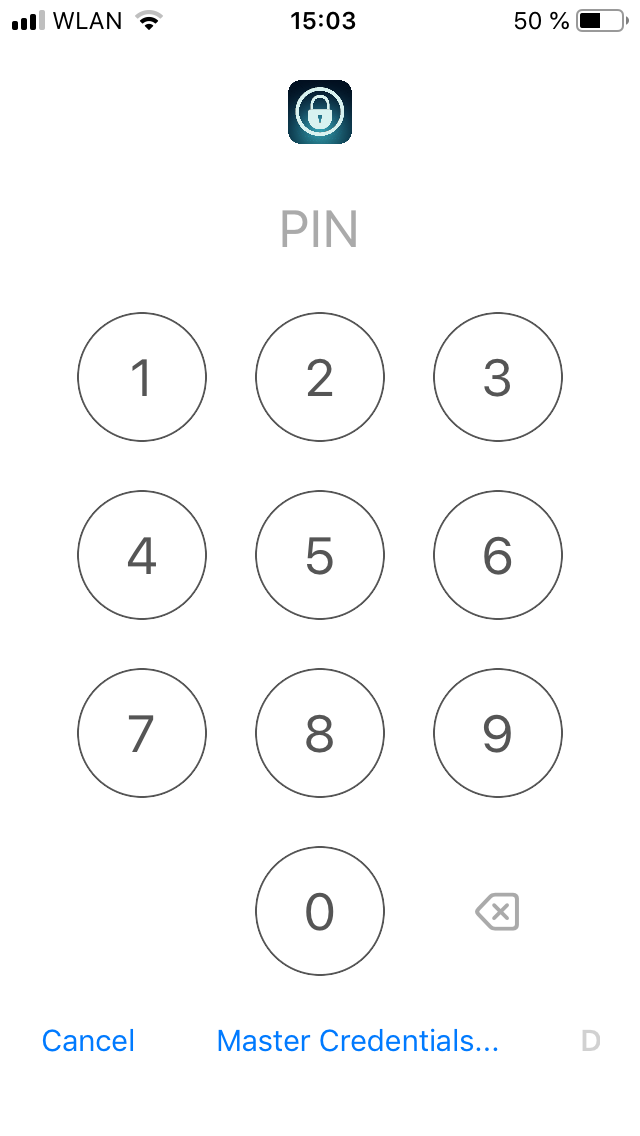
On another note, but totally unimportant: I liked the letters on the touchpad, it made for more easily rembered pin codes, but I adapted...
 eike-fokken
All 7 comments
Hi @eike-fokken, this should be fixed in version 1.30.0 - Have you tried that version?
 mmcguill
on 6 Jun 2019
mmcguill
on 6 Jun 2019
Also, maybe you're not aware but you can switch on Instant Pin Unlock so that you don't have to hit the Done button if you like
mmcguill
on 6 Jun 2019
I'm proud to say that I actually thought of updating to the latest version before filing this report! (Had the mouse already on the submit button, to be honest)
So the problem persists.
eike-fokken
on 6 Jun 2019
Wait a second, my phone does stupid things, I downloaded 1.30, but it is still on 1.29.something. I'll check back when I have the newest version.
eike-fokken
on 6 Jun 2019
Hm... i feel stupid now...
Yeah, it's gone, sorry to have bothered you
eike-fokken
on 6 Jun 2019
Oh fantastic, great to hear it! Still worth trying out instant pin unlock feature, it’s nice!
mmcguill
on 6 Jun 2019
I just turned it on, it is definitely nice!
eike-fokken
on 6 Jun 2019
Related issues
 limuc
·
6Comments
limuc
·
6Comments
 Slummi
·
5Comments
Slummi
·
5Comments
 rob3c
·
3Comments
rob3c
·
3Comments
 Ben-Voris
·
4Comments
mmcguill
·
5Comments
Ben-Voris
·
4Comments
mmcguill
·
5Comments
Most helpful comment
I just turned it on, it is definitely nice!