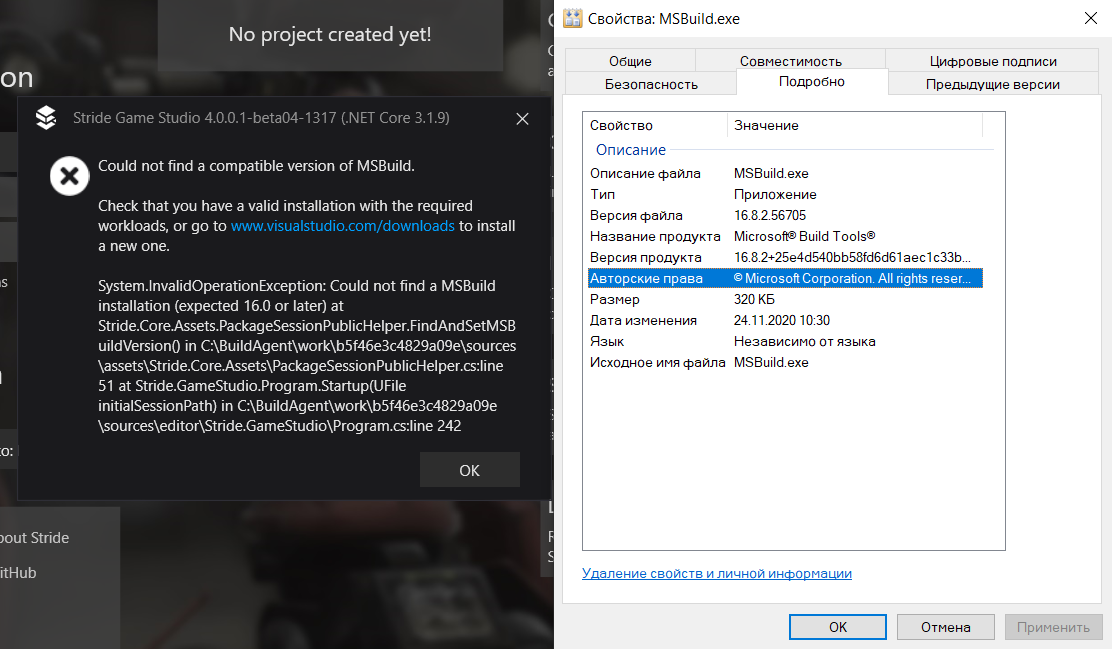
Stride: Stride cannot run becouse version of MSBuild is not 16.0 or later
Release Type: Official Release
Version: 4.0.0.1-beta04-1317
Platform(s): Windows
Describe the bug
Stride cannot run becouse version of MSBuild is not 16.0 or later but I have MSBuild version 16.8.2.56705
Expected behavior
I deleted one of my projects from disk and removed it from list in Stride Launcher and started Stride.
Screenshots
Log and callstacks
Could not find a compatible version of MSBuild.
Check that you have a valid installation with the required workloads, or go to www.visualstudio.com/downloads to install a new one.
System.InvalidOperationException: Could not find a MSBuild installation (expected 16.0 or later) at Stride.Core.Assets.PackageSessionPublicHelper.FindAndSetMSBuildVersion() in C:\BuildAgent\work\b5f46e3c4829a09e\sources\assets\Stride.Core.Assets\PackageSessionPublicHelper.cs:line 51 at Stride.GameStudio.Program.Startup(UFile initialSessionPath) in C:\BuildAgent\work\b5f46e3c4829a09e\sources\editor\Stride.GameStudio\Program.cs:line 242
 snaulX
All 6 comments
This is happening to me too. It happened after I updated Visual Studio 2019 to the latest version and reinstalling did nothing.
I am still able to build from Visual Studio and everything seems to be working fine there.
 Grafcube
on 24 Nov 2020
Grafcube
on 24 Nov 2020
I could solve this issue by manually installing .NET Core 3.1 SDK from https://dotnet.microsoft.com/download/dotnet-core/3.1
 DirkRinge
on 24 Nov 2020
DirkRinge
on 24 Nov 2020
@snaulX does this fix your problem?
 bmello4688
on 24 Nov 2020
bmello4688
on 24 Nov 2020
@snaulX does this fix your problem?
I have latest version of Visual Studio 2019 and of .NET Core 3.1 and run Stride using this version and I don't found solutions to fix this problem
snaulX
on 24 Nov 2020
Release Type: Official Release
Version: 4.0.0.1-beta04-1366
Platform(s): Windows Pro x64
Windows Version: Windows 10 Pro 20H2
Visual Studio Version: VS Enterprise 2019 Preview 16.9.0 Preview 2.0
I have encountered the same problem, but fixed by manually reinstalling the .NET 5 & .NET Core 3.1 SDKs
 ArcadeArchie
on 2 Jan 2021
ArcadeArchie
on 2 Jan 2021
I fixed this with downloading of new update of Stride. Thanks to all for helping!
snaulX
on 4 Jan 2021
Related issues
 tebjan
·
4Comments
tebjan
·
4Comments
 sanslash332
·
3Comments
sanslash332
·
3Comments
 seelikes
·
4Comments
tebjan
·
6Comments
seelikes
·
4Comments
tebjan
·
6Comments
 xen2
·
4Comments
xen2
·
4Comments
Most helpful comment
I could solve this issue by manually installing .NET Core 3.1 SDK from https://dotnet.microsoft.com/download/dotnet-core/3.1