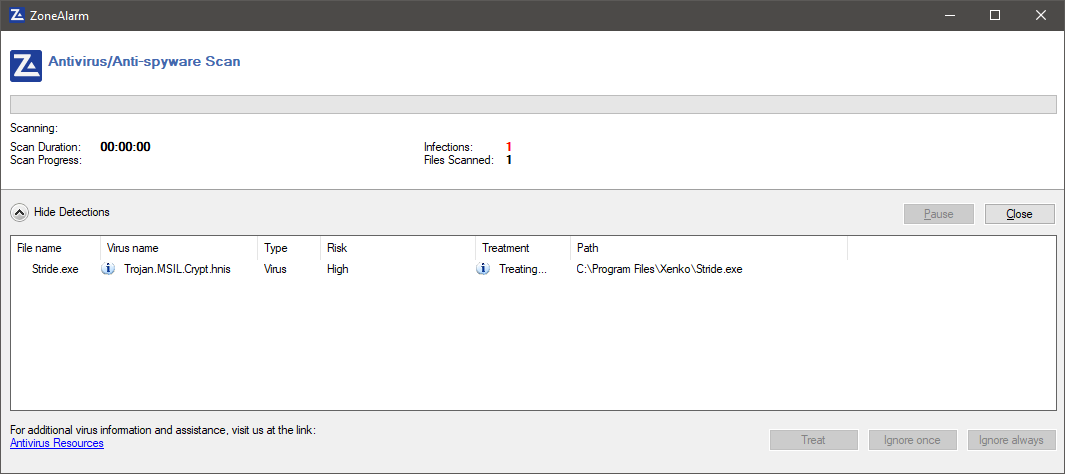
Stride: Antivirus software detects stride.exe containing "Trojan.MSIL.Crypt.hnis" virus
My Antivirus scanner ZoneAlarm claims Strider.exe is a virus Trojan.MSIL.Crypt.hnis. I downloaded Stride v4.0.0.1-beta02-0926 using the Xenko dashboard. I know it must be a false detection, but I wanted to at least make somebody aware of this issue, in case other antivirus scanners pick this up to in the future. Older Xenko versions are fine with no alerts.
My Antivirus scanner details
ZoneAlarm Free Antivirus + Firewall version: 15.8.038.18284
Vsmon version: 15.8.9.18268
Driver version: 15.1.29.17237
Anti-Virus engine version: 8.9.1.113
Anti-Virus signature DAT file version: 1352299008
Question and/or Comment
 chriswinslow
All 31 comments
Kaspersky does too, since today
 Myterian
on 26 Apr 2020
Myterian
on 26 Apr 2020

 brnbruno
on 27 Apr 2020
brnbruno
on 27 Apr 2020
Antivirus are know to have this kind of false positives. That's why I only use Windows Defender.
 Kryptos-FR
on 27 Apr 2020
Kryptos-FR
on 27 Apr 2020
they also need some time to adjust to the new exe name, since they have no information in their databases yet.
so it is very important that you mark it as non-virus and send it back to the antivirus provider in order to get it whitelisted.
 tebjan
on 27 Apr 2020
tebjan
on 27 Apr 2020
they also need some time to adjust to the new exe name, since they have no information in their databases yet.
so it is very important that you mark it as non-virus and send it back to the antivirus provider in order to get it whitelisted.
I was looking for a way to submit the exe to ZoneAlarm, but I can't see anything on their website to submit files for analysis and to top it all ZoneAlarm has removed the exe from xeno folder. I'll now to either have to re-install it again or compile a copy to replace the deleted version.
chriswinslow
on 27 Apr 2020
I have never used ZoneAlarm but in general AV have a quarantine thing that you can browse to recover and whitelist files
 Eideren
on 27 Apr 2020
Eideren
on 27 Apr 2020
I removed what was left of Stride via Control Panel > Programs and Features and I then downloaded the installer from Strides website for a reinstall, the default install folder is now called Strider and not Xenko which of course makes sense. Scanning the exe file again the Antivirus scanner no longer detects Strider.exe as being a virus.

chriswinslow
on 27 Apr 2020
https://opentip.kaspersky.com/5522EB424EEEA3ADCFA31C65E0A9C9AF865A9002B2CF0E6E130B5149EF7AD21D/
So basically that is was kaspersky is detecting, installer as well
Edit: Will try to reinstall
Edit 2: Looks good now
Edit 3: Nope, still still detected
Myterian
on 27 Apr 2020
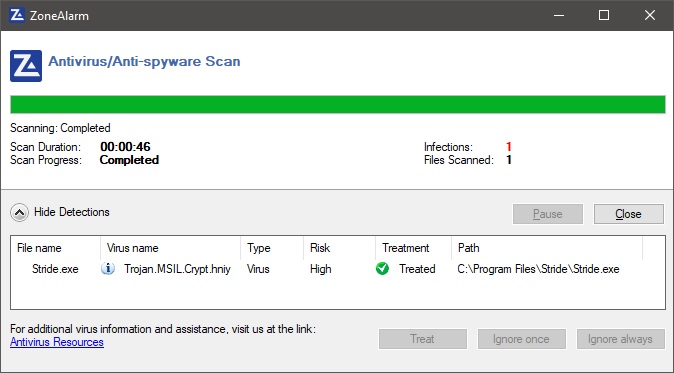
After updating ZoneAlarms Anti-virus signature file and restarting my PC. Upon starting Windows, ZoneAlarm has once again detected stride.exe as being a virus. The only way around it is for me to place it on the AV whitelist.
chriswinslow
on 29 Apr 2020
glad i'm not the only one
Edit: Kaspersky even warns against the download now
Myterian
on 29 Apr 2020
Not sure what to do besides sending the exe to virustotal or something similar every time its hash changes but that's kind of a pain. If someone has time on their hand to research this that would be nice
Eideren
on 2 May 2020
Some users on the discord channel of "gamesfromscratch" have sent a list with the AV with issues in in virustotal:
https://discordapp.com/channels/696089433665044522/699291360187908106/706175555933831189
 meriaizen86
on 2 May 2020
meriaizen86
on 2 May 2020
I must have a ghost in my machine. Stride has now been completely removed from my machine, even the installation directory is gone and even the desktop icon is missing! ZoneAlarm as not logged removing this. I'm going to forget this engine, maybe it is a virus!?
chriswinslow
on 2 May 2020
Well it worked perfectly before 6 days ago, are there changes that could have cuased that?
Myterian
on 2 May 2020
Investigating. I hope it's just a false positive...
I have installed Kaspersky on the same computer that built Stride.exe and StrideSetup.exe.
I tried to rebuild the executable (on the same PC) and it's not detected on the new one.
Nothing else is detected by Kaspersky on that computer.
So I think it's a false positive, maybe the non-deterministic part of the build triggered a pattern it didn't like.
However, I recommend people to be cautious just in case.
Anyway, what I will do is:
- Build
Stride.exeandStrideSetup.exeon one of the teamcity agent (rather than PC I used to build it last time) - Make sure no virus detected this time
- If yes, update it everywhere (website etc.)
 xen2
on 2 May 2020
xen2
on 2 May 2020
YEEESS, thank you, that seemed to fixed it. Kaspersky no longer detects a virus in the installer or exe
Myterian
on 2 May 2020
btw it seems to have affected only 4.0.4 and not 4.0.1 to 4.0.3 (probably argument in favor of false positive)
xen2
on 2 May 2020
And what about ZoneAlarm antivirus? When I downloaded Stride via the Xenko download it detected Stride as a virus, so I downloaded the standard Stride installer via the website and all was well for a while until I updated ZoneAlams virus signature database, it then continued to detect Stride as a virus. Please install ZoneAlarm and test it with it to fix this.
chriswinslow
on 3 May 2020
Are there any updates made when you start stride or smth? Cause kaspersky is blocking it all over again. I also read yesterday that embedded dlls in the exe or compressed exe is flagged just in case, if that helps
Myterian
on 3 May 2020
It seems it got flagged again...
xen2
on 3 May 2020
I don't have a Kaspersky account, but it seems you can report a false positive if you do:
https://forum.kaspersky.com/index.php?/topic/406709-how-to-submit-a-false-positive/&tab=comments#comment-2849332
xen2
on 3 May 2020
I'll do. Btw, was there an update from yesterday? Because the file count dosent match from yesterday and today
Myterian
on 3 May 2020
The current version of the Setup is triggering the AV.
See the virustotal page
https://www.virustotal.com/gui/file/182fddcec8edab176f4380ec3952319ed0bbfdcdab577a01f5d222876db50ce9/detection
 aivascu
on 6 May 2020
aivascu
on 6 May 2020
Funny, Kaspersky tells me know its clean. Also I've been trying to get the support to look at it but I cant seem to get a password on an zip archive, which they require
Myterian
on 6 May 2020
@Myterian I am also using Kaspersky (Total Security) and it also alerted me about the setup.
aivascu
on 6 May 2020
It is well established now that ZoneAlarm/Kaspersky is flagging Stride as being a virus. The questions now is why and how can this be fixed?
Why didn’t these anti virus programs ever flag any of the Xenko builds as being a virus?
And how do we submit these Stride files to these company’s so that they can analyse the program and stop this once and for all. I’ve checked ZoneAlarm website but I can’t see any way of submitting files for analysis. Does ZoneAlarm use Kaspersky Av signature files or vice versa?
chriswinslow
on 7 May 2020
Yeah Kaspersky let me restore the exe and I could download the installer no problem. I've been scanning them over the course of today an everthing seems fine, even on their web scanning tool. I'll keep an eye on that, it seems Kaspersky is a bit jumpy but maybe it got fixed
Myterian
on 7 May 2020
@chriswinslow I'm already working with the Kaskpersky Support. I don't know about Zonealarm but there should be an option to summit a false positive on their support site aswell
Myterian
on 7 May 2020
So, Kaspersky Support couldn't recreate the false detection, I can't replicate anymore and their online scanning service rates stride as clean, too. So yeah, it was a false positive all along
Myterian
on 8 May 2020
Thanks for going through this @Myterian , hopefully we won't have to deal with this again with other versions. I'll close this off in a couple of days if there are no more reports coming in.
Eideren
on 8 May 2020
@chriswinslow We had the same issue during the first Xenko releases.
I suppose that if you update an existing executable (Xenko.exe) it is easier for antivirus to trust than a new executable name.
xen2
on 8 May 2020
Related issues
 CharlesWoodhill
·
3Comments
CharlesWoodhill
·
3Comments
 Qibbi
·
4Comments
Qibbi
·
4Comments
 EternalTamago
·
3Comments
EternalTamago
·
3Comments
 Domvel
·
4Comments
Domvel
·
4Comments
 MichaelJ1423
·
3Comments
MichaelJ1423
·
3Comments
Most helpful comment
@chriswinslow I'm already working with the Kaskpersky Support. I don't know about Zonealarm but there should be an option to summit a false positive on their support site aswell