Stride: Warning/Error on Project Load Causes GameStudio to Blink/become Unsuable
Release Type: Github latest
Platform(s): Windows 10 x64
Describe the bug
When opening a project that has a warning or error, you'll see the warning/error text in the "opening session" log. If you try to click "Close" or interact with GameStudio -- or really try to progress any further anywhere -- GameStudio starts to blink wildly and the only way out seems to force-close the whole application. Sometimes my machine becomes unresponsive during the blinking.
To Reproduce
Steps to reproduce the behavior:
- Make a small error in your project
- Save & close GameStudio
- Try to open that project.
Expected behavior
I should be able to use GameStudio to correct the error.
 phr00t
All 6 comments
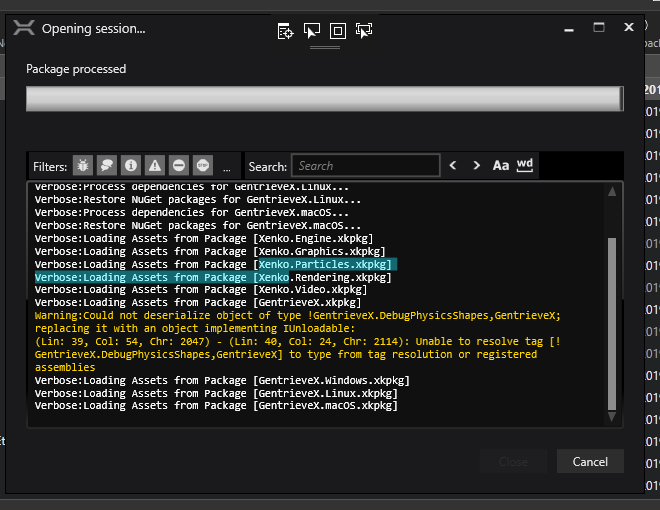
This is the "warning" I get, which I can't seem to get around & my project is currently being held hostage by:
phr00t
on 28 Mar 2019
When Xenko is freaking out, the call stack looks like this:
[Managed to Native Transition]
Microsoft.VisualStudio.DesignTools.WpfTap.dll!Microsoft.VisualStudio.DesignTools.WpfTap.WpfVisualTreeService.Adorners.AdornerLayerWindow.BringToTop()
Microsoft.VisualStudio.DesignTools.WpfTap.dll!Microsoft.VisualStudio.DesignTools.WpfTap.WpfVisualTreeService.Adorners.AdornerLayerWindow.BringToTopIfNeeded()
Microsoft.VisualStudio.DesignTools.WpfTap.dll!Microsoft.VisualStudio.DesignTools.WpfTap.WpfVisualTreeService.Adorners.AdornerLayerWindow.UpdatePlacement()
Microsoft.VisualStudio.DesignTools.WpfTap.dll!Microsoft.VisualStudio.DesignTools.WpfTap.WpfVisualTreeService.Adorners.AdornerLayerWindow.UpdatePlacementAsync.AnonymousMethod__77_0(object obj)
WindowsBase.dll!System.Windows.Threading.ExceptionWrapper.InternalRealCall(System.Delegate callback, object args, int numArgs)
WindowsBase.dll!System.Windows.Threading.ExceptionWrapper.TryCatchWhen(object source, System.Delegate callback, object args, int numArgs, System.Delegate catchHandler)
WindowsBase.dll!System.Windows.Threading.DispatcherOperation.InvokeImpl()
mscorlib.dll!System.Threading.ExecutionContext.RunInternal(System.Threading.ExecutionContext executionContext, System.Threading.ContextCallback callback, object state, bool preserveSyncCtx)
mscorlib.dll!System.Threading.ExecutionContext.Run(System.Threading.ExecutionContext executionContext, System.Threading.ContextCallback callback, object state, bool preserveSyncCtx)
mscorlib.dll!System.Threading.ExecutionContext.Run(System.Threading.ExecutionContext executionContext, System.Threading.ContextCallback callback, object state)
WindowsBase.dll!MS.Internal.CulturePreservingExecutionContext.Run(MS.Internal.CulturePreservingExecutionContext executionContext, System.Threading.ContextCallback callback, object state)
WindowsBase.dll!System.Windows.Threading.DispatcherOperation.Invoke()
WindowsBase.dll!System.Windows.Threading.Dispatcher.ProcessQueue()
WindowsBase.dll!System.Windows.Threading.Dispatcher.WndProcHook(System.IntPtr hwnd, int msg, System.IntPtr wParam, System.IntPtr lParam, ref bool handled)
WindowsBase.dll!MS.Win32.HwndWrapper.WndProc(System.IntPtr hwnd, int msg, System.IntPtr wParam, System.IntPtr lParam, ref bool handled)
WindowsBase.dll!MS.Win32.HwndSubclass.DispatcherCallbackOperation(object o)
WindowsBase.dll!System.Windows.Threading.ExceptionWrapper.InternalRealCall(System.Delegate callback, object args, int numArgs)
WindowsBase.dll!System.Windows.Threading.ExceptionWrapper.TryCatchWhen(object source, System.Delegate callback, object args, int numArgs, System.Delegate catchHandler)
WindowsBase.dll!System.Windows.Threading.Dispatcher.LegacyInvokeImpl(System.Windows.Threading.DispatcherPriority priority, System.TimeSpan timeout, System.Delegate method, object args, int numArgs)
WindowsBase.dll!MS.Win32.HwndSubclass.SubclassWndProc(System.IntPtr hwnd, int msg, System.IntPtr wParam, System.IntPtr lParam)
[Native to Managed Transition]
[Managed to Native Transition]
WindowsBase.dll!System.Windows.Threading.Dispatcher.PushFrameImpl(System.Windows.Threading.DispatcherFrame frame)
PresentationFramework.dll!System.Windows.Application.RunDispatcher(object ignore)
PresentationFramework.dll!System.Windows.Application.RunInternal(System.Windows.Window window)
Xenko.GameStudio.exe!Xenko.GameStudio.Program.Main() Line 159
at D:\Phr00tsSoftware\xenkosources\editor\Xenko.GameStudio\Program.cs(159)
phr00t
on 28 Mar 2019
I was able to recover my project by manually removing the DebugPhysicsShape tag reference from my MainScene.xkscene file. That was quite a headache to accomplish... GameStudio needs to better handle minor project warnings and errors here.
phr00t
on 28 Mar 2019
This only happens when debugging the Xenko project through Visual Studio, and not release runs! Phew! I wouldn't consider this a problem, then.
phr00t
on 29 Mar 2019
Microsoft.VisualStudio.DesignTools.WpfTap.dll!Microsoft.VisualStudio.DesignTools.WpfTap.WpfVisualTreeService.Adorners.AdornerLayerWindow.BringToTop()
That logs means that you have the XAML debugging feature on. It is known to cause issues and slowdown. I would consider disabling it, unless you are actually debugging editor stuff. To do so, go to Debug -> Options and at the bottom uncheck "Enable UI Debugging Tools for XAML".
 Kryptos-FR
on 29 Mar 2019
Kryptos-FR
on 29 Mar 2019
Disabling "Show runtime tools in application" seems to be enough.
 xen2
on 29 Mar 2019
xen2
on 29 Mar 2019
Related issues
xen2
·
4Comments
 meriaizen86
·
5Comments
meriaizen86
·
5Comments
 WhitePhoera
·
3Comments
meriaizen86
·
5Comments
WhitePhoera
·
3Comments
meriaizen86
·
5Comments
 CharlesWoodhill
·
3Comments
CharlesWoodhill
·
3Comments