Issue description
I am trying to get streama to work behind my reverse proxy that is secured by https (the streama server is not secured, only the proxy)
the url I am trying to get to work is https://vinylcraft.net/vinylstream/
it keeps rewriting to https://vinylcraft.net/login/auth
Steps to Reproduce
- download windows .war file, setup yml with correct url, setup settings with correct url (both set with https://vinylcraft.net/vinylstream)
- configure reverse proxy through nginx with instruction provided:
server {
  listen 443 ssl http2;
  location /vinylstream {
        proxy_set_header Host $host;
        proxy_set_header X-Real-IP $remote_addr;
        proxy_set_header X-Forwarded-Proto $scheme;
        proxy_set_header X-Forwarded-Port $server_port;
        proxy_http_version 1.1;
        proxy_set_header Upgrade $http_upgrade;
        proxy_set_header Connection $http_connection;
        rewrite ^/vinylstream/(.*)$ /$1 break;
        proxy_pass http://192.168.0.13:8080;
  }
}
- start streama and reload nginx proxy
Expected Behaviour
should redirect to https://vinylcraft.net/vinylstream
Actual Behaviour
goes to https://vinylcraft.net/login/auth
Environment Information
- Operating System: Windows 10
- Streama version: v1.6.0-RC9
 MimTiller
All 30 comments
This has been a issue for ages, and I thought that someone had worked out how to fix it and it was in that nginx config in the docs.
@dularion Any ideas on this?
 HannahRy
on 30 Nov 2018
HannahRy
on 30 Nov 2018
I'm fairly certain this has to do with the Content Security Policy. I'm on Apache2 but I had the same exact issue. Disabling "Header set Content-Security-Policy "default-src 'self';"" fixes the issue
I'm sure it can be fixed properly with the correct CSP but I don't know enough to fix it atm.
 EchoDev
on 25 Dec 2018
EchoDev
on 25 Dec 2018
Sorry, I missed this until now. thank you so much that seemed to correct the issue!
MimTiller
on 4 Jan 2019
@MimTiller Sorry, but what exactly did you do in your nginx server block to fix the issue? Mine looks like this
location /videos/ {
                client_max_body_size 64g;
                proxy_set_header Host $host;
                proxy_set_header X-Real-IP $remote_addr;
                proxy_set_header X-Forwarded-Proto $scheme;
                proxy_set_header X-Forwarded-Port $server_port;
                proxy_set_header X-Forwarded-For $proxy_add_x_forwarded_for;
                #WebSocket Support
                proxy_http_version 1.1;
                proxy_set_header Upgrade $http_upgrade;
                proxy_set_header Connection $http_connection;

                rewrite ^/videos/(.*)$ /$1 break;
                proxy_pass http://192.168.178.201:8080;
        }
and I'm not sure what to do. If you explain to me whats wrong I'll go and change the docs, too
 f1reflyyyylmao
on 4 Jan 2019
f1reflyyyylmao
on 4 Jan 2019
I apologize I was too hasty in closing. I am not sure if I have fixed the issue. I had disabled CSP on my firefox browser to test, and it worked at least once, but doesnt seem to be working now. so back to square one.
I am messing around with the nginx configuration- I think I may have gotten somewhere further
location /streama/ {
    proxy_set_header Host $host;
    proxy_set_header X-Real-IP $remote_addr;
    proxy_set_header X-Forwarded-Proto $scheme;
    proxy_set_header X-Forwarded-For $proxy_add_x_forwarded_for;
    proxy_pass http://192.168.0.13:8080/login/auth;
I added the extra headers to the proxy pass and took out the rewrite and the port header
right now I am not getting any nginx/404 errors from the /login/auth redirect, and it is going to the right URL, but the page is just white, and has the version # for streama at the top and thats it. any ideas what this is? should I open an alternate issue?
I should probably mention that I am using SSL, and so in the application yml its set to "https://vinylcraft.net/vinylstream/assets" and in the settings in streama its "https://vinylcraft.net/vinylstream"
MimTiller
on 4 Jan 2019
If anyone has anything else to add that I may be missing let me know. but for now, I did end up getting it working on a subdomain e.g. streama.vinylcraft.net
would really love to have it as a header if anyone can get it figured out!
MimTiller
on 4 Jan 2019
You shouldn't disable CSP in your browser, that is a bad idea.
Anyways this CSP seems to work. This is how it is configured for Apache2
Header set Content-Security-Policy "default-src 'self'; script-src 'self' 'unsafe-eval' 'unsafe-inline'; font-src 'self' data:; style-src 'self' 'unsafe-inline'; img-src 'self' https://image.tmdb.org;"
Stuff like unsafe-inline makes your page less secure, but I doubt people want to attack your Streama server. The unsafe-inline could be removed if nonces were used or SHA256 of the scripts were calculated but that is kinda a lot of work. I might look into it later not sure.
Also I noticed Streama loads a font from Netflix servers, is it really needed? I didn't allow the font to load in the CSP config above so you can add it yourself if you want it.
EchoDev
on 5 Jan 2019
I added it to my streama location block like this
proxy_set_header Content-Security-Policy "default-src 'self'; script-src 'self' 'unsafe-eval' 'unsafe-inline'; font-src 'self' data:; style-src 'self' 'unsafe-inline'; img-src 'self' https://image.tmdb.org;";
but it still redirects to mydomain.net/login/auth instead of mydomain.net/videos/login/auth and media won't load on the machine that still has a valid login cookie from previous tries
f1reflyyyylmao
on 5 Jan 2019
Are you sure proxy_set_header can apply the CSP on Nginx?
Also what does your browser console say. If you get multiple CSP errors it probably didn't apply the CSP
You should try add_header instead of proxy_set_header
EchoDev
on 5 Jan 2019
Both statements work, i just tested it. Anyway, it doesn't throw any csp errors currently, which makes me think my server block is borked in other ways. The nginx docs suggest that one should drop the rewrite line and just add a slash to the end of the proxy_pass statement so nginx takes care of url replacement automatically. When I do that i can open streama on a computer thats already logged in by forcing it multiple times to the correct url. When i open streama that way it fails to load any of my media, even though a quick check by manually pasting the url to the resource (mydomain.net/videos/file/serve/xxx.jpg) shows the file just fine. The assets seem to load as well, so the yaml configuration seems to be correct. I changed two lines from my previous config:
#rewrite ^/videos/(.*)$ /$1 break;
proxy_pass http://192.168.178.201:8080/;
Notice the pound symbol and added slash
f1reflyyyylmao
on 5 Jan 2019
Reverted the proxy_pass and rewrite statements to their previous states, but changed the proxy_set_header Host from $host to $http_host. I think this might've been a problem because I don't host streama on the same machine as nginx itself. The redirections work now, but the links to files are still all wrong. Example: When I inspect a cover image both ng-src and src point to /file/serve/###.jpg instead of /videos/file/serve/###.jpg. The streama logo has the same problem, it points to /assets/logo.png instead of /videos/assets/logo.png. I configured my application.yml as described in the docs, anyone got any ideas if nginx may be breaking this? My current approach is to use the sub_filter module to replace all occurances of /serve/file/ with the correct path, but I'm 99% sure thats a horrible idea. I'd be really glad about any input.
Also sorry for abusing the issue tracker for discussions.
f1reflyyyylmao
on 7 Jan 2019
can you post your full nginx configuration now? maybe I can do some more digging too
you are the bomb!
MimTiller
on 7 Jan 2019
... I could do that, yeah, but ... I kinda broke it again without having commited the half-working version in my git repo. I'm very sorry, I'll post when i managed to get it running again. In the meantime it's probably a good idea to re-open this issue, as we both have problems with it.
f1reflyyyylmao
on 9 Jan 2019
is this an issue with grails? or does anyone know where the underlying problem resides?
MimTiller
on 11 Jan 2019
Pretty sure the problem is right here. There are several places in the code which don't take into account the possible path rewrite.
 viluon
on 19 Jan 2019
viluon
on 19 Jan 2019
Turns out the advertised reverse proxying feature is not implemented at all. It took 4 rewrites until I got streaming working and even with 6 rewrites logging in still doesn't work correctly.
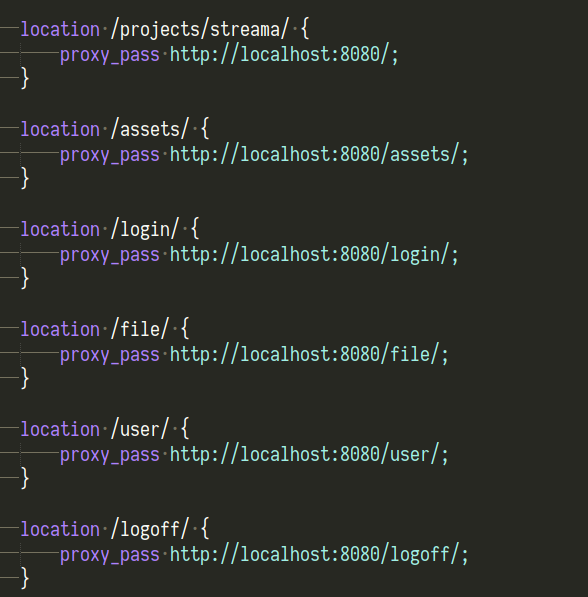
Logging out is completely broken:

Somehow the session is invalidated, but the cookie isn't deleted, which means that the login screen doesn't show up when it should.
All these path rewrites obviously prevent me from using them for other purposes.
viluon
on 19 Jan 2019
we now added a missing setting in the application.yml, that might fix it. please let me know!
 dularion
on 30 Jan 2019
dularion
on 30 Jan 2019
(should be in the next release, v1.6.1) - its on master-branch already
dularion
on 30 Jan 2019
I have the exact same issue in v1.7.2 . Help ?
 aaruni96
on 30 Jul 2019
aaruni96
on 30 Jul 2019
This has been fixed 6 months ago. I do have 1.7.2 and works ok. This is an old post. Follow the guide and it will work...
 Ircas
on 30 Jul 2019
Ircas
on 30 Jul 2019
My application.yml looks like this
# Place this file next to the streama-[version].war and rename to application.yml with your own     settings
environments:
    production:
        grails:
            assets:
                url: https://home.edufor.me/streama/assets/
        dataSource:
#            driverClassName:  'com.mysql.jdbc.Driver'
#            url: jdbc:mysql://localhost/streama
#            username: root
#            password:
            driverClassName:  'org.h2.Driver'
            url: jdbc:h2:./streama;MVCC=TRUE;LOCK_TIMEOUT=10000;DB_CLOSE_ON_EXIT=FALSE
            username: root
            password:
        server:
            port: 8080

streama:
  regex:
    movies: ^(?<Name>.*)[._ ]\(\d{4}\).*
    shows:
      - ^(?<Name>.+)[._ ][Ss](?<Season>\d{2})[Ee](?<Episode>\d{2,3}).*    # example:       "House.MD.S03E04.h264.mp4"
      - ^(?<Name>.+)[._ ](?<Season>\d{1,2})x(?<Episode>\d{2,3}).*         # example:  "House.MD.03x04.h264.mp4"
      - ^(?<Season>\d{2})-(?<Episode>\d{2,3})-(?<Name>.*?)-.*             # example:  "02-05-Dr. House-Tanz_ums_Feuer-cineonws.mp4"
      - ^(?<Name>.*?)(?<Episode>\d{1,3})x(?<Season>\d{2}).*               # example:  "Castle4x06DaemonsWebdl480pOktober242011rC.mkv(jkuzt).mp4"
And my nginx config looks like this :
location /streama/ {

 proxy_set_header Host $host;
  proxy_set_header X-Real-IP $remote_addr;
  proxy_set_header X-Forwarded-Proto $scheme;
  proxy_set_header X-Forwarded-Port $server_port;
  proxy_set_header X-Forwarded-For $proxy_add_x_forwarded_for;

  #WebSocket Support
  proxy_http_version 1.1;
  proxy_set_header Upgrade $http_upgrade;
  proxy_set_header Connection $http_connection;

  rewrite ^/streama/(.*)$ /$1 break;
  proxy_pass http://localhost:8080/;
  }
I also changed the Base URL on the admin page
I dont know what I'm missing.
aaruni96
on 30 Jul 2019
This is my nginx file for mine, feel free to copy from it and modify as needed
server {
    listen 80;
    listen [::]:80;

    index index.html index.htm index.nginx-debian.html;

    client_max_body_size 128g; # allows larger files (like videos) to be uploaded.

    location / {
        proxy_set_header Host $host;
        proxy_set_header X-Real-IP $remote_addr;
        proxy_set_header X-Forwarded-For $proxy_add_x_forwarded_for;
        proxy_set_header X-Forwarded-Proto $scheme;

        # websocket start
        proxy_http_version 1.1;
        proxy_set_header Upgrade $http_upgrade;
        proxy_set_header Connection $http_connection;
        proxy_read_timeout 86400;
        # websocket end

        rewrite ^/streama/(.*)$ /$1 break;
        proxy_pass http://localhost:8080;
    }

    location ~ /\.ht {
        deny all;
    }
}
 TheNocturnalDev
on 30 Jul 2019
TheNocturnalDev
on 30 Jul 2019
You are doing reverse proxy on the root location. I am trying to do reverse proxy from a subdirectory.
The docs say it works if you just copy the config to the location /streama block, but I'm running into this problem.
aaruni96
on 30 Jul 2019
location /streama/ {
        proxy_set_header Host $host;
        proxy_set_header X-Real-IP $remote_addr;
        proxy_set_header X-Forwarded-For $proxy_add_x_forwarded_for;
        proxy_set_header X-Forwarded-Proto $scheme;

        # websocket start
        proxy_http_version 1.1;
        proxy_set_header Upgrade $http_upgrade;
        proxy_set_header Connection $http_connection;
        proxy_read_timeout 86400;
        # websocket end

        rewrite ^/streama/(.*)$ /$1 break;
        proxy_pass http://localhost:8080;
    }
except for proxy_read_timeout, the config is the same as what I;m currently using,and its not working...
aaruni96
on 30 Jul 2019
can we talk on discord? you can tag me as @♡♡๖ۣۜƝƠƇƬƲƦƝƛԼ๖ۣۜ♡♡#0001
TheNocturnalDev
on 30 Jul 2019
I'm not on Discord. Is there any other channels you're also active on?
aaruni96
on 30 Jul 2019
sadly no, but for better support id recommend discord anyways
Discord
TheNocturnalDev
on 30 Jul 2019
yeah also not working for me...
 jaroslaw-weber
on 29 Aug 2019
jaroslaw-weber
on 29 Aug 2019
Seems subdirectory proxy isn't properly supported.
There are two problems.
- url rewriting not being accounted when returning redirects
- absolute paths being used everywhere
I got around the first problem with the following double proxy_redirect...
location /stream/ {
                proxy_pass http://localhost:8085/;
                proxy_redirect default;
                proxy_redirect https://$host/ https://$host/stream/;

                rewrite /stream/(.*) /$1 break;

                proxy_set_header Host $host;
                proxy_set_header X-Real-IP $remote_addr;
                proxy_set_header X-Forwarded-Proto $scheme;
                proxy_set_header X-Forwarded-Port $server_port;
                proxy_set_header X-Forwarded-For $proxy_add_x_forwarded_for;

                #WebSocket Support
                proxy_http_version 1.1;
                proxy_set_header Upgrade $http_upgrade;
                proxy_set_header Connection $http_connection;
 }
For the second problem, a partial fix is to use in Application.yaml the server.contextPath and streama.servePrefix variables then altering proxy_pass to http://localhost:8085/stream/ which allows the rest of the program to work.
environments:
    production:
        dataSource:
            driverClassName:  'org.h2.Driver'
            url: jdbc:h2:./streama;MVCC=TRUE;LOCK_TIMEOUT=10000;DB_CLOSE_ON_EXIT=FALSE
            username: root
            password:
        server:
            contextPath: '/stream'
            port: 8085
        grails:
            assets:
                url: '/stream/assets/'
streama:
    servePrefix: '/stream'
I was very very close to getting it to work, except certain /assets/ and certain actions (login/logout) are hardcoded as absolute and don't respect server.contextPath or streama.servePrefix.
Decided to give up and just use a subdomain.
 notfood
on 11 Jan 2020
notfood
on 11 Jan 2020
Related issues
 HendrikD
·
3Comments
HendrikD
·
3Comments
 KwikFlix
·
7Comments
KwikFlix
·
7Comments
 mazzucato
·
4Comments
mazzucato
·
4Comments
 Shrinks99
·
6Comments
Shrinks99
·
6Comments
 Norwelian
·
3Comments
Norwelian
·
3Comments
Most helpful comment
This has been fixed 6 months ago. I do have 1.7.2 and works ok. This is an old post. Follow the guide and it will work...