Stickers: [Android} There aren't any stickers in this pack

I can see all the stickers in the preview window, before installing.. and even after successful installation when I navigate to my stickers tab.. I get this msg saying "There aren't any stickers in pack",
I've 7 stickers in my pack. still it is showing that error msg.
 satyapol
All 29 comments
try to use a debug version of your sticker app, and try to do a re-add to WhatsApp. It is likely because you have some invalid metadata. Or you can check your logcat.
 simonzhexu
on 8 Nov 2018
simonzhexu
on 8 Nov 2018
After a dozen hours of 'try-again's I've managed to solve this for me. When converting from png to webp, be careful not to save any metadata. If you're using the same photoshop plugin as I am ( https://github.com/fnordware/AdobeWebM#download ), then you must have unchecked the "Save Metadata" box.
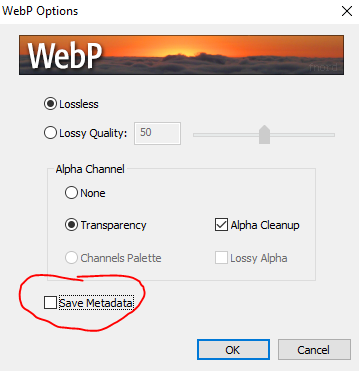
Hope this helps.
 cornelg7
on 9 Nov 2018
cornelg7
on 9 Nov 2018
This answer is not working. I'm getting the same error.
 mumayank
on 9 Nov 2018
mumayank
on 9 Nov 2018
what do you see when you try to add your pack again?
simonzhexu
on 9 Nov 2018
Then I could see my stickers again. But if I remove my app from background/ recent apps list, then WhatsApp starts showing the same error message. Why would this be happening I wonder.
Device: OnePlus5
Android Studio: 3.2.1
Code: Taken from WhatsApp Sticker Sample Android App, only did minimum changes.
mumayank
on 9 Nov 2018
After a dozen hours of 'try-again's I've managed to solve this for me. When converting from png to webp, be careful not to save any metadata. If you're using the same photoshop plugin as I am ( https://github.com/fnordware/AdobeWebM#download ), then you must have unchecked the "Save Metadata" box.
Hope this helps.
This solution worked properly!!
Thank you
satyapol
on 10 Nov 2018
@satyapol
I feel bad about this. Firstly, just because a solution worked for only you using the paid tools used by you, doesn't mean it worked for everyone else, right? You have repeatedly posted the same answer multiple times in multiple issues of this repository.
I am using Android Studio along with GIMP. This is just not working!!! How can you close this thread on your own? Please reopen and suggest some Free alternatives instead of Adobe Photoshop.
mumayank
on 10 Nov 2018
@satyapol
I feel bad about this. Firstly, just because a solution worked for only you using the paid tools used by you, doesn't mean it worked for everyone else, right? You have repeatedly posted the same answer multiple times in multiple issues of this repository.I am using Android Studio along with GIMP. This is just not working!!! How can you close this thread on your own? Please reopen and suggest some Free alternatives instead of Adobe Photoshop.
Hey I'm really sorry for closing the issue.. I didn't mean any inconvenience
satyapol
on 10 Nov 2018
@satyapol
I feel bad about this. Firstly, just because a solution worked for only you using the paid tools used by you, doesn't mean it worked for everyone else, right? You have repeatedly posted the same answer multiple times in multiple issues of this repository.I am using Android Studio along with GIMP. This is just not working!!! How can you close this thread on your own? Please reopen and suggest some Free alternatives instead of Adobe Photoshop.
If it helps, take a look at this documentation
satyapol
on 10 Nov 2018
@satyapol No offence to you, and I'm sorry I was impolite. I have tried making it work all night yesterday with no success. Such a non-trival thing becoming a major roadblock you know.
Thanks for the link but I cropped/ edited my files using GIMP, and converted to WebP using Android Studio. I'm actively looking for an answer, and if I find a working solution, I'll post it here.
mumayank
on 10 Nov 2018
@satyapol No offence to you, and I'm sorry I was impolite. I have tried making it work all night yesterday with no success. Such a non-trival thing becoming a major roadblock you know.
Thanks for the link but I cropped/ edited my files using GIMP, and converted to WebP using Android Studio. I'm actively looking for an answer, and if I find a working solution, I'll post it here.
https://launchpad.net/gimp-webp
Have a look at this as well. But I don't have GIMP, so not sure
satyapol
on 10 Nov 2018
I can confirm this issue, when removing the app from my recent app list, my stickers go away 9/10 times.
When I scan my webp files for metadata, I only get
Mimetype: | application/octet-stream
I don't know if this is useful, though.
I hope a fix will arrive for this.
Running a Oneplus 3T with the basic app example, changed some strings and stuff, but nothing major.
EDIT: Changed all files to the no metadata version as suggested by @cornelg7 but that did not solve the issue.
EDIT2: The solution below this comment solves the issue!
 kevinsnijder
on 11 Nov 2018
kevinsnijder
on 11 Nov 2018
SOLVED!
Okay guys, thank you for the patience. I have figured out why the issue was occuring for only select developers. Google Android smartphones sport vanilla Android OS, and hence everything works as expected. But, almost all other Android smartphone manufacturers customize the Android OS and then install it on their Android devices before selling/ providing OTAs. This leads to surprizes for devs/ users, like the one few of us are facing here.
One chief thing that most device manufacturers do is to think of ways to prolong the device's battery. One way of doing this is to force stop apps which aren't running in foreground/ or are in recent app list. After trial and error, I figured out this was the issue. I went to Settings > Battery > Optimization > [My app] > and selected Don't Optimize option. My stickers now works flawlessly in WhatsApp! My app doesn't need to be in recent app list!
Sadly, I wasn't able to find an API provided by Google to do this programmatically, so that users of our apps have a seamless experience. And neither other device manufacturers provide an API documentation for developers to do so, nor I would recommend this. Think: even if there was an API for this by each device manufacturer, developers' life would be so misrable! I think it is high time Google puts some restrictions on device manufacturers using Android, for the sake of awesome UX, and of course, for the developers.
For quick reference, here is the combined screenshot:

My device: OnePlus 5
OS: OxygenOS 5.1.5 based on Android Oreo 8.1.0
Please put a thumbs up ( :+1: ) if the answer worked for you. I'd highly appreciate it :)
mumayank
on 11 Nov 2018
Thank you. I have seen users write in to use for this problem and could not repro it. So far, I have only seen this happen to OnePlus devices, have you seen this for other devices?
simonzhexu
on 13 Nov 2018
Well, this doesn't solve the issue though. We know exactly why the stickers are disappearing from WhatsApp - that's because for it to be in it the app has to be opened! Why is that even necessary, why can't WhatsApp save the stickers from an app instead of it requiring the app to be opened 24x7 for the user to use the stickers - this is a very poor Sticker mechanism.
 xxxdepy
on 13 Nov 2018
xxxdepy
on 13 Nov 2018
@xxxdepy Could you please provide the official statement from WhatsApp to support what you are saying? I was not able to find in WhatsApp stickers dev documentation that to use stickers in WhatsApp, the stickers app needs to remain open in the background.
Is it just your assumption, or you have valid official proof to support your claim?
mumayank
on 16 Nov 2018
Hello,
than how can i convert own pic as sticker.can is possible to i convert png to webp programatically?
 HareshSolankiibl
on 17 Nov 2018
HareshSolankiibl
on 17 Nov 2018
@HareshSolankiibl there are lot of ways to convert PNG to webp, and yes, you can also convert your own images to webp, if you want to make use of it in whatsapp sticker app make sure you size it according to the standards. The easiest method I use is using Android studio, open project folder in the IDE, select image, right click and convert to webp (uncheck the box that tells to ignore images with alpha channel).
xxxdepy
on 17 Nov 2018
@HareshSolankiibl there are lot of ways to convert PNG to webp, and yes, you can also convert your own images to webp, if you want to make use of it in whatsapp sticker app make sure you size it according to the standards. The easiest method I use is using Android studio, open project folder in the IDE, select image, right click and convert to webp (uncheck the box that tells to ignore images with alpha channel).
Thank dear for replay.
HareshSolankiibl
on 20 Nov 2018
OnePlus broke how ContentProvider works in Android. The fix would be to suggest your user to turn on Battery->Do not optimize for the sticker app.
simonzhexu
on 20 Nov 2018
I looked into this issue, it seems the user has to turn on "Advanced Optimizations" in order to see the issue happen. We are talking to OnePlus to hopefully fix it for future OS. I am also looking into a way to remind the user about it for the current OS.
simonzhexu
on 4 Dec 2018
Thank you. I have seen users write in to use for this problem and could not repro it. So far, I have only seen this happen to OnePlus devices, have you seen this for other devices?
Facing the same issue on Moto X4 running Android 8.0
 amrit-citrusleaf
on 8 Dec 2018
amrit-citrusleaf
on 8 Dec 2018
Hii, I am getting this error but not understand why?
issue : Third party pack cannot be found likely because the corresponding app is restricted, sdk: 27 ,power saving mode: false
Please help as soon as possible.
 PriyankPainter
on 8 Apr 2019
PriyankPainter
on 8 Apr 2019
@mumayank I have facing the issue is that I already click on don't optimize option and then only I add sticker in whats App but I face same issue that when I kill app sticker are automatically disappear.
 RahulPrajapati97
on 29 May 2019
RahulPrajapati97
on 29 May 2019
Try to Pack Size Small. And After Check Again.
 HasmukhBorad
on 1 Jun 2019
HasmukhBorad
on 1 Jun 2019
I had a very similar problem. I could see the stickers in the stickers app but not on WhatsApp; most of them would be missing in the corresponding pack tab. For some packs, none was visible and the error message _Something went wrong_ appeared.
My solution
I didn´t try @cornelg7 solution, though I tried @mumayank suggestion with no success. I was using ImageMagick to convert PNG images to webP. The webP files were 512x512 px < 100Kb, but WA still didn't show them. After much fiddling around I decided to try another tool for the conversion. The obvious choice was Android Studio, so I converted one PNG and it worked! However, I wanted a conversion tool that could be used from cmd.exe, so I switched to cwebp and that is what I currently use. In fact, I use two batch scripts to automate converting PNG files of varying dimenstions to 512x512px webP < 100Kb. If you are interested, you can find the scripts in my GitHub. I still use ImageMagick for changing the dimensions of the PNG without distorting aspect ratio or removing transparency, but the conversion PNG-webP is done with cwebp.
 HerCerM
on 1 Jun 2019
HerCerM
on 1 Jun 2019
SOLVED!
Okay guys, thank you for the patience. I have figured out why the issue was occuring for only select developers. Google Android smartphones sport vanilla Android OS, and hence everything works as expected. But, almost all other Android smartphone manufacturers customize the Android OS and then install it on their Android devices before selling/ providing OTAs. This leads to surprizes for devs/ users, like the one few of us are facing here.
One chief thing that most device manufacturers do is to think of ways to prolong the device's battery. One way of doing this is to force stop apps which aren't running in foreground/ or are in recent app list. After trial and error, I figured out this was the issue. I went to Settings > Battery > Optimization > [My app] > and selected Don't Optimize option. My stickers now works flawlessly in WhatsApp! My app doesn't need to be in recent app list!
Sadly, I wasn't able to find an API provided by Google to do this programmatically, so that users of our apps have a seamless experience. And neither other device manufacturers provide an API documentation for developers to do so, nor I would recommend this. Think: even if there was an API for this by each device manufacturer, developers' life would be so misrable! I think it is high time Google puts some restrictions on device manufacturers using Android, for the sake of awesome UX, and of course, for the developers.
For quick reference, here is the combined screenshot:
My device: OnePlus 5
OS: OxygenOS 5.1.5 based on Android Oreo 8.1.0Please put a thumbs up ( 👍 ) if the answer worked for you. I'd highly appreciate it :)
Nailed it!
 hbeita
on 22 Aug 2019
hbeita
on 22 Aug 2019
I am facing the same issue, as soon as I terminate/kill the app from background I could see that stickers are gone.
 farhanrasool63866
on 15 Sep 2019
farhanrasool63866
on 15 Sep 2019
Hi @farhanrasool63866, an update to the repo was pushed with sticker caching. Please update your sticker app to this version: https://github.com/WhatsApp/stickers/releases/tag/v1.1
Let us know if it solves your problem :)
 MarvinJWendt
on 16 Sep 2019
MarvinJWendt
on 16 Sep 2019
Related issues
 iamrishan
·
4Comments
iamrishan
·
4Comments
 IshanUdyoga
·
5Comments
IshanUdyoga
·
5Comments
 modys
·
4Comments
modys
·
4Comments
 RobinDew
·
7Comments
RobinDew
·
7Comments
 thetommes
·
3Comments
thetommes
·
3Comments
Most helpful comment
SOLVED!
Okay guys, thank you for the patience. I have figured out why the issue was occuring for only select developers. Google Android smartphones sport vanilla Android OS, and hence everything works as expected. But, almost all other Android smartphone manufacturers customize the Android OS and then install it on their Android devices before selling/ providing OTAs. This leads to surprizes for devs/ users, like the one few of us are facing here.
One chief thing that most device manufacturers do is to think of ways to prolong the device's battery. One way of doing this is to force stop apps which aren't running in foreground/ or are in recent app list. After trial and error, I figured out this was the issue. I went to Settings > Battery > Optimization > [My app] > and selected Don't Optimize option. My stickers now works flawlessly in WhatsApp! My app doesn't need to be in recent app list!
Sadly, I wasn't able to find an API provided by Google to do this programmatically, so that users of our apps have a seamless experience. And neither other device manufacturers provide an API documentation for developers to do so, nor I would recommend this. Think: even if there was an API for this by each device manufacturer, developers' life would be so misrable! I think it is high time Google puts some restrictions on device manufacturers using Android, for the sake of awesome UX, and of course, for the developers.
For quick reference, here is the combined screenshot:
My device: OnePlus 5
OS: OxygenOS 5.1.5 based on Android Oreo 8.1.0
Please put a thumbs up ( :+1: ) if the answer worked for you. I'd highly appreciate it :)