Stencil: Conditional slots are not rendered correctly in IE11/Edge
Stencil version:
@stencil/[email protected]
I'm submitting a:
[x] bug report
[ ] feature request
[ ] support request => Please do not submit support requests here, use one of these channels: https://stencil-worldwide.herokuapp.com/ or https://forum.ionicframework.com/
Current behavior:
When a slot within a component is dynamically added or removed, stencil (es5 builds only) does not render correctly.
Expected behavior:
If a slot within a component is removed dynamically, the corresponding content should also be removed. If the slot is added again, the content should also reappear.
Steps to reproduce:
Issue A (toggle slot directly):
Component
@Component({
  tag: 'dynamic-slot',
  styles: `
    div {
      display: block;
      width: 200px;
      height: 100px;
      background-color: lightcoral;
    }
  `,
  shadow: true
})
export class DynamicSlot implements ComponentInterface {
  @State() toggle: boolean;

  @Listen('click')
  clickHandler() {
    this.toggle = !this.toggle;
  }

  render() {
    return (
      <div>
        <p>{this.toggle ? 'Toggle true' : 'Toggle false'}</p>
        {this.toggle ? <slot /> : null}
      </div>
    );
  }
}
HTML
<dynamic-slot>
  <a>Should be rendered if toggle is true</a>
</dynamic-slot>
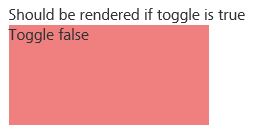
Before click
The text should be hidden because toggle is false.
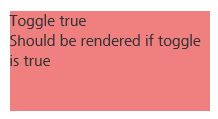
After first click
Correct rendering after the first click.
After second click
The text should be removed because toggle is false.
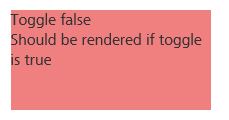
After nth click
The text does not toggle. Always same result.
Issue B (toggle slot with div wrapper):
Component
import {
  Component,
  ComponentInterface,
  h,
  State,
  Listen,
} from '@stencil/core';

@Component({
  tag: 'dynamic-slot',
  styles: `
    div {
      display: block;
      width: 200px;
      height: 100px;
      background-color: lightcoral;
    }
  `,
  shadow: true
})
export class DynamicSlot implements ComponentInterface {
  @State() toggle: boolean;

  @Listen('click')
  clickHandler() {
    this.toggle = !this.toggle;
  }

  render() {
    return (
      <div>
        <p>{this.toggle ? 'Toggle true' : 'Toggle false'}</p>
        {this.toggle ? <div><slot /></div> : null}
      </div>
    );
  }
}
HTML
<dynamic-slot>
  <a>Should be rendered if toggle is true</a>
</dynamic-slot>
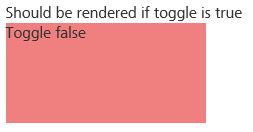
Before click
The text should be hidden because toggle is false.
After first click
Correct rendering after the first click.
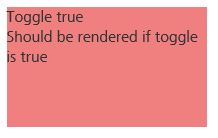
After second click
Correct rendering after the second click (text was removed).
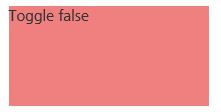
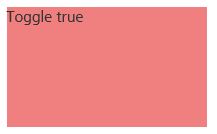
After nth click
The text should be displayed because toggle is true again.
Related code:
// insert any relevant code here
Other information:
In the pre-release @stencil/core 1.9.0-14 it still worked.
 cwaespi
All 6 comments
I am experiencing the same issue - but on all browsers.
 Gbuomprisco
on 26 Mar 2020
Gbuomprisco
on 26 Mar 2020
I am working with someone who has fundamentally the same issue on Edge. Their repro repo is here: https://github.com/pmenichelli/angularjs-interpolation-in-slots
Despite the name of the repo, this one has nothing to do with AngularJS, they are just re-using a repo from a different issue... :)
Be sure and use the test/unused-slots-in-edge branch.
so: https://github.com/pmenichelli/angularjs-interpolation-in-slots/tree/test/unused-slots-in-edge
 kensodemann
on 23 Apr 2020
kensodemann
on 23 Apr 2020
I am experiencing the same issue with @stencil/[email protected] IE 11 and Edge. Will this be fixed any soon?
 Knockdown26
on 24 Apr 2020
Knockdown26
on 24 Apr 2020
same issue with "@stencil/core": "2.3.0",
 antoniosZ
on 23 Dec 2020
antoniosZ
on 23 Dec 2020
I just tried 2.4.0-1 and it fixes the slot issue but the named slots, still have similar problems
antoniosZ
on 23 Dec 2020
I was able to get named and unnamed slots work properly on IE11 with 2.4.0-1 but with really specific workarounds.
- the conditional slots must be wrapped with an element, rendering just
<slot></slot>or<slot name="test"></slot>does not work well, if at all - the hidden attribute that gets added to the hidden slots, does not get removed properly and stays depending on what got rendered and when
I managed to get everything working by doing the following:
- as mentioned, wrap the conditional slots in an element (note: Fragment does not work, I tried) ie.
<span><slot></slot></span>,<span><slot name="test"></slot></span> - use CSS as fallback in IE11, to target the slotted elements by their names ie
::slotted(*[slot='test'])and hide/show them depending on my state. this ensures the slots that should be hidden are hidden but also the ones that should be visible are visible (remember, the hidden attribute does not get applied/removed correctly at this point in time)
I hope this helps with further fixing stencil+ie11 conditional slots or if nothing else, when 2.4.0-1 becomes stable, if the fix stays as-is, others will know the workaround...
antoniosZ
on 23 Dec 2020
Related issues
 magic-akari
·
23Comments
magic-akari
·
23Comments
 Aaron-Sterling
·
18Comments
Aaron-Sterling
·
18Comments
 AmitMY
·
18Comments
AmitMY
·
18Comments
 cmaas
·
19Comments
cmaas
·
19Comments
 alasdairmackenzie
·
31Comments
alasdairmackenzie
·
31Comments
Most helpful comment
I am working with someone who has fundamentally the same issue on Edge. Their repro repo is here: https://github.com/pmenichelli/angularjs-interpolation-in-slots
Despite the name of the repo, this one has nothing to do with AngularJS, they are just re-using a repo from a different issue... :)
Be sure and use the
test/unused-slots-in-edgebranch.so: https://github.com/pmenichelli/angularjs-interpolation-in-slots/tree/test/unused-slots-in-edge