Stencil: Condtionally rendered shadow-DOM slots are visible all the time in IE11
Stencil version:
@stencil/[email protected]
I'm submitting a:
[x] bug report
[ ] feature request
[ ] support request => Please do not submit support requests here, use one of these channels: https://stencil-worldwide.herokuapp.com/ or https://forum.ionicframework.com/
Current behavior:
Components which are using conditionally rendered native slots are improperly rendered inside of Internet Explorer 11. Slotted content is visible no matter if condition is fulfilled or not. This is not the case in other supported browsers and is probably caused by the lack of shadow DOM polyfill in Stencil, since adding it manually fixes the issue.
Expected behavior:
Conditionally rendered slots behave the same way in all of the browsers, since full IE compatibility was supposed to be baked in into Stencil.
Steps to reproduce:
Create a new component using shadow DOM, slots and conditional rendering. Use production build for IE support: stencil build --prod --watch --serve
Related code:
Component:
import { Component, Prop } from "@stencil/core";

@Component({
  tag: "my-test",
  shadow: true
})
export class MyTestComponent {
  @Prop() opened: boolean;

  render() {
    return this.opened ? (
      <div>
        Text outside of the slot <br />
        <slot />
      </div>
    ) : null;
  }
}
Usage:
<my-test opened="true">Slotted text on rendered component</my-test><br /><br />
<my-test opened="false">Slotted text on not rendered component</my-test>
Other information:
How it looks in IE:
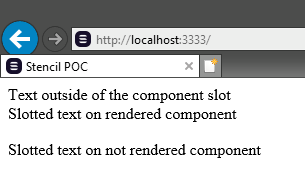
How it's supposed to look:
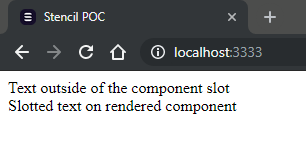
 Salet
Salet
All 3 comments
@Salet How did you manually apply a Shadow DOM polyfill to bypass this?
 simondiep
on 16 Sep 2019
simondiep
on 16 Sep 2019
This should be fixed in the latest version. If it's still a problem, would you be able to create an issue with a thorough description on how to replicate this? Thanks
 adamdbradley
on 15 Jan 2020
adamdbradley
on 15 Jan 2020
This issue is still present in 1.8.5
 learnwithratnesh
on 24 Jan 2020
learnwithratnesh
on 24 Jan 2020
Related issues
 lcswillems
·
3Comments
lcswillems
·
3Comments
 elmariofredo
·
3Comments
elmariofredo
·
3Comments
 anthonylebrun
·
3Comments
anthonylebrun
·
3Comments
 joewoodhouse
·
3Comments
joewoodhouse
·
3Comments
 karsvaniersel
·
3Comments
karsvaniersel
·
3Comments
Most helpful comment
This issue is still present in 1.8.5