Stencil: CSS Properties fail to resolve in IE11 inside shadow: true components
Stencil version:
@stencil/[email protected]
I'm submitting a:
[x] bug report
Steps to reproduce:
Demo repo: https://github.com/mattdsteele/stencil-ie11-shadow-props
The component is the standard starter (shadow: true) with a few styles around CSS custom props:
:host {
  --some-value: green;
}
div {
  --some-value: blue;
  background-color: var(--some-value);
}
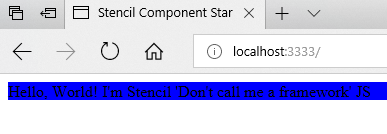
In non-IE browsers (Chrome, FF, Edge) it works fine:
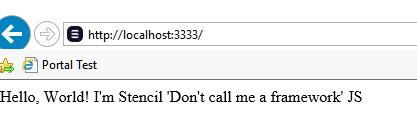
But no styles are applied in IE11:
Here's the style tag that gets added to the head of the page in IE11:
<style>div.sc-my-component{background-color:}</style>
Other information:
This appears to have started with 0.11.0. I tried with 0.10.10 and it was working fine.
Switching to shadow: false fixes it, but most of our components are using Shadow DOM features, so it's not really a great workaround.
 mattdsteele
All 9 comments
I was seeing a similar issue caused by what looked like a couple of factors:
incorrectly named auto-generated styles e.g. in the style tag at the top of the page the classes are
.foo-bar-elem,.button.foo-bar-elemetc but the class that is added to the element itself is.foo-bar-elem-0in my older version of the component-starter (that worked with shadowDOM) it added an attribute to the custom elem rather than a class
 grahamlucid
on 15 Aug 2018
grahamlucid
on 15 Aug 2018
I am having the same issue with Stencil 0.11+
:host styles are not being applied at all in IE
 slavicandreev
on 22 Aug 2018
slavicandreev
on 22 Aug 2018
Thanks for reporting the issue, I am actively working on it
 manucorporat
on 25 Aug 2018
manucorporat
on 25 Aug 2018
This should be fixed in next 0.13.0-0 version!
manucorporat
on 4 Sep 2018
Looks like it's working in our test case - I'll try updating our main app and see if I run into anything else. Thanks!
mattdsteele
on 4 Sep 2018
Looks good in our real app. Thanks again!
mattdsteele
on 5 Sep 2018
@kevinlandsberg Hmm, I just tried 0.13.0-8 in my app, and it still seems to be working well there. Could you create a test case/modify mine to reproduce what you're seeing?
(I repurposed my repo, but the commit w/ the issue as I saw it is at https://github.com/mattdsteele/stencil-ie11-shadow-slot/tree/6f4aea9de0e57eec259fcbf78d27f7bf9cb6c7e0 )
mattdsteele
on 12 Sep 2018
I'm having similar issues with ie11 and css-vars. The strange is how variables are finally updated in the dom:
html {
    font-size: 10px;
    height: 100%;
    --content-color: brown: ;
    --BORDER-SMALL: 1px: ;
    --BORDER-COLOR: #eaeaea: ;
    --GRID-XS: 4px: ;
    --GRID-S: 8px: ;
    --GRID-BASE: 16px: ;
    --GRID-L: 24px: ;
    --GRID-XL: 32px: ;
    --GRID-XXL: 48px: ;
    --TYPOGRAPHY-BASE-SIZE: 1.6em: ;
    --TYPOGRAPHY-BASE-LINE: 1: ;
    --COLOR-PRIMARY: #69f: ;
    --COLOR-SECONDARY: #58e: ;
    --COLOR-ACCENT: red: ;
    --COLOR-BACKGROUND: #ddd: ;
}
Notice that an extra ":" is added at the end.
 dvelasquez
on 21 Sep 2018
dvelasquez
on 21 Sep 2018
I'm having similar issues with ie11 and css-vars. The strange is how variables are finally updated in the dom:
html {
    font-size: 10px;
    height: 100%;
    --content-color: brown: ;
    --BORDER-SMALL: 1px: ;
    --BORDER-COLOR: #eaeaea: ;
    --GRID-XS: 4px: ;
    --GRID-S: 8px: ;
    --GRID-BASE: 16px: ;
    --GRID-L: 24px: ;
    --GRID-XL: 32px: ;
    --GRID-XXL: 48px: ;
    --TYPOGRAPHY-BASE-SIZE: 1.6em: ;
    --TYPOGRAPHY-BASE-LINE: 1: ;
    --COLOR-PRIMARY: #69f: ;
    --COLOR-SECONDARY: #58e: ;
    --COLOR-ACCENT: red: ;
    --COLOR-BACKGROUND: #ddd: ;
}
Notice that an extra ":" is added at the end.
I'm experiencing the same issue with version 0.18.0 and the way vars are rendered in IE11:
:root {
    --progress-color:red: ;
    --current-value:20: ;
    --max-value:50: ;
    --hrwidth:50%: ;
}
But the strangest part is that in the style that gets added in the head, it looks ok:
<style>:root{--progress-color:red;--current-value:20;--max-value:50;--hrwidth:50%}</style>
 inigotoro
on 14 Mar 2019
inigotoro
on 14 Mar 2019
Related issues
 rajiramamoorthi
·
3Comments
rajiramamoorthi
·
3Comments
 MatanYadaev
·
3Comments
MatanYadaev
·
3Comments
 ryanmunger
·
3Comments
ryanmunger
·
3Comments
 elmariofredo
·
3Comments
elmariofredo
·
3Comments
 ckrack
·
3Comments
ckrack
·
3Comments
Most helpful comment
Thanks for reporting the issue, I am actively working on it