Stencil: defineCustomElements not working with IE11 and Angular
Stencil version:
@stencil/[email protected]
I'm submitting a:
[x] bug report
[ ] feature request
[ ] support request => Please do not submit support requests here, use one of these channels: https://stencil-worldwide.herokuapp.com/ or https://forum.ionicframework.com/
Current behavior:
When using defineCustomElements inside of an Angular 6 project and loading the project in IE11 none of our Stencil components seem to be rendering. The Angular project seems to work fine in every other browser. Our Stencil project also works fine in IE11 (when not loaded in Angular).
Expected behavior:
To see Stencil components that are loaded into an Angular 6 project render in IE11.
Steps to reproduce:
Using angular-cli, we built out a test Angular project to see how our Stencil components behave in it.
We followed the setup steps include Stencil components in an Angular project from the Stencil docs.
Related code:
The standard setup steps for loading Stencil components into Angular.
Other information:
When remove the call to defineCustomElements and load the app in Chrome, similar behavior of components not rendering is happening. This is what made us think it could be related to how IE11 is handling defineCustomElements.
 ryanmunger
All 3 comments
Do you happen to receive any errors in the console?
Also please verify that you have updated based on the changelog.
https://github.com/ionic-team/stencil/blob/master/CHANGELOG.md#definecustomelements
 jthoms1
on 17 Sep 2018
jthoms1
on 17 Sep 2018
I was able to reproduce this as well. Here's what I did:
- Setup a new Angular app -
ng new stencil-test-app - Build a dependency with Stencil
0.13.0-11. - Add in all polyfills and dependencies required for an Angular app to load in IE11
- Check that the basic boilerplate app loads in IE11
- Create a link to the dependency -
yarn link - Add the link to the Angular app -
yarn link my-stencil-component - Import
defineCustomElementsintomain.ts-import { defineCustomElements } from 'my-stencil-component/dist/loader'; - Run it -
defineCustomElements(window) - Add the component to the
app.template.htmlfile -<my-stencil-component>Hello</my-stencil-component> - Load the application in Chrome/Safari/Firefox - both the initial Angular boilerplate and the Stencil component appear as expected
- Load the application in IE11 - the initial Angular boilerplate appears as expected, while the Stencil component does not render at all.
The only other change I can think to make is to create another Stencil dependency and make sure that it isn't something specific with the Stencil code I wrote.
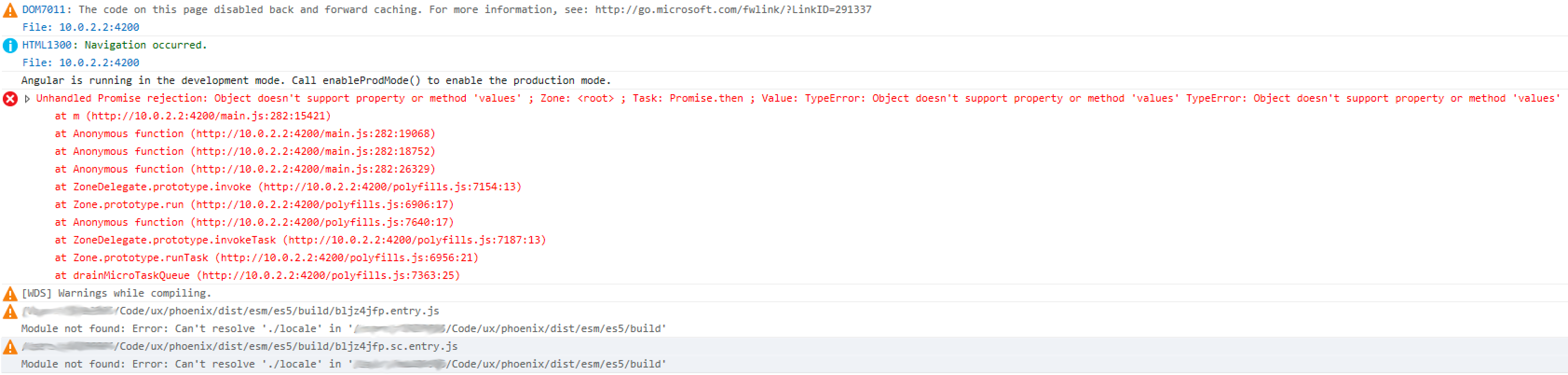
The only errors I see are from zone.js, and from conversations on Slack it sounded like that may be a separate bug. Here's a screenshot of all the warnings/errors I see:
 pseudoramble
on 18 Sep 2018
pseudoramble
on 18 Sep 2018
I dug into the error that was showing up in the console more. It looks like Stencil requires Object.values to exist somewhere in the code base. In IE11, that needs to be polyfilled. Importing core-js/es7/object within the polyfill.ts file resolves this issue.
One note - Angular's default polyfill.ts file only includes core-js/es6/object and not the ES7 version. You'll need to add both in to have the code load properly in Angular and IE11.
Would it be worthwhile adding this to this section of the docs? https://stenciljs.com/docs/framework-integration.
pseudoramble
on 18 Sep 2018
Related issues
 anthonylebrun
·
3Comments
anthonylebrun
·
3Comments
 danschultz
·
3Comments
danschultz
·
3Comments
 kensodemann
·
3Comments
kensodemann
·
3Comments
 mitchellsimoens
·
3Comments
mitchellsimoens
·
3Comments
 noahlaux
·
3Comments
noahlaux
·
3Comments
Most helpful comment
I dug into the error that was showing up in the console more. It looks like Stencil requires
Object.valuesto exist somewhere in the code base. In IE11, that needs to be polyfilled. Importingcore-js/es7/objectwithin thepolyfill.tsfile resolves this issue.One note - Angular's default
polyfill.tsfile only includescore-js/es6/objectand not the ES7 version. You'll need to add both in to have the code load properly in Angular and IE11.Would it be worthwhile adding this to this section of the docs? https://stenciljs.com/docs/framework-integration.