Stencil: How to include third party javascript library in stenciljs?
I need to inlude this script in my stencil component. I included this in the index.html which is in src folder. This is working exactly how i need in the development mode but once i run npm build . This doesn't work. Can someone tell me where do i include this third party library?
 kartikgreen
All 48 comments
Hey! Are you getting any errors when this happens? If you inspect your HTML in the browser do you see that script tag?
 jgw96
on 29 Jan 2018
jgw96
on 29 Jan 2018
Hi, There is no error but when i make production build, the script tag i mentioned is not compiled so i have to again include that script tag in the index.html where i add the custom element.
kartikgreen
on 29 Jan 2018
Ahhh, are you using the stencil-component starter?
jgw96
on 29 Jan 2018
yes I ' am. Here is the link to the component i made https://github.com/kartikgreen/google-charts
once you run this in development , you see a form , once the form i submitted , you see the google charts . You dont see the google charts in the production build.
kartikgreen
on 29 Jan 2018
The link to the git repo in the above comment is changed with the correct url.
kartikgreen
on 29 Jan 2018
The error that i receive when i build is [ ERROR ] Runtime error detected during componentDidLoad(): app-charts
google is not defined ReferenceError: google is not defined at e.createPieChart
kartikgreen
on 30 Jan 2018
Hello! Is there a way i can resolve this issue?
kartikgreen
on 30 Jan 2018
As far as I know, this should only be possible from latest feat commit on master
feat(esmodules): add support for esmodule based code splitting.
So if you are using a stenciljs release and import external library as an ES module, it will cause an error, due to Rollup version not supporting this.
PS: Please correct me if I'm wrong (I'm not a core contributor)
 kristianmandrup
on 30 Jan 2018
kristianmandrup
on 30 Jan 2018
Hi please see what i did,
1.I cloned the seed project from this link
2.Added script tag in the index.html of the src folder and google charts code in the home.tsx file
Link to configure google charts
Google charts demo on fiddle
Link to the new component where i configured google charts
Issue:
Can run in development mode but fails in production. Temporary workaround for me is to add again the script tag in the index.html of the production build.
Here is the link for you to clone and reproduce the error
kartikgreen
on 30 Jan 2018
Hello @kartikgreen! So the reason your running into an issue here is because you are using pre-rendering and the script tag you're adding does not get loaded when pre-rendering is running. Is this component mean to be a standalone component used in other projects or are you building an app using Stencil?
jgw96
on 30 Jan 2018
I inspected the dom and found the script tag is included but still not sure why it is not working. We are building a widget which will be used in our clients webpage.
kartikgreen
on 30 Jan 2018
It is very sad to say that npm run build without pre-rendering also doesnt work
kartikgreen
on 31 Jan 2018
I'm running into the same problem here. As for me, I'm trying to build a standalone component distributed over npm. Some third party libraries that I'm interested in using include moment, resize-detector, etc. I realize Stencil isn't likely ready to be used this way, but hopefully providing some use cases would be beneficial to the team in the long run. Anyways, the specific error I'm running into is:
[ ERROR ]  bundling: dist/collection/components/...
'default' is not exported by node_modules/resize-detector/esm/index.js
import resizeDetector from 'resize-detector';
[ ERROR ]  rollup died at /Users/.../Documents/.../node_modules/@stencil/core/dist/compiler/index.js:3490:19
 ghost
on 2 Feb 2018
ghost
on 2 Feb 2018
What version of Stencil are you using? This might be fixed in the latest 0.3.0-5. This is what i was getting before with Redux (but just from time to time).
 bfmatei
on 2 Feb 2018
bfmatei
on 2 Feb 2018
I am using the latest version.
kartikgreen
on 5 Feb 2018
Please run ‘npm list @stencil/core’ and provide the exact version. There are two “latest” versions: 0.2.3 and 0.3.0-5. If you want the second one, manually specify it (or “nex”) in the package.json file.
bfmatei
on 5 Feb 2018
I changed my package.json as
{
"name": "my-component",
"version": "0.0.1",
"description": "Stencil Component Starter",
"main": "dist/mycomponent.js",
"types": "dist/types/index.d.ts",
"collection": "dist/collection/collection-manifest.json",
"files": [
"dist/"
],
"browser": "dist/mycomponent.js",
"scripts": {
"build": "stencil build",
"dev": "sd concurrent \"stencil build --dev --watch\" \"stencil-dev-server\" ",
"serve": "stencil-dev-server",
"start": "npm run dev",
"test": "jest --no-cache",
"test.watch": "jest --watch --no-cache"
},
"dependencies": {
"@stencil/core": "0.3.0-5",
"flatpickr": "^4.2.4"
},
"devDependencies": {
"@stencil/dev-server": "latest",
"@stencil/utils": "latest",
"@types/jest": "^21.1.1",
"jest": "^21.2.1"
},
"repository": {
"type": "git",
"url": "git+https://github.com/ionic-team/stencil-component-starter.git"
},
"author": "Ionic Team",
"license": "MIT",
"bugs": {
"url": "https://github.com/ionic-team/stencil"
},
"homepage": "https://github.com/ionic-team/stencil",
"jest": {
"transform": {
"^.+\.(ts|tsx)$": "
},
"testRegex": "(/__tests__/.*|\.(test|spec))\.(tsx?|jsx?)$",
"moduleFileExtensions": [
"ts",
"tsx",
"js",
"json",
"jsx"
]
}
}
The problem doesn't seem to solve.
kartikgreen
on 5 Feb 2018
The problem remains the same even after updating the stenciljs to the latest version.
kartikgreen
on 5 Feb 2018
Please set a public github repo and provide me the link to it.
bfmatei
on 5 Feb 2018
Please find the link to the repo https://github.com/kartikgreen/widget-chart
kartikgreen
on 5 Feb 2018
It works fine for me (no compiling errors and i can surf the page). Just refetch your project, make sure to use node 8 or 9 (i'm using 9 at the moment) and do a fresh npm install.
bfmatei
on 5 Feb 2018
Hello,
There is no compiling errors but you don't see the pie chart that is shown once you click the go button(only in the production build).
My node version is 8.9.4. Did you run this in production build? (npm run build)
I just tried in a new machine. This is working in development mode but not in the production build.
what does not work is the google chart, that is shown once you click go button on the form.
kartikgreen
on 5 Feb 2018
This is my index.html that refers to the dist folder generated by the command npm run build,
<!DOCTYPE html>
<head>
  <meta charset="utf-8">
  <title>Stencil Component Starter</title>
  <meta name="Description" content="Welcome to the Stencil App Starter. You can use this starter to build entire apps all with web components using Stencil!">
  <script src='./dist/mycomponent.js'></script>
</head>
<body>
  <app-charts></app-charts>
</body>
</html>
can you upload your dist folder here ?
kartikgreen
on 5 Feb 2018
Hey @kartikgreen , after further research it seems that the library your using only works through a cdn, not importing it. I would look into using something like d3.js, which is made to work as an import. Thanks for using Stencil!
jgw96
on 5 Feb 2018
So can I not use cdn in stencil components?
kartikgreen
on 6 Feb 2018
@kartikgreen You can not use ES5 import a file that is not designed for import, ie. that does not export anything.
You can however always include a CDN source file in your .html file (ie. in your DOM) via an "old school" <script> tag, and the source code will be included "as is" (ie. as though you copy/pasted the source code into your script tag.
Perhaps using stencilJS is a bit too soon if you don't yet understand these concepts. Keep it simple until you "level up". Stencil is a very advanced framework, mostly for experienced developers.
Perhaps first learn some ES5 and ES6 basics. There are plenty of free courses and resources online. Have fun and good luck.
kristianmandrup
on 6 Feb 2018
@kristianmandrup . Great. If you can include the script tags then pull my repo, include the script tag and prove me it works only if you are a man. I don’t know what made you to tell me that I need to learn the basics of es5 and es6. You just don’t know how to include google charts in stencil components and boasting as if you were the master of stenciljs. All you know is stencil is an advance framework for experienced developers. You should at least try to answer my question rather than demotivating. I at least made a component With stenciljs what the hell did you do? You should learn stencil before coming here to comment here. Please find my repo. Please have a look at the index.html, I have included a cdn of google charts via script tag. importing the modules like d3.js work without any issues.
kartikgreen
on 7 Feb 2018
@jgw96 , Hey please tell me why including cdn in the script tag of index.html does work only in the development mode but not in the production mode.
kartikgreen
on 7 Feb 2018
@kartikgreen
I don't know what you are trying to do. I downloaded the repo you pointed out, did a npm i and ran both dev and build successfully. You have the log below.
▶ npm run build

> [email protected] build /Users/bmatei/Workspace/personal/stencil/widget-chart
> stencil build
[52:46.4]  @stencil/core v0.3.0-5
[52:46.5]  build, mycomponent, prod mode, started ...
[52:46.5]  compile started ...
[52:48.6]  compile finished in 2.16 s
[52:49.3]  generate bundles started ...
[52:52.1]  generate bundles finished in 2.83 s
[52:52.1]  generate app files started ...
[52:54.2]  generate app files finished in 2.08 s
[52:54.2]  generate service worker started ...
[52:54.4]  generate service worker finished in 218 ms
[52:54.4]  build finished in 7.96 s
Additionally, you should lazy load external charts: after the app loads, dynamically create a script tag in order to load the library. It's better than forcing the browser to load the script synchronously when the page loads. What is the scope of the project you are working on? Will it be a standalone website, standalone web component etc.?
bfmatei
on 7 Feb 2018
Hello @bfmatei, Well you can run without compiling errors but you don't see the pie chart in the production build.(click go button on the form to view the pie chart in the development mode)
kartikgreen
on 7 Feb 2018
Actually... check it here: https://imgur.com/UCRVOmg
bfmatei
on 7 Feb 2018
No disrespect @kartikgreen ;) Just sounded like you were a bit of a novice to modern web app development and was taking the dive on the deep end a bit early. We all know how it is, all of us have been there, too eager to play with the most fancy toys. Still falling into this trap....
Why I wished you good luck on your journey. Sorry, I don't have time to deep dive into your particular issue/repo either. I hope you will resolve your issues with the help from the community.
Cheers!
kristianmandrup
on 7 Feb 2018
@bfmatei
Did you crop that image from the production build?
can you drop the build file here?
Please open this directory and in the directory open index.html in firefox then you don't see the pie chart
kartikgreen
on 7 Feb 2018
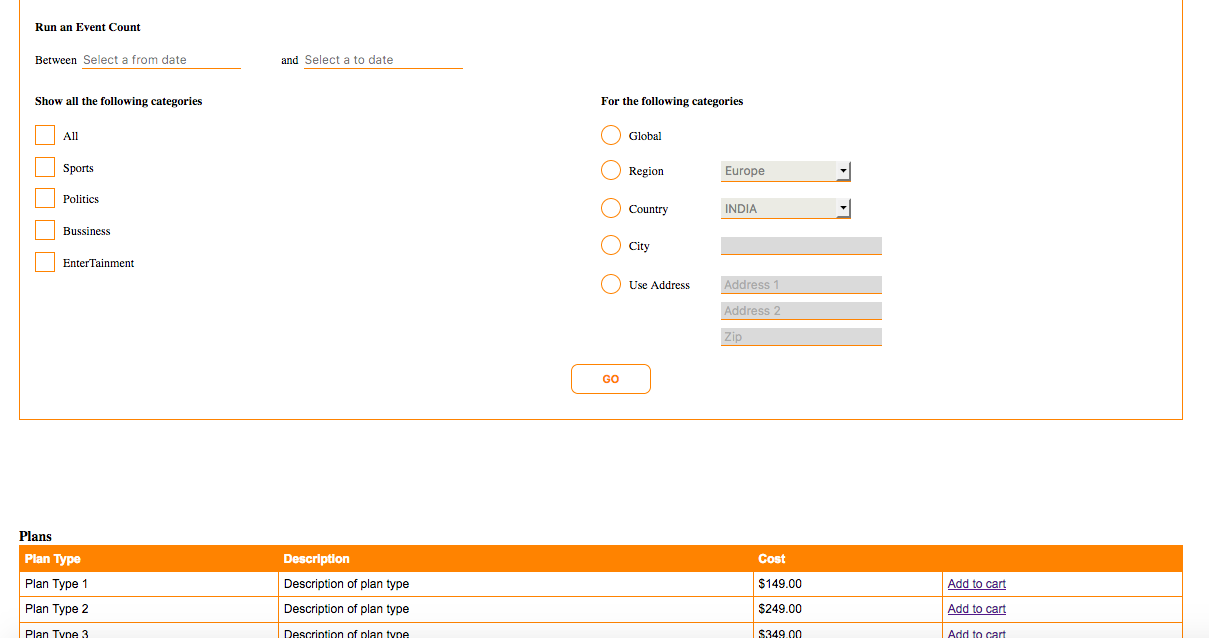
@bfmatei The Pie chart is not show in the production build.
kartikgreen
on 7 Feb 2018
Direct path here: https://stencil-boilerplate.bmatei.com/
bfmatei
on 7 Feb 2018
@bfmatei Well then why dont you drop me the dist folder here?
kartikgreen
on 7 Feb 2018
You can find the dist and www folders here: https://ufile.io/gya5m
I'm out. Good luck!
bfmatei
on 7 Feb 2018
@bfmatei Did you again include the google chart's cdn in the production build?
kartikgreen
on 7 Feb 2018
@bfmatei
I think you have again included the google chart's cdn in the production build. It could really be nice if you can send me the whole directory. I have included your dist and build folder in the directory and within the directory open index.html then you dont see the pie chart https://uploadfiles.io/scnkn.
kartikgreen
on 7 Feb 2018
I didn’t modify anything. I told you: pull, install and build/run.
bfmatei
on 7 Feb 2018
@bfmatei Please drop in the directory. I would like to see your index.html which includes your production build.
kartikgreen
on 7 Feb 2018
@bfmatei sending your directory can resolve my issue. please do that.
kartikgreen
on 7 Feb 2018
I guess one solution could be to create component at the bigining to load imports from cdn. I have seen fech components. Use the same logic. Hive array of cdn url. And it will generate imports, or when u give ti it will give u js and attache to the htlm->script. But im not sure )
 azatTemirbek
on 19 Mar 2018
azatTemirbek
on 19 Mar 2018
With all the respect, sorry, I just stumble upon this issue and felt really sorry about @kartikgreen. This type of answers I faced when initially trying to find solutions with ionic 1. This team just doesn't have the right attitude. @kristianmandrup, I hope that you understand that throwing some nonsense of an answer, like go learn ES6 modules instead of explaining how a 3rd party script from cdn could be included in the stencil build. I hope that sometime in the future you will have some obvious issues and someone insult you like that.
I on the other hand just gonna continue using something else, no more ionic. To me Stencil is not web-components. If I would wanted Web components I would go with any of the Polymer versions. hell even Angular Elements is better that this. VDOM?Guys have you browsed Facebook recently. Prove me that is has better performance than the real DOM. React is speculation, VDOM is speculation. unnatural. For a company that went the Angular path, turning on 180 degrees doesn't give me a whole bunch of confidence that you know what are you doing, https://twitter.com/dan_abramov/status/842329893044146176?lang=en
 talamaska
on 27 May 2018
talamaska
on 27 May 2018
@kartikgreen I don't think script tags referencing external js (cdns) are included in production builds (at least not that I've seen). It works when running locally because it's just serving your index.html through a local server. Once it's bundled up it won't include those external cdns you're referencing from your index.html file.
What you can do is install your dependency via npm, then import it into your component. It looks like you're using google charts: https://www.npmjs.com/package/google-charts
Install the dependency
npm install google-charts --saveImport it into your component at the top
import {GoogleCharts} from 'google-charts';
Now when creating a build google charts will be included in your bundle.
 scottlepp
on 22 Mar 2019
scottlepp
on 22 Mar 2019
Hi @kartikgreen , it seems you are creating standalone components. Well they are components and they do not directly have or should have an access to the index.html of real-world app which uses it. As a component, you do not have the index.html with you, the app that uses your component do. Which means, that parent app needs to import the script tag or more specifically, your app's index.html. How do you dictate that while sitting from inside?
However, DOM is your own property nomatter whatever frontend framework you are in and it does give you access even from inside your component. So, just create the script tag with document.createElement("script") from inside your component maybe in "componentWillLoad" lifecycle and put the scr inside. Something like,
let script = document.createElement("script");
script.src = "https://connect.facebook.net/en_US/sdk.js";
document.head.appendChild(script)

// It adds the following script at the head of the index.html of the app that uses your stencil component

<script src="https://connect.facebook.net/en_US/sdk.js"></script>
Coming to the question, why did it not give error in dev but did in production, what you are calling dev's index.html where you imported the script, is the testing appication's index.html. Stencil provides it to you just to test how would your component behave inside an actual html environment. It is not part of your final compilation.
Stencil is new but very powerful. Learn ins and outs, learn more basic js and you can do a lot of crazy stuff with it.
 juny58
on 12 Jun 2020
juny58
on 12 Jun 2020
Hi @kartikgreen , it seems you are creating standalone components. Well they are components and they do not directly have or should have an access to the index.html of real-world app which uses it. As a component, you do not have the index.html with you, the app that uses your component do. Which means, that parent app needs to import the script tag or more specifically, your app's index.html. How do you dictate that while sitting from inside?
However, DOM is your own property nomatter whatever frontend framework you are in and it does give you access even from inside your component. So, just create the script tag with
document.createElement("script")from inside your component maybe in "componentWillLoad" lifecycle and put the scr inside. Something like,let script = document.createElement("script"); script.src = "https://connect.facebook.net/en_US/sdk.js"; document.head.appendChild(script) // It adds the following script at the head of the index.html of the app that uses your stencil component <script src="https://connect.facebook.net/en_US/sdk.js"></script>Coming to the question, why did it not give error in dev but did in production, what you are calling dev's index.html where you imported the script, is the testing appication's index.html. Stencil provides it to you just to test how would your component behave inside an actual html environment. It is not part of your final compilation.
Stencil is new but very powerful. Learn ins and outs, learn more basic js and you can do a lot of crazy stuff with it.
This issue was posted when you were a kid. Read the issue well before learning JS. :)
kartikgreen
on 2 Sep 2020
Related issues
 mitchellsimoens
·
3Comments
mitchellsimoens
·
3Comments
 joewoodhouse
·
3Comments
joewoodhouse
·
3Comments
 kensodemann
·
3Comments
kensodemann
·
3Comments
 rajiramamoorthi
·
3Comments
rajiramamoorthi
·
3Comments
 karsvaniersel
·
3Comments
karsvaniersel
·
3Comments
Most helpful comment
@kristianmandrup . Great. If you can include the script tags then pull my repo, include the script tag and prove me it works only if you are a man. I don’t know what made you to tell me that I need to learn the basics of es5 and es6. You just don’t know how to include google charts in stencil components and boasting as if you were the master of stenciljs. All you know is stencil is an advance framework for experienced developers. You should at least try to answer my question rather than demotivating. I at least made a component With stenciljs what the hell did you do? You should learn stencil before coming here to comment here. Please find my repo. Please have a look at the index.html, I have included a cdn of google charts via script tag. importing the modules like d3.js work without any issues.