Staxrip: Bug when typing values of resize (instead of moving slider) - newly introduced. used to work ok!
Describe the bug
When typing a value of new height or new width in the resize boxes, instead of moving the slider, the display of the size under the Target field is not refreshed.
- Opening the Info window and closing it will make the refresh happen (after closing it).
- Using the slider does not cause any problem.
- In order to reproduce this, you must disable option Image > Aspect Ratio> "adjust height according to target display aspect ratio"
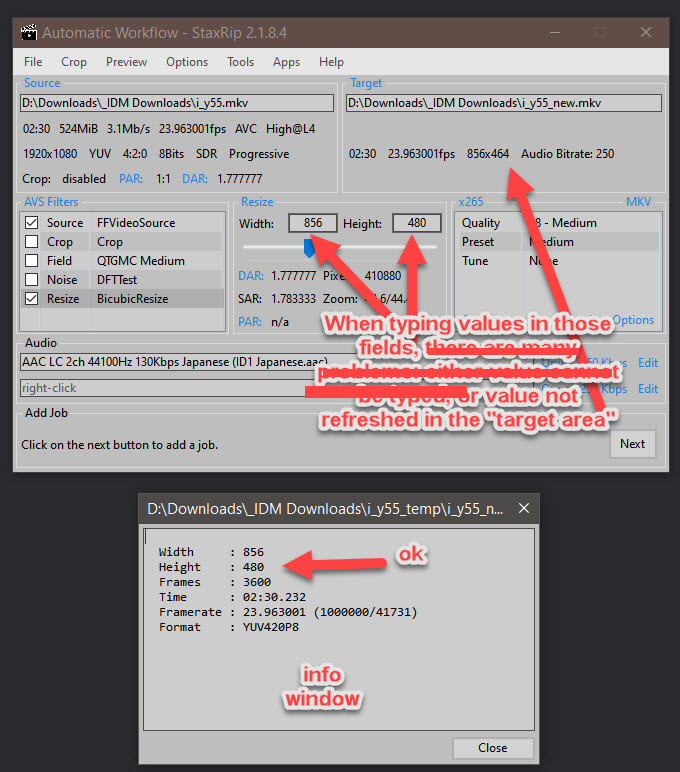
Sorry for the sloppy screenshots with corrections 🤣
bug
 ghost
ghost
😄2
👀1
👍1
All 3 comments
To be more precise, the bug happens when typing in the HEIGHT box!
Edit: another way to reproduce the bug easily:
- use fresh install of staxrip (no changes, and mod set to 8, it's the default)
- remove option Image > Aspect Ratio> "adjust height according to target display aspect ratio" so it doesn't interfere.
- load any video
- use resize, move slider so the resize value is 848x480 (or 856x480)
- now in the HEIGHT box, type 464 (which is a MOD 8 value)
- Staxrip will say " Change output size to be divisible by 8 etc.." 😮 BUT WHY? 464 IS divisible by 8 ! Because in the target section, you see 46 and NOT 464.
- The only way to validate 464 is to open the Info window (from the filters section) and close it.
ghost
on 4 Mar 2021
👀1
👍1
Let's see if this fixes it for you - my tests were positive:
StaxRip v2.1.8.4D_Size.zip
 Dendraspis
on 4 Mar 2021
Dendraspis
on 4 Mar 2021
Thanks @Dendraspis ! the problem is gone ! i'll close it :-)
😃
Don't forget t o commit 😁
ghost
on 4 Mar 2021
😄1
👍1
Was this page helpful?
0 / 5 - 0 ratings
Related issues
 Xperia
·
3Comments
ghost
·
4Comments
Xperia
·
3Comments
ghost
·
4Comments
 AYColumbia
·
3Comments
AYColumbia
·
3Comments
 vonH
·
4Comments
vonH
·
4Comments
 JJKylee
·
3Comments
JJKylee
·
3Comments
Most helpful comment
Thanks @Dendraspis ! the problem is gone ! i'll close it :-)
😃
Don't forget t o commit 😁