Staxrip: Add 'SelectRangeEvery' to filter options
Is your feature request related to a problem? Please describe.
N/A This is not an issue with Staxrip.
Describe the solution you'd like
When creating a script, I would use #SelectRangeEvery(1500,50) (depending on source) to get a reasonable idea of the end results, but without having to encode the entire file. I know this can be added by editing the script in Staxrip, but it's hard to work out where to place it (I'm not used to the UI and editing the script brings up this box:
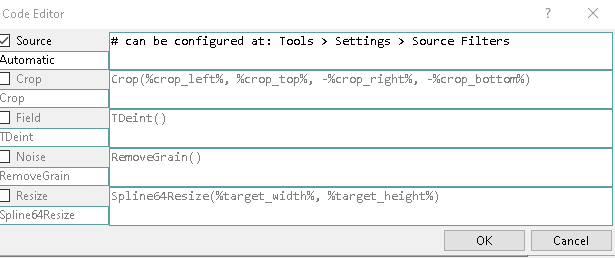
Where should I add the SelectRangeEvery()?
Describe alternatives you've considered
I've considered trying to load a pre-written script into Staxrip, but then it seems pointless to use Staxrip in the first place if I go back to writing the script.
Explain why the feature matters to you
It's a really useful tool and would be an excellent add-on to the program. I can't imagine it would be hard to implement. I would suggest adding it to 'AVS Filters -> Misc -> SelectRangeEvery' or perhaps 'AVS Filters -> Testing -> SelectRangeEvery()' (new category) and let the user decide.
Additional context
I can't think of any. I have read through the documentation and this forum post but can't seem to work out exactly where to place it and really believe there would be a benefit of adding it.
 vonH
vonH
All 4 comments
I should add that this can be done by going to Profiles -> Misc -> and adding 'SelectRangeEvery() = #SelectRangeEvery(1500,50)' without the ' , but it would be nice to see this added as a standard option in the next release, if possible.
vonH
on 1 Jun 2020
I've added it to the presets.
Where should I add the SelectRangeEvery()?
In the Code Editor menu:
Add... > Empty Filter
 stax76
on 6 Jun 2020
stax76
on 6 Jun 2020
New beta is online.
stax76
on 22 Jun 2020
I've added it to the presets.
Where should I add the SelectRangeEvery()?
In the Code Editor menu:
Add... > Empty Filter
Only just seen this. Not sure how I missed the notification as I added it then saw you'd added in. Just wanted to say thank you.
vonH
on 10 Sep 2020
Related issues
stax76
·
3Comments
 Xperia
·
3Comments
Xperia
·
3Comments
 AYColumbia
·
3Comments
AYColumbia
·
3Comments
 ghost
·
4Comments
ghost
·
3Comments
ghost
·
4Comments
ghost
·
3Comments
Most helpful comment
Only just seen this. Not sure how I missed the notification as I added it then saw you'd added in. Just wanted to say thank you.