Status-react: Biometric sign-in
I've been working on Face ID/Touch ID/Fingerprint sign-in options in settings and ran into a few problems:
Is it really "SIgn-in"? I mean, obviously you can not sign in on another device using your fingerprint, which means we are not offering you a "fingerprint sign-in". Most apps call this "app lock" which is something on top of sign-in/sign-out.
"Save password" option. If the user has this turned on, there's no reason to enable biometric sign-in at all. Although this is true only if we assume that the goal of "biometric sign-in" is to speed up the sign-in process, make it smooth. Because what can be smoother than not asking for anything at all?
In general, I have a feeling that we have not thought this through and it requires more discussion and research. What is the problem we're solving here? I understand that this feature is in high demand by our community, but maybe they are asking for something else actually? What if some of them want an "app lock" – a way to prevent strangers from opening the app when they got their phone. And others want transaction signing with a fingerprint. And others just did not notice that "Save password" option (or use an old Android build) and are just annoyed by entering the password each time they run the app?
If it was up to me, I'd suggest postponing this feature to have some more time for proper research.
But, anyway, to make it work now as a really simple app-lock, we can do this:
Settings
"App lock with Face ID" option in "Privacy and security".
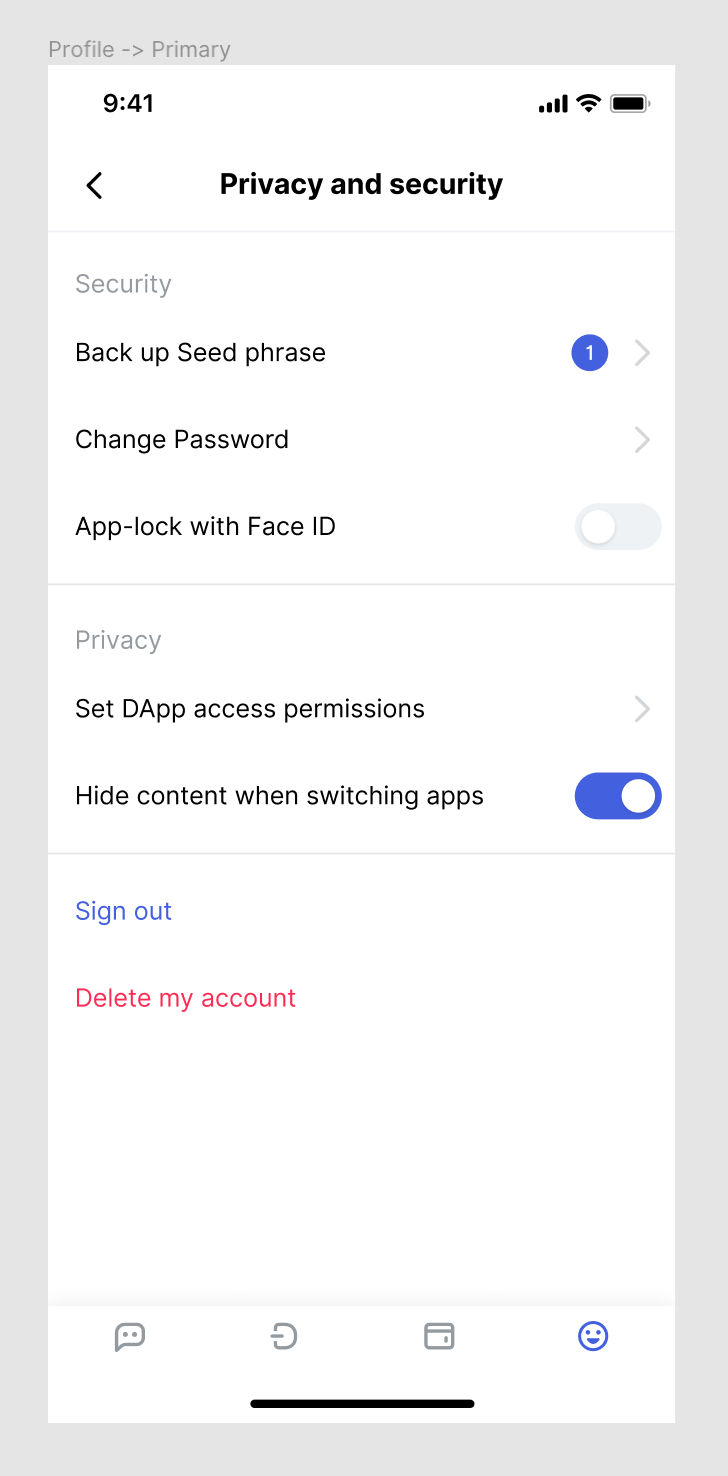
Save password feature
If the user does not have the "save password" box checked they get asked for the password each time they run the app. If the goal of "biometric sign-in" aka “app-lock” is making it easy yet secure to sign-in, it basically means that "biometric sign-in" is a security level ontop of "save password". (for those who choose that it’s better for them to instead of being asked for nothing, to be asked for biometric data to run the app) This means that to enable "biometric sign-in" the user should first check the "save password" box on the sign-in screen.
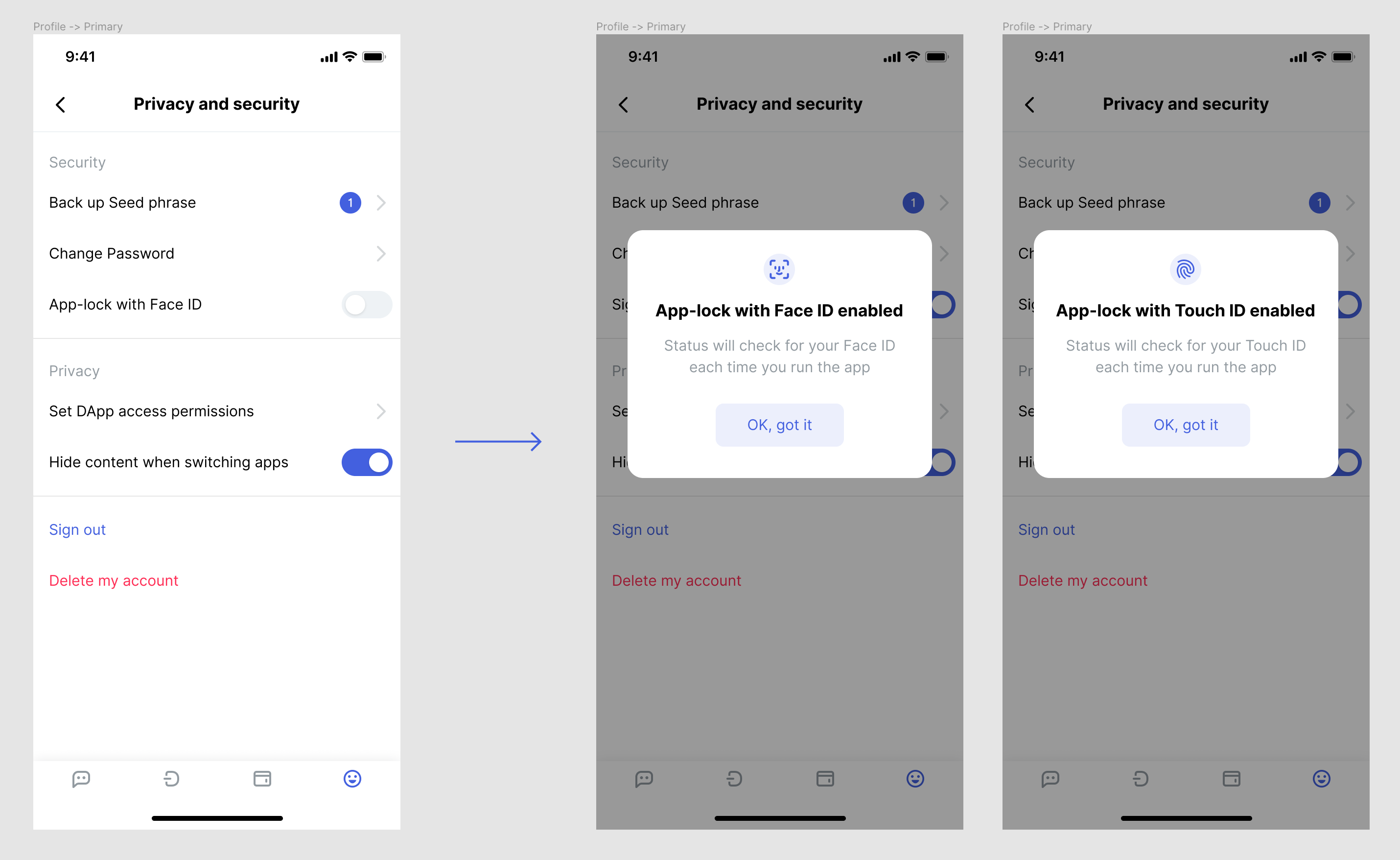
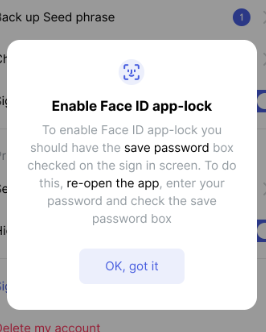
So if the user tries to turn the "App-lock with Face ID" toggle on, they will get this popup:

If the "save password" box is checked, it just going to turn the app-lock on and inform that everything is okay. It's important to mention here when are we going to check for the face id/fingerprint (each time the user runs the app) since we don't have an option for the user to control that yet like some other apps do.
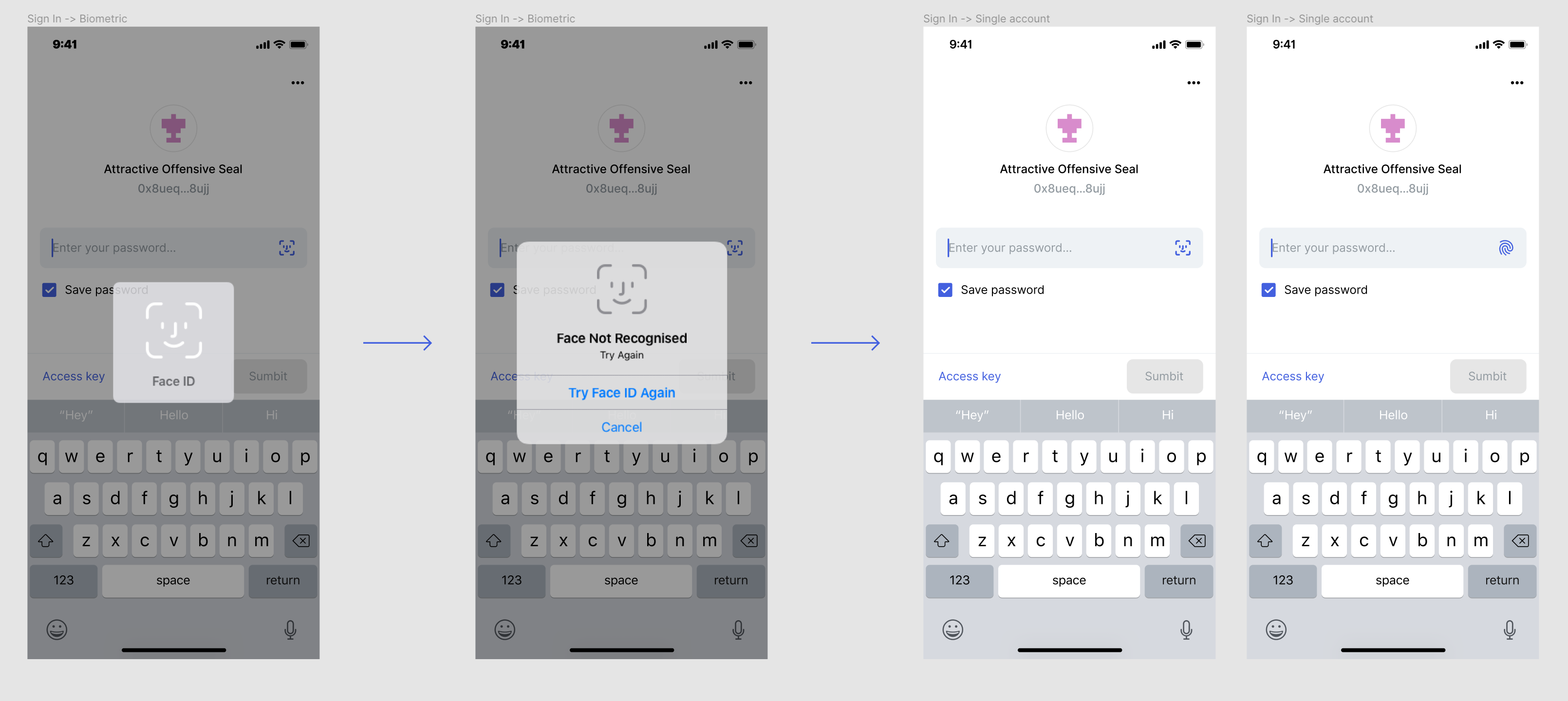
Sign-in screen
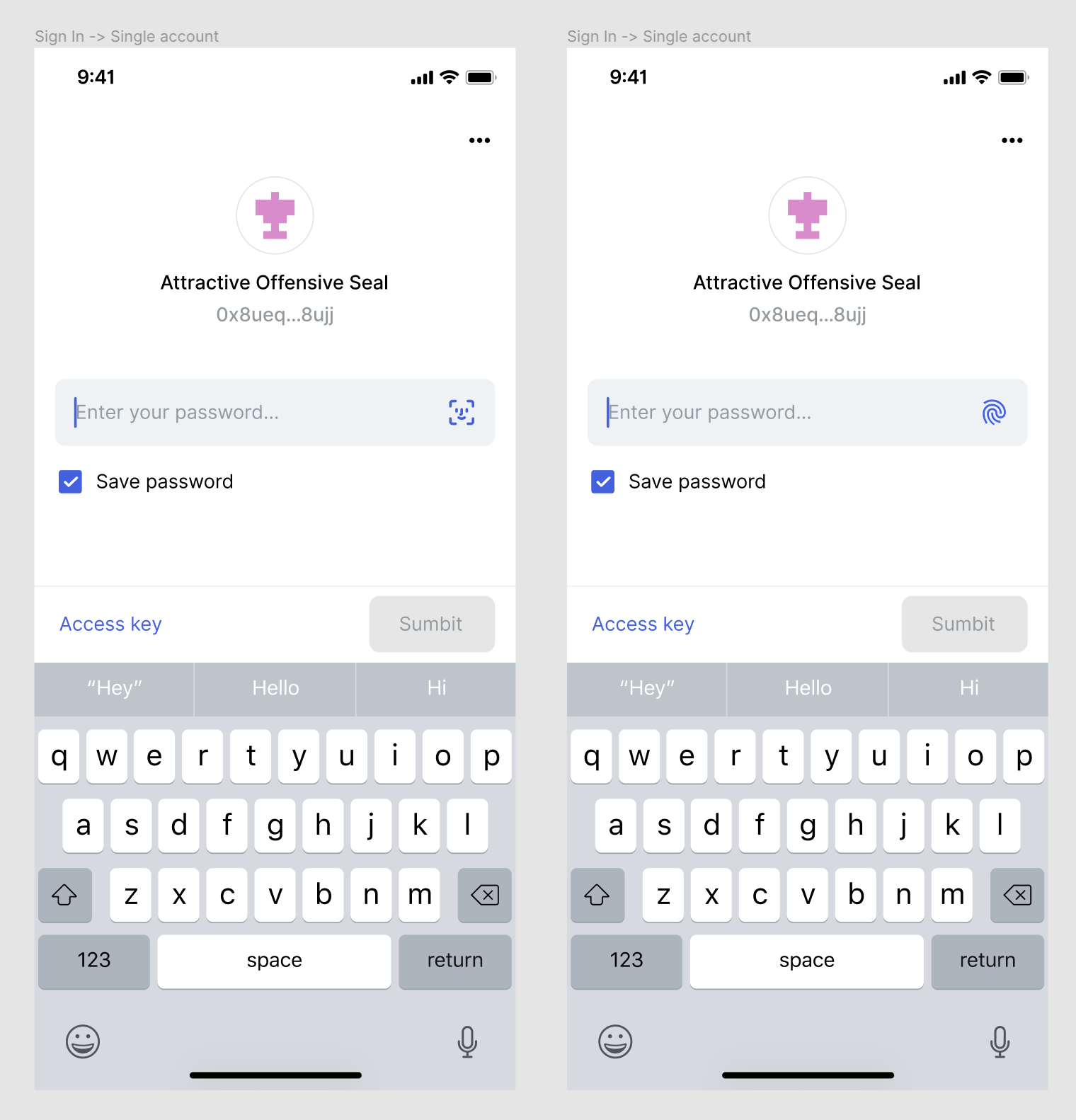
If the app-lock is enabled, it checks for the biometric data on the sign-in screen. If the face/fingerprint is not recognized, the native "Face not recognized" alert is shown. But we still need to provide a re-try option for the users, this is why there's a face id/fingerprint icon in the password field for those who have the app-lock enabled.
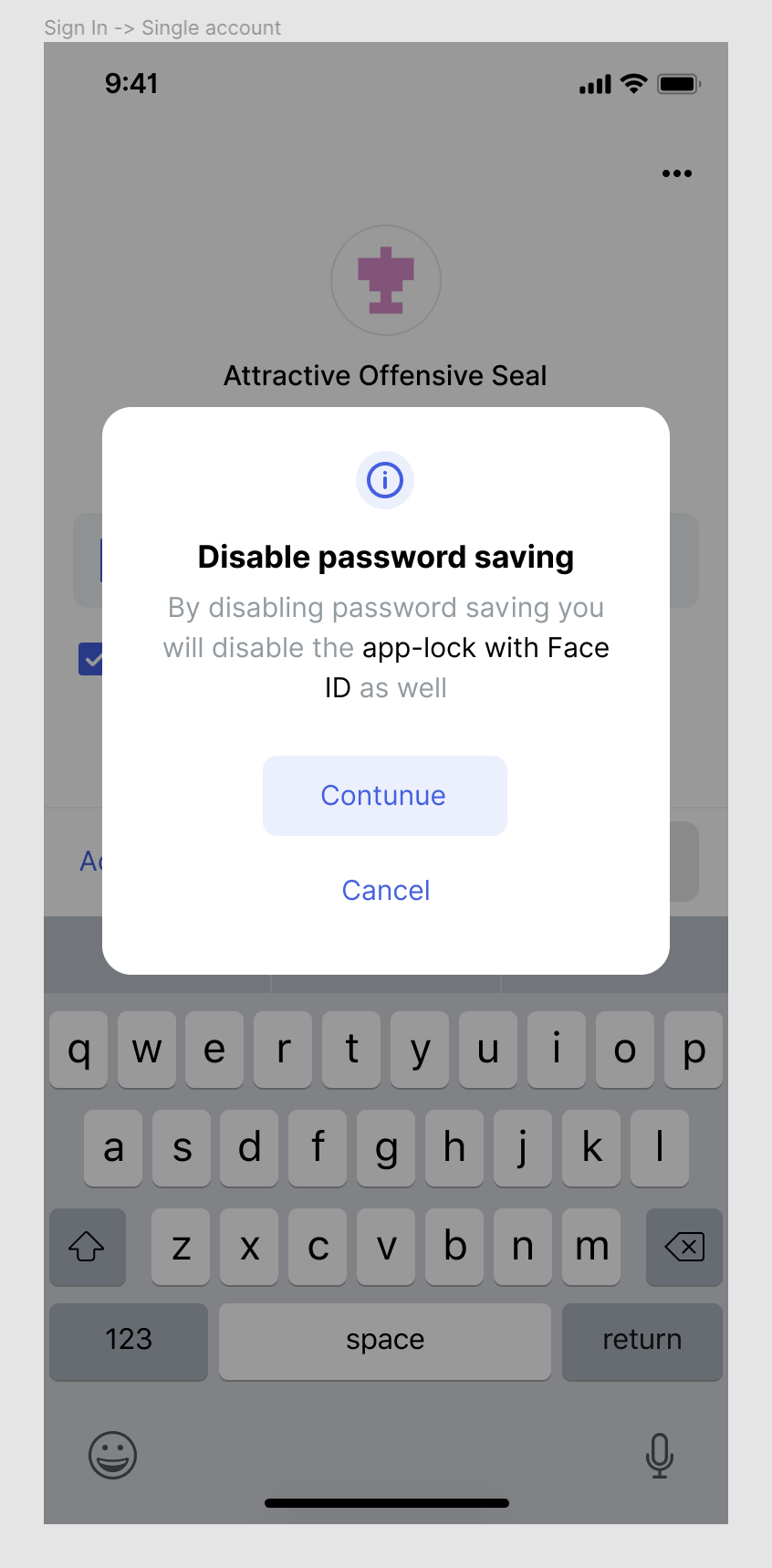
Save password again
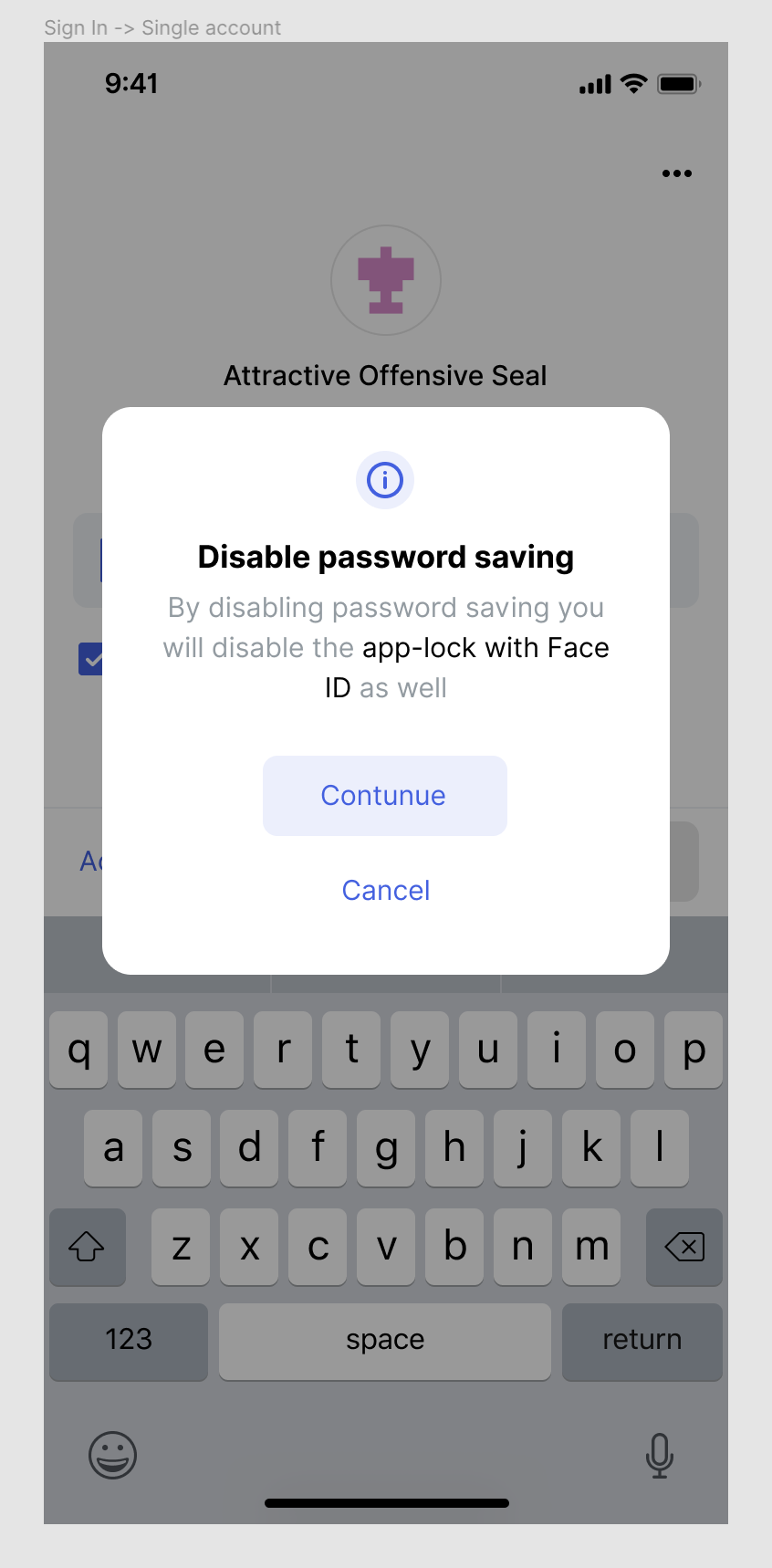
If the user has the app-lock enabled but tries to un-check the save password box, we need to tell them that by doing that, they disable the app lock.
Onboarding screens
I’d remove the whole thing from onboarding since it has almost nothing to do with sign-in/sign-up. Biometric app-lock is a feature for those who don't want to enter the password every time but want an extra layer of security on top of saving the password.
Also, we want the user to first check the "save password" box to keep things consistent.
Note: Copy on all these screens may need some more work/discussion. Also, I'm not sure that "App-lock" is the best way to call this feature, I just think that "sign in with Face/Touch ID” is wrong
 andmironov
All 73 comments
сс @hesterbruikman
andmironov
on 11 Sep 2019
Figma:
Settings https://www.figma.com/file/bPS9GrvMr7LnH7vnkmuveQfd/Settings?node-id=576%3A0
Login: https://www.figma.com/file/dEIljL7UPbXgsZUA0Q4qlE5E/Onboarding?node-id=927%3A14702
andmironov
on 11 Sep 2019
thanks, @andmironov looks good to me, yeah you're right about onboarding, a user should be aware that we gonna save his password!
 flexsurfer
on 11 Sep 2019
flexsurfer
on 11 Sep 2019
@rachelhamlin who could help us with the copy?
flexsurfer
on 11 Sep 2019
Here's what I recall of the situation:
Problem: Users want faster log-in. They like using biometrics in other apps. Also, typing your password in public is something of a security risk.
Save password was implemented because it was a less costly means of attacking the same problem.
The first instance of biometrics being implemented in Status was within this PR, and you're absolutely right, @andmironov, this was the only spec:
To the bounty hunter:

(1) Add a setting to require touch/face-id to sign-in (just like "Browser privacy mode")
(2) Implement biometric protection to the saved password entry for iOS and for Android (you might use a 3rd party library for that).
(3) This should be disabled by default.
So I'm glad we're having this discussion now. :)
Here's how I envision it working:
Access points
- Option to use biometric login is presented during onboarding
- ALT: @andmironov I like your suggestion for it NOT to be included in onboarding, though. Could the user authenticate it for the first time from the icons on the login screen?
- It can also be toggled on or off from the profile
Happy path logic
- If biometric is enabled at any point,
Save passwordis also enabled - When the user opens Status, it will check their face or fingerprint* and they will be logged in
- If biometric is _not_ enabled, the user can still opt to
Save passwordand that will work as usual
*I am unclear about how this is chosen—does user get option to verify both face ID and fingerprint when toggling biometrics on? Is it device specific? The apps I use only check face ID.
Error logic
- Native error, user then has option to enter password or trigger the biometric again, as per the designs above
@andmironov our happy path logic conflicts. I would not have Save password trigger biometric. But I would have biometric enable Save password. I think it's different, and that Save password should remain its own option (again based on my banking app). It also seems less complicated to develop this logic. WDYT?
 rachelhamlin
on 11 Sep 2019
rachelhamlin
on 11 Sep 2019
@flexsurfer I will, as soon as we align on the relationship between Save password and biometric..! I'm in disagreement here.
If biometric login toggles Save password on but NOT vice versa, we don't need this pop-up:
Nor these, I don't think:
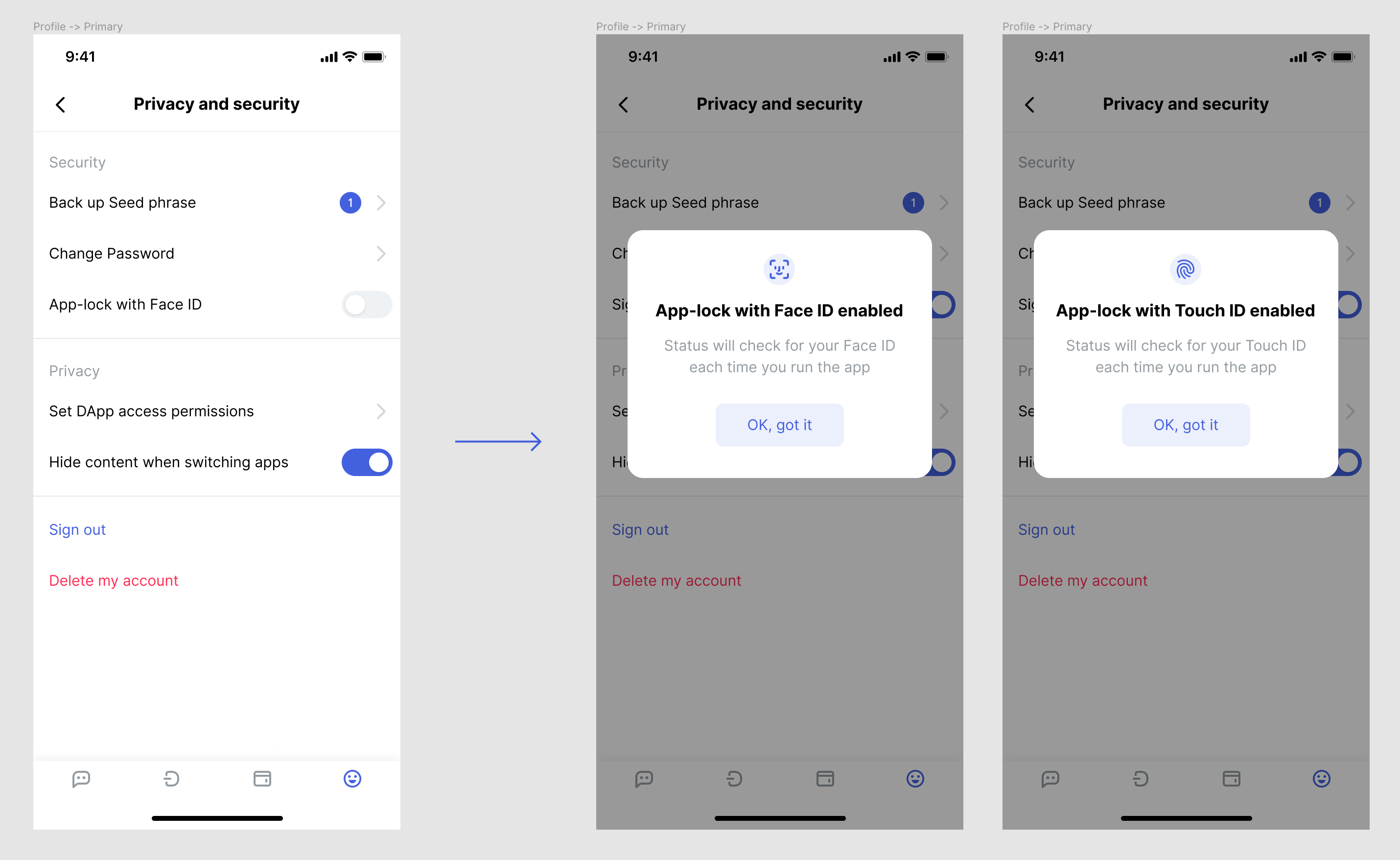
You would just enable biometric from your profile screen, and that would be that.
If you don't enable it, Save password continues to work just the way it does now.
Above I mention the option to enable biometric from the login icons as well; perhaps we don't need to show those unless user enables it first.
rachelhamlin
on 11 Sep 2019
So i'll try to clarify, to sign in (btw i think we don't use signin anymore, we use unlock) into account we need a password to decrypt the app db, so if user doesn't want to enter password each time he must save his password first and then if he still wants to guard his account he can use biometric
flexsurfer
on 11 Sep 2019
maybe we could say smth like "Save password and enable fingerprint" in that case we can keep fingerprint in onboarding because we have a password and can save it
flexsurfer
on 11 Sep 2019
@flexsurfer hmm are you saying that 'save password' MUST also toggle biometric? or merely that it's required in order to do so
rachelhamlin
on 11 Sep 2019
@rachelhamlin no, they are not related, but there is no sense to enter a password and use biometric, so if you want to use your password (disable "save password") mayb we should turn off biometric
flexsurfer
on 11 Sep 2019
so to unlock the account (signin) you ALWAYS need a password , you can enter it or it can be saved and used without you ("save password" option) , and additional to that you can have biometric, but it make more sense when you saved your password but for sure you can use both, enter password and use biometric
flexsurfer
on 11 Sep 2019
Right, we agree on that. So if you have biometric on, you don't enter password. But if you don't have biometric on, you can either type password or save password.
What I'm suggesting that differs from what Andrei wrote (I think), is that choosing to save password does not turn on biometric. Only the biometric settings do that.
rachelhamlin
on 11 Sep 2019
What I'm suggesting that differs from what Andrei wrote (I think), is that choosing to save password does not turn on biometric. Only the biometric settings do that.
Nope, I'm not suggesting that :-) Sorry I was not making my point clear I guess! I think we are on the same page actually.
What I am suggesting is:
- You can not turn on biometric if you have not turned on
save passwordbefore. So if you try to do that, from profile you get a popupPlease close the app, open it again, turn on save password and only then you can enable biometric
andmironov
on 11 Sep 2019
So if you have biometric on, you don't enter password..
only if you used "save password" option, if not you still have to enter a password even if biometric is on
What I'm suggesting that differs from what Andrei wrote (I think), is that choosing to
save passworddoes not turn on biometric. Only the biometric settings do that.
it doesn't turn on yes, but maybe we must turn off if user has it enabled and wants to disable 'save password'
flexsurfer
on 11 Sep 2019
- You can not turn on biometric if you have not turned on
save passwordbefore. So if you try to do that, from profile you get a popupPlease close the app, open it again, turn on save password and only then you can enable biometric
we don't need to ask the user to close the app and save password , we can just log out the user and select this 'save password' option for him, but if he'll deselect it we'll show alert if biometric is on "biometric will be off as well"
flexsurfer
on 11 Sep 2019
Ohh, I see.
only if you used "save password" option, if not you still have to enter a password even if biometric is on
So next question: can we save password automatically when user opts in to biometric?
it doesn't turn on yes, but maybe we must turn off if user has it enabled and wants to disable 'save password'
Agreed. And a biometric user needs to be able to do this before face ID logs them in.
rachelhamlin
on 11 Sep 2019
Also, it works vice versa. If you have the save password option on and biometric on -> biometric does not recognize you during sign in -> you see the regular sign-in screen but with icons now. Icons are there to allow you to trigger the biometric check again.
And if in this situation you tap on the save password box you get this popup:
because if you turn off save password you disable biometric since biometric is just an extra layer of security on top of saving the password.
andmironov
on 11 Sep 2019
So next question: can we
save passwordautomatically when user opts in to biometric?
no because we don't have a password :) that's why we want to redirect to login screen with 'save password' enabled
flexsurfer
on 11 Sep 2019
_if I understand correctly everything we just discussed is already covered in the issue_
andmironov
on 11 Sep 2019
_if I understand correctly everything we just discussed is already covered in the issue_
yes but with different copy, and we'll logout user automatically, maybe we need two buttons, yes and no, yes - for logout
flexsurfer
on 11 Sep 2019
and what about onboarding?
flexsurfer
on 11 Sep 2019
yes but with different copy, and we'll logout user automatically, maybe we need two buttons, yes and no, yes - for logout
I don't think we have to log users out because:
- You don't have to log out, you just have to re-open the app;
- For some reason, I like that we are not automating this and asking users to do it manually. IThe flow seems to be more intuitive this way.
andmironov
on 11 Sep 2019
*I am unclear about how this is chosen—does user get option to verify both face ID and fingerprint when toggling biometrics on? Is it device specific? The apps I use only check face ID.
Yes, it's device-specific. Face ID/Touch ID is iOS-only. On Android devices, there might be different ways they call it or we might use something generic like "biometric"
andmironov
on 11 Sep 2019
i've never seen this before, that app asks to re-open the app, most users don't know what does that mean
flexsurfer
on 11 Sep 2019
Got it :) that makes sense now.
Re logout - from my POV, when a pop-up requires me to take further action in order to accomplish what I came to do, I like the option to jump right into that action. However, if people don't read the copy on this pop-up, they may miss the crucial bit about save password then log out and log back in without doing it. I'm impartial on that.
And I also think it's okay to leave out of onboarding.
rachelhamlin
on 11 Sep 2019
it brokes the flow. i want to enable fingerprint, why would i want to reopen the app? i want to enable fingerprint enter my password and scan my finger :)
flexsurfer
on 11 Sep 2019
i've never seen this before, that app asks to re-open the app, most users don't know what does that mean
yes, you've never seen it because the way we do it is a bit weird in the first place. Everyone else has an "app-lock" which works independently from sign-in/sign-up. Although many other apps have "biometric will work when you will use the app next time" which is close to our situation. Except that to make it work we require an extra step from the user which ONLY the user is able to perform.
So in order to be honest and not cut any corners, I think it's better to ask to reopen the app and save the password since that is the only way to make the biometric work.
I like it (and just to be clear, I 100% understand the weirdness of it) because it seems to be a more consistent and secure flow.
If we do it the way you suggest (logging-off the user automatically) the user will end up on the sign in screen with no indication of the fact that it's a step in "enabling the biometric" flow.
andmironov
on 11 Sep 2019
I'm not forcing this and if you have read my reasons to do so and you are not convinced, maybe that means I'm wrong and we should log people off automatically, no big deal :-)
It's just something that seems off to me here.
1. Approach. Manual
- I go to Settings;
- Toggle the biometric thing;
- I am asked to re-open the app, enter my password and turn the "save password" option on and come back. Because "this is the way it works";
- I re-open the app, do the stuff;
- I come back to settings and turn it on;
2. Approach
- I go to Settings;
- Toggle the biometric thing;
- I am warned that I'm about to be logged off to enter my password and turn the "save password" option on and come back;
- I'm logged off, I do the stuff;
- _I still have to manually come back to settings and turn on biometric_
What bothers me is that it's still a manual flow and we are automating just one step (logging off) and I would expect as a user to be guided after it which is not going to happen. So I'd prefer to stay in "full manual mode" but be consistent. I know that might make no sense :-)
andmironov
on 11 Sep 2019
they may miss the crucial bit about save password then log out and log back in without doing it.
+1
andmironov
on 11 Sep 2019
if we can't guide the user all the way through a certain flow it happens for a reason. And cutting a corner and "helping with something" might make it even worse, instead of improving it
andmironov
on 11 Sep 2019
also, we can test it later and add that automatic log-off if it helps after all :-)
andmironov
on 11 Sep 2019
What bothers me is that it's still a manual flow and we are automating just one step (logging off) and I would expect as a user to be guided after it which is not going to happen.
Yup, this is the crux of it for me. Let's go with manual instead @flexsurfer?? And you can add pop-up modal only and no log-out trigger. :D
Here are my copy suggestions:
Do not make 'app-lock' a term. Instead use the following wording:
Setting
Lock app with Face ID/Touch ID/fingerprint
Unlock Screen
Save password and enable Face ID/Touch ID/fingerprint
Settings Modal, Save Password Off
Enable Face ID/Enable Touch ID/fingerprint
To enable Face ID/Touch ID/fingerprint, your must save your password on the unlock screen. To do so, close Status. Re-open the app, enter your password and check 'save password and enable Face ID.'
OK, got it
Settings Modal, Save Password On
Face ID/Touch ID/Fingerprint enabled
Status will unlock using Face ID/Touch ID/fingerprint with this enabled
OK, got it
Disable saving
Disable password saving
If you disable this, you will also disable Face ID/Touch ID/fingerprint
Continue
Cancel
@andmironov yes/no/maybe on these?
rachelhamlin
on 11 Sep 2019
i don't understand, i want to enable fingerprint and you show me a message "please close the app"? ok . i closed it, and opened one week later, and what next ? i can't get it
i want just to enable fingerprint, you say ok, please save you password first, i say ok, login screen opens with save password enabled, i enter my password, scan fingerprint and voila
flexsurfer
on 11 Sep 2019
i say ok, login screen opens with
save passwordenabled
Okay, I didn't get this part. It does the save password action for you, and you simply type your PW. That sounds more obvious & thus better for the user.
Either way, user needs to come back to settings and enable biometric again, yes or no?
rachelhamlin
on 11 Sep 2019
Either way, user needs to come back to settings and enable biometric again, yes or no?
no , he's already enabled it, it will be enabled after login , oh ! finally, i got your point! you want user to save first and then go to profile and enable biometric, hm this more complicated for user but easy to implement
flexsurfer
on 11 Sep 2019
you want user to save first and then go to profile and enable biometric, hm this more complicated for user but easy to implement
No, I don't think we should do that! I think Andrei and I misunderstood it to be required.
Since we can check save password... automatically for the user when they go through this settings modal, I now feel we SHOULD automate it because it's smoother, and not confusing like I thought.
These are my revised suggestions for copy/buttons:
Do not make 'app-lock' a term. Instead use the following wording:
Setting
Lock account with Face ID/Touch ID/fingerprint
Unlock Screen
Save password and enable Face ID/Touch ID/fingerprint
Settings Modal, Save Password Off
Enable Face ID/Enable Touch ID/fingerprint
To enable Face ID/Touch ID/fingerprint, your must save your password on the unlock screen.
OK, save password --> back to unlock screen with box ticked
Cancel
Settings Modal, Save Password On
Face ID/Touch ID/Fingerprint enabled
Status will unlock using Face ID/Touch ID/fingerprint with this enabled
OK, got it
Q: Is there a modal for when you toggle off to disable on the settings screen? I don't think there should be.
Disable Saving
Disable password saving
If you disable this, you will also disable Face ID/Touch ID/fingerprint
Continue
Cancel
rachelhamlin
on 11 Sep 2019
btw we don't lock app we lock an account, don't forget we have more than one account and other accounts have their settings
flexsurfer
on 11 Sep 2019
or maybe i'm wrong, we lock the app because you can't access other accounts you need to unlock account first and then logout to access other accounts
flexsurfer
on 11 Sep 2019
Well...hopefully not that many Status accounts with multi-account. You mean 'account' as in, one random name?
rachelhamlin
on 11 Sep 2019
sorry i meant multi-account
flexsurfer
on 11 Sep 2019
so if you have multiaccount1 and multiaccount2 and you saved password for multiaccount2 , to access multiaccount1 you have to logout from mutiaccount2 first , oh still we can't say the app is blocked because you can fail biometric login screen will be opened and you can access multiaccount1 , so yeah it's account lock , not app for sure
flexsurfer
on 11 Sep 2019
Either way, user needs to come back to settings and enable biometric again, yes or no?
i think the answer is yes. Otherwise, if we enable it “in advance” and the user does not check the “save password” button, how do we handle that? And we can’t even show a success message since the flow is interrupted with sign-out -> sign-in.
I’d suggest to stick to manual, also because it’s easy to implement. Fist you have to save the password, then you come to settings and enable biometric. If you did not save the password and still try to enable biometric – go ahead and close the app, save it and come back :-)
andmironov
on 11 Sep 2019
so if you have multiaccount1 and multiaccount2 and you saved password for multiaccount2 , to access multiaccount1 you have to logout from mutiaccount2 first , oh still we can't say the app is blocked because you can fail biometric login screen will be opened and you can access multiaccount1 , so yeah it's account lock , not app for sure
That makes sense, and I changed 'app' to 'account'. But why would users have multiple multi-accounts anyway? It's kinda silly. The whole point of multi-account is so you can manage various addresses inside one container, right? Plus some day even multiple chat IDs. I guess it is possible. Especially if people want to import from seed phrase that is not supported in v1.
Otherwise, if we enable it “in advance” and the user does not check the “save password” button, how do we handle that? And we can’t even show a success message since the flow is interrupted with sign-out -> sign-in.
I think what Andrey is saying is that we can actually check that button for them, if they opt to do so from the settings modal. So it's just a matter of typing in their password after that.
rachelhamlin
on 11 Sep 2019
I think what Andrey is saying is that we can actually check that button for them, if they opt to do so from the settings modal. So it's just a matter of typing in their password after that.
even if so, its not a wizard or a flow with a cancel button. On that screen the user can un-check it manually or go back and log in into another account. We never know. This is why i like the “all or nothing” approach.
andmironov
on 11 Sep 2019
so let's see two cases
1) user switches on fingerprint option - fingerprint enabled - app logouts user - user enters a password - app show fingerprint - user scans finger - done
if user deselect save password - fingerprint disabled
if a user fails to scan finger - fingerprint disabled
if a user closes app or log in later with 'save password` , we still show fingerprint popup after login
2) user switches on fingerprint option - we show an alert with instructions- fingerprint disabled
user in any time login with save password enabled
goes to profile and switch on fingerprint option - fingerprint enabled - we show fingerprint popup, a user scans finger - done
if a user fails to scan finger - fingerprint disabled
flexsurfer
on 11 Sep 2019
if user fails scanning finger - fingerprint disabled
nope, it just offers to enter password. you might wear glasses or be sleepy and the face id scanner does not recognize you. but next time you open the app it scans your face again, until you manually turn it off in settings
andmironov
on 11 Sep 2019
also, notice how approach 2 has less dependencies and is “flat” in general. no flow at all, just an instruction or a “rule”
andmironov
on 11 Sep 2019
if user fails scanning finger - fingerprint disabled
nope, it just offers to enter password. you might wear glasses or be sleepy and the face id scanner does not recognize you. but next time you open the app it scans your face again, until you manually turn it off in settings
i'm talking about enabling biometric , to enable it you have to scan it properly, for next sign in yes you can enter password and biometric still will be enabled
flexsurfer
on 11 Sep 2019
to enable it you have to scan it properly
are you sure? not the case with face id on iOS for sure. I just enable it, and it scans for it the next time i unlock the app
andmironov
on 11 Sep 2019
idk how it works in other apps, but it looks reasonable to ask confirmation that you have a proper biometric before enabling it, what if you want to enable it but you don't have a finger anymore?
flexsurfer
on 11 Sep 2019
:-) you can always turn it off and enter the password. afaik it’s a common pattern not to ask for biometric data to turn it on, the app assumes that you have it set up already.
andmironov
on 11 Sep 2019
ок
flexsurfer
on 11 Sep 2019
ops
flexsurfer
on 11 Sep 2019
if we don't need to scan
1) user switches on fingerprint option - fingerprint enabled - app logouts user
a user enters a password immediately or later with save password enabled - done
if user deselect save password - fingerprint disabled
2) user switches on fingerprint option - we show an alert with instructions- fingerprint disabled
user in any time login with save password enabled
goes to profile and switch on fingerprint option - fingerprint enabled - done
flexsurfer
on 11 Sep 2019
I don't like that it's possible to go from fingerprint enabled to fingerprint disabled in the #1 approach by mistake (by deselecting save password)
andmironov
on 11 Sep 2019
but its safe :) in that case next time you have to enter password, but if in 2) user misunderstood, and will save a password and won't go to profile and won't enable biometric, his account will be unsafe which is worst
from security perspective 1 is better
flexsurfer
on 11 Sep 2019
in 2) user misunderstood, and will save a password and won't go to profile
what i like about is that we never enable anything there, we just provide and instruction.
andmironov
on 11 Sep 2019
the approach #1 introduces a schrodinger's cat situation for biometric. when the user is on the sign in screen it’s both enabled and not and the result is hidden, until you get through the sign in.
Approach #2 like i said is more flat and transparent, harder to get confused. At the same time it is a bit weird since the user is asked to perform an extra action.
I’d suggest sticking to #2
andmironov
on 11 Sep 2019
but we can use the approach #1 as well!
that’s a serious discussion here! i guess there’s no right or wrong, let’s stick to either of the approaches and find out which one works best! 😅
andmironov
on 11 Sep 2019
or we can mix them :) add enable and logout checkbox to the alert :)
flexsurfer
on 11 Sep 2019
it was a joke 😅
flexsurfer
on 11 Sep 2019
lets vote then i'm for #1, because it's simpler for the user and more secure :)
flexsurfer
on 11 Sep 2019
by tomorrow afternoon i’ll create two simple clickable prototypes one for each of the approaches and hopefully that’d help us decide!
andmironov
on 11 Sep 2019
@rachelhamlin wdyt? https://github.com/status-im/status-react/issues/8966#issuecomment-530466288
flexsurfer
on 12 Sep 2019
1 = automated log out and #2 = manual log out after closing alert, yes?
I still prefer #1 atm. Just want to make sure we fully agree on behavior of the Save password and enable [biometric] checkbox.
What happens if user checks the save password and enable... box on the home screen directly? Does it enable biometric from there? Does a pop up confirmation appear?
Like-
rachelhamlin
on 12 Sep 2019
Save password and enable [biometric]checkbox.
hm this is something new , we have only two separate options save password on login and enable biometric in profile
flexsurfer
on 12 Sep 2019
if we don't need to scan
1) user opens profile - switches on fingerprint option - fingerprint enabled - app logouts user
a user enters a password immediately or later with save password enabled - done
if user deselect save password - fingerprint disabled
2) user opens profile - user switches on fingerprint option - we show an alert with instructions- fingerprint disabled
user in any time login with save password enabled
user opens profile - switches on fingerprint option - fingerprint enabled - done
flexsurfer
on 12 Sep 2019
Okay, so in other words, the checkbox remains save password - and you can still use it as you would today.
Only if you enable biometric from your profile settings, does it turn on biometric.
Sorry, was leaning on this comment from earlier.
In that case, option #1 =
- User enables biometric setting in profile.
- Modal directs them back to unlock screen, w/
save passwordchecked. - User enters password, biometric is enabled from then on.
- User can disable biometric from the profile.
- User can disable biometric by unchecking
save password. - User can still
save passwordas usual if biometric is unchecked in profile.
Is that it?!
rachelhamlin
on 12 Sep 2019
correct, only from a security perspective, i would disable save password option when disabling biometric in profile, so next time user has to enter password. if he wants he can save password then and use it without biometric
flexsurfer
on 12 Sep 2019
Okay. That sounds fair. Might be slightly confusing as we could be setting users up to expect that save password is always biometric, but TBD.
To amend this then:
- User enables biometric setting in profile.
- Modal directs them back to unlock screen, w/
save passwordchecked. - User enters password, biometric is enabled from then on.
- User can disable biometric from the profile.
- User can disable biometric by unchecking
save password. - If user disables biometric from the profile,
save passwordis also disabled. - User can still
save passwordas usual, even if biometric is unchecked in profile. _This option might be slightly confusing to a user who has had biometric on previously; he might expect save password to turn on biometric as well._
rachelhamlin
on 12 Sep 2019
Copy suggestions in light of this understanding:
Unlock screen checkbox
Save password - does not change
Biometric settings option
Lock app with Face ID/Touch ID/fingerprint
Settings modal if save password is OFF
Enable Face ID/Enable Touch ID/fingerprint
To enable Face ID/Touch ID/fingerprint, your must save your password on the unlock screen.
OK, save password --> back to unlock screen with box ticked
Cancel
Settings modal if save password is ON
Face ID/Touch ID/Fingerprint enabled
Status will unlock using Face ID/Touch ID/fingerprint with this enabled.
OK, got it
Disabling save password
Disable password saving
If you disable this, you will also disable Face ID/Touch ID/fingerprint.
Continue
Cancel
rachelhamlin
on 12 Sep 2019
Thanks a lot for such a great discussion, team!
Updated all the copy in FIgma:
Settings https://www.figma.com/file/bPS9GrvMr7LnH7vnkmuveQfd/Settings?node-id=576%3A0
Login: https://www.figma.com/file/dEIljL7UPbXgsZUA0Q4qlE5E/Onboarding?node-id=927%3A14702
andmironov
on 12 Sep 2019
Thanks @andmironov! And ditto. Hopefully we can get back into user testing for flows like these soon after v1 launches.
rachelhamlin
on 12 Sep 2019
Related issues
 asemiankevich
·
4Comments
asemiankevich
·
4Comments
 andytudhope
·
4Comments
andytudhope
·
4Comments
 jarradh
·
4Comments
jarradh
·
4Comments
 denis-sharypin
·
4Comments
denis-sharypin
·
4Comments
 alwx
·
4Comments
alwx
·
4Comments
Most helpful comment
Copy suggestions in light of this understanding:
Unlock screen checkbox
Save password- does not changeBiometric settings option
Lock app with Face ID/Touch ID/fingerprintSettings modal if save password is OFF
Enable Face ID/Enable Touch ID/fingerprintTo enable Face ID/Touch ID/fingerprint, your must save your password on the unlock screen.OK, save password--> back to unlock screen with box tickedCancelSettings modal if save password is ON
Face ID/Touch ID/Fingerprint enabledStatus will unlock using Face ID/Touch ID/fingerprint with this enabled.OK, got itDisabling save password
Disable password savingIf you disable this, you will also disable Face ID/Touch ID/fingerprint.ContinueCancel