Status-react: Extension is not shown in chat if Development mode is switched off
Description
_Type_: Bug
_Summary_: Extension command and its chat message is not shown after user installed the extension and relaunched the app if development mode is OFF. If user tries to install extension again by tapping on its placeholder message then popup is shown that extension is already installed.
So, in order to have extension working user needs to turn ON development mode. Because user can install extension by scanning QR code or by tapping on extension's message in the chat (e.g. for Gfycat) and have no idea about development mode we need to warn user about setting development mode on or find other solution.
We also might add some info on the message placeholder "To see this message install the extension" to inform about turning on development mode.
So, there should be solution that explains to the user why extension is not shown even if it's installed for 2 cases:
- user never turned on development mode
- user turned off development mode after installing an extension
after user relaunch the app:

Reproduction
- Install Status and create an account
- Install Gfycat extension from https://status-im.github.io/pluto/try.html?hash=Qmb1B3jXNdc9WZCcWFzpkTXtrurnKxYQFvUDhp2J4SVCCX
- send some Gfycat image to the public chat
- Close the app
- open app again and check if you can see the image and Gfycat command in the chat
Note: if you will turn on development mode then extension image will be shown again as expected. If you will turn it off and relaunch the app then instead of the image there is placeholder with text "to see this message Install the extension"
Additional Information
- Status version: 0.9.33 and 0.9.34
- Operating System: Android and iOS
 annadanchenko
All 9 comments
@rachelhamlin I suggest showing the message if dev mode is off, something like "To be able to install the extension you need to enable dev mode first in your Profile under Advanced", wdyt? could you help with the text of this message?
 flexsurfer
on 6 Mar 2019
flexsurfer
on 6 Mar 2019
Hmm. Tough one. If the user enables dev mode and revisits this chat, do we then display the install extension message @flexsurfer?
In that case, I'd write: "Please enable development mode in advanced settings (link to profile)." [Option A]
Better yet, if we can deep link to the advanced settings section directly, "To see this message, enable development mode (link to advanced profile settings)." [Option B]
 rachelhamlin
on 6 Mar 2019
rachelhamlin
on 6 Mar 2019
@rachelhamlin or we can show popup "Enable dev mode and install" "Yes" "No" , in this case, we just enable dev mode when user press "yes" and install the extension
flexsurfer
on 6 Mar 2019
Oooh that would really be best @flexsurfer. We don't need design for this, do we?
rachelhamlin
on 6 Mar 2019
@rachelhamlin we don't need, we can use a standard popup, I just need a text of this message
flexsurfer
on 6 Mar 2019
Maybe something like this @flexsurfer?
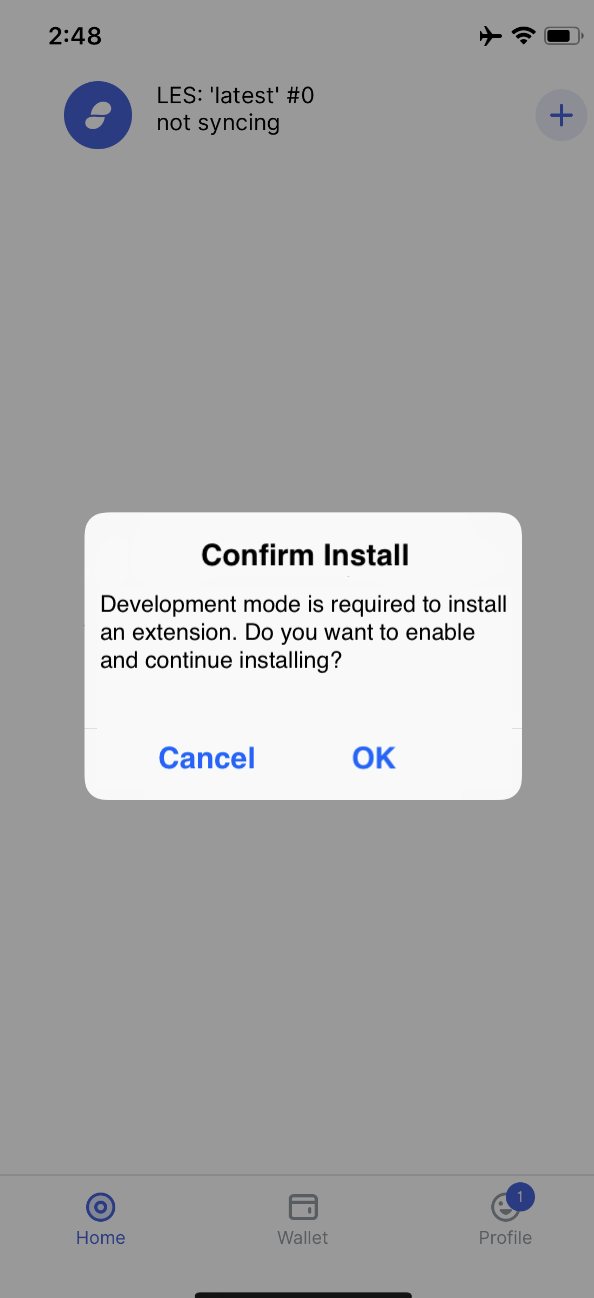
Confirm Install
Development mode is required to install an extension. Do you want to enable and continue installing?
OK Cancel
rachelhamlin
on 6 Mar 2019
can reproduce on release 0.12.0 build 13 both ios and android
annadanchenko
on 1 May 2019
seems like there is some specific case when it can be reproduced, so assigned to myself to investigate more
annadanchenko
on 1 May 2019
can't repro
annadanchenko
on 3 Jun 2019
Related issues
 jarradh
·
4Comments
jarradh
·
4Comments
 yevh-berdnyk
·
4Comments
yevh-berdnyk
·
4Comments
 andmironov
·
3Comments
flexsurfer
·
3Comments
annadanchenko
·
4Comments
andmironov
·
3Comments
flexsurfer
·
3Comments
annadanchenko
·
4Comments
Most helpful comment
Maybe something like this @flexsurfer?
Confirm Install
Development mode is required to install an extension. Do you want to enable and continue installing?OKCancel