Staticman: Cannot add collaborator - Invitation not found
I'm trying to add staticmanapp as a collaborator to my repository (https://github.com/Eeemil/blog), but whenever I've tried to go accept the invite by either https://api.staticman.net/v2/connect/Eeemil/blog or https://api.staticman.net/v2/connect/eeemil/blog (for trying case sensitivity) it just says "Invitation not found".

 Eeemil
All 88 comments
I have also been facing this issue. If it helps, mine is a private repo.
 HaoZeke
on 3 Sep 2018
HaoZeke
on 3 Sep 2018
When I tried https://api.staticman.net/v2/connect/Eeemil/blog again ~18 hours later, it worked and I received an OK. For me, the issue is resolved but I'll wait for a developer to mark this as solved if this issue is affecting more people.
Perhaps there is a delay from inviting staticmanapp untill the invite can be accepted? If so, this should be documented on https://staticman.net/docs/
Eeemil
on 3 Sep 2018
I think this is an intermittent server load problem, since I am still getting the invitation not found error.
HaoZeke
on 3 Sep 2018
I am facing the same problem
 kulbhushanchand
on 3 Sep 2018
kulbhushanchand
on 3 Sep 2018
Mine was also automatically resolved in a day or so. I guess there's a waiting list.
HaoZeke
on 4 Sep 2018
I have the same problem. I sent the invitation 18 hours ago, and using the accept link, I've received the JSON message "Too many requests in this time frame", and a date for the next allowed request. I reloaded the page, and the "Invitation not found" message appeared.
Now, same steps happen: first a JSON message, "Too many requests...", and in second page load, "Invitation not found"... Still I don't have the invitation accepted.
 jzeneto
on 4 Sep 2018
jzeneto
on 4 Sep 2018
It's been 7 days, and still invitation pending or too many requests.
If @eduardoboucas may check for the issue (he is the creator of staticman).
kulbhushanchand
on 5 Sep 2018
Same here :)
 akmur
on 6 Sep 2018
akmur
on 6 Sep 2018
I have the same issue. It just returns "Invitation not found".
 sfi0zy
on 6 Sep 2018
sfi0zy
on 6 Sep 2018
I also get "Invitation not found". Looks like I have to wait.
 MichaelRumpler
on 7 Sep 2018
MichaelRumpler
on 7 Sep 2018
Me too... keep getting the same "Invitation not found"...
 morningspace
on 7 Sep 2018
morningspace
on 7 Sep 2018
Same thing here also. Two test sites and the invitations are not found.
 samarulmeu
on 10 Sep 2018
samarulmeu
on 10 Sep 2018
Same here, did anyone got it sorted?
 ricardonadao
on 13 Sep 2018
ricardonadao
on 13 Sep 2018
No lucky at all. I tried multiple times by re-adding the staticmanapp, waiting even a couple of days, still got "Invitation not found". It looks the service is completely stop working... I don't know what we could do until someone to take look at the hosted service? It's not something wrong in code that we could fix by issuing a PR. It's the deployment env that we couldn't touch... :-(
morningspace
on 13 Sep 2018
Sorry, I’m AFK for a few days, but I’ll have a look when I get back on Sunday or Monday. The “Too many requests” is a message from the GitHub API indicating that we’re over the limit, I wonder if the “Invitation not found” is a similar thing, i.e. the user being added to too many repos.
 eduardoboucas
on 13 Sep 2018
eduardoboucas
on 13 Sep 2018
Thank you Eduardo, boas ferias ;)
ricardonadao
on 13 Sep 2018
After 10 days, I got OKresponse. Comments on my blog working now. 👍
kulbhushanchand
on 13 Sep 2018
no response from me either...
 janiceleng
on 14 Sep 2018
janiceleng
on 14 Sep 2018
does anyone have any updates on this issue?
janiceleng
on 18 Sep 2018
I got OK two days ago. Perhaps this is an intermitent issue...
jzeneto
on 18 Sep 2018
I never got OK... More than a week of waiting...
samarulmeu
on 18 Sep 2018
Isn't there a possibility that this issue is affecting comment submissions as well?
 maxime-michel
on 18 Sep 2018
maxime-michel
on 18 Sep 2018
If this issue is urgent, why don't consider setting up your own API instance? Provided you have a (free) Heroku account, the whole setup can be done under fifteen minutes.
 VincentTam
on 19 Sep 2018
VincentTam
on 19 Sep 2018
Indeed, this is also the suggested solution in https://github.com/eduardoboucas/staticman/issues/222.
However, it is not explicitely described anywhere yet that to make sure all submitted comments on your site get processed, you should deploy your own. It reduces the appeal quite a bit, too. As far as I'm concerned, I would rather pay a small fee than have to deal with that.
maxime-michel
on 19 Sep 2018
However, it is not explicitely described anywhere yet.
The second link of my previous comment does describe the _whole_ process of hosting it on a Heroku free dyno. If you follow it, you will have your own API instance built within a quarter of an hour.
"GitLab does not have collaborator invites, so this is currently not required for Staticman to collaborate on a project. The user can just add Staticman immediately." -- #219
Moreover, with #219, you may bypass this problem by using GitLab pages. In fact, users in #22 has reported an array of advantages of GitLab over GitHub, for example, native CD/CI support.
The screenshot below illustrates my demo GitLab Pages (Source). From the timestamp in each commit, it's clear that _this site was built while @staticmanapp was "on holiday"_. How does this works? I've built my own API instance and GitHub/GitLab bot @staticmanlab.

"Not that I'm aware of. Could you create one?"
As a consequence of @eduardoboucas's request, I've really built one running on a free Heroku dyno to test the newly available #219 GitLab suuport. The associated Git* bots are both named @staticmanlab.
VincentTam
on 19 Sep 2018
(Sorry, I wasn't talking about the deployment process, for which you've given an excellent and totally clear link, I was talking about the Staticman getting started: it doesn't mention these potential API limit problems yet.)
maxime-michel
on 19 Sep 2018
@maxime-michel I see your point. It's better to mention this limitation at the very beginning, so that users can choose between
- use public API instance
- setup own API instance
This is more efficient as @staticmanapp will receive less invitations.
VincentTam
on 19 Sep 2018
This still happened to me after waiting for five days. The response is still 'invitation not found'. Is there any workaround for this?
Thanks
 saifulmuhajir
on 25 Sep 2018
saifulmuhajir
on 25 Sep 2018
@saifulmuhajir As depicted on Staticman's set, Staticman functions basically like a :truck: truck which POSTs HTML :page_facing_up: form data into your GitHub/GitLab repo :file_folder: (running on any GitHub/GitLab server).
When a bus is not working, passengers would be asked to take another one. Similarly, for a _workaround_, you can use _my API instance_ (built at the request of @eduardoboucas for testing #219) or even build your own instance within Heroku's free tier.
VincentTam
on 25 Sep 2018
@VincentTam thanks. I'll try those options.
saifulmuhajir
on 26 Sep 2018
@saifulmuhajir To bypass this invitation problem, why not try GitLab Pages? In GitLab, there's no such invitation mechanism---you just add the bot (say @staticmanlab) into the contributing members.
If you really love open source, migrating from the _proprietary_ GitHub to _open souce_ GitLab, which has _native_ CD/CI support, will free you from the aforementioned GitHub API limit.
VincentTam
on 26 Sep 2018
@VincentTam Apart from initial invitation, does GitLab suffers from bottleneck because of many users using same @staticmanapp and thus some of the comments not getting processed?
I meant to say what if everyone is using same GitLab app for staticman?
kulbhushanchand
on 26 Sep 2018
@Kulbhushan-Chand I don't know about that, but a quick search points me to a GitLab forum question "*
Does GitLab have an API rate limit*". The last comment lists out several endpoints which control the traffic. Hope that helps.
The last question is precisely the problem. Now the :truck: is overloaded. One may either wait (for an indefinite time period) for a larger truck, or build his/her own one. Building the former costs surely a fortune, while building the later for a personal blog can be free.
VincentTam
on 26 Sep 2018
It would be nice to have a breakdown of the usage. Does somebody really believe that there's enough Staticman-powered websites for the bot to hit 5k requests an hour? I have a feeling that if anything, it is a spam problem that we have.
maxime-michel
on 26 Sep 2018
@VincentTam Furthur exploring the link in the last comment that you mentioned, points thay GitLab indeed have api request limit

Also mentioned here
Which means it is a matter of time when enough people use someone's / their own's GitLab api and hit 600 req/min.
Looks like self hosted instance for your personal use only is the safe option, BUT that too only upto the limit that the number of users commenting on your self hosted staticman api should not collectively generates more than 600 req/min.
kulbhushanchand
on 26 Sep 2018
This is a matter of scalability indeed.
Maybe we'll end up building federated commenting (API) system where people can build their API servers (with their request limits) and join them with existing ones.
Also, if @Kulbhushan-Chand picture says 600 req/min/IP that's actually good enough for normal people because one IP should have less than 600 requests per minute.
saifulmuhajir
on 26 Sep 2018
@saifulmuhajir Rightly said -
for normal people it is good enough
but only if they have deployed their own personal api instance. If group of staticman users ends up using the same api, the limit will be easily achieved.
As mentioned by @VincentTam here about the steps of deployment, it is still not easy for majority of people.
kulbhushanchand
on 27 Sep 2018
If group of staticman users ends up using the same api, the limit will be easily achieved.
Wait, what? Let's say 50 people use the same deployment. 600 req/min / 50 sites = 12 requests per minute per site. That means at the end of the week, each site would have received a maximum of 12*60*24*7 = 120k comments.
The same math applied to GitHub means 50 sites each get a maximum of 16k comments per week.
On my most visited website (800-1000 daily visits), I get maximum 10 comments a week. I have Staticman running on 3 sites so in the end even that 'high figure' gets drowned into a very low average of 3. Am I missing something or is some spammer abusing the tool?
maxime-michel
on 27 Sep 2018
👍 Thanks for the math part. Honestly I didn't calculate the numbers when commenting.
Even 12 request per minute per site can be a bottleneck at the peak time of the site visit (only for some very interesting article/site). (Please note I don't have any research fact)
With the growing popularity of staticman, there can be more than 50 people using some specific api instance (this is what happening now with @staticmanapp on github).
I am sure with the use of reCaptcha with staticman, spamming is negligible.
kulbhushanchand
on 27 Sep 2018
50 was just an example to show we have an extremely large comments per minute / site ratio at our disposal. Yet people have been consistently unable to add Staticman as a collaborator for a month. In my opinion, either we have too many unmaintained sites that weren't set up with captchas and get spam, or somebody is deliberately bricking the instance.
maxime-michel
on 27 Sep 2018
If someone deliberately bricking it, the best way is -- hitting the api from different IPs concurrently to reach the limit per minute using https://api.staticman.net/v2/entry/{GITHUB USERNAME}/{GITHUB REPOSITORY}}
In any-case we need data/log (if available) of @staticmanapp to find out the cause.
kulbhushanchand
on 27 Sep 2018
Staticman's demo site Popcorn receives thousands of commits a day. Maybe that uses up the API quota.
VincentTam
on 29 Sep 2018
Excellent catch, @VincentTam. I vote for adding a captcha or an Akismet key to that site.
maxime-michel
on 29 Sep 2018
@VincentTam Allow me to correct, by commits if you mean pull requests. Since there are only 30 commits out of which only few are caused by staticman comment entry.
However, there are > 3000 opened pull requests caused by staticman, but spanned over last two months. There are only 13 pull requests in the lat 24 hours.
I am sure this is not the cause for eating away of API quota.
kulbhushanchand
on 29 Sep 2018
I just spammed said form a little and noticed that while I still can't add Staticman to my repository, my comments got through just fine. What the hell is going on? If we're hitting the API limit, we would hit it for all cases.
maxime-michel
on 29 Sep 2018
@Kulbhushan-Chand @maxime-michel Thannks for doing the math. In fact, since the public (production and development and my own) API instances are powered by Heroku apps, they are subject to both Heroku and GitHub/GitLab's limits. From it's server response time to a GET request to /, the first instance _isn't_ run on the free dyno, whereas the other two _are_.
From a server-side point of view, the traffic from GET requests to / and /favicon.ico and POST requests with status 500 (possibly due to GitHub/GitLab repo owners who wish to test/use Staticman) are also considerable.
Since the documentation for Staticman v3 in #219 has not yet been integrated to the official site, it's possible that a user has forgotten to supply the Git service provider when firing a POST request to the /entry endpoint, like
POST /entry/v3/user/repo/branch/property (wrong URL!)
he/she may keep trying until he/she hits status 427 "too many requests" or he/she gets tired of status 500 "internal server error".
For the case of the public production instance (still running v2), it has to handle requests with _wrong_ endpoint path/request body from GitHub repo owners, who might fire (a multitude of invalid POST) requests over a short period of time.
Lacking knowledge in networking, while testing Staticman with a sample GitHub repo, I've tried sending POST requests from the famous RESTclient, but all of them _failed_ with a status 500. Finally, I've given up those request clients and coded a HTML form. As a result, the project has been expanded to a minimal Jekyll+Staticman v3 GitHub Pages.

Looking back, if I had kept trying RESTclient, I might have hit the bottleneck of my own API instance _without_ building anything.
VincentTam
on 30 Sep 2018
@VincentTam That seems to be working fine. I added few test commits to your link. Even @staticmanapp (GitHub app) is working fine on my personal-website.
However for another repo of mine, I am still waiting for OKreponse from @staticmanapp for the last 20 days.
kulbhushanchand
on 30 Sep 2018
I'm also having the same issue when contacting the API - I'm getting "Invitation not found" although I submitted one a couple of hours earlier. So there's no solution yet except to host your own API?
 matdoering
on 31 Oct 2018
matdoering
on 31 Oct 2018
@matdoering Switching to GitLab can bypass this. You may see my sample GitLab page powered by Staticman v3 and its source code for details.
VincentTam
on 31 Oct 2018
@VincentTam Thanks for the advice! Since switching to GitLab wasn't an option for me, I instantiated my own version of the Staticman API. It was actually quite easy thanks to your great description in your blog post.
To share my experience, I just wrote a blog post about getting the Staticman API running and getting the commenting system working for Hugo.
matdoering
on 1 Nov 2018
Perhaps we'll go the self-hosted route, having same issues here and unresolved after a week.
 mdesignco
on 8 Nov 2018
mdesignco
on 8 Nov 2018
@VincentTam Thanks for the advice! Since switching to GitLab wasn't an option for me, I instantiated my own version of the Staticman API. It was actually quite easy thanks to your great description in your blog post.
To share my experience, I just wrote a blog post about getting the Staticman API running and getting the commenting system working for Hugo.
Thanks this will be helpful
 sharegrams
on 10 Nov 2018
sharegrams
on 10 Nov 2018
At first attempt, haven't dug in deeper, getting an RSA error Key not Found error thrown after npm start.
 scottmathson
on 10 Nov 2018
scottmathson
on 10 Nov 2018
@scottmathson You are following @matdoering's tutorial to deploy a custom API instance on Heroku?
VincentTam
on 10 Nov 2018
@VincentTam altered a bit, using netlify.toml instead of Procfile as wanting to run on Netlify instead. But yeah I checked that article out.
scottmathson
on 11 Nov 2018
@scottmathson wait, can you keep an NPM process alive from a Netlify build? With the free plan? I thought this was meant to build static sites only.
maxime-michel
on 11 Nov 2018
@VincentTam Thanks for the advice! Since switching to GitLab wasn't an option for me, I instantiated my own version of the Staticman API. It was actually quite easy thanks to your great description in your blog post.
To share my experience, I just wrote a blog post about getting the Staticman API running and getting the commenting system working for Hugo.
@matdoering When I read your old reply the second time, I find your reason for setting up a custom API instance ("switching to GitLab wasn't an option") misleading. In fact, the same API instance can handle multiple Git service providers. Again, to verify this, one may refer to my demos.
- Minimal Jekyll GitHub Pages at https://git.io/smdemo
- Minimal Hugo GitLab pages at https://vincenttam.gitlab.io/test-hugo-staticman
For the correct URL schemes, please refer to #219.
Last but not least, congrats for having successfully set up Staticman.
VincentTam
on 12 Nov 2018
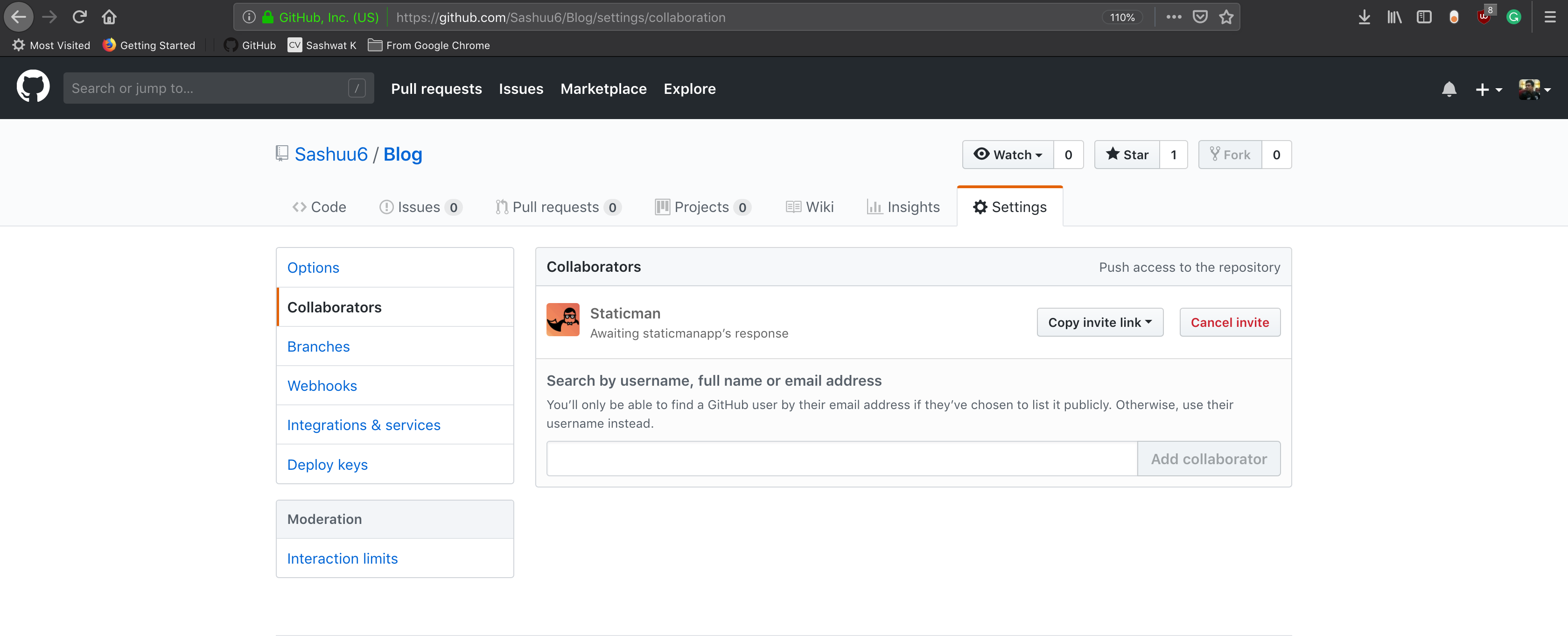
I am having the same issue. I am either getting "Invitation not found" or "too many requests". The below screenshot shows that I have added staticman.
 sashuu6
on 14 Nov 2018
sashuu6
on 14 Nov 2018
@Sashuu6 In your repo Sashuu6/Blog/docs/_docs/18-history.md, it's written that custom Staticman API path is allowed, thanks to @maxime-michel, who has contributed to mmistakes/minimal-mistakes#1842.
From #239, it seems that @staticmanapp is taking a holiday for the moment. #222 suggests building one's own API instance, whereas #219, which resolves #22, allows us to bypass this problem by switching to GitLab. (You may click on the link above to my sample Staticman demo on GitLab.)
P.S. Searching #staticman on GitHub, I've found that okfde/edulabs#555 is generated by @staticwalrus. Maybe you can find a temporary workaround from this. I prefer switching to the free GitLab though.
VincentTam
on 14 Nov 2018
@Sashuu6 In your repo Sashuu6/Blog/docs/_docs/18-history.md, it's written that custom Staticman API path is allowed, thanks to @maxime-michel, who has contributed to mmistakes/minimal-mistakes#1842.
From #239, it seems that @staticmanapp is taking a holiday for the moment. #222 suggests building one's own API instance, whereas #219, which resolves #22, allows us to _bypass this problem by switching to GitLab_. (You may click on the link above to my sample Staticman demo on GitLab.)
P.S. Searching #staticman on GitHub, I've found that okfde/edulabs#555 is generated by @staticwalrus. Maybe you can find a temporary workaround from this. I prefer switching to the _free_ GitLab though.
How do I make my own staticman instance.
sashuu6
on 21 Nov 2018
@Sashuu6 You may find a link to my guide in one of my previous comments https://github.com/eduardoboucas/staticman/issues/227#issuecomment-422691004
It's a crude version when I have not yet figured out exactly the role of gitlabAuth in staticman.yml. You may see @matdoering's _refined_ version.
P.S. To hook up Staticman with your Git repo, you don't necessarily need to set up your own instance. Say, Cohere-city/pledge#57 is created by an API instance which the project owner doesn't own, and which @staticmanlab serves. You may see my GitLab repo setup guide if you _don't_ wish to deploy your own API instance.

New logo of @staticmanlab serving Cohere-city/pledge
VincentTam
on 21 Nov 2018
Hey everyone,
It has started to worry me that I may have some misconfguration somewhere. After about three days, I am still getting the 'Invitation not found'.
I have studied the code in 'connect.js' file to understand how the API end point responses to the connect requests. It seems like that it looksup my GitHub username and repository and if it can't find it, throws the error I mentioned above.
There is a process/method in that file called 'getRepoInvites'. It's trying to match 'invitation.repository.full_name' with the one been requested.
Can anyone shed some light on this or help me understand this more?
Thanks,
Saeed
 ghanavat
on 4 Jan 2019
ghanavat
on 4 Jan 2019
@ghanavat https://github.com/eduardoboucas/staticman/issues/243#issuecomment-450472431 provides a detailed analysis for this problem.
IMHO, the simplest workaround is to migrate to GitLab, which allows collaboration without invited users approval. Import of a GitHub project can be done in one click. It has integrated CD/CI, which greatly simplified setup for Hugo blogs. (On GitHub, you need a third-party CD/CI service for Hugo sites.) The online platform can also generate a GitLab CI config file from a drop-down menu.
VincentTam
on 4 Jan 2019
@ghanavat #243 (comment) provides a detailed analysis for this problem.
IMHO, the simplest workaround is to migrate to GitLab, which allows collaboration _without_ invited users approval. Import of a GitHub project can be done in one click. It has _integrated_ CD/CI, which greatly simplified setup for Hugo blogs. (On GitHub, you need a third-party CD/CI service for Hugo sites.) The online platform can also generate a GitLab CI config file from a drop-down menu.
Thanks, but migrating to GitLab isn't a solution for me to be honest. My site is running on Jekyll, and Jekylls works perfectly with GitHub, including GitHub Pages.
The comment you have shared the link to is helpful. I think I would be able to run my own Staticman instance, and swing away from all these API limitations. I will write an update here, which I think might help others too.
ghanavat
on 5 Jan 2019
Hey @VincentTam,
I think I misunderstood your comment above. Correct me if I'm wrong, you were advising me to setup my own instance of Staticman API on GitLab. Yes? Then I can use that as a bot to collaborate with my current GitHub account where my blog is hosted. This way I can run Staticman API under my own GitLab account without invitation etc. Please advise.
 ghost
on 5 Jan 2019
ghost
on 5 Jan 2019
@ghanavat :v: Great to hear that you've made the first step to decentralization of Staticman API.
Thanks, but migrating to GitLab isn't a solution for me to be honest. My site is running on Jekyll, and Jekylls works perfectly with GitHub, including GitHub Pages.
Jekyll works also well on (custom-hosted) GitLab. Here's my demo Framagit + Staticman + Jekyll site with the _same_ theme as yours: https://staticman-gitlab-pages.frama.io/jekyll/jekyll/update/2016/03/24/welcome-to-jekyll.html
Btw, your site _haven't_ yet incorporated Staticman. Don't abandon your faithful :robot: @ghanavatsStaticmanAPI! He'll :cry: if you do so.
I think I misunderstood your comment above.
No, in your first reply, you understand well my comment.
You were advising me to setup my own instance of Staticman API on GitLab. Yes?
:point_right: I've pointed out _two_ workarounds. You can choose either one or both of them. I've written two separate guides.
- Use the public GitLab instance @staticmanlab
- Self-host API
I'm _neutral_ :neutral_face: on any choice b/c IT _isn't_ my field. The _theoretical_ possibility of hosting a _free_ (as in freedom) site drives me to promote Nicolas Tsim's work found in #255 on GitHub, GitLab, Framasphere, Stack Exchange, Hugo Discourse, etc.
Due to GitHub's _proprietary_ license and several shortcomings detailed in Le danger Github (revu et augmenté) :fr:, shifting to GitLab is recommended. #219 provides v3 endpoints to debundle Staticman from the proprietary GitHub service. A GitHub account is, nonetheless, required for GitHub PR though. (One _can't_ created a GitHub PR from a GitLab repo, and _vice versa_.)
Then I can use that as a bot to collaborate with my current GitHub account where my blog is hosted. This way I can run Staticman API under my own GitLab account without invitation etc. Please advise.
I'm _not_ sure whether a GitLab bot can interact with a GitHub repo. Even though it's possible, it would be far more sensible to include a personal access token for each Git server provider in Staticman's API config. For example, the public API instance for GitLab holds _two_ tokens, one for @staticmanlab on GitHub and one for Staticman Lab on GitLab.
VincentTam
on 6 Jan 2019
Hey @VincentTam,
Thanks for your response. @ghanavatsStaticmanAPI also belongs to me. I have created a new GitHub accound, forked the staticman master branch into it, and cloned a copy from it on my local machine. For experimental purposes and learn how I can decentralise Staticman.
Excellent, I have taken a quick look at some of the features that GitLab provides, and they also have hosting solution similar to GitHub called GitLab Pages. This will help me to setup my site hassle free, as I am currently using GitHub Pages.
Will start this project from tomorrow morning. Will leave comments here if I need yours or anybody else's help.
ghanavat
on 6 Jan 2019
I have taken a quick look at some of the features that GitLab provides, and they also have hosting solution similar to GitHub called GitLab Pages.
I personally think that GitLab Pages are _much_ better than its GitHub counterpart due to its _integrated_ CD/CI. The former supports almost _all_ static blog generators. That concerns, in particular, Hugo users. You may compare the deployment of a Hugo site to GitLab to the homologous setup for GitHub.
The build time for a Jekyll site on Framagit is about 24s, whereas the figure for its upstream on GitLab.com is about 75s.
More importantly, GitLab is _free_ (as in freedom), whereas GitHub is _proprietary_.
VincentTam
on 6 Jan 2019
I have taken a quick look at some of the features that GitLab provides, and they also have hosting solution similar to GitHub called GitLab Pages.
I personally think that GitLab Pages are _much_ better than its GitHub counterpart due to its _integrated_ CD/CI. The former supports almost _all_ static blog generators. That concerns, in particular, Hugo users. You may compare the deployment of a Hugo site to GitLab to the homologous setup for GitHub.
The build time for a Jekyll site on Framagit is about 24s, whereas the figure for its upstream on GitLab.com is about 75s.
More importantly, GitLab is _free_ (as in freedom), whereas GitHub is _proprietary_.
I probably shouldn't get into this, but my understanding was that GitLab is also proprietary, but it also has an open sourced version which may be self hosted. Could we maybe highlight the most important points of this discussion and have this one closed? I fear a lot of the later topics are getting in the way of understanding the workarounds. (this includes people saying me too and stuff)
HaoZeke
on 6 Jan 2019
Since the problem is ongoing, I _don't_ think closing this issue is appropriate.
The workarounds are ways to help people to enjoy this great service despite Staticman's API limit. Since the documentation has not described them, it's natural that users ask questions about them. Instead of closing this issue and hiding them in the closed tab, we should let them stay there until the problem is resolved.
More importantly, the decentralization of Staticman's API allows netizens to enjoy this service in countries where some Google and Facebook are forbidden.
Hence, through the discussion of the workarounds, some users enjoy greater freedom when using Staticman. This phenomenon should be embraced instead of feared.
VincentTam
on 6 Jan 2019
i have the same issue... and after 1 month not worked
 omidonrails
on 10 Jan 2019
omidonrails
on 10 Jan 2019
@omidonrails You may find this repo useful: https://github.com/asadise/blog
P.S. It's made by an Iranian 🇮🇷 web developer.
VincentTam
on 10 Jan 2019
I've pointed out _two_ workarounds. You can choose either one or both of them. I've written two separate guides.
- Use the public GitLab instance @staticmanlab
- Self-host API
Hey @VincentTam, I would like to self host my own API instance (#2 above). For that I would need your help please.
My goal is (as per your advise above) to host my own Staticman API instance. And I want to do it through GitLab, and to be hosted on GitLab Page (Not Heroku). Then I can use it through my GitLab Repo (My blog, which has been migrated from GitHub, and is hosted on GitLab Page)
In stage 1 of your tutorial, I need a clone of Staticman from GitHub. Should I push this to a GitLab account created as a Staticman bot? Then it can be hosted on GitLab Page, correct?
Please advise.
ghanavat
on 10 Jan 2019
Should I push this to a GitLab account created as a Staticman bot?
No. A copy of this Node.js app should be run on the _server side_. Heroku is just an example. The actual setup can vary greatly, and my tutorial also covers some general discussions. You may view, for example, @gabeluci's tutorial in #244 as a reference. Nonetheless, there're _no_ guarantee on the validity of the docs and tutorials online, as can be seen in #255.
Another tutorial is coming soon at https://team-parallax.com/use-selfhosted-staticman-with-gitlab-1
Then it can be hosted on GitLab Page, correct?
GitLab Pages is static web host, not a Node.js web host.
VincentTam
on 10 Jan 2019
@VincentTam Thanks for yours persistence contributions to this issue. The link you have shared above is for hosting staticman instance with GitLab.
Why GitLab? Well, opposed to GitHub, you can have lots of unlimited private repositories.
The above reason was given in the tutorial, but few days ago Microsoft gave the access to create private repositories to free users as well. (It was not when the tutorial was written). and I want to stick with GitHub (personal preference)
Is there any tutorial (verified to be working) for creating private instance of staticman-v3 with GitHub?
kulbhushanchand
on 10 Jan 2019
@Kulbhushan-Chand Due to the lack of Staticman self-hosting tutorials, which are too specific to be included in the official documentation, I've posted URLs to several tutorials.
@VincentTam Thanks for yours persistence contributions to this issue. The link you have shared above is for hosting staticman instance with GitLab.
A Staticman API instance can interact with one GitHub and/or GitLab account. This is documented in the official documentation for the API config and Staticman v3's API endpoint scheme in #219. (GITHUB_TOKEN and GITLAB_TOKEN).
Therefore, once the API instance is set up, it remains to add the appropriate GitHub token.
VincentTam
on 10 Jan 2019
I omitted the word "private" in my last reply.
Setting up an API instance (server-side) and setting up a remote Git repo (client-side) are two separate processes.
If you want a tutorial on "private instance of Staticman", I recommend @gabeluci's _updated_ article in #244: https://www.gabescode.com/staticman/2019/01/03/create-staticman-instance.html
For "Staticman that works with GitHub", the official documentation already covers that. You may consult, nonetheless, more for blog themes with Staticman support, say Beautiful Hugo, Minimal Mistakes, Minimo, etc.
VincentTam
on 11 Jan 2019
@VincentTam Thanks
I found your tutorial (https://vincenttam.gitlab.io/post/2018-09-16-staticman-powered-gitlab-pages/2/)
informative.
I am using minimal mistakes theme and staticman official github public instance served me well for a month before felling down for this issue. I may give one last (also my first attempt) shot to set up private instance, that's why looking for very specific and reliable tutorial.
Your tutorial looks promising, however I wanted to use the free service of Heroku, which has a limitation of making service sleep after 30 minutes of inactivity. How you manged to deal with this?
kulbhushanchand
on 12 Jan 2019
@Kulbhushan-Chand Perhaps a ping to the API server when a JavaScript input event is triggered.
VincentTam
on 12 Jan 2019
@VincentTam Any idea about time delay for API server to get active, if tried to ping just before posting comment? I meant to say do we need to wait some time after pinging so the comment may not get unregistered.
Also did you have verified this ping method?
kulbhushanchand
on 12 Jan 2019
No, I've not tested that, but that should work in principle. A free dyno needs 20s to wake up, so I think it's better to ping the API when the user has input sth.
VincentTam
on 12 Jan 2019
Hi. Can I ask anyone with problems authenticating with Staticman to please read this comment and try the suggested route? It's only active on the development instance, I'm looking to collect feedback before deploying to production.
Thanks for your patience.
eduardoboucas
on 13 Jan 2019
I'm getting the error when trying to accept the invitation.
Application error
An error occurred in the application and your page could not be served. If you are the application owner, check your logs for details. You can do this from the Heroku CLI with the command
heroku logs --tail
 dannyzhan
on 20 May 2019
dannyzhan
on 20 May 2019
Duplicate of #317
 alexwaibel
on 8 Nov 2019
alexwaibel
on 8 Nov 2019
its been long now the staticman has different COLLABORATORS,
I have added it 24hrs ago and still its showing PENDING INVITE , but when i hit this https://api.staticman.net/v2/connect/ahmedshakeel083/nextjs-blog/
i m getting OK?
is there any solutuon for this
I m using NEXT with NETLIFY CMS
 ahmedshakeel083
on 9 Jan 2021
ahmedshakeel083
on 9 Jan 2021
@ahmedshakeel083 Please stay away from public instances and set up your own one.
VincentTam
on 12 Jan 2021
Hi Vincent ,
I am newbie to all this , do u mean i should take the pull repo of staticman and add to my code than use it
ahmedshakeel083
on 13 Jan 2021
@ahmedshakeel083 Sorry for late reply. If you are satisfied with the features in the standard release, you can simply click the Heroku deploy button and config the necessary variables through the online dashboard.
VincentTam
on 1 Feb 2021
Related issues
 jkbecker
·
5Comments
jkbecker
·
5Comments
 rskupnik
·
7Comments
eduardoboucas
·
11Comments
rskupnik
·
7Comments
eduardoboucas
·
11Comments
 ex-punctis
·
8Comments
ex-punctis
·
8Comments
 Isaac-Tait
·
5Comments
Isaac-Tait
·
5Comments
Most helpful comment
When I tried https://api.staticman.net/v2/connect/Eeemil/blog again ~18 hours later, it worked and I received an OK. For me, the issue is resolved but I'll wait for a developer to mark this as solved if this issue is affecting more people.
Perhaps there is a delay from inviting staticmanapp untill the invite can be accepted? If so, this should be documented on https://staticman.net/docs/