Staticman: Can't submit despite config
Hi,
I just set up staticman on my website but when I submit, I get "Sorry, there was an error with your submission. Please make sure all required fields have been completed and try again.".
My test article is: https://jkbecker.net/meta/2018/03/an-attempt-at-a-blog/
Here is my staticman.yml: https://gist.github.com/jkbecker/d058ca16661a5c1f4f7912f0302b2594
Thanks for your help!
 jkbecker
All 5 comments
Hi! This is the author of GitLab Pages' Sample Jekyll+Staticman.
"Sorry, there was an error with your submission. Please make sure all required fields have been completed and try again."
This is just your blog theme's UI text in case of unsuccessful comment submission. Please provide the Staticman server's reponse body (viewable in the web developers' tools "network" tab) and error code as well as a URL to the source of your repo to see if there's any error in your setup.
 VincentTam
on 17 Dec 2018
VincentTam
on 17 Dec 2018
@VincentTam Even am ending up with above error . Can you please explain how to debug it ? Could not get above point.
 lavitrv
on 5 Jul 2020
lavitrv
on 5 Jul 2020
@lavitrv In your browser, right click the page and choose "Inspect Element" (if you're on firefox), or "Inspect" (if on chrome). Then click the "Network" tab. At this point you may need to reload the page (but don't close that inspector window). Then submit your form, and see if you notice any error listed in that Network tab.
For example, you may see something like this:
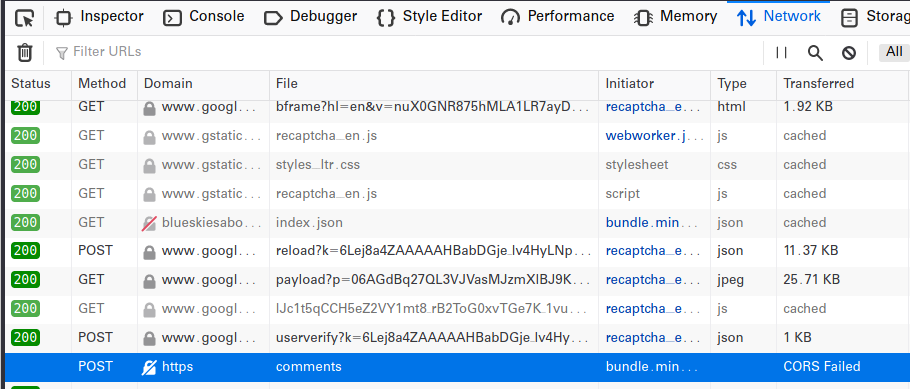
What you're seeing in that example is a CORS error, which is caused when you're website is using "http" but staticman is expecting "https". So the resolution in this case would be to get an ssl certificate for your domain, so it starts using https.
Hope that helps you on your way.
 RyanTG
on 8 Jul 2020
RyanTG
on 8 Jul 2020
@VincentTam Even am ending up with above error . Can you please explain how to debug it ? Could not get above point.
For proper testing, you might want an API client like Postman. For details, I would recommend PR 219. That's my entry point of this project, which has evolved to somewhere that I don't keep up with now. From my interactions with the author of the referenced PR, you'd see how I tested the stuff two years ago.
VincentTam
on 17 Jul 2020
For anyone landing here from a web search like I did:
I got this same error (using beautiful-jekyl theme) and for me the issue was that NoScript (Firefox add-on) was blocking staticman script. Trusting it solved the issue.
 kienerj
on 22 Jul 2020
kienerj
on 22 Jul 2020
Related issues
 eduardoboucas
·
11Comments
eduardoboucas
·
11Comments
 tichter
·
13Comments
tichter
·
13Comments
 onwingslikeeagles
·
15Comments
onwingslikeeagles
·
15Comments
 donaldboulton
·
9Comments
donaldboulton
·
9Comments
 rskupnik
·
7Comments
rskupnik
·
7Comments
Most helpful comment
For anyone landing here from a web search like I did:
I got this same error (using beautiful-jekyl theme) and for me the issue was that NoScript (Firefox add-on) was blocking staticman script. Trusting it solved the issue.