I play drums in a few bands, and when I learn new songs, I often use a combination of standalone sheet music creation apps and word-processing apps to cobble together performance notes.
It would be great if sheet music and note-taking functionality were available in the same app.
There is a well-established and well-documented format called abc notation, developed by Chris Walshaw. In addition, there is a JavaScript plugin called abcjs, developed by Paul Rosen and Gregory Dyke, that might be useful.
Implementation
The abc notation standard could be implemented in fenced code blocks:
```abc
X:1
T:A Song Title
C:Some Composer
M:4/4
L:1/8
K:G
|ABc d|z4 a4|
```                    -
Rendered Version

 Audiosyncrasy
All 11 comments
Excellent! I'll consider it.
 benweet
on 28 Jun 2018
benweet
on 28 Jun 2018
Hey, @benweet , do you mind me trying my best on that one? :)
 flxwu
on 30 Jul 2018
flxwu
on 30 Jul 2018
Sure, it should be implemented as an extension.
benweet
on 30 Jul 2018
What exactly do you mean by that? :) @benweet
flxwu
on 30 Jul 2018
It should be done in a file named abcExtension.js (or something similar) in https://github.com/benweet/stackedit/tree/master/src/extensions.
benweet
on 30 Jul 2018
Hey @benweet ,
I've started working on it now, but somehow, while running yarn start, when opening localhost:8080/app, instead of seeing the editor, it just shows a blank screen :(
I don't know whether it is related, but the console outputs an error:
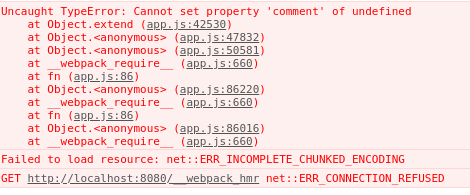
Update: same as #1311, hopefully I can resolve that now.
flxwu
on 1 Aug 2018
I had the same issue. It's a bug with the installed version of Prismjs. What worked for me -> Remove the Prismjs module from node_modules, specify "prismjs": "1.9.0" in package.json and run install again.
 chriscouch
on 1 Aug 2018
chriscouch
on 1 Aug 2018
You have to use npm >= 5 to take advantage of the package-lock.json, not yarn.
benweet
on 1 Aug 2018
FWIW - (I haven't spent any time looking into why) I'm using NPM 6.2 and while the package-lock file specifies 1.9, 1.15 is getting installed. I can only get the build to work by changing the package.json file. It could be my environment but it looks like there are at least a few of us having the same issue.
chriscouch
on 1 Aug 2018
Found the issue. You must use npm ci to install NOT simply npm install.
TL;DR
I haven't run into before and I feel like I should have! - so FYI -
Since NPM 5.1 "the generated module tree is a combined result of both package.json and package-lock.json. (Example: package.json specifies some package with version ^1.1.0; package-lock.json had locked it with version 1.1.4; but actually, the package is already available with version 1.1.9. In this case npm i resolves the package to 1.1.9 and overwrites the lockfile accordingly, hence ignoring the information in the lock file.)"
Since package.json specifies "prismjs": "^1.6.0" the npm command install ignores the prismjs spec in the package-lock file and installs 1.15.0. Using npm ci installed the proper version. I guess if 1.15 didn't have a bug I still wouldn't know about ci.
@benweet functional question for you: my assumption as a user is that the editor should still work even if a "non-critical" module fails to load for some reason. So in this case, code highlighting would not work but the editor would load and be functional. Would you agree with that? I'm going to look into it but any guesses or direction on why a bug in prismjs prevented stackedit from loading?
chriscouch
on 1 Aug 2018
Thanks :smiley: @chriscouch @benweet .
Can I somehow call a function after the whole DOM is rendered? Problem is, abcjs doesn't provide any API endpoint that returns the svg as a string, they only have render functions that will put the rendered svg into a certain DOM element or id
Edit
Never mind, I got it to work! :ok_man:
The Pull Request is open at #1354 .
flxwu
on 1 Aug 2018
Related issues
 rajanand
·
3Comments
rajanand
·
3Comments
 nobozo
·
5Comments
nobozo
·
5Comments
 cbratteli
·
3Comments
cbratteli
·
3Comments
 beib
·
9Comments
beib
·
9Comments
 KOLANICH
·
4Comments
KOLANICH
·
4Comments
Most helpful comment
Excellent! I'll consider it.