Sqlitebrowser: Missing 'Add Record' 'Delete Record'
Details for the issue
Downloaded and installed v 3.12.0 x86_64
Qt Version 5.12.8
SQLite Version 3.32.2
Browse Data Tab. Usually has the Add Record, Delete Record buttons
Did not see the buttons. Needed to reinstall older version. Am I just missing something?
Win 10 Desktop V 1903
DB4S v3.12.0 [built for x86_64-little_endian-llp64] on Windows 10 (10.0) (winnt/10.0.18362) [x86_64]
using SQLite Version 3.32.2
and Qt 5.12.8
 RutagerD
All 2 comments
It should be the first and second icon in the third group of icons.

If you hover your mouse over them, they should also say, "Insert a new record......." etc.
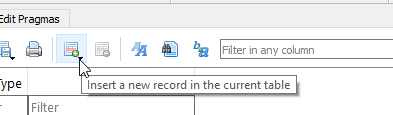
If you don't see these buttons, can you provide a screenshot?
In the preferences, you can also change the appearance of these buttons. I normally like 'text to the right of the image' but this only shows a small number of buttons before they disappear, so 'text under the image' is better...
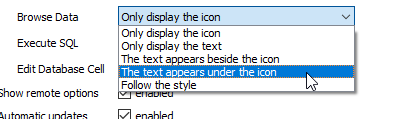
Which then gives this:

Hope this helps, but yell back if you need anything else.
 chrisjlocke
on 25 Jun 2020
chrisjlocke
on 25 Jun 2020
Great. Thanks for the retraining 🙂
RutagerD
on 27 Jun 2020
Related issues
 mbraeutigam
·
3Comments
mbraeutigam
·
3Comments
 to302
·
3Comments
chrisjlocke
·
3Comments
to302
·
3Comments
chrisjlocke
·
3Comments
 emrecpp
·
3Comments
emrecpp
·
3Comments
 botist
·
3Comments
botist
·
3Comments
Most helpful comment
It should be the first and second icon in the third group of icons.
If you hover your mouse over them, they should also say, "Insert a new record......." etc.
If you don't see these buttons, can you provide a screenshot?
In the preferences, you can also change the appearance of these buttons. I normally like 'text to the right of the image' but this only shows a small number of buttons before they disappear, so 'text under the image' is better...
Which then gives this:
Hope this helps, but yell back if you need anything else.