Sqlitebrowser: 3.11.0 release - outstanding pieces?
We've published the beta3 binaries for our 3.11.0 release. I think we're mostly good now for getting 3.11.0 out the door:
- [x] Get signing certificates for Windows (@MKleusberg)
- Ideally we should have the signing be an automatic part of our nightly build process
- Certificate has arrived (2019-01-23).
- Now we just need to figure out how to sign stuff. The Certum smart card reader + bits seem super picky and flaky, and also seem to be windows only. :slightly_frowning_face:
- [x] Double check the status of all languages
- All languages will need updating again, as new SQLCipher dialog text was added today.
- The SQLCipher dialog is needed, as that lets us use SQLCipher 4.0.1 which avoids the new Magellan bug.
- [x] Update the strings in the
v3.11.xbranch again, for the new SQLCipher dialog.
- Done. 66172ace8e7e19a1f3209c96bb67e7ac99c67f31
- [ ] The new SQLCipher dialog needs translating for all languages.
- [ ] sqlb_ar_SA.ts
- [ ] sqlb_cs.ts
- [x] sqlb_de.ts
- [x] sqlb_es_ES.ts
- [ ] sqlb_fr.ts
- [x] sqlb_it.ts
- [ ] sqlb_ko_KR.ts
- [ ] sqlb_pl.ts
- [x] sqlb_pt_BR.ts
- [ ] sqlb_ru.ts
- [ ] sqlb_tr.ts
- [ ] sqlb_uk_UA.ts
- [ ] sqlb_zh.ts
- [ ] sqlb_zh_TW.ts
- [x] Compile the math extension for macOS
- Done. 7fbd89a59fc07160dca07146448649341f8addbf
- [x] For the Windows installer, should we update the final dialog (which .exe to launch SQLite vs SQLCipher) for the release?
- Updated enough. We don't really require the dialog offering to launch DB4S, so we'll skip it instead. :smile:
- [x] Use SQLCipher 4.0.1.
- The SQLCipher 4.x dialog change has been cherry-picked across to the
v3.11.xbranch
- The SQLCipher 4.x dialog change has been cherry-picked across to the
- [x] Fix DBHub.io bug #116, so the DB4S <-> DBHub.io integration works.
- Without this, people can't update their existing remote databases without renaming them on each save. :frowning:
- The problem turned out to be the server giving a bad url in a request response, which subsequent requests tried to make use of and then hit problems. It's been fixed server side, but existing databases that have been uploaded via DB4S will probably still need renaming (once) when uploading, so an upload succeeds + they get new (correct) metadata to use for subsequent requests.
- [x] DB4S bug https://github.com/sqlitebrowser/sqlitebrowser/issues/1708 sounds like it could be important to fix first
- Fixed by @MKleusberg in 03d39bb139ce67da82ac5568f073f58afb9db7d6
 justinclift
All 126 comments
For the Windows installer, should update the final dialog (which .exe to launch SQLite vs SQLCipher) for the release?
Sorry, I don't have much time to look into that. I will get it done as soon as possible.
I think this will require replacing the whole Finish dialog, or create a new/custom one before it. I still don't know what is the best way, from the user perspective, to do it.
If this is going to be a release blocker, then maybe we should hide this checkbox at the end, and let the user start the application manually?
 karim
on 12 Dec 2018
karim
on 12 Dec 2018
... maybe we should hide this checkbox at the end, and let the user start the application manually?
Yeah, was also suspecting that would be the right way to go for now too.
Also only realised about an hour ago that I'd not updated the msi installer pieces in the v3.11.x branch before making the 3.11.0-beta2 release today. So, it had none of the recent updates to the initial dialogs, nor the removal of old installations code in it. Oops. :wink:
I'll make a 3.11.0-beta3 release tomorrow with the msi bits updated, so people have a chance to test it before the actual release.
justinclift
on 12 Dec 2018
Okay, I hid the checkbox at the end till we figure out a better way to handle this.
It is probably going to be a radio button? Something like..
- Run DB Browser (SQLite)
- Run DB Browser (SQLCipher)
- Do nothing
Or maybe as a list? Like
- Run [listbox with the same list above]
karim
on 12 Dec 2018
A radio button approach sounds like a decent choice. :smile:
justinclift
on 12 Dec 2018
I find a bit odd to remove SQLite from the application name. It's incoherent with all our references. What about this?
- Run DB Browser for SQLite
- Run DB Browser for SQLite (SQLCipher)
Or this?
Run DB Browser for SQLite:
- Standard SQLite edition
- SQLCipher edition
 mgrojo
on 12 Dec 2018
mgrojo
on 12 Dec 2018
Yeah, I have trouble with that too. Your first suggestion sounds decent to me:
- Start DB Browser for SQLite now
- Start DB Browser for SQLite (SQLCipher) now
- Don't start either. <-- or whatever wording sounds ok to you
justinclift
on 13 Dec 2018
Just published a 3.11.0-beta3 release, which has the updated MSI installer dialogs, auto-uninstall of v3.10.1 for Windows, and includes the math extension on macOS:
https://github.com/sqlitebrowser/sqlitebrowser/releases/tag/v3.11.0-beta3
justinclift
on 13 Dec 2018
Was Korean updated?
We haven't received any update from user progh2 after the first positive answer to my translation request. I also asked ChangJoo-Park, but didn't receive any answer from him.
mgrojo
on 14 Dec 2018
Ahhh, let's ping them again.
@progh2 We're finally near to releasing 3.11.0. :wink: Do you reckon you'd have time to look at translating the changed strings in the next few days? Also, should we grab the strings translated so far in #1600 as a place to start with? Grabbing those bits should be pretty easy for us.
@ChangJoo-Park As above, we're finally near to releasing our next major version. It's taken a lot longer than we were expecting, but we're there now. Any interest in updating our translated strings for this release? :smile:
justinclift
on 14 Dec 2018
@karim
Okay, I hid the checkbox at the end till we figure out a better way to handle this.
This approach (no offer to auto-launch stuff) seems to work well. At least in my testing here on Win7. We'll be fine to do the release like that. :smile:
justinclift
on 14 Dec 2018
@justinclift I wiil do asap~
 progh2
on 17 Dec 2018
progh2
on 17 Dec 2018
Thanks @progh2. :smile:
justinclift
on 17 Dec 2018
The v3.11.x branch has been updated with the new SQLCipher 4.0.x dialog. That lets us include SQLCipher 4.0.1, which doesn't have the Magellan vulnerability.
justinclift
on 20 Dec 2018
I find a bit odd to remove SQLite from the application name. It's incoherent with all our references. What about this?
* Run DB Browser for SQLite

* Run DB Browser for SQLite (SQLCipher)
@mgrojo
DB Browser for SQLite (with SQLCipher) <- This one is too long, and I remember Justin not liking it. :smiley:
DB Browser for SQLite (SQLCipher) <- This one might be a bit confusing to some?
Your second example is better in my view. Anyway, I will post screenshosts when before committing any changes.
This approach (no offer to auto-launch stuff) seems to work well.
@justinclift That will have to do for now, sorry. I will get it done when I have some free time. Do you think this could wait for the next release? I don't want to delay the 3.11 release.
karim
on 20 Dec 2018
Yep, it's no worries to delay it until a future release. I've run through the installer several times since we removed that option from the dialog... and it's not much of a difference really. eg I don't think many people will miss that bit. We have the main things taken care of after all. :smile:
justinclift
on 20 Dec 2018
Just realised we'll need to update the strings in the v3.11.x branch again, as the new SQLCipher dialog will need translating too.
Done in 66172ace8e7e19a1f3209c96bb67e7ac99c67f31.
justinclift
on 20 Dec 2018
I've reported to translators in #1567. The Spanish translation is already complete.
mgrojo
on 3 Jan 2019
Thanks @mgrojo, that really helps. :smile:
justinclift
on 3 Jan 2019
@firateski Any interest in updating the last few strings for the 3.11.x branch? We needed to update the SQLCipher dialog, to support the new SQLCipher release. So, new English strings need translating. :innocent:
justinclift
on 10 Jan 2019
@bernardosulzbach @bartlomiej-przymus @m4sk1n @PeterDaveHello @Genyk @keedhost @VanDerSam @zvova7890 @schdub @bssthu @SafaAlfulaij @mvt91 As above. :smile:
On a side note, I've just emailed Petr Tykal directly too, asking if interested in updating the Czech one. :smile:
justinclift
on 10 Jan 2019
@firateski Any interest in updating the last few strings for the 3.11.x branch? We needed to update the SQLCipher dialog, to support the new SQLCipher release. So, new English strings need translating. 😇
I wasn't around here a long time and I'll complete the Turkish translation as soon as possible. Is the only file I need to edit is "/src/translations/sqlb_tr.ts", or should I have to update any other files?
 firateski
on 10 Jan 2019
firateski
on 10 Jan 2019
@firateski
I wasn't around here a long time and I'll complete the Turkish translation as soon as possible. Is the only file I need to edit is "/src/translations/sqlb_tr.ts", or should I have to update any other files?
You'll only have to update "src/translations/sqlb_tr.ts".
mgrojo
on 10 Jan 2019
Just ordered the certificate thing. Let's see how long it takes to ship the smart card reader :wink:
 MKleusberg
on 13 Jan 2019
MKleusberg
on 13 Jan 2019
Quick update on the certificate and the reader: just got an email that the parcel was picked up today in Poland. Apparently it's supposed to arrive here tomorrow :smile:
MKleusberg
on 22 Jan 2019
@MKleusberg I'll generate the release binaries for macOS & Windows tomorrow, and upload them to the nightlies server, so you have something to practise on.
Oh, I'll get the sha256 checksums to you as well via some different channel too, just for safety. :smile:
justinclift
on 2 Feb 2019
Created them now instead:
- https://nightlies.sqlitebrowser.org/win32-prerelease/DB.Browser.for.SQLite-3.11.0-win32.msi
- SHA256: d2ccc988d35ed77d11f32a90e4dd2da3593c5dc0b68b3860919893142e3c93f2
- https://nightlies.sqlitebrowser.org/win32-prerelease/DB.Browser.for.SQLite-3.11.0-win32.zip
- SHA256: 1535ecd52969b2c298f0f940e54eedde96442453dddce55dda42f0296c1843a3
- https://nightlies.sqlitebrowser.org/win64-prerelease/DB.Browser.for.SQLite-3.11.0-win64.msi
- SHA256: a58aac58f3f274283f24ab52ce98e3129aa51243005bac2c10cf20ac5300a451
- https://nightlies.sqlitebrowser.org/win64-prerelease/DB.Browser.for.SQLite-3.11.0-win64.zip
- SHA256: 6db8fb98910e6c60c66c4e7e22aa7ab5aa285ebe7411fcaa2f4eb252dce825a3
justinclift
on 2 Feb 2019
Started building the macOS binaries. It looks like macOS Homebrew (the package manager we use) silently dropped all support for providing options on the command line when installing, and also silently stopped compiling in some of the things we use (eg FTS5):
We'd better create our own Homebrew tap with the actual things we need, to avoid having this kind of thing crop up again. :frowning:
justinclift
on 2 Feb 2019
Just created a new Homebrew tap, containing the SQLite options we need:
https://github.com/sqlitebrowser/homebrew-sqlite3
The SQLCipher formula (as it presently stands) still seems ok in Homebrew, and contains the FTS5 compile time option already. So, no need to create/maintain a tap for that.
justinclift
on 2 Feb 2019
macOS 3.11.0 build:
https://nightlies.sqlitebrowser.org/osx-prerelease/DB.Browser.for.SQLite-3.11.0.dmg
That one doesn't need signing with the new windows certificate. It needs signing with an Apple certificate. I just generated one on the buildmac, as it turns out I'd forgotten to transfer across the old signing certificate when I rebuilt the server a few weeks ago.
Not sure if the new certificate is really ok, as it's a slightly different type.
@revolter (or anyone on macOS), would you have time/interest in checking if the above new 3.11.0 dmg for macOS installs + launches DB4S ok?
I have a complete drive image of the old build mac's hdd around still, so I should be able to recover the old certificate if we really need to. (it'll just be a pain to do :wink:)
justinclift
on 2 Feb 2019
@justinclift, It works. Though I still have that issue in which the colors are messed up.
This is after I use the "Restore Defaults" option:
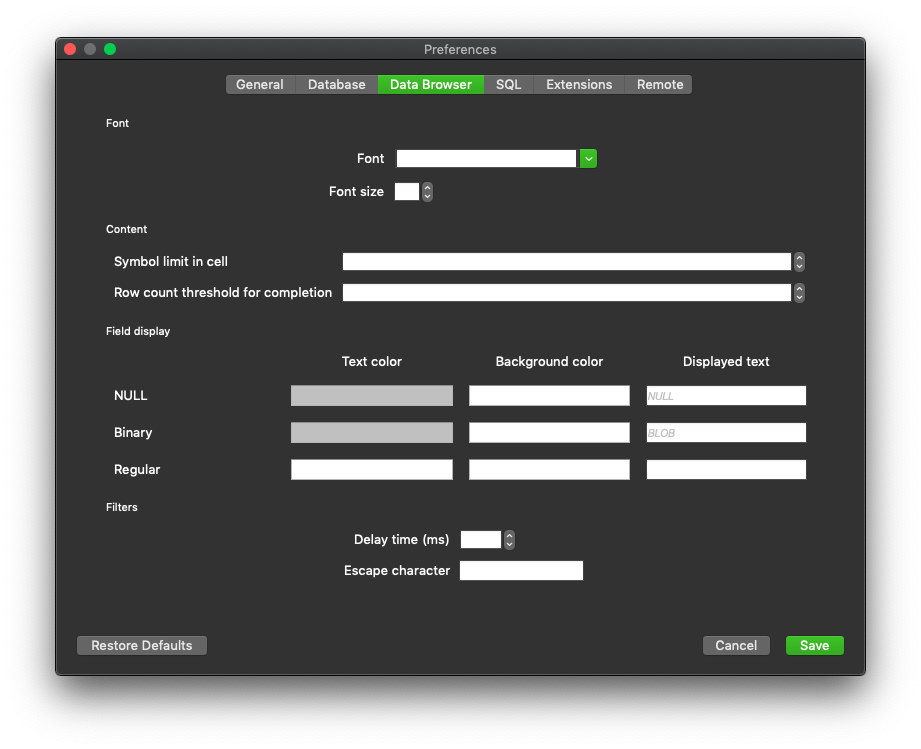
And it looks like this:

_(white text on white background)_
And the dark mode support looks incomplete:

 revolter
on 2 Feb 2019
revolter
on 2 Feb 2019
Thanks @revolter. :smile:
Ouch about those colours. That's when using a dark theme in the OS?
Actually, I'm about to hit the sack (4am here now), so will read this back and investigate tomorrow. If I can duplicate the weird colour thing on the buildmac, then I should be able to attach a debugger to the program when it's running to find out what the cause is. :smile:
justinclift
on 2 Feb 2019
This the relevant code for the default colours:
I've reviewed the QPalette documentation and everything seems in order. Specifically:
Constant | Value | Description
-- | -- | --
QPalette::Text | 6 | The foreground color used with Base. This is usually the same as the WindowText, in which case it must provide good contrast with Window and Base.
I guess the actual problem is the defaults are not restored in macOS. I think that was reported in some issue. It would explained why those colours don't match the defaults. They are old values except for reg_fg_colour which is new and was added for the dark theme support.
@revolter Could you test whether the "Restore Defaults" feature is actually working after having changed some preference?
This is the related code:
https://github.com/sqlitebrowser/sqlitebrowser/blob/dc749f98f96455d14df80ecd0309231aec459167/src/Settings.cpp#L381
Might be related to these fallback-features that I've not yet analysed:
http://doc.qt.io/qt-5/qsettings.html#clear
http://doc.qt.io/qt-5/qsettings.html#fallback-mechanism
P.S. Might be related to #737?
mgrojo
on 2 Feb 2019
And #1404 is broken too :(
revolter
on 2 Feb 2019
@mgrojo, Still doesn't work.
revolter
on 2 Feb 2019
I deleted the preferences file and it still doesn't work.
revolter
on 2 Feb 2019
@revolter
I deleted the preferences file and it still doesn't work.
Is there, maybe, some system file with incorrect or imcomplete colour settings?
According to http://doc.qt.io/qt-5/qsettings.html#platform-specific-notes
On macOS versions 10.2 and 10.3, these files are used by default:
- $HOME/Library/Preferences/com.MySoft.Star Runner.plist
- $HOME/Library/Preferences/com.MySoft.plist
- /Library/Preferences/com.MySoft.Star Runner.plist
- /Library/Preferences/com.MySoft.plist
mgrojo
on 2 Feb 2019
And #1404 is broken too
Ugh. That sounds like something we need to fix for this release, and the colour problem on macOS too.
With the #1404 breakage, what's going wrong?
justinclift
on 3 Feb 2019
Anyone around good with German (the language)?
https://twitter.com/fthierygeo/status/1091775178328236032
Not sure if that's a 3.11.0 thing or just something not relevant to the release. "Translate Tweet" isn't really helping. :wink:
justinclift
on 3 Feb 2019
I think it's not relevant. She has used DB4S for some planned project and she is advancing little by little (nuss by nuss like a squirrel).
mgrojo
on 3 Feb 2019
Thanks @mgrojo. :smile:
justinclift
on 3 Feb 2019
Is there, maybe, some system file with incorrect or imcomplete colour settings?
According to http://doc.qt.io/qt-5/qsettings.html#platform-specific-notes
On macOS versions 10.2 and 10.3, these files are used by default:
- $HOME/Library/Preferences/com.MySoft.Star Runner.plist
- $HOME/Library/Preferences/com.MySoft.plist
- /Library/Preferences/com.MySoft.Star Runner.plist
- /Library/Preferences/com.MySoft.plist
It's in /Users/revolt/Library/Preferences/com.sqlitebrowser.sqlitebrowser.plist and I deleted it before opening DB4S.
revolter
on 3 Feb 2019
@revolter Check for other *sqlite* things in the same dir, as from memory the info is split across two files. Checking on the build system here, that shows both:
$ ls -la ~/Library/Preferences/*sqli*
-rw-------  1 jc  staff  1088 Feb  2 16:30 /Users/jc/Library/Preferences/com.sqlitebrowser.sqlitebrowser.plist
-rw-------  1 jc  staff   142 Jan 28 07:22 /Users/jc/Library/Preferences/net.sourceforge.sqlitebrowser.plist
Indeed. I used AppCleaner to completely uninstall it and the default colors are still incorrect like in the first screenshot.
revolter
on 3 Feb 2019
At least for the dark mode issue, running the latest commit from Qt Creator shows like:

revolter
on 3 Feb 2019
And #1404 is broken too
Ugh. That sounds like something we need to fix for this release, and the colour problem on macOS too.
With the #1404 breakage, what's going wrong?
I think the issue is related to the new SQLCipher 4.
revolter
on 3 Feb 2019
I think the issue is related to the new SQLCipher 4.
Oohhhh.....
We probably need to add further info to the .env files. They'd need to store the other SQLCipher parameter's used for opening the database too:
- Page size
- KDF iterations
- HMAC algorithm
- KDF algorithm
With those in the .env file, and DB4S reading + using them... it should work. :smile:
If if helps someone for implementation, the SQLCipher 3 defaults are:
- Page size: 1024
- KDF iterations: 64000
- HMAC algorithm: SHA1
- KDF algorithm: SHA1
And the SQLCipher 4 defaults are:
- Page size: 4096
- KDF iterations: 256000
- HMAC algorithm: SHA512
- KDF algorithm: SHA512
justinclift
on 3 Feb 2019
I'm trying to fix it now.
Adding:
database.sqlite = password
database.sqlite_pageSize = 1024
database.sqlite_kdfIter = 64000
database.sqlite_hmacAlgorithm = SHA1
database.sqlite_kdfAlgorithm = SHA1
worked! Maybe we should mention this in the release notes for users that didn't migrate their databases to SQLCipher 4.
revolter
on 3 Feb 2019
So, no code changes needed?
justinclift
on 3 Feb 2019
Nope, @MKleusberg took care of it ❤️. I'll look into the colors issue too in a bit.
revolter
on 3 Feb 2019
Ahhh... so it was part of the code base already, and - as you mention - we need to update the docs to include it?
justinclift
on 3 Feb 2019
Well, I don't think we have this dotenv feature in the docs. And this "issue" that we talked about should actually be described in a migration guide, hence my proposal of describing it in the release notes, something along the lines of:
If you were using the dotenv feature for automatically opening encrypted database using one of the previous versions of DB4S, and it stopped working after updating to the latest version, it means you are probably trying to open a database that was encrypted using SQLCipher 3, whereas the latest version of DB4S uses the default values specific to SQLCipher 4:
• Page size: 4096
• KDF iterations: 256000• HMAC algorithm: SHA512
• KDF algorithm: SHA512In this case, you need to specify in your
.envfile the default values for SQLCipher 3 that were previously used by DB4S too like this:database.sqlite = password database.sqlite_pageSize = 1024 database.sqlite_kdfIter = 64000 database.sqlite_hmacAlgorithm = SHA1 database.sqlite_kdfAlgorithm = SHA1
revolter
on 3 Feb 2019
Definitely a good idea. That suggested text looks good too, with the exception of a simple crypted -> encrypted typo. :smile:
justinclift
on 3 Feb 2019
It took a bit longer (I was quite busy over the last week or so) but I now have an activated code signing certificate which actually seems to work :smile: Now it just needs a driver for the smart card reader and the code signing command line tool from the Windows SDK. So still no idea how we could automate this on Linux but it's reasonably easy to sign files now.
@justinclift Should I still sign the files you posted above?
MKleusberg
on 3 Feb 2019
Should I still sign the files you posted above?
Not sure yet, so probably not. We need to figure out what the problem is on macOS, as that really does sound like a release blocker.
No idea if the same problem also occurs on Windows. Either way, I've already created the Windows batch files specifically for generating 3.11.0, and it's easy enough to run them later on after we look into the weird colour problem. They'll just pick the latest commits on the v3.11.x branch at that point.
It's good that we have all the other bits in place now though. We probably really can do a 3.12.0 release not too long after this one. :smile:
justinclift
on 3 Feb 2019
Could somebody else test this too on macOS?
revolter
on 3 Feb 2019
Probably not me unfortunately.
The only mac I have access to these days is the build mac, and that's running High Sierra, which doesn't have a proper Dark mode.
I've just tried the (limited) "Dark menu + dock", then restored the preference defaults on 3.11.0 DB4S... but it doesn't go into any kind of dark mode.
It'll need to be someone running macOS Mojave (10.14) or higher.
justinclift
on 3 Feb 2019
So much for triggering the problem here and attaching a debugger to it for stepping through. :frowning:
justinclift
on 3 Feb 2019
That's why the nightly is different from the app ran through Qt Creator by me on Mojave. I asked a friend to help me and it's the same. And an interesting I found out is that the text color for the regular section is actually black when Dark Mode is off, and white when Dark Mode is on.
revolter
on 3 Feb 2019
Were all the macOS apps built on the same machine in the past months or so? Because I think that at work I downloaded a nightly or beta version and it looks ok.
revolter
on 3 Feb 2019
Hmmm, we did try out some different Qt versions a while back. Um... maybe just before Xmas (guessing)?
The macOS nightlies and release builds are all done on the same machine. Hmmm... thinking about it more, the macOS version was upgraded from El Capitan to High Sierra at about the same time we experimented with Qt versions.
justinclift
on 3 Feb 2019
And I guess it's not that easy/safe to upgrade to Mojave?
revolter
on 3 Feb 2019
As far as I know, this old mac mini can't be upgraded to Mojave.
This is the model of mac mini, if that's useful info:
https://everymac.com/systems/apple/mac_mini/specs/mac-mini-core-2-duo-2.4-mid-2010-specs.html
justinclift
on 3 Feb 2019
I made a backup image of the mac's previous (El Capitan) installation before doing the upgrade. I can restore that to (say) a USB drive and boot off of it, then see if macOS builds created from that have the same dark mode problem.
It'll take a bunch of hours, so not right now (4:56am atm). Can do it after getting some sleep though. :smile:
justinclift
on 3 Feb 2019
@revolter
Well, I don't think we have this dotenv feature in the docs. And this "issue" that we talked about should actually be described in a migration guide, hence my proposal of describing it in the release notes, something along the lines of:
But given that #1404 was merged between releases and that the only documentation is this line in our release notes for 3.11.x:
Look for a dotenv file with a stored password when trying to open an encrypted database (#1404)
what we need more desperately is documenting this feature in the wiki. Given this lack of publicity, It's probable that the only people affected by this issue are in the development team, and they're already aware of the solution :wink:
mgrojo
on 3 Feb 2019
By the way, if you need help with the dark mode in macOS, there are affected users in #1493, who are probably willing to assist in the solution.
mgrojo
on 3 Feb 2019
@revolter @wmertens New 3.11.0 macOS build for testing:
That was built with a freshly installed macOS El Capitan + Qt 5.9, which is the same combination we used to build the nightlies with for a long time. Lets see if this build has the same weird dark mode problem or not.
Note - the above app/dmg is unsigned, so might need some mucking around with in the macOS System Preferences to try it out. Not sure. :wink:
justinclift
on 4 Feb 2019
@fah Same as above comment. Any interest in testing that build, to see if the dark mode problem shows up?
justinclift
on 4 Feb 2019
Created a build with Qt 5.11.3 too, just to see if it makes a difference:
justinclift
on 4 Feb 2019
both builds work insofar that the theme stays light but does not become
mixed. No dark mode in sight. Still, better than nothing :)
Wout.
 wmertens
on 4 Feb 2019
wmertens
on 4 Feb 2019
Thanks @wmertens, that's super useful. :smile:
It's weird that changing the version of the OS the build is happening on is having this kind of change on the resulting binary. :confused:
At least it's different from the Dark mode problem. And it looks like whatever the problem is, it's not purely some bug in our code. We'll need to work around whatever the problem is though. :wink:
justinclift
on 5 Feb 2019
Thinking things over... I'm inclined to releasing 3.11.0 today. Probably that build on El Capitan with Qt 5.11.3, after signing it.
With that, we can figure out the real & solution cause - or at least a proper ongoing workaround - as we get time instead of it blocking the release. :smile:
Thoughts?
justinclift
on 5 Feb 2019
Yes seems good!
wmertens
on 5 Feb 2019
@wmertens Are you going to be around for a few hours? I'm updating the macOS build mac to Sierra at the moment, just to see if builds created with that have the problem or not. Would be useful to have someone readily available to test, but it'd be a few hours away. Lots of downloading here, waiting for install to the USB drive (very slow), etc. :wink:
justinclift
on 5 Feb 2019
Yes, I just woke up and I'll monitor this issue closely for the next 16
hours :)
Wout.
wmertens
on 5 Feb 2019
@justinclift: not really important since we don't need it, but why are we using Qt 5.11.3 instead of the just released Qt 5.12.1 LTS?
 GortiZ6
on 5 Feb 2019
GortiZ6
on 5 Feb 2019
@wmertens Here's an initial build on macOS Sierra, using Qt 5.11.3:
@GortiZ6 Didn't realise Qt 5.12.1 was out. :wink:
When Qt 5.12.0 was released, we switched the nightlies over to that, and some of the 3.11.0-betas. But it seemed buggy (eg #1658).
Haven't yet tried the .1 release of it. Will probably switch the nightlies to use that soon-ish, just to see if the previously experienced bug has gone away.
justinclift
on 5 Feb 2019
but why are we using Qt 5.11.3 instead of the just released Qt 5.12.1 LTS?
See #1688 and #1658. When using Qt 5.12, cell contents were wrapped, making the 'Browse Data' tab quite ugly.
Going on previous Qt topics, a revision increase in Qt normally means bugs have been introduced, not resolved. Older versions appear more stable.
 chrisjlocke
on 5 Feb 2019
chrisjlocke
on 5 Feb 2019
I see.. anyway there are changes on that so it could be fixed:
http://code.qt.io/cgit/qt/qtbase.git/tree/dist/changes-5.12.1/?h=v5.12.1
- Reverted a Qt 5.12.0 behavior change in QToolTip that made plain tooltip
text be wrapped automatically. - [QTBUG-27110] Reverted a change that caused a regression related to
styling a QListView using CSS.
Did we file a bug for it? If not and it's not fixed yet, we should probably do it.
GortiZ6
on 5 Feb 2019
Did we file a bug for it? If not and it's not fixed yet, we should probably do it.
Agreed. I don't think anyone got around to it, so if it's in Qt 5.12.1 then we should. Would you be up for filing the bug? :smile:
justinclift
on 5 Feb 2019
Agreed. I don't think anyone got around to it, so if it's in Qt 5.12.1 then we should. Would you be up for filing the bug? 😄
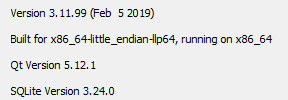
Actually I've just built on Windows with 5.12.1 and opened one of my databases with long rows... and this is what I can see:
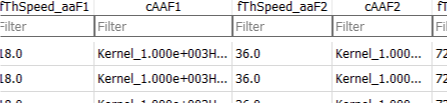
To me it seems the right behavior... should I do something more to trigger the issue?
GortiZ6
on 5 Feb 2019
should I do something more to trigger the issue?
No, it was initially apparent. Excellent. Can't believe something has actually been fixed.
chrisjlocke
on 5 Feb 2019
No, it was initially apparent. Excellent. Can't believe something has actually been fixed.
:sweat_smile:
Anyway I agree with you and mgrojo that having wordwrap when words fit would be nice 😄
GortiZ6
on 5 Feb 2019
That Sierra build works fine, btw, but it will stop working for older macOS versions, right?
wmertens
on 5 Feb 2019
@wmertens "works fine" meaning the Dark Mode theme is ok, or meaning that it displays in non-dark-but-readable mode?
justinclift
on 5 Feb 2019
Non dark but readable
Wout.
wmertens
on 5 Feb 2019
but it will stop working for older macOS versions, right?
That's a good point. If we do the release with the Sierra built one, it might not work with prior macOS versions (eg El Capitan). But if we do the release with the (slightly older) El Capitan built one, that should work with macOS El Capitan onwards.
From that viewpoint, there's no advantage from using the newer Sierra based one for this release.
The nightly builds though will keep with newer macOS versions, as they're a lot faster to build on (due to a side effect of macOS Homebrew).
justinclift
on 5 Feb 2019
@MKleusberg When you have a few minutes, please sign those windows builds after all. :smile:
justinclift
on 5 Feb 2019
@fah Same as above comment. Any interest in testing that build, to see if the dark mode problem shows up?
Sorry, I'm all sick and can't do anything useful. I'll leave the conversation therefor.
Many many thanks for the really good work!
Good bye
 fah
on 5 Feb 2019
fah
on 5 Feb 2019
@justinclift I have just drafted a new release and uploaded the signed files there for lack of a better place to store them :wink: I'm not entirely sure I signed all required files though - it's just the SQLite and SQLCipher EXEs for both 32bit and 64bit and both MSI files. I hope we don't need to sign any DLLs as well and I hope it's enough to just sign the MSI installer and not the files it includes :wink:
MKleusberg
on 5 Feb 2019
Excellent! :smile:
Yeah, I think that's all that's needed for the Win part of things. About to get some sleep here (very tired atm), so tomorrow I'll get the remaining bits done:
- [ ] sign the macOS binaries + add them to the new release draft
- [ ] copy them all to our download server cluster
- [ ] update the new release draft with the info from the 3.11.0-alpha (the change log bits, etc)
- [ ] make a new (draft) blog post entry on our website, copying the contents of that release draft
- [ ] publish the draft release on GitHub + our blog at the same time, also announce it via Twitter
- [ ] whatever else needs doing, that I'm not remembering now :wink:
Already added an extra server to our download cluster today, in preparation. There's now three, just because I'm not sure what kind of peak traffic to expect. Hopefully that's overkill, rather than under estimating requirements. :wink:
justinclift
on 5 Feb 2019
@revolter @wmertens New 3.11.0 macOS build for testing:
That was built with a freshly installed macOS El Capitan + Qt 5.9, which is the same combination we used to build the nightlies with for a long time. Lets see if this build has the same weird dark mode problem or not.
Note - the above app/dmg is unsigned, so might need some mucking around with in the macOS System Preferences to try it out. Not sure. 😉
This one looks ok, except that fact that is not dark at all.
Created a build with Qt 5.11.3 too, just to see if it makes a difference:
Same with this one.
It's weird that changing the version of the OS the build is happening on is having this kind of change on the resulting binary. 😕
Not weird at all. When they added the dark mode feature, they also added public native APIs for using it, but when you build with an older macOS version, these APIs are not available, and not used by Qt.
@wmertens Here's an initial build on macOS Sierra, using Qt 5.11.3:
Same. Looks good but no dark mode.
If we do the release with the Sierra built one, it might not work with prior macOS versions (eg El Capitan).
I'm not trying to say that you're wrong, but are you sure about this? I don't know much about macOS apps, but, for example, on iOS, I build the app against the iOS 12 SDK but it works on 11 and 10 too. And it goes back to 10 because I manually set it as the deployment target, but it could work even on iOS 7.
revolter
on 5 Feb 2019
@justinclift, Did you manage to do that build with the latest Qt version?
revolter
on 5 Feb 2019
Not weird at all. When they added the dark mode feature, they also added public native APIs for using it, but when you build with an older macOS version, these APIs are not available, and not used by Qt.
Heh Heh Heh. Seems weird to me that they'd do this, so that resulting binaries are then hard coded with a lack of the capability instead of being able to match capabilities at runtime. But heck, I guess it's just Apple's way of doing things.
I'm not trying to say that you're wrong, but are you sure about this? I don't know much about macOS apps, but, for example, on iOS, I build the app against the iOS 12 SDK but it works on 11 and 10 too. And it goes back to 10 because I manually set it as the deployment target, but it could work even on iOS 7.
Could be I'm wrong. If there's some way to set a "deployment target" for macOS, that might fix a bunch of macOS build issues. We'd need to keep our existing build process for general users wanting to build DB4S for themselves, but if there's a benefit for doing something special with our own nightly/release build process then sure, that's potentially doable. Depending on effort required, etc. :smile:
Did you manage to do that build with the latest Qt version?
Caught up on sleep instead. :smile:
Our build server has been offline for the last couple of hours - still hooked up to the external USB drive with Sierra on it - so none of the nightly builds has run yet. I'll run the nightlies now, but update the Qt version to 5.12.1. We can check if that fixes the dark mode problem, and if it does we can add that to the improvements in a subsequent DB4S 3.11.1, along with whatever other high priority bugs shows up in the next few days.
justinclift
on 6 Feb 2019
k, todays macOS and Win64 nightlies are online, built with Qt 5.12.1:
justinclift
on 6 Feb 2019
Bizarrely, the nightlies have the display quirk.

Unsure about the dark theme...
chrisjlocke
on 6 Feb 2019
*sigh*
Seems like it's a Qt 5.12.1 bug specific to Windows then. Anyone want to report the bug to Qt?
We really should, I'm just mentally exhausted atm (long day, already).
justinclift
on 6 Feb 2019
Oh, I'd better switch the Win64 nightlies back to Qt 5.11.3 then too.
justinclift
on 6 Feb 2019
Not for me... 😅

GortiZ6
on 6 Feb 2019
Hmmm, wonder what the difference is then?
@GortiZ6 Which compiler did you use for that?
justinclift
on 6 Feb 2019
I didn't compile.. I've used this:
GortiZ6
on 6 Feb 2019
(ditto)
chrisjlocke
on 6 Feb 2019
@GortiZ6 No worries.
Sounds like some system specific setting then. It'd be useful to figure out exactly wtf is going wrong here. :smile:
justinclift
on 6 Feb 2019
Same issue with multiple lines in a cell on macOS Mojave too.
revolter
on 6 Feb 2019
Thanks @revolter. I'll switch our macOS nightly builds back to Qt 5.11.3. :smile:
justinclift
on 7 Feb 2019
Just uploaded the signed macOS build, copied-and-pasted the previous release notes (including minor updates from the alpha/betas), then published it on GitHub:
https://github.com/sqlitebrowser/sqlitebrowser/releases/tag/v3.11.0
Haven't yet put a notice about it on the sqlitebrowser.org website, added it to our download cluster (etc). Will get that done over the next few hours. :smile:
- [x] sign the macOS binaries + add them to the new release draft
- [x] update the new release draft with the info from the 3.11.0-alpha (the change log bits, etc)
- [x] create the release on GitHub
- [x] update our github download stats polling scripting for the new release
- [x] copy the release binaries to our download server cluster
- [x] update download links on the sqlitebrowser.org website, pointing at the download server cluster
- [x] copy the release notes from GitHub to our blog, but use the download locations of our download cluster instead of GitHub urls
- [x] announce it via Twitter
justinclift
on 7 Feb 2019
If someone has time to look over that blog entry, it would be useful. All of the links in that were manually created while very tired, so it's possible some typos (etc) slipped though. :wink:
I'll leave off the Twitter announcement (for now anyway), as it seems like we've already received a potentially serious bug report → #1730 :scream:
justinclift
on 7 Feb 2019
On the Translation section you surely miss the updated Italian translation ;)
Checked working links on all the sections except from "Enhancements" and "Bug fixes" which are way too many ;)
GortiZ6
on 7 Feb 2019
Oops. Completely forgot to include the latest translations.
I'm super tired atm (~4:30am) and wanting to get some sleep. I'll get the updates done tomorrow. :wink:
PR's on the new website repo are welcome of course. :smile:
justinclift
on 7 Feb 2019
I've updated the translations part of the release notes with the latest additions and updates in the v3.11.x branch.
mgrojo
on 7 Feb 2019
Added also the most relevant changes that were made on the v3.11.x branch after the alpha release.
mgrojo
on 7 Feb 2019
Thanks heaps @mgrojo!
Those changes have now been copied to the website blog post too. :smile:
justinclift
on 8 Feb 2019
Twitter announcement now done too: https://twitter.com/sqlitebrowser/status/1093737730645753856
justinclift
on 8 Feb 2019
Tomorrow (giving it a day for any serious bugs to show up first, just in case) we can update the currentrelease file that DB4S checks upon startup, and get the remaining Notification tasks done too:
https://github.com/sqlitebrowser/sqlitebrowser/wiki/Release-process#notify-people
justinclift
on 8 Feb 2019
It's been about a day, and no deal breaker bugs have been reported. Whew.
So, just updated the currentrelease file.
People will now be notified about the new release when they start DB4S. :smile:
justinclift
on 8 Feb 2019
We've received a report on Twitter that Dark mode support isn't working on Windows either.
Maybe we really do need to go with a colour picker approach or something instead?
justinclift
on 9 Feb 2019
Not for me... sweat_smile
Do those values have word separators? It happens only if Qt thinks that can do word wrapping. It has been seen with 5.12.1 even on Linux, so I would discard some system specific setting.
mgrojo
on 9 Feb 2019
It turns out our encryption of new databases is busted (#1732), so I've just reverted the currentrelease file back to 3.10.1 for now, and am in the process of revert the download page back to 3.10.1 as well.
I'll try and duplicate the problem today in a local VM - rather than the super slow build mac - and see if I can figure out what's going wrong and/or how to fix it.
justinclift
on 11 Feb 2019
Do those values have word separators? It happens only if Qt thinks that can do word wrapping. It has been seen with 5.12.1 even on Linux, so I would discard some system specific setting.
You're right... my bad. It was just a very long filename, so no spaces in between. I'll check if I can open a Qt bug or fix it.
GortiZ6
on 11 Feb 2019
@mgrojo created a bug about it umm... 2 days ago from memory:
justinclift
on 11 Feb 2019
Ok, I voted for it... hope for a fix on 5.12.2
GortiZ6
on 11 Feb 2019
Well, I give up on trying to debug this stupid problem under windows. When building through Qt Creator, DB4S immediately crashes when launched - not even showing a window, and when building through MSVC 2017, launching DB4S just pops up a dialog "Access is Denied".
Searching through the Microsoft dev areas shows plenty of people with the same problem, several suggested fixes, and not one of them makes any difference whatsoever.
Tomorrow I might attempt to get it working with Qt Creator under Linux instead. Don't think I've ever tried compiling SQLCipher under Linux... not sure how easy/hard/etc that will be. :wink:
justinclift
on 11 Feb 2019
Can't remember who it was now, but didn't someone recently compile DB4S+SQLCipher under Windows OK, as they used a different DLL or something. WOnder how they compiled it...
I've some time tonight, so can load the extra bits on my laptop. I've already got VS2017 on it, as I use that for work. On a side note, VS2019 supports CMake natively now, apparently. DOn't know if that's useful (not in solving this issue, but in general...)
chrisjlocke
on 11 Feb 2019
Yeah, the problem is getting debugging working. eg so putting a breakpoint on the code just before the SQLCipher encryption bit runs, to then step through the code and potentially try different things.
If you can get it figured out, that would be nifty. :smile:
justinclift
on 11 Feb 2019
Aah, gotcha. (we need an emoji for 'the penny has dropped'). 💡 No, not that one.
Will have a bash tonight. I remember setting up the development stuff before, but can't remember compiling from it, and definitely not debugging with it.
Assume its the same steps as the 'standard' DB4S steps you posted, but extra bits for the SQLCipher DLL, or does that just find the DLL and use it as is?
chrisjlocke
on 11 Feb 2019
Well, I setup the new dev VM as per our nightly build mac has things, then tested building with a copy of the win64 nightly build script. That bit worked, so the build process itself is ok (that far).
The MSVC and Qt installs didn't seem to install a debugger which Qt could use, even though I'd enabled the 'Just-in-time debugger' option in the MSVC installation options. Grrr. :wink:
So, downloaded the "Win10 SDK" installer, chose the debugger options from that (both x86 and x64). Qt then seems to find the debugger (yay), and looks ok with a SQLite build.
Updating the paths in src/src.pro for Qt to find the SQLCipher library instead... with a lot of effort and beating into shape it can find the right bits. But then crashes when I try and launch it.
After getting frustrated with Qt, tried with MSVC just in case that goes better. Nope, that just pops up the dumb "Access is Denied" dialog when trying to launch it. No other info, like what exactly is being denied, what it's being denied from doing, who's doing the denying, etc.
I'd like an icon for "throws computer out the window". :angel:
justinclift
on 12 Feb 2019
Closing this, as there's a new 3.11.1 specific tracking issue: #1747
justinclift
on 16 Feb 2019
Related issues
mgrojo
·
4Comments
 aneroid
·
4Comments
aneroid
·
4Comments
 freekee1
·
4Comments
freekee1
·
4Comments
 dridk
·
3Comments
dridk
·
3Comments
 mrgou
·
3Comments
mrgou
·
3Comments
Most helpful comment
It's been about a day, and no deal breaker bugs have been reported. Whew.
So, just updated the
currentreleasefile.People will now be notified about the new release when they start DB4S. :smile: